custom firmware for sega flashback 2018

  • Thread starter Thread starter WD_GASTER2
  • Start date Start date
  • Views Views 275,568
  • Replies Replies 649
  • Likes Likes 11
Thank you for the tests, unfortunately I can't test as much as I'd want, my FB HD 2018 freezes after 10 minutes, at least it's enough to test the updates.
I think the emulator has the same kind of audio delay as the Legends Flashback. They've changed a setting "AudioSample" in the ini file from 2048 to 150 but I couldn't understand how this setting work, the last time I've played with I couldn't find any difference.

 
Thank you for the tests, unfortunately I can't test as much as I'd want, my FB HD 2018 freezes after 10 minutes, at least it's enough to test the updates.
I think the emulator has the same kind of audio delay as the Legends Flashback. They've changed a setting "AudioSample" in the ini file from 2048 to 150 but I couldn't understand how this setting work, the last time I've played with I couldn't find any difference.
Previously was using Pico version and it did infact work with zipped games, it's all good everything works on latest update now.
 
  • Like
Reactions: rrifonas
SegaCD performance seems to be significantly better with this latest update.

What's the reason the official firmware update is so large (138MB)?
 
Last edited by Excalibur007,
@dcuk7 Anychance you can add .gg support to the app?
also @rrifonas massive sound delay when playing SMS games especially Sonic 2 SMS. Noticeable in all games though.
 
Last edited by Conex,
SegaCD performance seems to be significantly better with this latest update.

What's the reason the official firmware update is so large (138MB)?
The update has a full dump of the data partition, with its original size.

@dcuk7 Anychance you can add .gg support to the app?
also @rrifonas massive sound delay when playing SMS games especially Sonic 2 SMS. Noticeable in all games though.
I noticed this sound delay with Sonic 2 SMS. It's more prominent in PAL games (like Sonic 2) but it happens with all games. While atgames is improving the emulation in general they still need to give more attention to these details in the sound.
 
dcuk7: But you mean the audio will go out of sync more and more after a while with the Picodrive? That is also not very good. I would prefer the GX version more than.
Does the audio lag only happen with the Sonic games or with more Genesis / Mega Drive games?

I just meant when comparing the two firmwares, one lags behind the other. If you just play the PicoDrive firmware, the audio lag is almost unnoticable. The issue with the PicoDrive firmware is that the audio can glitch or get choppy. This slows the emulator down, meaning the game can stutter. I can live with that though. The audio lag on the GX firmware is very noticable on the Sonic games but happens on every game. It is worth noting that none of these audio issues are to do with the emulators. These are all specific to the AtGames devices. They are getting better though with each update.

@dcuk7 Anychance you can add .gg support to the app?
also @rrifonas massive sound delay when playing SMS games especially Sonic 2 SMS. Noticeable in all games though.

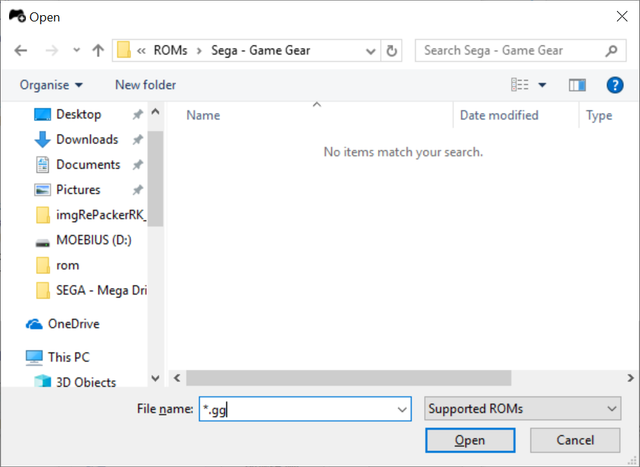
I am readying a new update for later this week. I will add .gg support in. As a workaround, when browsing for the rom file, type *.gg in the dialog box and it will force it to show .gg files (all my roms are zipped so mine don't show in the example below).

gg.png


I may capture some footage of these issues to highlight it more clearly. Gives me a reason to break out the Elgato!
 
  • Like
Reactions: ATFlashback2018
Keep going Dcuk7 and rrifonas you doing great work to the community! I am sure you will fix all the issues and we will have an awesome Sega Flashback system!
GG support would be great!

Also I can recommend buying the new Retro-Bit Original Sega COntrollers. They are awesome and can be used on the Sega Flashblack! We make a review of these soon on your channel.
Retro-bit have send us some samples!
 
The audio lag on the GX firmware is very noticable on the Sonic games but happens on every game. It is worth noting that none of these audio issues are to do with the emulators. These are all specific to the AtGames devices. They are getting better though with each update.

I didn't notice it when I first tested the new firmware, but after your first post about it, I went back and did hear it. It seemed to be less noticeable with "Overdrive" enabled in the Settings.

Another thing that I didn't notice at first was the spotty enabling of FM sound. The emulator enables it for some FM supported games (like R-Type, Rampage, Rastan, etc.), but not for others (like Golvellius, Shinobi, Phantasy Star FM patched from smspower, etc.). I'm wondering if the setting for GenPlusGX in the firmware is set to "auto" for FM sound instead of "ON", and is having trouble detecting it in some games. I've seen this issue in GenPlusGX using RetroArch before, so I always set FM to ON. I'd think each game where it's not detected could be patched to force FM, but I haven't tried yet.

I've been very pleased with SegaCD emulation since the last update. I'm not getting any more sound hiccups/stutters now.
 
So I've been playing around with different firmwares and here is something I've noticed. On the new GX firmware, if you disable the background music and enable overdrive as @Excalibur007 says above, it really reduces the audio lag considerably. It's almost on par with the Picodrive firmware.
 
So I've been playing around with different firmwares and here is something I've noticed. On the new GX firmware, if you disable the background music and enable overdrive as @Excalibur007 says above, it really reduces the audio lag considerably. It's almost on par with the Picodrive firmware.
I will have to give that a go.
Also I was doing a diff work around for gg currently, i was renaming the rom .sms before sending to SD I would tell your app to rename it .gg in filename haha

UPDATE: Turned on overdrive (already had music off) it did help with the NTSC games but the PAL sms games still are pretty bad. :/
Work around at least for SMS sonic 2 is to just play the GG version as that is NTSC and doesn't lag.
 
Last edited by Conex,
Hi @rrifonas or @Steve_Rose or @dcuk7
I have been trying to unpack and repack the .img file to try something out, but have hit a brick wall repacking the .dump file
I am using imgRePackerRK106 on Windows (as my attempt at Linux via a VM was woeful) and I think that I may need a config file that was being spoken about in Post #94
Would it be possible to have a copy of this file please so rather than relying on everyone else (well apart from for the config file!! and all the stuff already done) so I can try things and try to learn.
Thank you
 
File is package-file, and it's basically a relationship between the partition and the files:

Code:
# NAME Relative path
parameter parameter
emulator emulator.img
data  data_no_test_sd_on.img
backup  RESERVED
#update-script  update-script
#recover-script recover-script

And you need to include the paremeter /rkaf in ImgRePackerRk.exe
 
Last edited by rrifonas,
I've edited Post #171 with links for the firmware with Picodrive instead of Genesis Plus GX.
This version looks better than the previous one, so I will remove the old updates and keep only the updates based on the latest Atgames firmware.
 
  • Like
Reactions: ATFlashback2018
I've edited Post #171 with links for the firmware with Picodrive instead of Genesis Plus GX.
This version looks better than the previous one, so I will remove the old updates and keep only the updates based on the latest Atgames firmware.
Do you think it might be better to make your own thread so you can keep the first post updated instead of having to keep referencing post 171 lol
 
Hi @rrifonas
Thank you for the file, have managed to use it to have a play, adding Roms to unit, and also changing the retroplayer_ro.ini to allow lock on cartridges, but cannot change as easily as your previous version, ie on the sd card, but have to unpack and repack the emulator.img each time.
My unit has now started freezing after 8 - 10 minutes of play....You have the same issue as stated above and in other Genesis 2018 out in the open thread.
Would this be a hardware issue that could have just occurred after 3 months of usage or may I have stuffed up something in a file somewhere? I understand that could be a difficult to answer question as the answer may be numerous causes.
Any ideas or suggestions that I could try?
Thank you
 
I couldn't figure out what happens with these devices. My Genesis FB 2018 is semi-broken while my Legends Flashback (which I've done much worse things) still working fine.
While this seems like a software issue (it's always around 10-15 minutes), it works again for the same time if you restart it, I'm quite sure it's something on the hardware level. What I've tested so far, without success:
1) Low level format and recover from Backup
2) Flash a backup from another device
3) Flash a backup from Legends Flashback
4) Re-solder the power circuit
 
Thank you for your response on the above, I had also tried flashing with an older backup to no avail.
There was mention of trying a heat sink in the other thread....Is it worth a shot? or just go and buy a new unit!!! This was a gift and I got a few dirty looks for having broken it by and I quote "P****** around with it rather than just playing with the damn thing"
I have found a patch that was done for the following "For some reason accessing memory region above 0xfe000000 freezes
system on rk3066" but I don't understand it or have the skill level to attempt it.
However as my unit freezes even if not playing games (just leaving on load up game selection page or even in the recovery section) I guess the above may be unhelpful, but can always hope. You may have already known about this or it may not be suitable however I thought it would be worth running past you just in case.
As always thanks for all you have done.
 
Thank you for your response on the above, I had also tried flashing with an older backup to no avail.
There was mention of trying a heat sink in the other thread....Is it worth a shot? or just go and buy a new unit!!! This was a gift and I got a few dirty looks for having broken it by and I quote "P****** around with it rather than just playing with the damn thing"
I have found a patch that was done for the following "For some reason accessing memory region above 0xfe000000 freezes
system on rk3066" but I don't understand it or have the skill level to attempt it.
However as my unit freezes even if not playing games (just leaving on load up game selection page or even in the recovery section) I guess the above may be unhelpful, but can always hope. You may have already known about this or it may not be suitable however I thought it would be worth running past you just in case.
As always thanks for all you have done.

I went ahead and tried to completely erase the NAND in MaskROM mode (the official Atgames contains the bootloader to recover the device later), and it still freezing after 10 minutes, so I'm almost certain it's a hardware issue. My device has the very same behavior as yours, it freezes even when no games are running. I've tried using a Raspberry Pi heatsink, no luck.
I never heard about this patch, but it would be difficult to apply it without the source code.

I'm still frustrated my Genesis FB 2018 is freezing, this device has everything to work as a real Genesis replacement. At least my 'full-modded' 2017 is working like a charm!
 
@rrifonas Thanks for the custom firmware. My system runs great!! Amazing job! I just started testing if my multi-disc games can disc swap. Think I have an idea that can work.

Currently using the Genesis GX Plus core. This latest version works really well. I tried Picodrive, but couldn't get my Sega CD games to work. That said, I've been using CHD and I'm not sure if Picodrive can use that format. Either that, or I need to provide the bios for Picodrive.
 

Site & Scene News