Gaming CPU Temps

  • Thread starter Thread starter Maz7006
  • Start date Start date
  • Views Views 1,891
  • Replies Replies 16

Maz7006

iSEXu
Member
Joined
Aug 2, 2008
Messages
3,649
Solutions
3
Reaction score
43
Trophies
1
Age
34
Website
Visit site
XP
597
Country
So Google decided to be a bitch today, and it wasn't giving me a direct answer. How can i increase a CPU's fanspeed.?

Setup:

- Intel Core 2 Duo E6550 @ stock 2.3 Ghz

- Stock Intel Fan (
dry.gif
)

- Intel DG33FB Motherboard.

Yeah i know, not so good, but it does a good job 'being turned on and downloading stuff all the time'

SO right now both cores are idle-ing at 43 Degrees Celsius, i only started being worried about it since i have been using this PC to emulate GC games, and temps hit 62-63 for both cores
unsure.gif
my experience tells me that that's just really really bad, i mean anything around 70 is bad enough.

So is there anyway to increase the CPU fan speed, or should i just throw out the stock, and get a proper cooler ?

Just for the note, its summer here, and outside the temperature is 32 Degrees Celsius, im guessing that during winter things will be better ?

I've realized this through my GPU, my Nvidia 8800GT used to idle at 50 Degrees Celsius, now in summer its always at 63

unsure.gif
should i be worried ?
 
The CPU, no.

The GPU, possibly. You don't need to worry about idle temps. If it goes up to 90 celsius on load then it becomes an issue. I personally feel that a GPU should not be exceeding a maximum temperature of 80 celsius on load. Mid-70s on load is pretty average I think.
 
Jiggah said:
The CPU, no.

The GPU, possibly. You don't need to worry about idle temps. If it goes up to 90 celsius on load then it becomes an issue. I personally feel that a GPU should not be exceeding a maximum temperature of 80 celsius on load. Mid-70s on load is pretty average I think.

on NFS Undercover load is at 89
unsure.gif
*deletes game*

for anything else the load on the GPU is 83...so i guess im fine?

thanks i feel so much better about the CPU temps now though
biggrin.gif


Will be installing some 120MM fans soon, heck i don't want to bust my PC :/
 
You can use overclock tools, but I think your motherboard automatically increases the CPU fan speed to max when needed. Check the BIOS.
Those temps seems normal. It is about 19ºC here and my temps are similar to yours. Unless you want that the CPU lasts 10 years, you should not worry.

About the GPU, I don't know.
 
speedfan has an option to boost fan speed. i wouldnt really say boost, just make it perform at its maximum. 60C is fine for loads, my desktop idles at 50
tongue.gif
. just have to watch it when it jumps into late 70 early 80. if you really dont want to fork out money for a new HSF you could always buy some thermal paste. Artic Silver 5 works wonders.

as for your 8800gt, thats fine as well. temps will drop come winter. if you're worried get some canned air and use it on the fans if the temps increase.
 
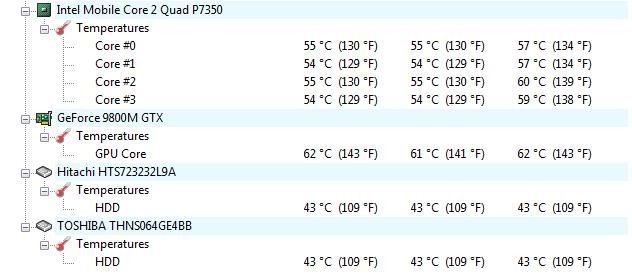
that is not terrible these are the temps on my laptop at the moment
Untitled.jpg

and ive just been on the web, and watching youtube for a hour or so now. i dont think your temps are anything alarming, mine have hit significantly higher without issue
 
chA1nBull3t said:
The temps are perfectly fine. When the CPU overheats, 99% of the time, the computer will hang or shutdown for safety measures. Unless you have been running into any of these problems/symptoms, then I wouldn't worry
smile.gif
.

Actualy 63c is pretty awful for a Core 2 Duo cpu. Thier safe max is around 72c for the E6x50 series.


Your motherboard bios usually has a setting for fan control, you should check and see. You could also reseat the stock heatsink, or get a better third party cooler.
 
Guess im safe as well, still looking towards a proper heatsink and fan a modding the case for better airflow.
Thanks guys, i guess i owe u one, or some
smileipb2.png
 
the core 2 duo cpu in my laptop never goes above 30C unless ive been gaming for like 5 hours straight. Gpu averages around 40-50 (60 when gaming) and i just worry about my hard drive which idles around 40-45 and after playing games for an hour + it goes above 50 (57 was the highest it was at), its a hitachi travel star 7k320 same as themuddaload's first hard drive. im pretty sure my cpu is just underclocked (gayway laptop) resulting in the low temps, but i guess thats good since i hate high temps.
 
Go into the BIOS settings. Sometimes you can up the speed in there. Also look into underclocking, you can make the temps go down a lot with that.

The video card is a little hot for my liking, but it's safe. (My 4830 idles at 35c and never goes past 65c while gaming.)

@DeviousTom: My old computer's hard drive is like at 65c at startup.
tongue.gif
 
Ok, just installed 2 side fans, and thinking of cutting the top of my case to install 2 more from top. Plus i need to install like 2 more in the front....heck it would be pretty load, but i really dont want to underclock the CPU.

The GPU is now not hitting more than 77 on load....
biggrin.gif


Again...thanks for ALL the replies, i really benefited from all the posts.
 
I know AMD has something called "cool 'n' quiet" which auto underclocks your CPU when your not using much of it (ie, emails, gbatemp, etc). It dropped my idle temps down by about 10c.
 
intel uses a few various thing like that built in the mobo bios

EIST
C1E
C2/C2E
 

Site & Scene News

Popular threads in this forum