Hacking Configurable USB Loader

  • Thread starter Thread starter oggzee
  • Start date Start date
  • Views Views 7,865,427
  • Replies Replies 18,482
  • Likes Likes 22
OOPPS - just seen your Edit now :wacko: :vul1: oh well, now you know how you can test your USB-stick ;)

PS: You can also use a big SD card - mine is 256 gb. You just have to make some thing to make it work.
Heh, it's no worries. My SD card is an 8GB SDHC card but right now there's only 1.28GB free. I plan on saving up for a 32GB one so I can fit a few more games on there.
 
When I press B on a game, there's an option to 'install'. What does this do? Does it install the game to the Wii menu as a forwarder? Does it install the covers for the game?
 
When I press B on a game, there's an option to 'install'. What does this do? Does it install the game to the Wii menu as a forwarder? Does it install the covers for the game?
It's been a long time since I used CFG but I would guess that copies the game to your HDD?
 
Now I need help again. I have got a new Wii and have installed all the stuff required to play (the IOS's etc., d2x-v10-beta52 and beta53). When I try to load Animal Crossing: Let's Go to the City, I get an error saying "ERROR: setting up fragments -2 3, ID mismatch = [RUUP01] [ ]". This is the same exact ISO I used for my other Wii and it worked there so why not here? Keep in mind this one is using a normal 2GB SD card whereas the other one which works is using a 8GB SDHC card.

EDIT: Turns out that Wii model just doesn't work with loading games from SD cards or HDDs at all so I got rid of it. No idea why it doesn't work. I tried EVERYTHING but to no avail. One of the installers I used was a fake installer (I didn't knew at the time, but then it told me and flat out had an insult at the end) which made BootMii no-longer appear on startup (changing settings didn't help). Whoever made that installer should've been banned. I give up. I'm just going to keep on borrowing the old black Wii I have.
 
Last edited by NinelivesBobcat,
If i want CFG to only show Wii games - is there an easyer way then manualy hide every gamecube game by hand?

In "USB Loader GX" i found that option. In CFG not - only if i hide every single game manualy.
 
Sooo, I bought a Wii recently, but it seems don't have GCN ports though, so I'm curious how to play the Wii games that have supported GCN controllers... is that possible to play a Wii game with GCN adapter like Nintendont did. I using this for Wii games though.
 
You can use the Wii U Gamecube adapter, a USB HID controller, a CC Pro, or a Wii remote + nunchuk or classic controller with Nintendont.

PS3/4 controllers work but they must be connected by USB cable. Xbox controllers will NOT work as they use a proprietary USB protocol instead of HID.
 
  • Like
Reactions: modbrain
You can use the Wii U Gamecube adapter, a USB HID controller, a CC Pro, or a Wii remote + nunchuk or classic controller with Nintendont.

PS3/4 controllers work but they must be connected by USB cable. Xbox controllers will NOT work as they use a proprietary USB protocol instead of HID.

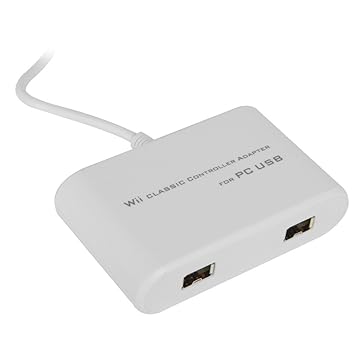
Do you by chance know if this adapter would work (conected to original Wii model), not only in Nintendont - but also in the System Menu/Homebrew Channel etc.? Basically like a Classic Controller acts when it's connected to the Wiimote.

"USB -to- Wii Classic Controller"

51vpnbB1qDL._SY355_.jpg


.
 
Maybe? If it's known to work it should be listed in the original post of the Nintendont thread. I seem to remember seeing someone ask about that one but I don't recall if they ever came back and said it worked or not.

The System Menu doesn't support any of the remote extensions.
 
The System Menu doesn't support any of the remote extensions.
...except the Classic Controller (& CC Pro). I use it all the time instead of a sensor bar. :P
Right stick = cursor, A = A, L/R = -/+

The problem with the Classic Pro (one with handles) is that it's a bit dissonant with some homebrew apps (the most unfortunate of which being SNEX9x GX and its variations, Pro causes it to crash). However, the OG Classic Controller works flawlessly on apps that support it.
 
Last edited by Sticksandstones,
The "For PC USB" kinda gives that away, don't you think? :P
You can attempt to create a HID profile for Nintendont with it with this guide, and this HID test Wii app should help, but that's ALL it'd work with on the Wii. Otherwise, that adapter can use your Classic Controller on PC with it.
I'm curious--why on earth would you want that with your Wii anyway, when your Wii Remote has this port on the back of it? The adapter you bought is for playing PC games with a Classic/Guitar Hero controller.
 
I'm curious--why on earth would you want that with your Wii anyway, when your Wii Remote has this port on the back of it?

Not all Wii Remotes have the USB port on the back of the battery. A while ago, I bought another Wii (don't have that anymore) and the Wii Remotes that came with it didn't have USB ports.
 
After looking at it more closely it's the opposite of what you want. This thing is for letting you use Wii remote extension controllers on a computer. What you need is one that lets you connect USB controllers to the extension port. I know they exist for Gamecube controllers but I'm not sure about USB ones.
 

Site & Scene News

Popular threads in this forum