Hacking Configurable USB Loader

  • Thread starter Thread starter oggzee
  • Start date Start date
  • Views Views 7,865,278
  • Replies Replies 18,482
  • Likes Likes 22
Hi Dr. Clipper,
this was probably already answered before but, do you guys plan to put game's banner and Riivolution-like features?
When I dump my games form Cfg, it keeps all partitions, deletes only the update or keeps only the game's partition?
Thanks for the great loader again.
 
YuriCPS said:
Hi Dr. Clipper,
this was probably already answered before but, do you guys plan to put game's banner and Riivolution-like features?
When I dump my games form Cfg, it keeps all partitions, deletes only the update or keeps only the game's partition?
Thanks for the great loader again.

Banner display requires somebody to write code to display the animation on the Wii, which is pretty hard and nobody is touching. Riivolution seems like it's a little too big a job.

By default, Cfg only installs the game partition, but you can make it install all the partitions (including the update partition, but it still skips updates when launching) or a near 1:1 copy of the entire disc including dummy data by using a different value of the "install_partitions=[only_game], all, 1:1" option
 
Chibicon said:
I see.

Another question... how do I install the same game twice?

I have custom ISOs for New Super Mario Bros Wii and some undubs. I installed my retail version of Arc Rise Fantasia, but I can't install my undub version of it because it says it is already installed.

I think you must change the ID of the original game with a software, like the Wii ISO Renamer. If you install the original game by the CFG, and this is on your HDD now, you can extract the ISO to your PC with Wii Backup Manager, and then, open the iSO on Wii ISO Renamer. Change de ID of the ISO, save and then install.

Or make this with your custom if you don't want change the original. I have this problem with GH3. I install the original, then to install a custom with the same ID I change the ID of the custom...

I hope this help you...
 
I use a pen-drive with cfg and everything is fine, except that every now and then when updating to the latest beta or release the boot.dol doesn't save the wii just hangs, I have to turn off the wii manually and then my pen-drive is corrupted and has to be re-formatted.
 
chop said:
I use a pen-drive with cfg and everything is fine, except that every now and then when updating to the latest beta or release the boot.dol doesn't save the wii just hangs, I have to turn off the wii manually and then my pen-drive is corrupted and has to be re-formatted.
It's totally corrupted? That's very weird and the first we've heard of it. Sometimes we have had cases where the boot.dol itself is corrupted (and can easily be fixed by just copying over the backup file that is created), but never a whole drive...
 
When I say corrupt I mean...

When the pen drive was plugged into my wii, the themes had become all screwed up, gone blank or the graphics were wrong. the button options from the bottom left were missing.

So when I plugged it into my laptop it wasn't auto recognised, windows explorer, 7Zip manager and wii backup manager all crashed trying to read it.

eventually in My computer, I right clicked about 3-4 mins later the options came up, I chose format, another 3 min wait, then quick format, 5 mins later it was done.

and am now using it perfectly fine again.

on the previous occasion I had this update problem, there was a load of undeleteable folders called '///%%\\(' and other random names. so had to re-format that time as well.
 
chop said:
When I say corrupt I mean...

When the pen drive was plugged into my wii, the themes had become all screwed up, gone blank or the graphics were wrong. the button options from the bottom left were missing.

So when I plugged it into my laptop it wasn't auto recognised, windows explorer, 7Zip manager and wii backup manager all crashed trying to read it.

eventually in My computer, I right clicked about 3-4 mins later the options came up, I chose format, another 3 min wait, then quick format, 5 mins later it was done.

and am now using it perfectly fine again.

on the previous occasion I had this update problem, there was a load of undeleteable folders called '///%%\\(' and other random names. so had to re-format that time as well.


iv had this issue only with a Falty flash/Pen Drive..
it could be the actual USB Stick with the issue.. no matter what i did it would Later go Corrupt or lose the data .
i just swap to a diffrent Brand and never had the issues again..

it might not be your issues but everything u just said above is the Exact problem i had when i had a falty Pen ..
 
Can anyone tell me which line in the config files refers to the font color that is used for things such as the game descriptions and "press a button to continue", etc.? Right now it is gray and it doesn't show up very well on the background I have. I've tried playing with gui_text_color, gui_text2_color, etc. but can't figure it out.
 
cu_shane said:
Can anyone tell me which line in the config files refers to the font color that is used for things such as the game descriptions and "press a button to continue", etc.? Right now it is gray and it doesn't show up very well on the background I have. I've tried playing with gui_text_color, gui_text2_color, etc. but can't figure it out.
That would be color_help, I think. Either that or color_inactive. The gui_text* options are only for the GUI colours, not the ones in the console.

It should also be noted that these are theme specific and not overridden by config.txt, so you should edit the specific theme.txt file for your theme rather than config.txt in this case.
 
Dr. Clipper said:
cu_shane said:
Can anyone tell me which line in the config files refers to the font color that is used for things such as the game descriptions and "press a button to continue", etc.? Right now it is gray and it doesn't show up very well on the background I have. I've tried playing with gui_text_color, gui_text2_color, etc. but can't figure it out.
That would be color_help, I think. Either that or color_inactive. The gui_text* options are only for the GUI colours, not the ones in the console.

It should also be noted that these are theme specific and not overridden by config.txt, so you should edit the specific theme.txt file for your theme rather than config.txt in this case.


Thanks!
 
I can only find the favourites system to highlight one group of games at a time but is there any way to have different favourites groups like 1 for music games, 2 for adventure games, 3 for FPS etc?
 
Skiller said:
iv had this issue only with a Falty flash/Pen Drive..
it could be the actual USB Stick with the issue.. no matter what i did it would Later go Corrupt or lose the data .
i just swap to a diffrent Brand and never had the issues again..

it might not be your issues but everything u just said above is the Exact problem i had when i had a falty Pen ..

Cheers
 
I'm working on a custom theme right now. When I finish it where do I post it?

It's a NMH theme btw. The current one you can download for t he console the font is really hard to read because the colours blend in all together, so I started to make my own. I'm even giving it music.
 
sock99 said:
I can only find the favourites system to highlight one group of games at a time but is there any way to have different favourites groups like 1 for music games, 2 for adventure games, 3 for FPS etc?
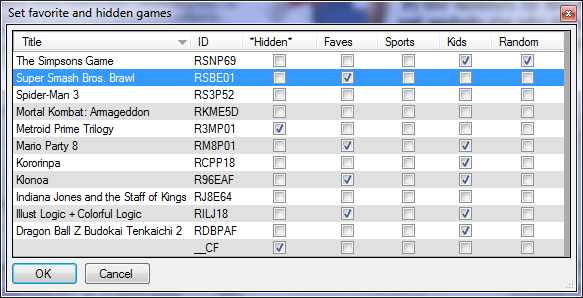
You want the profile system. Each profile has a different set of favourites. The easiest way to create these is with the Configurator Profile and Favorites wizards:

prof.png
favorites.png


QUOTE(Dark-Aries @ Sep 2 2010, 03:03 AM) I'm working on a custom theme right now. When I finish it where do I post it?

It's a NMH theme btw. The current one you can download for t he console the font is really hard to read because the colours blend in all together, so I started to make my own. I'm even giving it music.
Yeah wii.spiffy360.com is the place to make it distributable. On the music front, you can't really include it as music is not theme specific.
 
cfg v59 (release)
Cfg_USB_Loader_59.zip (full)
cfg59.dol
cfg59-222.dol
lang59.zip
(or online update)
Changes:

01-09-2010 cfg v59 (release)
* version change

31-08-2010 cfg v59b2 (beta)
* dip+frag plugin for cios 249 updated to rev20
* Changed the default value of: disable_dvd_patch = 1
Since now the dvd slot check is handled properly by
all cios the patch is disabled by default
* Enable shadow mload on hermes cios v5.1

30-08-2010 cfg v59b (beta)
* Loading games from SDHC for hermes cIOS
* Update modifies existing meta.xml instead of replacing it (gannon)
(So that any additional parameters or user edits will be retained,
only version and date are updated)
* Changed directory creation code to avoid errors on an incomplete path (Clipper)

27-08-2010 cfg v59a (alpha)
* Improved support for Hermes cIOS v5.x
Updated ehcmodule to v5 and new odip plugin
Moved frag code from ehcmodule to odip
Removed support for Hermes cIOS 1,2,3 and external modules
(cios v4 is still supported)
Games on SD/SDHC don't work with hermes cios for the moment.
 
Nice, I just installed 58 and now I need 59.
smile.gif


I just made the move from GX to this and I gotta say I really like all the options I have and it seems to be a real nice app. Congrats.
 

Site & Scene News

Popular threads in this forum