Hacking Configurable USB Loader

  • Thread starter Thread starter oggzee
  • Start date Start date
  • Views Views 7,865,622
  • Replies Replies 18,482
  • Likes Likes 22
Can someone tell me how to play mortal kombat? I choose mk7.dol as alternative .dol but when it goes to the game menu the only game that I can choose is the kart game. Why is that?
 
dkmaster said:
Can someone tell me how to play mortal kombat? I choose mk7.dol as alternative .dol but when it goes to the game menu the only game that I can choose is the kart game. Why is that?

He he the same happened to me.
 
dkmaster said:
Can someone tell me how to play mortal kombat? I choose mk7.dol as alternative .dol but when it goes to the game menu the only game that I can choose is the kart game. Why is that?
nunchuck?
 
dkmaster said:
Ok new problem now. I managed to fix the sd inaccessable error. I can load games fine. But I installed (Universal) Forwarder Channel: (by Narolez) for priiloader and checked the setting to autorun installed file. Now when I open wii it gives error dsi occured. How can I fix this? Can not load priiloader nor system menu.

it doesn't work with priiloader greater than 0.1 (rev15), not sure why, if its priiloader or the forwarder, but it hasn't been fixed yet
 
Hi guys,

I don't post too often, but had a question. I have Configurable USB Loader all setup and have a bunch of games on my Maxtor One Touch II 300 GB external. I can see the games perfectly and they start fine, but after 10-15 minutes it freezes (seems to be always during loading or a movie). I read on the USB compatibility list a few issues, but none seemed related as the USB Loader can see my HDD and start games fine. Also tried in USB Loader GX but same result. Anyone have any quick thoughts or suggestions, or should I post in a different location? Thanks!

 
ericback said:
Hi guys,

I don't post too often, but had a question. I have Configurable USB Loader all setup and have a bunch of games on my Maxtor One Touch II 300 GB external. I can see the games perfectly and they start fine, but after 10-15 minutes it freezes (seems to be always during loading or a movie). I read on the USB compatibility list a few issues, but none seemed related as the USB Loader can see my HDD and start games fine. Also tried in USB Loader GX but same result. Anyone have any quick thoughts or suggestions, or should I post in a different location? Thanks!
Seems your HDD is going to sleep mode.
Try using ios 222
 
xflak40 said:
great work gannon!

do u think u can add a couple more categories that we can sort to?

1) Wiiware / VC forwarder ISOs
2) Utilities forwarder ISOs (ie. homebrew channel, internet channel etc.)
There are no flags for that information in the WiiTDB database, so that would be impossible to do automatically. For selecting these types, I suggest you use the profile features of the loader instead.
 
someone posted that your HDD is going to sleep and thats why it freezes.

I like the config usb loader but there is a lot of games that play and just restart for no reason, or just freeze.

Wiiflow plays them fine.....my kids have done hours of testing on them for me. I dont think its a sleep issue and it does the same thing on both my wii's and on both HDD's and is VERY random.

From disc they have always played fine and Ive triple checked every bit of data.

There has to be some bugs with the loader or internally on the wii. Still, Im sure they will all be worked out in the near future. This program has a lot to offer and continues to be my choice as the best.
 
@afnuke i have almost 500 games on my HDD (Hitachi Simpledrive 1TB) and they all work perfectly with configurable usb loader. I would think that u have a problem either with ur HDD or something is not installed correctly on ur wii.
 
delt31 said:
delt31 said:
Dr. Clipper said:
delt31 said:
Guitar Hero Smash Hits issue here - the "start" button doesnt work. I choose quickplay, choose my instument, choose my song, and then it says to press start to continue, but start will not work on anything. Therefore I stay stuck on the song selection screen, rendering my rock experience a major bore. What should I do?
Are you using an IOS222 or IOS223 that was merged with IOS37 when it was installed? If not, do so.


Yes I did 38 merged with 37. Rb and gh AFDC work fine. What could it be?


anyone know what this might be caused by?

not to be a pain but has no one experienced any problems with this game?
 
Dr. Clipper said:
xflak40 said:
great work gannon!

do u think u can add a couple more categories that we can sort to?

1) Wiiware / VC forwarder ISOs
2) Utilities forwarder ISOs (ie. homebrew channel, internet channel etc.)
There are no flags for that information in the WiiTDB database, so that would be impossible to do automatically. For selecting these types, I suggest you use the profile features of the loader instead.

This is what I do:

I have parental settings enabled so what I do is mark the Wiiware as hidden. Then if I want to see/play them I unlock it and they all appear. It will take a while to setup tho if you have a lot cuz you have to hide each one individually. Or you can just mark them as favorites (if you dont use fav already) and then you just click the 2 button (I think) to show just the wiiware games.

------------
Anyone know how to Hide/block the new Menu from kids? I have the childproof on and it still allows access without password.
 
Hey oggzee,

Is it possible to specify ntfs partition using the old syntax? like DISCID-0 for WBFS1 & DISCID-4 for FAT1?

What would be the values for NTFS partitions then? 8, 9, A, B ?

Or is it only supported with the arg partition=NTFS1?

There is constant requests regarding NTFS partition selection in Crap, hope you can clear a bit this questions of mine.
 
WiiCrazy said:
Hey oggzee,

Is it possible to specify ntfs partition using the old syntax? like DISCID-0 for WBFS1 & DISCID-4 for FAT1?

What would be the values for NTFS partitions then? 8, 9, A, B ?

Or is it only supported with the arg partition=NTFS1?

There is constant requests regarding NTFS partition selection in Crap, hope you can clear a bit this questions of mine.
No, i haven't updated the gameid-X syntax to include ntfs, so for the moment it would only work with partition=ntfs1
I could update the gameid-X syntax if that makes it easier ...
 
ThaDraGun said:
Dr. Clipper said:
xflak40 said:
great work gannon!

do u think u can add a couple more categories that we can sort to?

1) Wiiware / VC forwarder ISOs
2) Utilities forwarder ISOs (ie. homebrew channel, internet channel etc.)
There are no flags for that information in the WiiTDB database, so that would be impossible to do automatically. For selecting these types, I suggest you use the profile features of the loader instead.

This is what I do:

I have parental settings enabled so what I do is mark the Wiiware as hidden. Then if I want to see/play them I unlock it and they all appear. It will take a while to setup tho if you have a lot cuz you have to hide each one individually. Or you can just mark them as favorites (if you dont use fav already) and then you just click the 2 button (I think) to show just the wiiware games.

------------
Anyone know how to Hide/block the new Menu from kids? I have the childproof on and it still allows access without password.
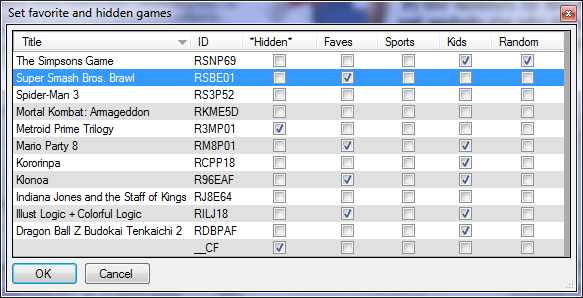
The Configurator makes it much easier to set your hidden games and favorites for each profile. You can just check them all off in the grid:
favorites.png


And gannon already posted that the next version will have a blockable - menu.
 

Site & Scene News

Popular threads in this forum