Hacking Configurable USB Loader

  • Thread starter Thread starter oggzee
  • Start date Start date
  • Views Views 7,866,569
  • Replies Replies 18,482
  • Likes Likes 22
Dr. Clipper said:
I believe the NForwarder is the one that only forwarded to the SD. You want the Universal Forwarder, or pepxl's one.

To see disc art, add "cover_style=disc" and they will then show up in the gridflow GUI modes and the menu screen

I figured out why "CFG USBLoader - FDCL" wasn't working for me.

I had it set up with USB:\apps\USBLoader and when I clicked on the forwarder it just reset the wii.
However, when I ejected the SD card the forwarder would then boot from the USB.
I still want the sd card in, I just dont want this app to use it. Is there a way to make it look in USB if it doesnt find anything in SD card instead of it reseting when there is nothing on sd?

Is there any way to disable a specific gui? I really just want all the neat 3d views. I know you can set it for 1 gui then disable changing gui, but there are only certain ones I didnt want. I wanted to disable the grid view.

How do I enable parental controls. I want my son to be able to play a game but not be able to mess around with it. I want to disable installing/deleting games & modifying settings unless a password is entered. Make it kid friendly.

I tried
admin_unlock = 1
unlock_password = 1234

it didn't work. Then I tried admin_unlock = 0 just incase and that didnt work either.

Am I using the wrong code or is it just not possible to do that?

 
I've got a few questions. First, is it possible to load music from a usb device? I've got a flash drive in the other usb port I'd like to load it from. If so, what is the correct path to use? Also, I'd like to run CFG from the same usb drive. I see it is possible with a channel forwarder, but I have preloader (not priiloader) autobooting to CFG. I tried just moving everything to the usb drive but I got a black screen, I'm assuming the forwarding dol I'm using only checks SD. Is there a forwarder dol that looks at the usb?
 
ThaDraGun said:
I tried
admin_unlock = 1
unlock_password = 1234

it didn't work. Then I tried admin_unlock = 0 just incase and that didnt work either.

Am I using the wrong code or is it just not possible to do that?

If you look at the very first page of this thread you will see it has numerous links that will answer your queries.

The admin password in particular is very easy to understand.

You can only enter the pasword you set with the buttons that are available to you, so a password of 1234 would be no good in the absence of buttons '3' and '4'. Your options on the Wiimote are obviously limited to the buttons that exist i.e. Back Up Down Left Right A Home 1 & 2.

The default (BUDAH12) can be entered by holding the '1' button until the password is requested then pressing the buttons B-U-D-A-H-1-2
wink.gif
 
GimmeWii said:
Is there a chance password protections on settings may be added? Kids and siblings can do horrible things I heard. Like a simple PIN would be enough to protect settings from being changed and games being removed.

GimmeWii

QUOTE(ThaDraGun @ Jan 1 2010, 10:19 PM) Is there any way to disable a specific gui? I really just want all the neat 3d views. I know you can set it for 1 gui then disable changing gui, but there are only certain ones I didnt want. I wanted to disable the grid view.

How do I enable parental controls. I want my son to be able to play a game but not be able to mess around with it. I want to disable installing/deleting games & modifying settings unless a password is entered. Make it kid friendly.

I tried
admin_unlock = 1
unlock_password = 1234

it didn't work. Then I tried admin_unlock = 0 just incase and that didnt work either.

Am I using the wrong code or is it just not possible to do that?

No, you can't hide specific guis - you can only lock a specific one (e.g. coverflow3d)

admin_unlock is enabled by default and works in combination with the simple and disable_* options. My suggestion for you is to just add simple = 1 to your config.txt and your kids will only be able to play games. No format, install, delete, etc.
 
Tristar said:
ThaDraGun said:
I tried
admin_unlock = 1
unlock_password = 1234

it didn't work. Then I tried admin_unlock = 0 just incase and that didnt work either.

Am I using the wrong code or is it just not possible to do that?

If you look at the very first page of this thread you will see it has numerous links that will answer your queries.

The admin password in particular is very easy to understand.

You can only enter the pasword you set with the buttons that are available to you, so a password of 1234 would be no good in the absence of buttons '3' and '4'. Your options on the Wiimote are obviously limited to the buttons that exist i.e. Back Up Down Left Right A Home 1 & 2.

The default (BUDAH12) can be entered by holding the '1' button until the password is requested then pressing the buttons B-U-D-A-H-1-2
wink.gif

I figured out Kidmode and the admin password. Found the Config tutorial on page 1, thanks.
I didnt know you had to use the keys on the wiimote for the password, thought a keyboard would pop up like Loader GX. Guess if I saw the tutorial I would have figured that out on my own eh.

Only 2 more things I need to figure out,

1. (EDIT) Answer about guis in the above post. I typed this too slow.

2. How do I get rid of the favorite star icon? I want to use favorites, but have no star.
I thought I could go to SD:\usb-loader\resources then just change the picture but that didnt work for me. I assumed favorite0.png was the pic used when there was no favorite since it is transparent so I copied that picture and made it the same as all the other pictures. So favorite0.png, favorite.png, favorite32.png, favorite64.png were all transparent. Loaded it up and there is still a star displayed on all the fav covers.
So then I tried deleting favorite0.png, favorite.png, favorite32.png, favorite64.png. There is still there is a star showing! I looked in the theme folders and there are no star icons. Not sure where its coming from..

Thanks alot for your help everyone. Sorry for so many questions.
 
is there anyway to reboot right into the usb loader when you quit a game or do you have to go back to the menu and then back into usb loader?

thanks
 
delt31 said:
is there anyway to reboot right into the usb loader when you quit a game or do you have to go back to the menu and then back into usb loader?

thanks

There is no way to boot directly into the loader, but the closest thing and the way I do it is to install a preloader and set that up so that is auto boots to the loader.
In my case I have it auto booting to a forwarder so that when I what to do an udate to the loader I don't have to replace the dol that is in the preloader.

Good luck;
 
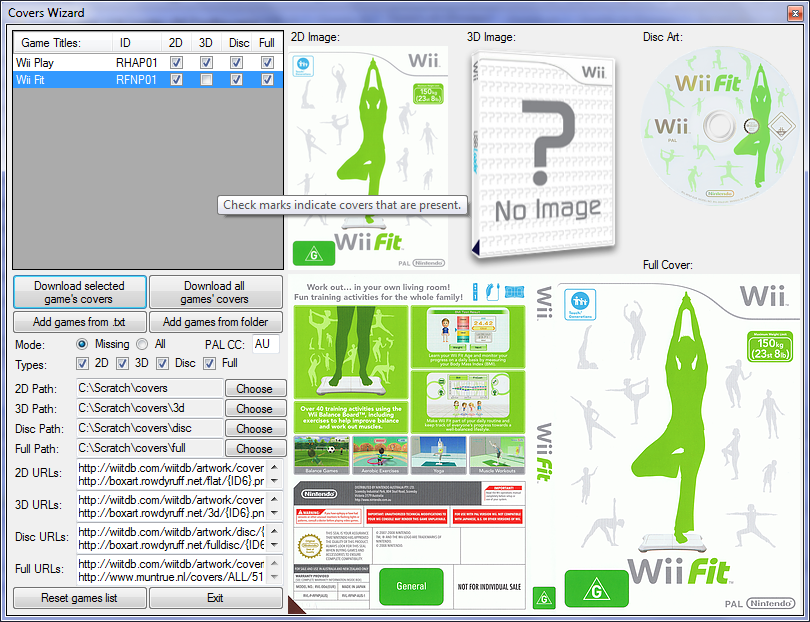
I just released a new beta version of the Configurator. Here's a pic of the new wizard it adds:
coverswiz.png


That's right: complete cover management!

I think this will make a few people happy
smile.gif
. I guess I might add some stats of how many covers are present/missing in the space at the upper right given that post requesting it for the loader recently. Please check the release post for details of use.

ThaDraGun said:
2. How do I get rid of the favorite star icon? I want to use favorites, but have no star.
I thought I could go to SD:\usb-loader\resources then just change the picture but that didnt work for me. I assumed favorite0.png was the pic used when there was no favorite since it is transparent so I copied that picture and made it the same as all the other pictures. So favorite0.png, favorite.png, favorite32.png, favorite64.png were all transparent. Loaded it up and there is still a star displayed on all the fav covers.
So then I tried deleting favorite0.png, favorite.png, favorite32.png, favorite64.png. There is still there is a star showing! I looked in the theme folders and there are no star icons. Not sure where its coming from..
Copy favorite0.png to sd:/usb-loader/favorite.png or sd:/usb-loader/themes//favorite.png to remove the star.
 
in the readme-cfg file it says this about the gui and styles
QUOTE said:
GUI Mode:
---------

By default console mode is started.
To switch to GUI mode, press B in main screen.
While in GUI mode, the following buttons are used:
button A : start selected game
button B : return to console mode
button LEFT/RIGHT (Grid): previous/next page
button LEFT/RIGHT (Coverflow) : rotate to next cover - hold down for fast rotate.
button UP/Down (Grid) : switch number of rows (1-3)
button UP (Coverflow) : flip center cover to its back/front
button DOWN : change gui styles (grid -> flow -> flow-z -> coverflow 3d -> etc)
button 1, +, - : options, install, remove
button 2: favorites game list
button HOME : exit
The background image in GUI mode can be changed with the file:
sd:/usb-loader/themes/Theme_Name/bg_gui.png or
sd:/usb-loader/bg_gui.png

what are the styles, rows to choose from as the coverflow doesnt list what there called so i cant set it as default
it shows grid, flow and flow-z but not the others
also had a problem with the coverflow crashing but have worked out it must of been a bad full image causing it
 
I can always use CfgLoader on a 100% pure softmod wii to install gamediscs on hdd, whether original or backup disc.

But I came across a buddy's set with a D2CPro modchip inside and it always complain that its not a Wii disc when I tried to install burnt discs. It'll only work with original discs. Wondering why a chip can cause this problem?
 
bert02 said:
in the readme-cfg file it says this about the gui and styles

what are the styles, rows to choose from as the coverflow doesnt list what there called so i cant set it as default
it shows grid, flow and flow-z but not the others
also had a problem with the coverflow crashing but have worked out it must of been a bad full image causing it

This is from the config tutorial http://gwht.wikidot.com/configurable-options

QUOTEI want to change the default GUI mode that is set at startup.
gui_style = grid, flow, flow-z, coverflow3d, coverflow2d, frontrow, vertical, carousel
gui_rows = 1, 2, 3, 4

Grid, flow and flow-z have multiple lines, settable by gui_rows, and use cover_style type covers. The others are all coverflow modes with a single row and use full covers.
 
so there is really no option to start directly in List Mode?
this, and a hold d-pad button to switch more sides in list mode are the only things i really miss since changing the loader..
 
Sup?

First off, I want to thank Oggzee, for this bitchin app,,Right on brother
smile.gif


I'm kinda new to the scene, but have been reading a few of the forums for a couple of months, and never had to post a problem. I guess I have been lucky enough to find all the answers I have needed by searching the crap out everything, and have been enjoying my softmodded Wii for some time now.

While this is not really a problem, as its just been the way it is, but I haven't been able to find a clear answer,,,so,

I got a question for ya'll


I have CFG up and running no probs. It will play all of my games, see's all of my covers, everything works awesome. It is v50.c installed in my FAT partition(100gb) of my 1TB WD my book essential USB HD. using the "CFG USBLoader - FDCL" forwarder to launch it as a channel from my system menu.

There is just one catch, I have to start it twice to make it work. If I turn my system on, then click the channel, click start,, then exactly 10 seconds from when the channel fades the Wii will reset, then I can click the channel, click start, then exactly 6 seconds it will show the CFG screen with the vrs 50.c,,then it will load up and I can play my games. If i leave one game then play another,,no probs. It does the 6 second routine and away I go.

I'm guessing that it is looking for an SD card the first time around, when it doesn't find it, it resets. then when I try the second time it looks for the USB first and finds it, then loads.

Maybe I'm just getting old or blind or both,,but is there a setting or something in the config. that I can change so it looks to the USB first and just loads the first time around?

If it is any help,, if i load the "CFG USBLoader ID - IDCL" wad as a channel it will load in 12 seconds as v48. As i understand it though from reading the release notes, this version loads the embedded V48 when it doesn't find the SD card.


Anyway, any help would be awesome, but if it is just the way it is,,well,, I'm already used to it :-)

Thanks
D.
 
ChaosEnergy said:
so there is really no option to start directly in List Mode?
this, and a hold d-pad button to switch more sides in list mode are the only things i really miss since changing the loader..
To start in the menu mode game list, remove "gui=start" from config.txt. Or change it to "gui=1". However, I'm not sure that's what you mean by "list" due to your mention of sides. If not, please elaborate.
 
thanks ThaDraGun the config.txt said check the readme-cfg file n wasnt there. knew it had to be somewhere tho

@ChaosEnergy
yeah gui=1 will start in list mode think its called console
and for the dpad press it sideways and it goes to the top(left)/bottom(right) press it again and it goes to the next page

@DMOSH
what does it do if you load it from the homebrew channel instead of the forwarder?
have you tried the universal forwarder instead?
 
Hey guys,

i did not read the whole 477 sites, but i think this issue is not planned to be realised.

My concern is about an internal savegame extractor included in future versions.

The original savegame extractor by waninkoko needs an original disc, to copy the savegame,

so you cannot copy savegames of games which are played on an usb-loader.

an alternative could be to set the savegamelocation on the sdcard.

if the wii has something like environment-variables lets call it %SAVELOC%

you could set %SAVELOC% to sd:\usb-loader\saves\

or something like that.

but the main idea, and i think others have had it before me(see usb-loader gx) is a internal savegame extractor.


i hope ill get a response

BME

//EDIT on following post

kk sry it seems that im not really into these things^^ buty thx anyway
 
BopMeExtreme said:
Hey guys,

***** snip *****

The original savegame extractor by waninkoko needs an original disc, to copy the savegame,

so you cannot copy savegames of games which are played on an usb-loader.

***** snip *****

i hope ill get a response

BME


or you could use wanin's savegame manager that installs and extract but doent need a disk to do so
 
Ok.. here is my problem. I am running Configurable USB loader 50. I have everything up and running through Homebrew. All covers are there and the games work perfect. I wanted to add a configurable USB channel so i don't need to go through Homebrew. When i installed the wads for this. it just resets back to the wii menu. The Wad i used was USBLoaderCFG_NForwarder-UCXF-Channel.wad. Went through WAD Manager on hombrew to do this. I have never had this happen before. I read through about 150 posts on here and either i'm not understanding correctly or i'm just clueless. Anyway. I'm using 249 with Rev. 14. Do i need to upgrade to rev 15 or 16? I had this channel working before when i upgraded from 1.5 but it didn't give me all the options that the homebrew version did. I couldn't do all the 3d views and the alt.dol option wasn't on the menu as well. Thats why i deleted the channel and tried to reinstall it and now the channel doesn't work at all. Can anybody tell me what i need to do or what i'm missing?
Thanks in advance.
 
oggzee said:
Wizard1 said:
Loader: 50c-Fat
IOS222 (Rev 4) [FAT]
Mounting drive........ TIME OUT
Seems ios222 does not support your usb (thumb) drive.
You can try removing it and inserting it back while the timeout is counting, sometimes that helps.
(not a good permanent solution i know, but it's worth a try)

Awesome thanks yeah that worked. I also tried a different flash drive and it worked right away without having to unplug and replug the USB drive.


Another problem that I just noticed is that while there's absolutely nothing wrong with my DVD Drive (ie.. DISC games load perfectly fine using NeoGamma), when I try to load backups using the traditional method (disc channel), it fails to detect, load, or preview whatever disc is in the drive.

Now I recently did a bunch of changes to my wii all at the same time so here's a list of what I did. Hopefully someone can help me narrow down or knows whats happening to my wii:

1)Installed Configurable USB Loader
2)As part of Conifgurable USB loader I installed Hermes 222 and 223
3)Installed USB Loader Channel Forwarder WAD
4)Installed NeoGamma WAD

Many thanks in advance. And props to Oggzee!
 

Site & Scene News

Popular threads in this forum