Hacking Cannot launch Godmode9

Sacajaweeaboo

Member
Newcomer
Joined
Jan 1, 2019
Messages
17
Reaction score
1
Trophies
0
Age
30
XP
160
Country
United States
I have been trying to launch GodMode9 (I have all the required files and they're in the right folders) but it does not load when I hold start and then power on my 3ds. Is there any reason why it may not be working? I'm using a new 3ds on firmware 11.9, maybe it's because of that?
 
I have been trying to launch GodMode9 (I have all the required files and they're in the right folders) but it does not load when I hold start and then power on my 3ds. Is there any reason why it may not be working? I'm using a new 3ds on firmware 11.9, maybe it's because of that?
Do you know if you have got luma3ds installed onto your console before hand?
 
Do you know if you have got luma3ds installed onto your console before hand?
Yes, I have Luma 9.1 and updated to firmware 11.9 and it didn't break my CFW. The Luma menu loads when I hold select and then power on my 3ds, but not GodMode9 when I hold start and power it on.
 
Can you take a picture of the SD:/luma/payloads folder? Preferably make it look like this one (but with your 3DS SD card, I don't have access to an SD reader rn):
upload_2019-1-17_20-59-19.png
 
Can you take a picture of the SD:/luma/payloads folder? Preferably make it look like this one (but with your 3DS SD card, I don't have access to an SD reader rn):
View attachment 155402
This is all that's in there, my brother is the one who hacked my 3ds and put Luma on, I would have asked him but he's at work and isn't allowed to have his phone on him.
 

Attachments

  • payloads.png
    payloads.png
    94.6 KB · Views: 541
This is all that's in there, my brother is the one who hacked my 3ds and put Luma on, I would have asked him but he's at work and isn't allowed to have his phone on him.
perhaps you have too many firm files in there?
 
copy them to a folder on your pc first . . . that way you can replace replace any and all files if you mess anything up
It didn't work D:
I guess I will just wait until tomorrow so my brother can look at it. I was hoping to use GM9 to use cheats on my custom virtual console games.
 
You can always copy godmode9 to be your boot.firm, just make sure to rename luma to luma.firm or something as GM9 can load firms when you press A on them.
Normally when people have this issue they named their payloads folder "playloads" or something like that...

edit: wait, you do have a luma boot.firm on your root, right? If you don't & you're loading from nand, that would explain not loading from payloads as nand luma checks for folders on nand.
Also, you should be able to safely delete every single one of those payloads except godmode9, as GM9 is the only relevant one nowadays.

 
Last edited by SCOTT0852,
  • Like
Reactions: wormdood
It didn't work D:
I guess I will just wait until tomorrow so my brother can look at it. I was hoping to use GM9 to use cheats on my custom virtual console games.
my guess is that the openfirminstaller.firm (say that 5 x fast and mario will come out your toilet and slap your mom for letting you hack your console) is assigning firms to buttons during boot like up firm is a shortcut to another firm if you hold up on boot (or something stupid like that)
 
Last edited by wormdood,
You can always copy godmode9 to be your boot.firm, just make sure to rename luma to luma.firm or something as GM9 can load firms when you press A on them.
Normally when people have this issue they named their payloads folder "playloads" or something like that...

edit: wait, you do have a luma boot.firm on your root, right? If you don't & you're loading from nand, that would explain not loading from payloads as nand luma checks for folders on nand.
Also, you should be able to safely delete every single one of those payloads except godmode9, as GM9 is the only relevant one nowadays.
There's a boot.firm and a luma.firm on the root of my SD card, I'm assuming I leave those alone?
 
There's a boot.firm and a luma.firm on the root of my SD card
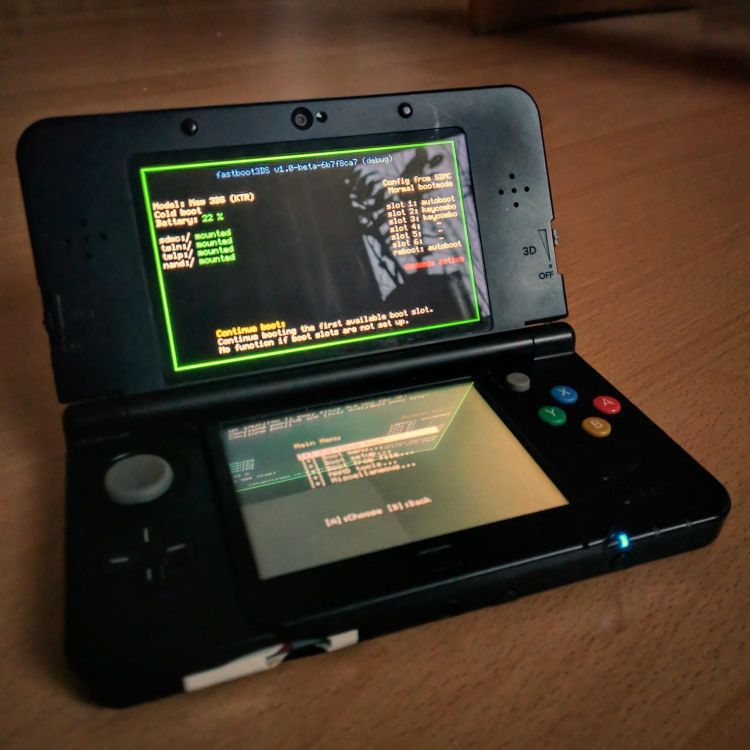
Sounds like maybe he's using fastboot as a boot.firm? There's no reason to do that if you already have Luma though...
Just replace boot.firm with luma.firm renamed to boot.firm, that should fix your problem. And, as mentioned earlier, you can delete all the firms in the payloads folder other than godmode9.
 
Sounds like maybe he's using fastboot as a boot.firm? There's no reason to do that if you already have Luma though...
Just replace boot.firm with luma.firm renamed to boot.firm, that should fix your problem. And, as mentioned earlier, you can delete all the firms in the payloads folder other than godmode9.
I know this is gonna sound really dumb but how I replace my boot.firm with the luma one?
I'm still somewhat of a noob when it comes to the system modding.
 
Rename your current boot.firm to something like boot.firm.old or oldboot.firm (the name doesn't matter as long as it isn't boot.firm) and then rename luma.firm to boot.firm.
This happened when I exited microsd management after renaming them. Is this normal?

50301892_284924422176742_7054713122048704512_n.jpg
 
I had tried that before and nothing happened. And then this happened when I renamed my boot.firm and exited micosd management. Is this normal?
The Luma3DS configuration menu is accessible when you turn on the 3DS and hold the (Select) button. Anytime you update to a newer version, that will appear until settings are chosen. Until you know what each one does, have this as the default.

luma_config.png
 

Site & Scene News

Popular threads in this forum