Homebrew B9S does not boot on New 2DS

  • Thread starter Thread starter Jannik
  • Start date Start date
  • Views Views 5,450
  • Replies Replies 28
I forgot the test ... ‍-snip-
Unfortunately, this can take another 2 hours.
What did the result say for that H2testw run?

I previously deleted the partition.

Formatting can now take 1-2 hours ... :sleep:

Oh no! You do quick formatting for all (4) four programs.
 
Last edited by TurdPooCharger,
How can I change my 2DS to EUR if it already has the region EUR from the factory?

--------------------- MERGED ---------------------------

Oh. As a prerequisite, my 2DS must be able to be switched on and it no longer does.
 
How can I change my 2DS to EUR if it already has the region EUR from the factory?

Oh. As a prerequisite, my 2DS must be able to be switched on and it no longer does.


Deutsch
Sie haben etwas über "LL" gesagt, das Japanisch ist. Ich dachte, dass Sie vielleicht ein n2DSLL von Japan gekauft haben.

English
You said something about "LL", which is Japanese. I thought that you might have bought a n2DSLL from Japan.

***

See if this helps.
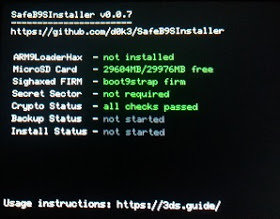
  1. Download SafeB9SInstaller, and extract the FIRM file with either 7-Zip or WinRAR.
  2. Rename the file, and put this in the root of the SD card.
    • SafeB9SInstaller.firmboot.firm
    • sdmc:/boot.firm
  3. Insert the SD card into the n2DSXL and turn on the system.
Does this show up?

20170929_000931.jpg.bffef02d471da5c54adcb3bda975c29e.jpg
 
Last edited by TurdPooCharger,
No. It doesn't show me that.
  1. Take a different SD card (preferably 4 GB) and copy everything off it to a computer.
  2. Quick reformat the card in [ FAT32 format | 32 KB cluster size | MBR disk | Primary Partition ] settings with MiniTool Partition Wizard (free edition).
  3. Add the SafeB9SInstaller v0.0.7 and Luma3DS v7.0.5 to the root of the SD card. This is to check for both B9S and A9LH custom firmwares.
    • SafeB9SInstaller.firmsdmc:/boot.firm
    • sdmc:/arm9loaderhax.bin
    • :!: Do not add anything else.
  4. Insert the SD card into the n2DSXL, turn on the system, and hold the (SELECT) button.

If the n2DSXL does not boot with either SafeB9SInstaller or Luma3DS v7.0.5 configuration,

Possibility (A) The n2DSXL's micro SD card slot reader is broken.
-or-

Possibility (B) The n2DSXL no longer has custom firmware installed.
  • Rehack it with ntrboot using R4i Gold 3DS Plus. If you have another (o/n)(2/3)DS(i)(XL/LL)(phat/lite) system with working DS mode, you may instead go with the R4iSDHC series (requires reflashing).
 
Last edited by TurdPooCharger,

Site & Scene News

Popular threads in this forum