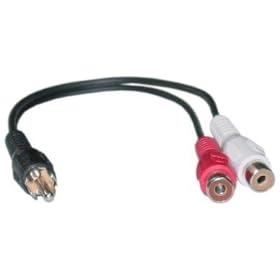
Gaming Audio input for PC to TV

  • Thread starter Thread starter frantier123
  • Start date Start date
  • Views Views 2,688
  • Replies Replies 12

frantier123

Well-Known Member
Member
Joined
Nov 9, 2008
Messages
176
Reaction score
0
Trophies
1
XP
74
Country
Senegal
I recently got a Toshiba full HD tv. I have connected my PC to the tv via VGA. However, it's the audio part that messes with me.

I got a 2 channel RCA, and apparently, the TV itself only supports one channel. However, if I pluck only a channel in (either red or white), the sound is very soft.

Are there any other wires or ways to get a dual sound instead of mono?


P/S: Sorry if posted in wrong section, since there aren't a section to post this here I guess.
 
Make and Model of Tv and PC sound card details would help more.

If your TV only has one channel audio input you would have to use a separate AMP and Speakers or HIFI System for the sound.
 
Basically, what I have is a Toshiba Regza 42RV500E.

A model of input connection at page 10 of the its instruction manual:
http://www.regza-asia.com/pdf/LCDTV/RV500/...RV500ETY-EN.pdf

I pluck in either one of my RCA channel into the the audio input that the manual point number 17.

As for sound card, I wasn't sure. No idea how to find it's detail on the system itself.
 
usually all you need is a plain audio cable. something like this.

mini%20audio%20cable.jpg


thats how i have plugged my HTPC to my tv. but your one looks like an rca cable so you can get a ahte 2rca to 1 output converters or just get a single audio to rca converter. but it might not produce stero sound.


Also my ATI card is hdmi compatible, all i did was have a dvi to hdmi converter and plug it into the hdmi slots. maybe you can do the same thing.
 
delta123 said:
yeah something similar to this

1057_Audio_Connector_200.gif


but tell me what your video card is first before i recommend it

Actually, this is what I got, the dual RCA channel.

However, my TV is 3.5mm Stereo audio jack, so I think I should get the one on top.

Oh, and how do I check my sound card?
 
i think its better get this

31Ov6mDRINL._SL500_AA280_.jpg


converst 2 rca to 1

or tell me what kind of video card you have, not sound card. i use a ATI HD3870 and that card had dvi hdmi output, and i use a hdmi cable for that. simple setup, and just one cable. most newer video cards support this.
 
delta123 said:

Maybe it's just me, but after your'd shown me the stero audio line, I still prefer that one to RCA dual channel.
Anyway, here's my graphic card:

NVidia GeForce Go6150
Integrated RAMDAC
287MB of total graphic memory

I don't think mine support high defination resolution though ...
 
Actually, HDMI is definitely better if your graphic card supports HD. 1 cord does it all.

However, if I am not wrong, I read it somewhere that some HDTV still requires you to jack in your audio despite the fact that you are connecting using HD.
 
the geforece go intergraed 9000 series is the one that has hdmi.

but you dont need an audio jack if you do everything through the hdmi cable, it does that for you if the video card itseld comes with a either a hdmi slot or a dvi to hdmi converter (as was my case). but for frantier you will need this i think i have found what you need. i hope.


100022.jpg

https://www.addison-electronique.com/catalo...ducts_id=100066
 
delta123 said:
the geforece go intergraed 9000 series is the one that has hdmi.

but you dont need an audio jack if you do everything through the hdmi cable, it does that for you if the video card itseld comes with a either a hdmi slot or a dvi to hdmi converter (as was my case). but for frantier you will need this i think i have found what you need. i hope.


100022.jpg

https://www.addison-electronique.com/catalo...ducts_id=100066
Thanks for your effort in finding infos for me ... But I'm just pondering what do I do with that though ...

Edit: Opps. I get it. Thanks for your help
wink.gif
 
XtremeCore said:
Actually, HDMI is definitely better if your graphic card supports HD. 1 cord does it all.

However, if I am not wrong, I read it somewhere that some HDTV still requires you to jack in your audio despite the fact that you are connecting using HD.
nvidia cards require you to run a SPDIF cable from your audio chipset to the gfx card to output sound over HDMI
ati cards have a built in 7.1 sound card so they can output nativity without a audio connection
 

Site & Scene News

Popular threads in this forum