ROM Hack Alan Wake Remastered - Graphic mod

  • Thread starter Thread starter cucholix
  • Start date Start date
  • Views Views 13,475
  • Replies Replies 23
  • Likes Likes 7

cucholix

00000780 00000438
Member
Joined
Jan 17, 2017
Messages
3,336
Solutions
1
Reaction score
2,348
Trophies
2
Age
46
XP
6,895
Country
Chile
Alan Wake Remastered - Gaphic mod | only for v1.0.1
There are 3 graphics options to you decided in the .rar
Option 1 -> AlanWake-Graphics-High

  • Resolution increased from 640x360 to 1280x720 [Handheld Mode]
  • Render resolution reduced from 1920x1080 to 1280x720 [Dock]
  • Resolution increased from 960x540 to 1280x720 [Docking Station]
  • FXAA [Handheld / Dock]
  • Enabled display of dynamic shadows from medium objects in the second cascade [Handheld Mode / Docking Station]
  • 4-cascade dynamic sun/moon shadow mode enabled [Handheld Mode / Docking Station]
  • Reduced the softness of the PCF shadow filter [Handheld Mode / Docking Station]
  • Increased the distances of small, medium and large objects [Handheld Mode / Docking Station]
  • Increased the distances of small and medium buildings [Handheld Mode / Docking Station]
  • Increased LOD distance of all vegetation [Handheld Mode / Docking Station]
  • Slightly forward-shifted texture mips [Handheld Mode / Docking Station]
Option 2 -> AlanWake-Graphics-648
  • Resolution increased from 640x360 to 1152x648 [Handheld Mode]
  • Render resolution reduced from 1920x1080 to 1280x720 [Dock]
  • Resolution increased from 960x540 to 1152x648 [Docking Station]
  • FXAA anti-aliasing [Handheld / Dock]
  • Enabled display of dynamic shadows from medium objects in the second cascade [Handheld Mode / Docking Station]
  • 4-cascade dynamic sun/moon shadow mode enabled [Handheld Mode / Docking Station]
  • Reduced the softness of the PCF shadow filter [Handheld Mode / Docking Station]
  • Increased the distances of small, medium and large objects [Handheld Mode / Docking Station]
  • Increased the distances of small and medium buildings [Handheld Mode / Docking Station]
  • Increased LOD distance of all vegetation [Handheld Mode / Docking Station]
  • Slightly forward-shifted texture mips [Handheld Mode / Docking Station]

Option 3 -> AlanWake-Graphics-720

  • Resolution increased from 640x360 to 1280x720 [Handheld Mode]
  • Render resolution reduced from 1920x1080 to 1280x720 [Dock]
  • Resolution increased from 960x540 to 1280x720 [Docking Station]
  • FXAA [Handheld / Dock]

Screenshots for comparison Option 3

Default docked (max CPU/GPU OC, RAM 1800)
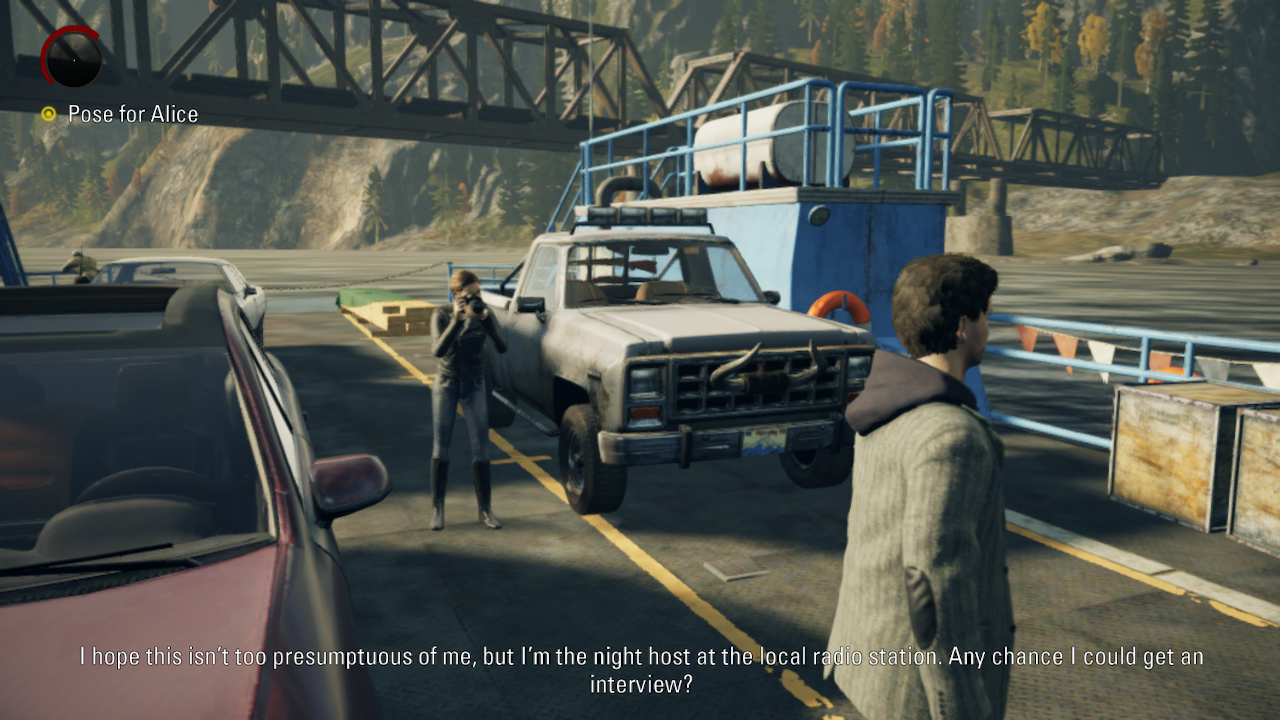
default.png


Mod docked (max CPU/GPU OC, RAM 1800)
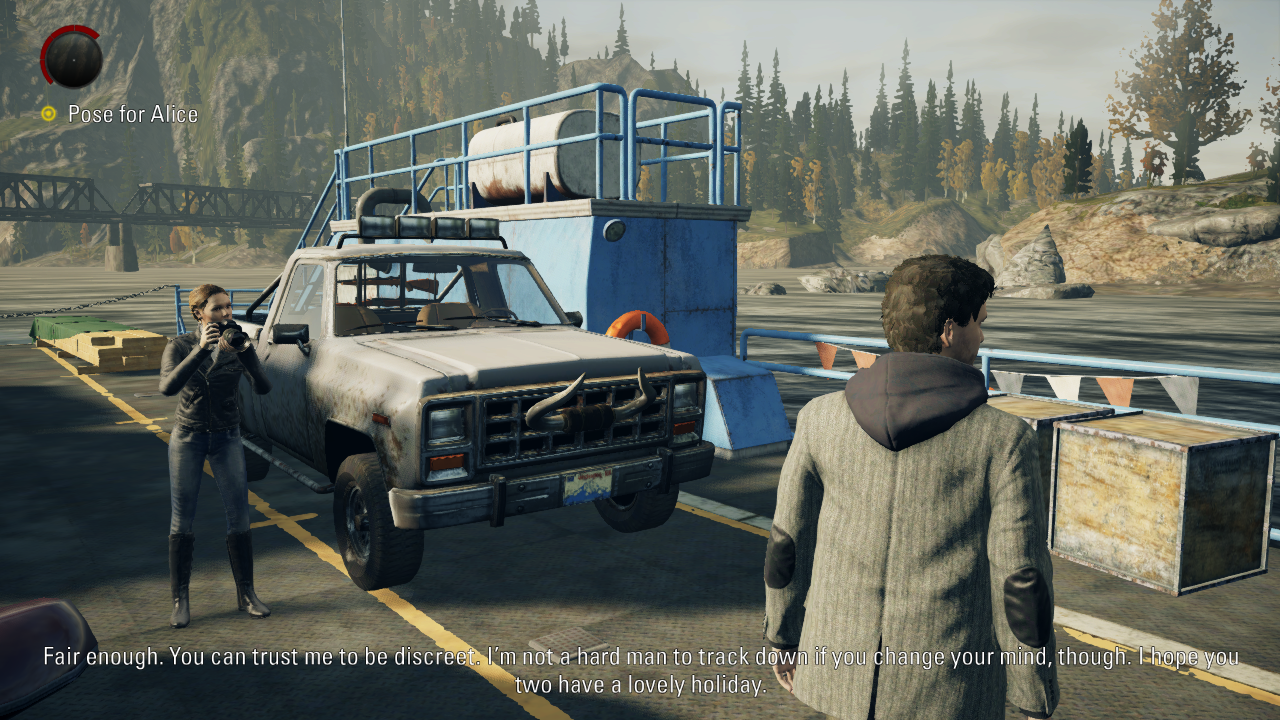
mod.png


This mod was created by @ecl0674 I just converted it to IPS I take no credit for this, changelog taken from source of the mod.
 

Attachments

Last edited by cucholix,
Disabled AA (docked/handheld mode)
TAA Disabled, FXAA still works.
but it runs bad on my Erista, so I only ported these changes.
For Erista, i made a 648p version with other nice changes. I would appreciate it if you would post an IPS version of my original mods.
 
TAA Disabled, FXAA still works.

For Erista, i made a 648p version with other nice changes. I would appreciate it if you would post an IPS version of my original mods.
Would it possible leave render resolution at 1080p so UI still renders at native resolution while scaling down game resolution?
 
Would it possible leave render resolution at 1080p so UI still renders at native resolution while scaling down game resolution?
In this game we can change render scale only for both modes at the same time. 66.67%+1080p for dock = 66.67%+720p for handheld. Yes, we can set 1080p render for handheld too, but... not native res = blurry, 1080p = slightly more overclock. No I won't do it. Also need some additional changes in main, because render scale is not a float value.
 
render scale is not a float value.
What I’ve tested so far, the scaler works with some sort of preset resolutions, similar to FPS where 1 is 60FPS, 2 is 30FPS, 3 is 15. Or probably use the int value in conjunction with other function.
 
Last edited by cucholix,
  • Like
Reactions: felmapiq
What I’ve tested so far, the scaler works with some sort of preset resolutions, similar to FPS where 1 is 60FPS, 2 is 30FPS, 3 is 15. Or probably use the int value in conjunction with other function.
I use erista, is there anyway to apply 1 those 3 options? or is file attached the only best option for erista?
 
I use erista, is there anyway to apply 1 those 3 options? or is file attached the only best option for erista?
AlanWake-Graphics-648 and AlanWake-Graphics-720 are meant to use with Erista. You can use AlanWake-Graphics-High too but the game will lag.
To sumarize:
  • AlanWake-Graphics-648 has all the graphical improvements of AlanWake-Graphics-High, but runs at 648p.
  • AlanWake-Graphics-720 doesn't have all the graphical improvements of AlanWake-Graphics-High, but runs at 720p.
  • AlanWake-Graphics-High has all the graphical improvements, plus it runs at 720p.
You only can use ONE of those.
 
AlanWake-Graphics-648 and AlanWake-Graphics-720 are meant to use with Erista. You can use AlanWake-Graphics-High too but the game will lag.
To sumarize:
  • AlanWake-Graphics-648 has all the graphical improvements of AlanWake-Graphics-High, but runs at 648p.
  • AlanWake-Graphics-720 doesn't have all the graphical improvements of AlanWake-Graphics-High, but runs at 720p.
  • AlanWake-Graphics-High has all the graphical improvements, plus it runs at 720p.
You only use ONE of those.
thank for your explanation 👍🏽, but I still don't know how to change the option, is it using sys clk manager or do I just need to put the file attachment in the correct folder?
edit: ah, i see.. so put the only option I chose, not the other 2.. right?
 
Last edited by felmapiq,
AlanWake-Graphics-648 and AlanWake-Graphics-720 are meant to use with Erista. You can use AlanWake-Graphics-High too but the game will lag.
To sumarize:
  • AlanWake-Graphics-648 has all the graphical improvements of AlanWake-Graphics-High, but runs at 648p.
  • AlanWake-Graphics-720 doesn't have all the graphical improvements of AlanWake-Graphics-High, but runs at 720p.
  • AlanWake-Graphics-High has all the graphical improvements, plus it runs at 720p.
You only can use ONE of those.
I use high version with my own RAM config (for my switch), and it's very stable at 30fps
 
  • Like
Reactions: felmapiq
thank for your explanation 👍🏽, but I still don't know how to change the option, is it using sys clk manager or do I just need to put the file attachment in the correct folder?

edit: ah, i see.. so put the only option I chose, not the other 2.. right?
Yeah, only one option, for example if you choose AlanWake-Graphics-720 then the path will be
Code:
atmosphere/exefs_patches/AlanWake-Graphics-720/6520258D00AEA915839F16ACDCF00682499D88F6.ips
 
Yeah, only one option, for example if you choose AlanWake-Graphics-720 then the path will be
Code:
atmosphere/exefs_patches/AlanWake-Graphics-720/6520258D00AEA915839F16ACDCF00682499D88F6.ips
thank for the details, bro 🤗
 
648p are meant to use with Erista + 4IFIR.
I use the loader.kip method for RAM OC, mine is set by default to 1862, so I'm runing the game with:
CPU=1785
GPU=921
RAM=1862
Does 4IFIR adds another features? Or it just allows higher OC? Cause my Erista freaks out with anything higher than 1862 in RAM.
 
  • Like
Reactions: felmapiq
648p option is the one I tried that works great on handheld even without OC. Thanks for this, makes the game really playable.
 
  • Like
Reactions: felmapiq

Site & Scene News

Popular threads in this forum