I have a few virtual console games I purchased from the eshop that I would like to replace with another game. I know how to do it for DS games by replacing the compressed rom file inside of the system's folder with the game I want to play, but now the game has the incorrect menu and boot screen imsgrd. Leaving it that way would be easy for me to complete the process but then it becomes a guessing game of "What game is this really?" with miss matched picture icons and boot screens leading to a totally different game. Lol 
So basically I'm asking if there is some windows app that makes the process a bit easier. I'm aware of the wii u injection tools, but it isn't useful for what I want to do. I want to replace "JUST THE IMAGES" from games I purchased in the eshop so I don't need to load cfw/haxchi to play them, so those tools won't help. It would be nice if it there is one that you can easily automate the process by searching for the name of the game and download images from a source kinda like the tool in the image below instead of painstakingly hunting them down and manually editing them (Especially if you aren't that good at it) I probably sound like I'm over-complicating things but that's just it. I wanted to know if there is a simple process for this.
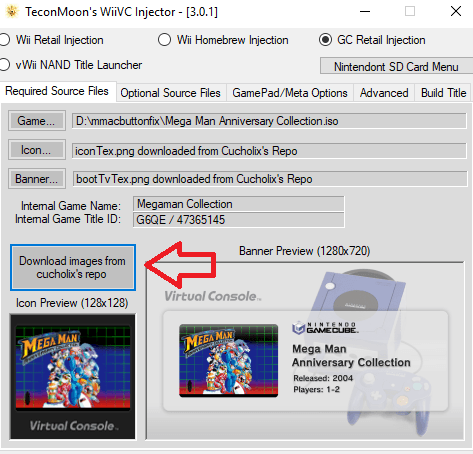
So basically I'm asking if there is some windows app that makes the process a bit easier. I'm aware of the wii u injection tools, but it isn't useful for what I want to do. I want to replace "JUST THE IMAGES" from games I purchased in the eshop so I don't need to load cfw/haxchi to play them, so those tools won't help. It would be nice if it there is one that you can easily automate the process by searching for the name of the game and download images from a source kinda like the tool in the image below instead of painstakingly hunting them down and manually editing them (Especially if you aren't that good at it) I probably sound like I'm over-complicating things but that's just it. I wanted to know if there is a simple process for this.