[3DS GateWay Help] Black screen

  • Thread starter Thread starter aaroninau
  • Start date Start date
  • Views Views 979
  • Replies Replies 5

aaroninau

New Member
Newbie
Joined
Jan 10, 2025
Messages
2
Reaction score
0
Trophies
0
Age
40
XP
28
Country
Australia
So I found my 3ds from the garage after many years and it still powers up but. I remember last time I couldnt get it work and I copy the files around between the sd card in 3ds and the micro sd in 3ds gateway card. It's been years I cannot remember how to get this thing work.

If SD card is not inserted, 3DS just powers off straightaway when power button is pressed.

With SD card inserted when It powers up, I see below screen. Either continue or back option, I get black screen.
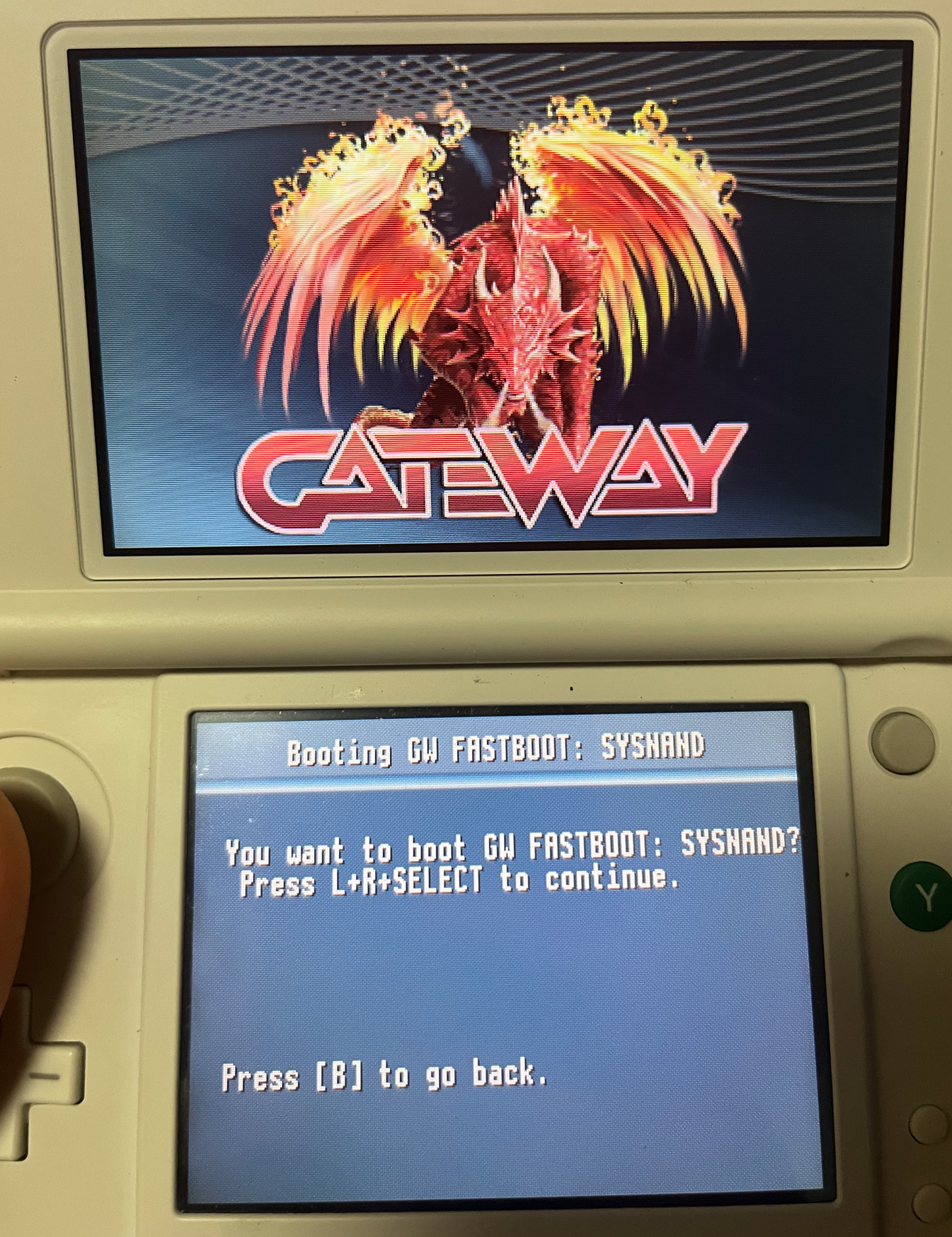
Capture2.PNG


The SD card has below files. I noticed the NAND.Bin file doesnt have a Date modified. Is Nand.Bin corrupted? I dont think I have a backup.
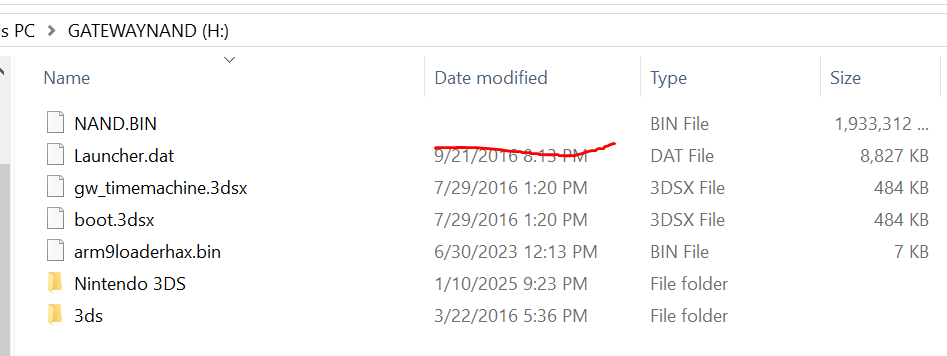
Capture.PNG


How can I check if the nand.bin is corrupted? I tried 3DSFAT16 tool but apparently I need xorpad which I don't.
Is it a NAND probelm?
is there a way to restore my 3ds without a working NAND.Bin?

1736527858208.png

Thank you for your help in advance.
 
I would strongly advise you to install Luma3DS and Boot9strap here: https://3ds.hacks.guide

Gateway 3DS by far is pretty outdated today and is only there for nostalgia. Unlike with custom firmware, you can install games and homebrew onto the SD card, disable signature checks, region free the console, and it gets regular updates. The Gateway launcher has not been updated up to system firmware 11.3.0 to my understanding, so you cannot use the latest firmware with Gateway, not without installing several patches: https://gbatemp.net/threads/setting-up-gateway-luma3ds-on-11-17-guide.640070
 
I would strongly advise you to install Luma3DS and Boot9strap here:

Gateway 3DS by far is pretty outdated today and is only there for nostalgia. Unlike with custom firmware, you can install games and homebrew onto the SD card, disable signature checks, region free the console, and it gets regular updates. The Gateway launcher has not been updated up to system firmware 11.3.0 to my understanding, so you cannot use the latest firmware with Gateway, not without installing several patches:
I cannot boot it into either sysnand or emunand Home menu. It is soft bricked. My understanding is that I need to restore the Nand to 3ds using hardmod to unbrick it first before install Luma3ds and Boot9strap. Is my understanding correct?


As mentioned in my post, I'm not entirely sure if the nand.bin i have is not corrupt as it looks odd without a last modified date.
Is there any other way to unbrick a soft bricked 3ds if the nand.bin is actually not good? Thank you
 
My understanding is that I need to restore the Nand to 3ds using hardmod to unbrick it first before install Luma3ds and Boot9strap. Is my understanding correct?
You can use ntrboot to get into GodMode9 and restore the RAW NAND backup. Then, install Luma and B9S.

https://3ds.hacks.guide/ntrboot

Make sure that the NAND backup is NOT modified in any way, and that it was your SysNAND backup.
 
Are you able to remove any SD cards and cartridges inserted into the console, enter safe mode (L + R + D-Pad Up + A while powering on, helluva combo to do with two hands), and do a system upgrade? If that works, let it update the console to the latest FW version, then follow the guide from the start.
 
  • Like
Reactions: SylverReZ
Hi aaroninau!

Your console is arm9loaderhaxed, that's why it doesn't turn on without a SD card. It requires the file arm9loaderhax.bin to be placed on the root of the SD card. The arm9loaderhax.bin file you have now in your SD is the one from the Gateway Team, that chainloads the file Launcher.dat, which is the Gateway menu you see on boot. The problem with the Gateway CFW is that it requires the Gateway Card to be inserted to boot the 3ds firmware. If the card is not working or is not making good contact, it could explain the black screen, it happened to me several times back then when I used my Gateway. You could try to clean the contacts on the Gateway Card to see if that changes anything.

You should restore the NAND only as an absolutely last resort, and only if you are completely sure your NAND backup is from your console and it hasn't been modified or corrupted.

Anyway, before doing anything with the NAND, I recommend you to discard the Gateway and try to boot your SysNAND using Luma3DS. If it boots fine, the NAND is ok and doesn't need to be restored. For trying that, download Luma3DS v7.0.5 (https://github.com/LumaTeam/Luma3DS/releases/download/v7.0.5/Luma3DSv7.0.5.zip), which is the last version to support arm9loaderhax entry point. Extract the file arm9loaderhax.bin to your SD card, overwriting the previous one (make a backup first, just in case), put the SD card back in the console, remove the Gateway Card and try to boot the console.

If it works, you will know your console and NAND are ok. Then, I recommend you to migrate from arm9loaderhax to boot9strap (https://3ds.hacks.guide/a9lh-to-b9s.html), update Luma to the last version (v13.3), update the console firmware to the last version (11.17) and install FBI (if you don't have it already) to install your games directly to the console SD card. Once everything is done, you can forget about Gateway, which is totally outdated and pretty useless by now.

Good luck!
 
  • Like
Reactions: SylverReZ

Site & Scene News

Popular threads in this forum