
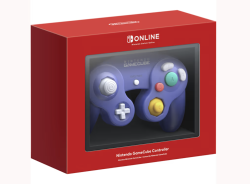
Review cover Nintendo Switch 2 GameCube Controller GBAtemp review
Hardware

Today for review, we’re taking a look at the latest in Nintendo’s line of wireless emulation controllers, the Nintendo Switch 2 GameCube controller!

attachFull510420

Ah, the humble GameCube; to many, one of Nintendo’s finest and most nostalgic of consoles. With its lineup of iconic and wildly fun games, it's a console thats had quite a bit of staying power in both the retro collecting and emulation scenes, and long have fans clammored for remakes, remasters, or official ports of some of their favorite games. And now with a selection of GameCube games being added to Nintendo Switch Online for the Switch 2, Nintendo's finally giving their fans what they asked for in a way. The only problem? The experience just isn't the same on a pro controller or set of JoyCons. Enter Nintendo's solution, a wireless GameCube controller for use exclusively with the new console, much in the vein of their wireless NES and N64 options. Does the controller hold up as a great way to play, or is this piece of nostalgia best left in the past? Let's find out!

attachFull510566

Review image Review image Review image

Starting off with first impressions and I have to admit I’m left wanting in the area of packaging. The controller comes in a flimsy-feeling cardboard box, and isn’t secured at all beyond the molded insert. When taking it out, the front window for the box revealed itself to even just be a slide of plastic that isn’t attached to the cardboard at all. For the controller itself, the only protection it received inside the box is a thin sheet of plastic that doesn’t even wrap all the way around it. Luckily mine came undamaged, and from an area of lowering the carbon footprint of the product, I see why a few of these decisions were made. But for those who like to keep hold of their boxes, or who wanted to keep their controller sealed, you’ll want to invest in a casing to protect the box as soon as possible. 

In terms of the controller itself, this is where I started to be properly impressed. The controller feels sturdy and quality in my hands. The buttons are all perfectly clicky, and the whole thing feels just like the GameCube controllers of days past. From a size perspective, it matches up perfectly with my third party controllers for my traditional GameCube, and it lines up with my WaveBird almost perfectly, but admittedly? It feels odd to be using a wireless controller that doesn’t have the additional hang-off from the WaveBird. It includes all of the buttons that the traditional GameCube controller has, with the addition of the Switch’s sync, capture, home, and GameChat buttons, and a hilariously small, second Z button on the right of the controller, giving it both a ZL and a ZR to bring it in line with modern Nintendo controllers, though the new ZL button is almost too small to be functional. Right where the cord would connect now exists a USB-C port, to be used with the included USB-C to USB-A cable for charging and initial setup. Overall? While the packaging may leave me wanting, the controller itself is a work of nostalgic art that leaves me feeling just as excited as the day I got my first GameCube way back when.

attachFull510568

 Review image Review image Review image

As both advertised, and expected, the primary intended use for this controller is to be used with Nintendo Switch Online’s new library of GameCube games that can be played exclusively on Switch 2, just as the N64, SNES, NES, and Genesis emulators all have their own dedicated controllers. From here, there really isn’t much to say; it just works. All three NSO GameCube games run wonderfully with the GameCube controller without issue, as I would expect them to do so; this is the product that it was built for, after all. It would be bordering on embarrassing if the controller failed here. It just works (save for a few general issues with NSO’s GameCube emulator that we’ll speak on later), and not only that, but it feels right at home to be playing these games again on a brand new, official Nintendo GameCube controller. From a function standpoint, the microscopic ZL button serves as access to your in-game suspension menu that allows you to use save states, reset, or return to game selection. Not only that, but the button remapping options exist for the GameCube controller as well, allowing you to customize the experience to be as comfortable for you as possible, while feeling right at home on an official piece of hardware. I’ll have a more general writeup on NSO’s GameCube selection in a couple of days, but in terms of the controller’s use for its intended audience? It literally just works as expected, and that’s all I need from it.

As nice as it is to have the controller work as intended for the NSO GameCube stock, that really wasn’t my biggest hope for the controller; ideally, my goal is to push it as far as I can into being my replacement for a more traditional pro controller. Despite Nintendo’s coyness in revealing so (likely to not cannibalize their own pro controller and joycon sales), the GameCube controller does indeed work as a standard pro controller with minimal issues; the biggest problems I’ve run into is the lack of a minus button, the ZL button not being functional in some games, and the lack of the analog and c-stick being clickable as extra buttons themselves. Right off the bat, this means it won’t be a great solution for every game, but there’s still plenty of games that it should work just fine for. Right off the bat, I started my testing with Mario Kart World, and found it to work flawlessly, while being significantly more comfortable to hold than a single joycon, which seems to be a best case scenario when using the controller; any situation where one would use a single sideways joycon, the GameCube controller can step in without issue. 

attachFull510575

Review image Review image Review image

One of the more surprising additions to the controller is definitely gyro support, allowing some surprising compatibility in a whole host of games, in a few ways one may not expect; through the gyro support, one can actually use the controller to aim Link’s bow in Breath of the Wild, use it as a stand-in for the cursor in Super Mario Galaxy, via the 3D All-Stars collection, and I was even able to use it for some driving controls in Mario Kart World. Now, none of this is to claim that these are the ideal ways to play these games or utilize these features - but when gyro support wasn’t even on most folks’ mind, it’s incredible to see these bonus features included in something Nintendo wasn’t even wanting to admit would work outside of its designed niche.

To finish my testing on other Switch games, I wanted to put the controller through its paces on some familiar suspects from the GameCube era; the remasters of Paper Mario: The Thousand Year Door and Metroid Prime, 3D All-Star’s port of Super Mario Sunshine, and finally, the franchise that’s kept the GameCube controller alive for the past 17 years, Super Smash Bros. Ultimate. Starting with what worked, in Smash Ultimate? The controller was exactly what I expected, and the game worked flawlessly with it, just as all Smash games since Melee have. The game even recognizes it as a GameCube controller, giving folks a first party wireless option for those who don’t still have their WaveBirds around, or who don’t want to spend the time setting up the GameCube adapter. Super Mario Sunshine on the 3D All-Stars collection was another that worked just as I expected, including support for the GameCube’s adaptive triggers to control the flow of water when spraying with F.L.U.D.D., a feature that notably didn’t work when playing the games with JoyCons. Admittedly the adaptive trigger functions were a lot more finicky on this version than I remember them being on the GameCube original - which may be up to memory, or it may be an imperfection of the port. But either way, the fact that the feature is back is just wonderful.

attachFull510580

Review image Review image Review image

Now we get into what didn’t quite work as expected - specifically with two GameCube darlings turned Switch Remasters, Metroid Prime and Paper Mario: The Thousand Year Door. The issue with both games comes down to two major missing factors - no Minus button, and no rumble support. Now, rumble support is far from a deal-breaker I know, but with how good the rumble is on the controller, it’s a serious bummer to see it missing. As far as what we lose by not having a Minus button? In Paper Mario, we lose the ability to access the Tattle Log, and thus the ability to check major information about the games enemies. In Metroid Prime Remastered, the minus button is connected to the Inventory screen, locking away information on Samus’ various power-ups if you decide to play with the GameCube controller. While neither of these omissions are what I would consider dealbreakers, they’re certainly both reasons to opt for a more traditional pro-controller, or a set of JoyCons.

Review image Review image Review image

Now, as I ended up getting my controller before I got my Switch 2, so I decided to run a few tests to see if it really was “compatible only with Switch 2” as advertised. The first test was to, obviously, try pairing it to my original Switch; as expected, there was a whole lot of nothing there, both when trying to pair wirelessly and when trying to connect it via USB. I also tried to connect it to my PC, which gave me much more interesting results; when trying to pair it via bluetooth sync, the PC would recognize the controller for a split second, but would not be able to connect. When connected via USB, the controller was fully recognized by my PC, but when I tried to get it working on Dolphin, button inputs would not be recognized, despite the controller being recognized and connected. I’m sure that, just like the N64 Switch controller, there will exist supplementary software for this GameCube controller eventually - but for the time being, it truly is compatible with only Switch 2.

Overall, to say I’m impressed with this GameCube controller would be an understatement. It provides a huge boost of nostalgia to the NSO collection, and is a serviceable replacement for a pro controller in a bunch of circumstances, and even has a few unexpected but welcome features! While its limitations are clear, and in some cases disappointing, this is still a controller I can highly recommend for any Switch 2 owners who want a bit of nostalgia, or just a damn good controller to add to their collection… assuming you can find it in stock, of course.

attachFull510589

Verdict

What We Liked ...
  • Beautiful and nostalgic design
  • Sturdy build
  • Surprise gyro support
  • Works with a surprising amount of games
What We Didn't Like ...
  • Flimsier triggers than older models
  • No rumble support on some games
  • Lack of modern buttons hinders support
9
out of 10

Overall

Sleek, sturdy, and almost entirely what I wanted out of this, the Nintendo Switch 2 GameCube controller manages to overcome its own limitations and be a controller worth grabbing.
Welcome to our Community
Wanting to join the rest of our members? Feel free to sign up today.
Sign up
You have a slight typo there I think.
"but when I tried to get it working on Dolphin, button inputs would be recognized, despite the controller being recognized and connected. "
 
  • Like
Reactions: RyRyIV
In theory, one should be able to remap the either Capture or the GameChat button to minus? Both are remappable in the Joy-Con 2 (or whatever they are called) and the GameChat button is a pretty minor loss if remapped to something else IMO.
 
Honestly, just give us the buttons. Not impossible to just do a bumper front L button like the OG Z button and have it look good. I don't think anybody would really mind having minus or L3/R3. There's a wildly impractical menagerie of stupid buttons on the top, even a freaking C button, for cripes' sakes.
I just disabled that button via button mapping so I don't open GameChat unnecessarily. A button for something I'll never use. 😑
 
It's a great controller, but Nintendo are a-holes for putting it behind a paywall. Do they really think scalpers and resellers won't pay for an NSO sub if it means buying up exclusive Nintendo products? Come on.
Well, somebody is being an a-hole. It ain't Nintendo.


"Starting off with first impressions and I have to admit I’m left wanting in the area of packaging. The controller comes in a flimsy-feeling cardboard box, and isn’t secured at all beyond the molded insert."
Seriously? You want Nintendo to waste more of the Earth's resources on packaging that you are likely to throw away? This comes straight from Nintendo and is not sold in stores. How much more waste of plastic and trees do you need... for a game controller???!!!
 
I just disabled that button via button mapping so I don't open GameChat unnecessarily. A button for something I'll never use. 😑
No friends then? Got it!

Hint: Even the self-proclaimed "cool" streamers who laughed at GameChat two months ago are loving it now that they've used it.
 
  • Sad
Reactions: Francie
Well, somebody is being an a-hole. It ain't Nintendo.


"Starting off with first impressions and I have to admit I’m left wanting in the area of packaging. The controller comes in a flimsy-feeling cardboard box, and isn’t secured at all beyond the molded insert."
Seriously? You want Nintendo to waste more of the Earth's resources on packaging that you are likely to throw away? This comes straight from Nintendo and is not sold in stores. How much more waste of plastic and trees do you need... for a game controller???!!!
It's sold for a premium price and sure as hell it looks really nice as a display item. Say, you don't like the way Nintendo did it? That's too bad, next.
 
I've never understood why people are so nostalgic over this controller (the original GCN controller) specifically, when...I've never been fussed over it myself.
Like, I guess it's a fine enough controller for what it is, but I've never liked the stiff d-pad, or the c-stick (almost as useless as the New 3DS's nub thing). Plus, when it comes to the X and Y buttons, I can never muscle-memory remember which one's which.

I'd much rather have the awesome Wii U Pro controller brought back; that thing was amazingly comfortable and brilliant in terms of battery life. I really should've bought a couple of those whilst the console was still on store shelves...oh well.
 
From my experience, it feels quite different than old GCCs from back in the day. Rubber dome buttons on front are way snappier and tactile, especially the dpad, and the z button has next to no travel. Also, I wish it would work outside of switch 2, as dealing with a wired controller, docks and adapters just to use dolphin on android with an authentic controller is a pain. The NSO app has just one game I'd want to play at the moment, and I haven't seen anyone talk about emulation quality.
 
From my experience, it feels quite different than old GCCs from back in the day. Rubber dome buttons on front are way snappier and tactile, especially the dpad, and the z button has next to no travel. Also, I wish it would work outside of switch 2, as dealing with a wired controller, docks and adapters just to use dolphin on android with an authentic controller is a pain. The NSO app has just one game I'd want to play at the moment, and I haven't seen anyone talk about emulation quality.
 
Yikes, no Rumble!?
What a bummer.

If I'm not mistaken, the OG GCN Controller pulls 12V from a Nintendo GameCube and a Nintendo Wii, and my guess is that Nintendo removed Rumble to "maximise" Battery Life, after all, it's the same case as with the OG Wavebird.

I could understand it from an N64, SNES, and NES lacking rumble, as those games were designed without it (up till N64)... but having played with a GCN Controller since the 2000s, it's kinda hard to pass absolute lack of rumble... ffs, there are better and more efficient motors nowadays than what we had in the 2000s, why not add Joy-Con motors in both the handles and the huge round part on the back?

Now I'm curious... if anyone takes apart the new GCN controller, what's the huge round part on the back being used for? Will people still find the M+ M- soldering points on the PCB? 🤔
 
Seems like a huge oversight to include ZL, home button, gyro etc and leave out the minus button

Like, whose idea was that...
Someone also said that this controller is also missing L3 and R3. Essentially third parties are now making better GameCube styled controllers than Nintendo 🤦🏾‍♂️. The fucking company is a damn failure this generation. Looks like I'll be sticking with my NYXI Warrior and Wizard controllers for a long while.
 
  • Like
Reactions: Chrono_Nightmare
I bought 2 with the plan to scalp them, but after giving one a go I've decided to keep them.
They're great. The Gamecube has some awesome games and I'm looking forward to support for Dolphin in the future.

I found the packaging was fine and pairing the controller was as easy as plugging it into the top USB C port (my Switch is in the dock). I don't like using the joycons other than in handheld mode, so these will go nicely with the Pro controller and Pro controller 2 making it so I should never need to use the joycons at all.
 
  • Angry
Reactions: Chrono_Nightmare
Yikes, no Rumble!?
What a bummer.

If I'm not mistaken, the OG GCN Controller pulls 12V from a Nintendo GameCube and a Nintendo Wii, and my guess is that Nintendo removed Rumble to "maximise" Battery Life, after all, it's the same case as with the OG Wavebird.

I could understand it from an N64, SNES, and NES lacking rumble, as those games were designed without it (up till N64)... but having played with a GCN Controller since the 2000s, it's kinda hard to pass absolute lack of rumble... ffs, there are better and more efficient motors nowadays than what we had in the 2000s, why not add Joy-Con motors in both the handles and the huge round part on the back?

Now I'm curious... if anyone takes apart the new GCN controller, what's the huge round part on the back being used for? Will people still find the M+ M- soldering points on the PCB? 🤔
The controller comes built-in with HD Rumble.
 
Someone also said that this controller is also missing L3 and R3. Essentially third parties are now making better GameCube styled controllers than Nintendo 🤦🏾‍♂️. The fucking company is a damn failure this generation. Looks like I'll be sticking with my NYXI Warrior and Wizard controllers for a long while.
Yeah, it's a shame Nintendo didn't make them clickable and the ZL being a tiny button is ridiculous.
 
I've never understood why people are so nostalgic over this controller (the original GCN controller) specifically, when...I've never been fussed over it myself.
Like, I guess it's a fine enough controller for what it is, but I've never liked the stiff d-pad, or the c-stick (almost as useless as the New 3DS's nub thing). Plus, when it comes to the X and Y buttons, I can never muscle-memory remember which one's which.

I'd much rather have the awesome Wii U Pro controller brought back; that thing was amazingly comfortable and brilliant in terms of battery life. I really should've bought a couple of those whilst the console was still on store shelves...oh well.
The best thing about the NWU Pro Controller was the battery it seemed like it lasted for months, although if you buy one now you may end up needing to buy a new battery as they typically die after 7 years. It's pretty easy to swap the internal batteries so no issue there.
 
I've never understood why people are so nostalgic over this controller (the original GCN controller) specifically, when...I've never been fussed over it myself.
Like, I guess it's a fine enough controller for what it is, but I've never liked the stiff d-pad, or the c-stick (almost as useless as the New 3DS's nub thing). Plus, when it comes to the X and Y buttons, I can never muscle-memory remember which one's which.

I'd much rather have the awesome Wii U Pro controller brought back; that thing was amazingly comfortable and brilliant in terms of battery life. I really should've bought a couple of those whilst the console was still on store shelves...oh well.
I guess I'm your exact opposite. I LOVE GameCube style controllers. They're the majority of the controllers in my house. If you plan to play Wii U, Switch or PC games here or will be with one of my many GC controllers. I LOVE the arrangement of the face buttons. I never have to look down to know which button is which and it's a lovely thing. It really is a shame that Nintendo failed to take the GameCube controller to the next level.
 
I guess I'm your exact opposite. I LOVE GameCube style controllers. They're the majority of the controllers in my house. If you plan to play Wii U, Switch or PC games here or will be with one of my many GC controllers. I LOVE the arrangement of the face buttons. I never have to look down to know which button is which and it's a lovely thing. It really is a shame that Nintendo failed to take the GameCube controller to the next level.
Nintendo never gave up on the GCN layout, the NWU PC, NS1 PC, and NS2 PC all use it, but in a more traditional sense.

I just wish they kept the analog triggers because using digital triggers feels kind of stupid.
 
Nintendo never gave up on the GCN layout, the NWU PC, NS1 PC, and NS2 PC all use it, but in a more traditional sense.

I just wish they kept the analog triggers because using digital triggers feels kind of stupid.
I completely agree about analog triggers. What the fuck were they thinking?! Racing games are a pain in the ass without analog triggers. Hell I had to use the right stock for acceleration in Grid because of Nintendo's stupidity. At least the pedals on the Mario Kart racing wheel are analog.
 
I completely agree about analog triggers. What the fuck were they thinking?! Racing games are a pain in the ass without analog triggers. Hell I had to use the right stock for acceleration in Grid because of Nintendo's stupidity. At least the pedals on the Mario Kart racing wheel are analog.
Gran Turismo on PS2 used the analog sticks to control the acceleration, but I never liked that as it didn't feel natural like pressing the analog triggers.

By the way, GT4 on PS3 does use the DS3 analog triggers. :)
 
  • Like
Reactions: LightyKD
I'd rather just play GameCube games on a real GameCube. And I do. :P

But I might end up buying a Sw2, so I might end up buying one of these too. It'd be nice if some third party company figured out how to make a dongle so this controller could work on a real Cube.

Also I didn't understand this:
"It feels odd to be using a wireless controller that doesn’t have the additional hang-off from the WaveBird."

Unless you meant the bulk of the battery compartment on the Wavebird. But there's nothing 'hanging off' of a Wavebird. That would be a Wii Pro Controller.
 
I'd rather just play GameCube games on a real GameCube. And I do. :P

But I might end up buying a Sw2, so I might end up buying one of these too. It'd be nice if some third party company figured out how to make a dongle so this controller could work on a real Cube.

Also I didn't understand this:
"It feels odd to be using a wireless controller that doesn’t have the additional hang-off from the WaveBird."

Unless you meant the bulk of the battery compartment on the Wavebird. But there's nothing 'hanging off' of a Wavebird. That would be a Wii Pro Controller.
Given I can play GCN games practically on any device these days, I wouldn't bother with a GCN/Wii for it and heck, the games would be loaded via a USB or SD than a disc in my case.

The Backbone One PS Edition controller really feels superb, it's a hybrid of PS/Nintendo.

51Q-Zjd-W8L.jpg


Also, the graphics would look better on a phone/tablet screen, but the expensive GCN component cable still offers the best picture quality, I'd guess.
 
Given I can play GCN games practically on any device these days, I wouldn't bother with a GCN/Wii for it and heck, the games would be loaded via a USB or SD than a disc in my case.

The Backbone One PS Edition controller really feels superb, it's a hybrid of PS/Nintendo.

51Q-Zjd-W8L.jpg


Also, the graphics would look better on a phone/tablet screen, but the expensive GCN component cable still offers the best picture quality, I'd guess.


GameCube's my favorite N console, so I went a little stupid on it. Orange DOL-001 purchased in Japan w/ 2 matching orange controllers and matching orange Gameboy Player, 2 silver Wavebirds purchased right at the end of the GC's lifespan, a GC Loader for the games replaces the optic drive, and there's an SD2SP in the bottom with the GameboyInterface iso's on it. And finally, the Retro-Bit Prism HDMI adapter. So my "real hardware" Gamecube experience is pretty user friendly, and looks amazing.

Can't take it anywhere tho.
 
  • Like
Reactions: Marc_LFD
Good to know that it's a big upgrade over the previous NSO GameCube controller, but I'm of course sticking to OG controller mod kits. I absolutely don't desire a Switch 1 or 2, nor do I know anyone who I'd be able to buy this controller through (the controller itself is ultra pricey), so I'm not getting it. I'd love to, though, if connecting it to anything but a Switch 2 becomes convenient anytime soon... (Edit: Apparently you can pair it already?)

That being said, I do wish mod kits the likes of PhobGCC and 8BitDo's (which has a major flaw) allowed for installing more missing inputs, because I really can't find myself using the controller outside of playing GameCube games.

Also, can you elaborate on rumble support? Does "no rumble support on some games" mean that a motor is included, but some NSO games that originally had rumble don't use it? Or does it mean that some games support rumble, but there's no motor to perform the action?
 
  • Like
Reactions: bonkmaykr
Also, can you elaborate on rumble support? Does "no rumble support on some games" mean that a motor is included, but some NSO games that originally had rumble don't use it? Or does it mean that some games support rumble, but there's no motor to perform the action?

It has rumble support
NSO Gamecube games use it

Some Switch games use it, but some don't recognise that it has rumble support when you use the Gamecube controller instead of a pro controller. Some do though, so it's hit & miss.
 
I already had my mind made that I would pick this up eventually when I feel financially capable of and also in need of a modern wireless GC controller. On the other hand, this did prompt me to check out 3D All Stars prices and damn like I thought; its been a couple of years and 3D All Stars has finally become a real price gouger if you didn't grab it during its "limited" run. GameStop has it going for $120 USD which is nuts.
 
  • Like
Reactions: Marc_LFD and x65943
I'm guessing the new controller doesn't have digital buttons on the triggers. It's not at all a requirement, as I've played GC games using a Blue Retro just fine, but the triggers certainly feel less precise with only analog control. Blue Retro lets you adjust the threshold where it counts as a button press, which helps.
These could make an excellent controller option for a Blue Retro actually, once support is added. There are some compatibility issues with Switch controllers on Blue Retro currently which limits you to a single Switch controller connected at a time (otherwise it introduces severe latency) so they would have to fix that.
 
I'm guessing the new controller doesn't have digital buttons on the triggers. It's not at all a requirement, as I've played GC games using a Blue Retro just fine, but the triggers certainly feel less precise with only analog control. Blue Retro lets you adjust the threshold where it counts as a button press, which helps.
These could make an excellent controller option for a Blue Retro actually, once support is added. There are some compatibility issues with Switch controllers on Blue Retro currently which limits you to a single Switch controller connected at a time (otherwise it introduces severe latency) so they would have to fix that.
These controllers do. It's analogue with a bump at the bottom, just like the original. Works great with Sunshine too.
 
  • Like
Reactions: Marc_LFD
The REAL issue that nobody seems to bring up is the fact that you can’t remap the buttons of the controller for use with other games. MOST of the issues could EASILY be solved by making the capture button the minus and the chat button a stick click. It’s not perfect for EVERY game but it makes MOST games more than playable.
 
The REAL issue that nobody seems to bring up is the fact that you can’t remap the buttons of the controller for use with other games. MOST of the issues could EASILY be solved by making the capture button the minus and the chat button a stick click. It’s not perfect for EVERY game but it makes MOST games more than playable.
 
Yes, think they want to be exactly like the GameCube controller without the modern buttons...

Was planning to get it, but ofcourse no PC support. I'll pass.
Yeah, what a ridiculous choice. Would've been just as easy to add a full Z button on the left side, that's what companies like Hori did with their GC layout classic controllers for Smash.

That ZL button looks unusable, so I don't know why they didn't just do a proper GC controller with a USB cable since we have a practically useless button and we're missing a button. Some games (like the Musou games) use the minus button for an important function.
 
So it has Rumble, yet some games that support it in a pro controller, don't with this controller? Why?
 
So it has Rumble, yet some games that support it in a pro controller, don't with this controller? Why?
 
So it has Rumble, yet some games that support it in a pro controller, don't with this controller? Why?
Nintendo hasn't made this controller compatible/recognized with all games that do so. It's a mixed bag.

The controller is great, but could have been even better.
 
I'd much rather have the awesome Wii U Pro controller brought back; that thing was amazingly comfortable and brilliant in terms of battery life. I really should've bought a couple of those whilst the console was still on store shelves...oh well.
These are STILL my GOATed pads.

As for the NGC pad, it has always been terrible, just like the N64 one, but nothing will outrank the Wiimote as the worst controller of all time for regular gaming.
Regarding NGC gaming, just use Dolphin on a PC for a vastly superior experience.
 
  • Love
Reactions: AkiraKurusu
I'm using the Wii u controller adapter and Wii white GameCube controller with the extra long leads (got 2) and working a treat. Can't wait for Double Dash.
 
So Nintendo actually designed a worse shoulder button than the GameCube Z button. Incredible that they have inflicted the GameCube ZL button upon us.

And all those buttons at the top! Why not use the WaveBird design and put them in a neat row along the bottom?

I read that the triggers feel different to the original controller too.

This is poor imo.
 
  • Like
Reactions: Marc_LFD
I cannot believe this controller doesn't have rumble. That's super baffling. I'd have gotten this despite not planning to get a Switch 2. Completely lost interest now. Rather continue using my og controller. Hilarious how the ZL button is just a sorry excuse of a button rather than being another Z button but on the left.
 
I cannot believe this controller doesn't have rumble. That's super baffling. I'd have gotten this despite not planning to get a Switch 2. Completely lost interest now. Rather continue using my og controller. Hilarious how the ZL button is just a sorry excuse of a button rather than being another Z button but on the left.
Dude, what are you talking about? It does have rumble.

Enjoy Nintendo GameCube – Nintendo Classics games the way they're meant to be played – using a full-size Nintendo GameCube-style wireless controller with rumble support!

https://store.nintendo.co.uk/en/nin...ntroller-nintendo-classics-000000000010015326
 
I misunderstood the review. "No rumble support on some games". So I guess I'm surprised that whether you get rumble depends on which game you play. Never heard of that being a thing myself. Either your controller has rumble or it doesn't.

I guess we'll need to wait for better PC support via 3rd party software to see how the rumble works there.
 
  • Like
Reactions: Marc_LFD
Not true. It works with some NS2 games, and it could work with more, but it needs Nintendo to improve compatibility.

The controller has rumble... And a tiny ZL button.

Does it work with Street Fighter and Mario Kart World?

Wonder if it will work on the new Donkey Kong?
 
Bought one. Works great on my GameCube with the laserbear board. Price is iffy, but it is a first party controller and sure as hell feels like one.
 
Bought one. Works great on my GameCube with the laserbear board. Price is iffy, but it is a first party controller and sure as hell feels like one.

The tiny ZL button is really stupid though, should've been a shoulder button.
 
Agreed, but a non-issue for me. They could have modernized it for sure.

Given it can be used with any game it'll eventually be an issue. Still, an amazing controller.

I'm surprised it took Nintendo so long to make a wireless GCN controller with rumble.
 
  • Like
Reactions: Kioku
Given I can play GCN games practically on any device these days, I wouldn't bother with a GCN/Wii for it and heck, the games would be loaded via a USB or SD than a disc in my case.

The Backbone One PS Edition controller really feels superb, it's a hybrid of PS/Nintendo.

51Q-Zjd-W8L.jpg


Also, the graphics would look better on a phone/tablet screen, but the expensive GCN component cable still offers the best picture quality, I'd guess.
If I have to take my phone out of it's protective bumper case just to use your product, then your product is garbage.
 
If I have to take my phone out of it's protective bumper case just to use your product, then your product is garbage.

If it's a bulky protective case I can't argue against it. After all, it's via USB-C than BT so there's that, too.
 
I bought this controller today and think it is a bummer they did not make the analogue sticks clickable nor support the rumble feature for some games. I want that rumble feature, it's a big deal to me. Aside from that a pretty nice controller.
 
Welcome to our Community
Wanting to join the rest of our members? Feel free to sign up today.
Sign up
Review cover

Reviews

  1. An absolute powerhouse from BOSGAME, we check out their flagship M5 Mini PC!

  2. The Infinix GT 50 Pro is a phone built for mobile gamers, but is there more to it than RGB lights and performance metrics?

  3. Adding more keys to their hit keyboard, we check out Ultimate Gadget Labs’ latest creation!

  4. A £500 Mini PC from BOSGAME, we take a look at the P6!

  5. reMarkable, the company known for making digital note-taking devices, launched its latest product, the more affordably priced Paper Pure. Does it finally herald a reMarkable for the masses?

Site & Scene News