Tutorial  Updated

How to flash Flash2Advance cart via DS with GBA slot.

EDIT - This post was written in 2016. It is now 2026, I have posted an updated guide here , this one will still work, but the new guide gives some newer version tools and explains more on flashing GameBoy and GameBoy Color games.

=-=-=-=-=-=-=-=-=-=-=-=

Hello everyone,

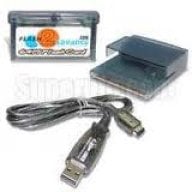
Ive had this Flash2Advance cart for what seems like 15 years now (think I got it around 2001). Surprisingly battery is still good, but I plan to change that out soon anyways, waiting for a few tools to come in the mail (I may do a guide on that too).

Anyhow, this cart requires use of Printer port and only supported up to WinXP. But even if you got a virtual machine going with XP you still need to have a DB25 Parallet port (Printer port) on your PC and as far as I know they stopped manufacturing computers with those over 10 years ago. So I had this Flash2Advance with 4 games on it for over a decade with no way to change the games. I figured it was time to fix that and sat down to really try and figure out how. It actually ended up being fairly easy. Here is my guide.

You need, a DS with GBA slot (Original DS or DS Lite). DSi wont work since it doesnt have GBA slot. You also need a DS flash cart that can run .nds files.

Full guide here -

So that you guys dont have to type out the kit links they are here:
http://tinyurl.com/hk5dd7s
That tinyurl expands to this link for Mega -
(https://mega.nz/#!PhsgnKQC!wu33542xUVPzghNneUIclKyIf7fE3lM9H3QhQt5qdys)

or use mirror link - http://www.mediafire.com/file/leps5cpv0ukck4y/F2A_tools.zip

PS - It says guide is by Duxa. Thats my name :)
 
Last edited by Chrushev,
yeah seriously have you? If so, KUDOS! I never had a F2A, nor really worked on any F2A support. The last update I did to my program was to get the official Nintendo Carts flashing (though erasing wasn't working so hot; they are slowwww carts).

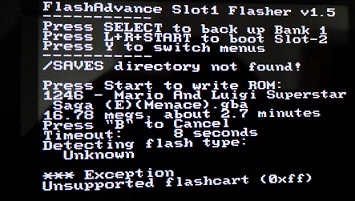
Though looking at your screenshot it looks like it still detects it as a FA256.. but you say it writes okay to a F2A? Weirddddd
 
Last edited by Smiths,
  • Like
Reactions: Deleted User
Now I want a Flash2Advance :P
Is this similar to the Xboo method of flashing? Because one can flash their own cart that way :P
 
FAS1 won't detect my F2A. I just get 'Unknown' for flash type and then it says 'Unsupported flashcart (0xff)' and hangs. I wonder if mine is damaged or something... It's at least there since I can backup the sav file from it :/
 
  • Like
Reactions: DragonStefan2
FAS1 won't detect my F2A. I just get 'Unknown' for flash type and then it says 'Unsupported flashcart (0xff)' and hangs. I wonder if mine is damaged or something... It's at least there since I can backup the sav file from it :/

Does it look like the one in the picture? Same sticker and everything? What are you using for Slot 1? and is that on latest build of Wood or whatever?
 
Does it look like the one in the picture? Same sticker and everything? What are you using for Slot 1? and is that on latest build of Wood or whatever?

Yeah, it's the same. My slot1 cart is also the same as the one pictured, actually. I'm just running the latest stock menu on it from the r4i-sdhc website. I figured my F2A wasn't functioning properly since I looked into this pretty extensively when I got it and tinkered with pretty much every relevant slot2 flashing tool I could get my hands on with no avail. (I'm the one who posted that thread on /r/gameboy about it) :(
 
Last edited by tan-tan,
Yeah I was shocked it detected your F2A as a FA256... they are supposed to have different hardware IDs and there's a different flashing method I believe. The uCON64 tool has the C files for how to flash a F2A but without a unit in my possession 10 years ago when I had the time and interest in this I never delved.
 
What I remember about uCON64's F2A support was (1) it didn't seem to support saves properly (I always got blank save files) and (2) it had issues with timeouts/timing which IIRC required me to throw in some sleeps/loops to compensate. But it's been a very long time since I messed with that. Lucky for me, I lucked out and got a motherboard with a LPT1 port head so it was trivial to buy and use for my F2A. I'd suggest for others here to look into their own motherboard. Maybe they got lucky too. :)

PS - I'm always one to plug my Unofficial Pogoshell fork. Especially useful if you've got a PogoBridge, some Gameboy Color games, and want to pack games in the empty space.
 
  • Like
Reactions: Smiths
Yeah, it's the same. My slot1 cart is also the same as the one pictured, actually. I'm just running the latest stock menu on it from the r4i-sdhc website. I figured my F2A wasn't functioning properly since I looked into this pretty extensively when I got it and tinkered with pretty much every relevant slot2 flashing tool I could get my hands on with no avail. (I'm the one who posted that thread on /r/gameboy about it) :(

Maybe there were different revisions?
 
It doesn't work with my F2A Ultra 256M :( saying Unsupported flashcart (0xff), but my F2A works perfectly and it has four games inside, is there anything I can do to solve this ?
 
It doesn't work with my F2A Ultra 256M :( saying Unsupported flashcart (0xff), but my F2A works perfectly and it has four games inside, is there anything I can do to solve this ?

Probably because its the "Ultra" version? Nothing you can do unless someone re-writes or edits existing code for FAS1, all code is on github.

Someone can probably remove the check completely for the cart and just have it attempt to write to the flash... a little dangerous, but could work.
 
Last edited by Chrushev,
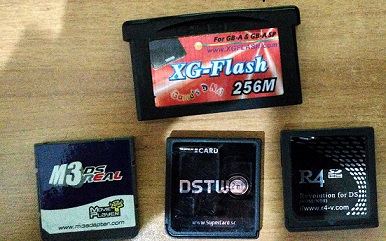
After months searching for something similar i found this guide for trying to falsh an xg-flash 256M.
I have followed this guide using .gba files and -bin files created with pogoshell and whit 3 different nds cards.
Here an image of my cards
IMG_20170114_223012_HDR.jpg


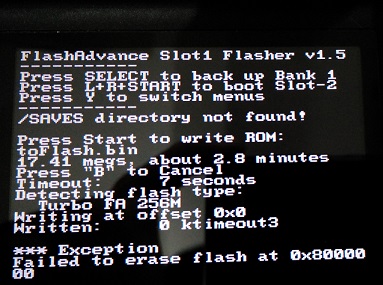
i had different errors. with m3 and dstwo:
IMG_20170114_222820.jpg

and with r4:
IMG_20170114_222913.jpg


So what can i do? i imagine that m3 and sdtwo have problems reading the slot2 card, and maybe r4 is working but can't erase the memory of the xg-flash.
Please help me, i have no idea, or i don't know if the xg-flash is not supported.
Thanks a lot, and sorry for my english :)
 

Site & Scene News

Popular threads in this forum