
For adding custom song you need
thememii
https://wiibrew.org/wiki/ThemeMii
BrawlCrate
https://gbatemp.net/download/brawlcrate-v0-39h1.38026/
AudioLoopingConverter
https://gbatemp.net/download/looping-audio-converter-version-3-0.38027/
Dolphin for testing
https://fr.dolphin-emu.org/download/?ref=btn
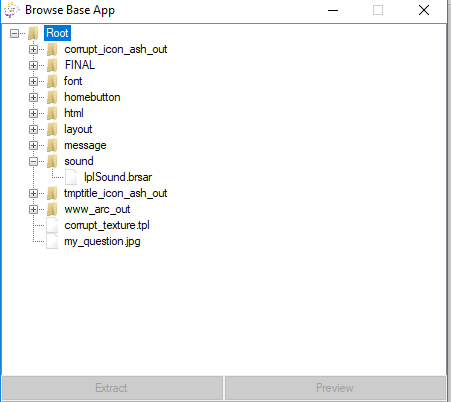
ectract iplsound.bsar with thememii
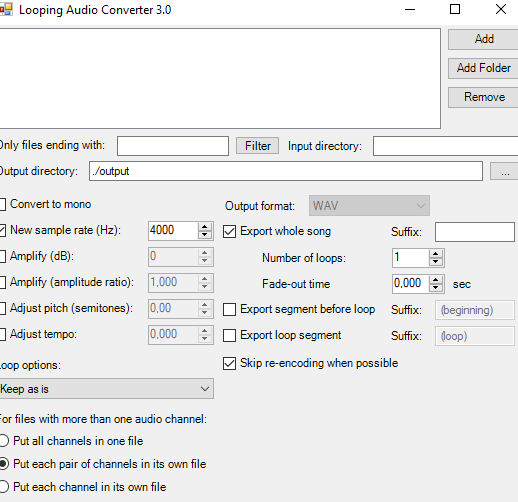
Extract and open AudioLoopConverter.exe
Click Add > audio file you want to use on your wii menu
Click New Sample Rate (Hz) and change this
(As far as I know the Wii does not like when the replacement sound is bigger than 1MB, so try to keep the length short at about 30 seconds and change the sample rate accordingly)
Change Output format to WAV
Click Start. It will save the output file in a folder called output (located in the same folder AudioLoopConverter is in)
Extract and Open BrawlCrate.exe
Go to File > Open... and browse and select IplSound.brsar extracted with theme mii
In BrawlCrate, go to WIPL > BGM
Right click on the MENU file, and click on Delete
Right click the BGM folder click on New > Sound > New
Right NewSound, click on Rename and rename it to MENU
In the right view, scroll down to RSAR Sound, go to Soundfile and select [0] GROUP/STATIC
Right click MENU and click View File
Right click [0] Audio and click Replace
Pick the .wav file that AudioLoopConverter made in the output folder
Tick the box Enable if you want the sound to loop
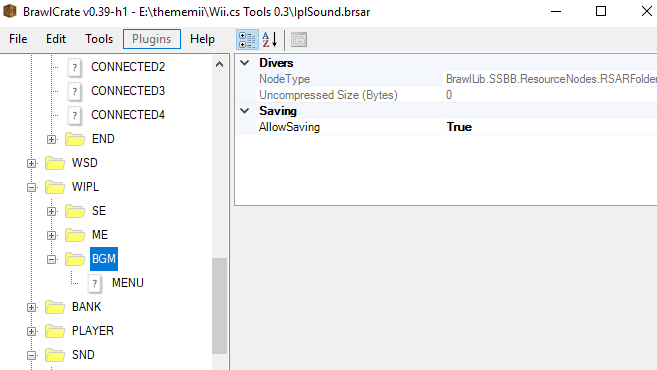
Just in case it doesn't register immediately, click Done, right click MENU and click on View File. The new sound should be there. Click on Done.
(Optional, but recommended if you want to get rid of the start sound that will play over your new sound if it's still there) Go to WIPL > SE > WII and delete the WII folder.
Go to File > Save
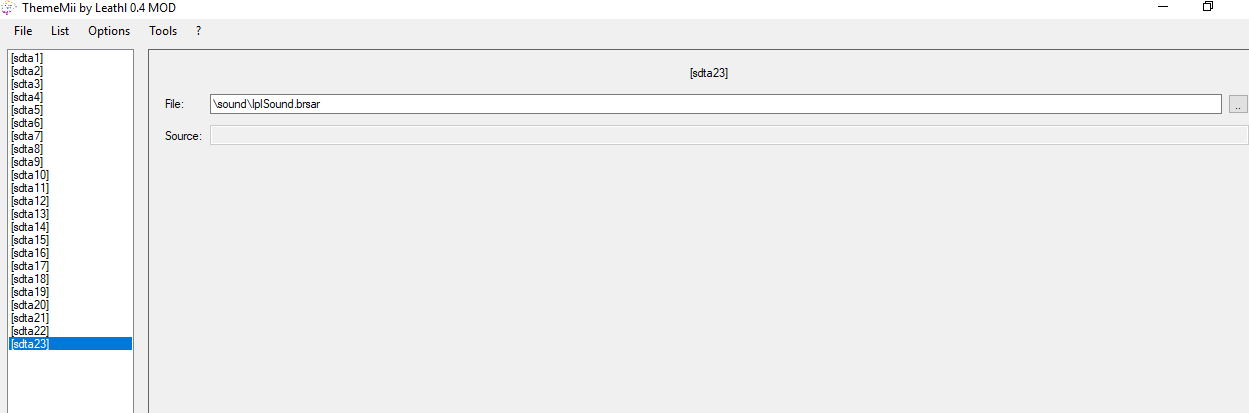
Back to thememii add new static data,select sound/iplsound.brsar and in file path select your IplSound.brsar modified with brawlcrate.
now you can install new wii menu with new audio.
source reddit;
||THIS FOLLOWING SECTION REGARDING DOLPHIN IS OPTIONAL BUT RECOMMENDED FOR TESTING||
Open Dolphin Emulator
Go to Tools > Perform Online System Update and select your region. If a prompt asks you to continue, choose Yes. It will now download the Wii Menu.
After it's done installing, browse dolphin configuration/ paths see the wii nand root. go to thememii
options /change nand backup path. select the wii nand root folder..
After go to tools in thememii select install theme to nand backup.
Go back to Dolphin and go to Tools > Load Wii System menu 4.3(region letter)
If everything went correctly, you should now be able to get past the health warning screen and hear your custom sound!!
||||
thememii
https://wiibrew.org/wiki/ThemeMii
BrawlCrate
https://gbatemp.net/download/brawlcrate-v0-39h1.38026/
AudioLoopingConverter
https://gbatemp.net/download/looping-audio-converter-version-3-0.38027/
Dolphin for testing
https://fr.dolphin-emu.org/download/?ref=btn
ectract iplsound.bsar with thememii
Extract and open AudioLoopConverter.exe
Click Add > audio file you want to use on your wii menu
Click New Sample Rate (Hz) and change this
(As far as I know the Wii does not like when the replacement sound is bigger than 1MB, so try to keep the length short at about 30 seconds and change the sample rate accordingly)
Change Output format to WAV
Click Start. It will save the output file in a folder called output (located in the same folder AudioLoopConverter is in)
Extract and Open BrawlCrate.exe
Go to File > Open... and browse and select IplSound.brsar extracted with theme mii
In BrawlCrate, go to WIPL > BGM
Right click on the MENU file, and click on Delete
Right click the BGM folder click on New > Sound > New
Right NewSound, click on Rename and rename it to MENU
In the right view, scroll down to RSAR Sound, go to Soundfile and select [0] GROUP/STATIC
Right click MENU and click View File
Right click [0] Audio and click Replace
Pick the .wav file that AudioLoopConverter made in the output folder
Tick the box Enable if you want the sound to loop
Just in case it doesn't register immediately, click Done, right click MENU and click on View File. The new sound should be there. Click on Done.
(Optional, but recommended if you want to get rid of the start sound that will play over your new sound if it's still there) Go to WIPL > SE > WII and delete the WII folder.
Go to File > Save
Back to thememii add new static data,select sound/iplsound.brsar and in file path select your IplSound.brsar modified with brawlcrate.
now you can install new wii menu with new audio.
source reddit;
||THIS FOLLOWING SECTION REGARDING DOLPHIN IS OPTIONAL BUT RECOMMENDED FOR TESTING||
Open Dolphin Emulator
Go to Tools > Perform Online System Update and select your region. If a prompt asks you to continue, choose Yes. It will now download the Wii Menu.
After it's done installing, browse dolphin configuration/ paths see the wii nand root. go to thememii
options /change nand backup path. select the wii nand root folder..
After go to tools in thememii select install theme to nand backup.
Go back to Dolphin and go to Tools > Load Wii System menu 4.3(region letter)
If everything went correctly, you should now be able to get past the health warning screen and hear your custom sound!!
||||
Last edited by pokemonster,