

Been creating my own theme as a little project, and I edited the 20th Anniversary PlayStation theme to contain my own background and icons for personal use. I wanted to change the little controller symbols that fly around the screen to a custom object, but noticed that the files used for "shape.mdx" (what I can assume are the object files for each shape,) are in this format that I have not found anything about online. It isn't the Warcraft III files, I already checked.
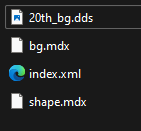
Pictured below is the "index.xml" file that is read by the PS4 to spawn in all of the actors for the theme.

I'm pretty sure the bg.mdx file is just a flat plane which uses the 20th_bg.dds file as a simple texture.
The shape.mdx file seems to be all of the shapes that float around the screen, maybe the animations for them, and likely just a value for the solid color that they have in the menus.
Does anyone have any information about these mysterious .mdx files and how we could possibly turn them into some kind of readable 3D file? It seems they were a .fbx file before conversion.
The only other place I've seen this discussion been made is an old vg-resource forum that got absolutely 0 traction. Hopefully this doesn't suffer the same fate.
Pictured below is the "index.xml" file that is read by the PS4 to spawn in all of the actors for the theme.
I'm pretty sure the bg.mdx file is just a flat plane which uses the 20th_bg.dds file as a simple texture.
The shape.mdx file seems to be all of the shapes that float around the screen, maybe the animations for them, and likely just a value for the solid color that they have in the menus.
Does anyone have any information about these mysterious .mdx files and how we could possibly turn them into some kind of readable 3D file? It seems they were a .fbx file before conversion.
The only other place I've seen this discussion been made is an old vg-resource forum that got absolutely 0 traction. Hopefully this doesn't suffer the same fate.