Editing Pokemon in Rumble Blast with Citra and Squalr

This guide will show you how to edit Pokémon in Pokémon Rumble Blast (Super Pokémon Rumble) using Citra and a memory editor. My memory editor of choice is Squalr and this is what I will be using for this guide, however if you have another one that you prefer the process will be pretty much the same. You can even use CitraMMJ on Android as it has memory search and edit functionality.

If you are already familiar with memory editing you can probably skip over most of this guide. Simply use the offsets from the current HP in combination with lists attached to edit Pokémon.
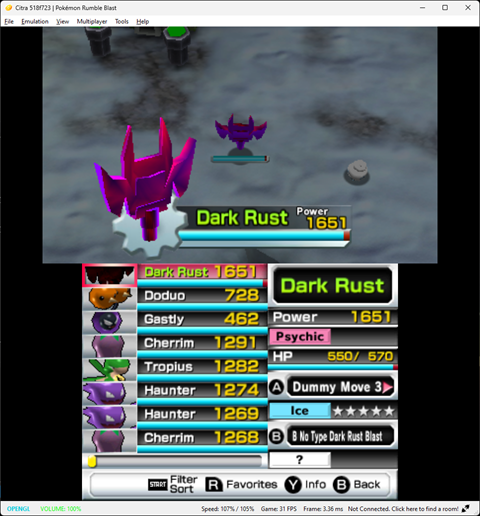
DarkRust.png


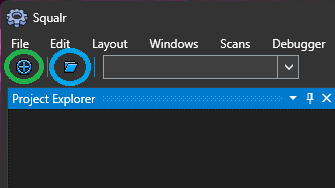
Lets get started! First open up Citra and load up Pokémon Rumble Blast, then open up Squalr. First attach to Citra by clicking the button circled with green in the screenshot below. Select "citra-qt" from the list of processes. Next lets create a new project by clicking the button circled in blue below.
first.png


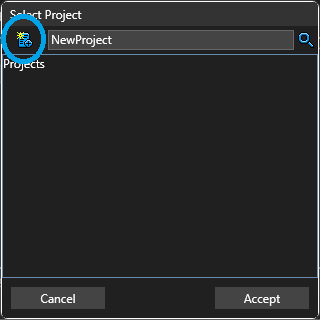
Click the new project button circled in blue below. Give your project a name and click accept.
second.png


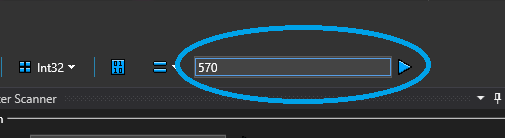
Now we are ready to start editing. To find data for a particular Pokémon in memory we want to start by choosing a value we can see and manipulate in game, in the case of this game we quite obviously should choose the Pokémon's current HP as we can easily see it, and easily change it by taking damage. So switch out the Pokémon you wish to edit then start a search in Sqaulr for it's current HP value. Type it's current HP into the box circled in blue below and click the play button next to it. (You can keep the default scan settings). This will likely find a few hundred values.To narrow the list down go and take some damage, then type the new HP value into the circled box and click the play button. This should narrow the list down to 1 or 2 values (If there are more simply repeat this step until there
are only 1 or 2, take damage then search for new value). If you only have 1 value then this is the value you want. If you have 2 then 1 of them will be the HP value of the Pokémon currently selected on the switch menu. Move up and down the switch menu and you will notice one of the values changes to match the current HP of the Pokémon selected on the menu, you want the value that does NOT change as you navigate the menu. When you have identified the value that represents the HP of the active Pokémon double click it to add it to your project.
third.png


Now it's time for the fun part!

Select our newly found address in the project explorer in Squalr, then we need to edit the address to point to the value we wish to change. To get to the desired locations we will need to subtract from this value, the amount depends on what you wish to edit. The offsets are as follows:

Trait: Subtract 0x18
Moves: Subtract 0x20
Species: Subtract 0x24

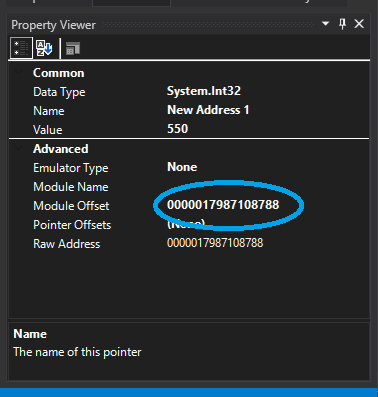
Please note that the address and these values are in hexadecimal, the math is easy but if you get stuck use a hexadecimal calculator for help. With the address selected in the project explorer turn your attention to the property viewer. Go to the module offset, circled in blue below:
fourth.png


Now edit this value to point the property you wish to edit. For example in my screenshot the address is: 0000017987108788 so if I wanted to edit the species I would change this value to: 0000017987108764 (0x0000017987108788 - 0x24 = 0x0000017987108764). When you click outside the box you will notice the value change in the property explorer.

To edit the actual value being pointed to simply double click it in the project explorer, and the value editor will be shown. All values provided in the lists below are in hexadecimal so we must right click the value editor's textbox and select hexadecimal. For species and trait simply paste the desired value into the box and click accept (You will need to switch out a different Pokémon and switch back for changes to take effect). For moves you must set both moves at the same time, again set the value editor input to hexadecimal. First paste in the B move then the A move. For example if I wanted the B move to be "B No Type Dark Rust Blast (02d1)" and the A move to be "Z Iron Tail (02a5)", I would enter 02d102a5 into the value editor and click accept.

You don't have to use Squalr, the process is exactly the same regardless of how you search and edit memory. The basic steps are simply:

1: Identify the current HP address of the pokemon you wish to edit
2: Subtract the desired offset from this address depending on what you wish to edit
3: Paste in the value(s) from one of the attached lists

Please note there may be a couple of typos in the lists, and the names of some of the forms are definitely wrong. Also I haven't tried out all the unused moves and Pokemon to find out what they do, I haven't played this game (or much Pokemon at all in recent years). Really this was a project for my son but seeing as I couldn't really find any info on how to do this for this game I thought I would make a guide. With the species list you will notice some values after Dark Rust, for some their names were in Japanese and they were just an un-textured model so I had no idea what to call them, some of them were 'turrets' as my son called them. With Citra on the PC these would cause an exception whenever the switch menu was opened however if you click to continue running and then close the switch menu in game it seems you can continue playing. The un-textured Pokemon couldn't move but the turrets could.

Update:

I thought it would be fun to use this information to make a simple Gateway code that changes a specific Pokémon, and came up with the following simple cheat to edit the Pokémon that is active when the save file is first loaded. I have also attached to this post some cheats that can be used on a 3DS by placing the cheats.txt file in the following folder on your SD card /luma/titles/0004000000066C00/ (Create it if it does not exist). These include some example Pokémon edits but also some simple "switchers" to make very basic edits to the Pokémon that is active when the save file is first loaded. Please note these cheats will not work on Citra due to the different address that this Pokémon is loaded to. It wouldn't take much to edit the cheats to work with Citra, simply change any instance of 091037XX to 091027XX. (Where XX represents any number, so 09103724 would become 09102724).

When our Pokémon are loaded from the save file they are always loaded into the same area of memory of the 3DS. When using Squalr to edit the memory of an instance of Citra you will notice that the addresses do change, but this is because Citra is loaded into a different area of memory every time that you run it. Using this knowledge we can create a simple cheat that changes our active Pokémon.

A simple memory write code has the following format:

0XXXXXXX YYYYYYYY - 0 = Indicates we wish to make a 32 bit write
X = Memory address we wish to write to
Y = Value we wish to write

The address of our active Pokémon's current HP is slightly different depending on if you are running Citra or on a 3DS.

If you are running the game on a 3DS then the address is: 09103748
If you are running the game on Citra then the address is: 09102748

So with this address and the offsets listed above we can create a simple cheat code to edit the Pokémon that is active when the save file is first loaded.

09103724 - Species address
09103728 - Moves address
09103730 - Trait address


[Change active to dark rust] - Name label for our cheat

09103724 005012A4 - 32 bit write value 005012A4 (Dark rust) to address 9103724
09103728 00030004 - 32 bit write value 00030004 (B no type dash, B no type Cobalion blast) to address 9103728
09103730 00003400 - 32 bit write value 00003400 (Epic) to address 9103730

This is enough to create a simple cheat to change our active Pokémon however if we enable this cheat before our save file has loaded the game will crash, luckily Action replay/Gateway codes allow operations to be performed conditionally. We can use this to perform some basic checks to make sure we don't write to these locations unless our save data is loaded.

The codes we will be using have the following format:

5XXXXXXX YYYYYYYY - 5 Indicates we wish to check the 32 bit value at address X is equal to value Y

6XXXXXXX YYYYYYYY - The same as above however we are checking the 32 bit value at address X is not equal to value Y

D2000000 00000000 - Indicates the end of all conditional blocks

5910374C 00000000 - When the save file has been loaded the 32 bit value at 0910374C will be equal to 0
69103740 00000000 - 09103740 is the address of the max hp of the active Pokémon, so when the save file has loaded this will not be equal to 0

This is pretty crude and if you try and activate the cheat while still on the Nintendo 3DS splash screen you will still get crashes. There are probably some better values that could be checked that would make this cheat more robust, but like I say as long as you don't activate the cheat on the Nintendo 3DS splash that displays as the game is loading you should be fine. If you are using your cheat with Citra then these checks are not needed, and you can activate the cheat whenever you like.

Putting it all together:

[Change active poké to dark rust]

5910374C 00000000
69103740 00000000
09103724 005012A4
09103728 00030004
09103730 00003400
D2000000 00000000

[Change active poké to dark rust]

09102724 005012A4
09102728 00030004
09102730 00003400

Another thing we could do is to give this Pokémon infinite HP by adding the following writes. The first bold line sets the active Pokémon's current HP to 9001, the second sets it's max HP to the same. You do not have to set the max HP but if you set a current HP that is larger than the max HP then the in game HP bar will extend beyond it's boundaries

[Change active to infinite HP dark rust]

5910374C 00000000
69103740 00000000
09103724 005012A4
09103728 00030004
09103730 00003400
09103748 00002329
09103740 00002329

D2000000 00000000

[Change active to infinite HP dark rust]

5910274C 00000000
69102740 00000000
09102724 005012A4
09102728 00030004
09102730 00003400
09102748 00002329
09102740 00002329

D2000000 00000000

You can also set the power value of Pokémon which is at address 09103744 on 3DS/Luma and 09102744 on Citra, however I'm not sure what effect (If any) that this really has.

I should note that any changes that you make to species, moves, or trait will be written to your save file. Changes to HP or Power will not.

To add this cheat to a 3DS running Luma create a text file called cheats.txt, add your cheat(s) to this file, and then copy it to the following folder on your SD card (Create any folders that do not exist): /luma/titles/0004000000066C00/

To add this cheat on Citra right click on the game on Citra's main menu, then click Properties, click on the Cheats tab. Now click on the Add Cheat button. Paste your cheat name where it says [new cheat], Paste your code into the box labelled Code:. Finally click the Save when you are finished.
 

Attachments

Last edited by User154,
The process couldn't be explained any better. The 'same distance' trick is especially clever. (it should be written in the textbook of game hacking 101, really)

As I was just tweaking around, I had a few trivial discoveries I thought I might share them as well:

1. The more BP the pokemon has, the more damage it can deal. for instance my BP1789 Gyarados had to use 3 to 4 times of 'Coballion Blast' to defeat the boss of Stage 1-1 (10-Star), where my BP3000 Gardevoir only used 2 blasts.

2. Not verified but based on probability, there are pokemons with lower capture rate (or 'befriend rate') seemed can never be captured with 'Coballion Blast' or any beta moves that one shot things. My original theory was that these pokemon can't be captured by lower BP pokemon, so I was testing in Stage 1-1 on Skitty and Delcatty, but it proved me wrong after about 50 Skitty Rushes. Then I noticed that it was almost a guaranteed capture on Delcatty when using normal move, but I've never captured Delcatty using beta moves in over 100 Skitty Rushes. To be fair the Delcatty is quite rare to appear (feels like 1 in 10 times it appears), so I'm not sure if the lack of samples has anything to do with it.

I realized a possibly better explanation after typing the above, which is that the game seems have a 'dizzy mechanism'. In short, if the pokemon is caused dizzy by your move, then it is a guaranteed capture. Since the beta moves kill everything they touch, they couldn't trigger dizzy. Still, not verified. I blame the game for not having decent in-game explanation. We basically have to guess everything :unsure:

3. My memory might be wrong but the animation of 'B no type Coballion blast' seems come from the first encounter of Coballion (in the plot fight scene).

1: That's quite interesting, it isn't something I have observed, but it's handy to know. In all honesty I haven't actually played this game that much, my endeavors in reverse engineering it have mainly been for the benefit of my son.

2: I can't really comment on this too much from personal experience but I spoke to my son about it and he confirmed that yes any Pokémon that is made 'wobbly' will be captured, and that if you use a beta move that one shots everything there are Pokémon that will never be made 'wobbly' and therefore not be captured. I tried to test out some of the beta moves to see if there were any that would cause all Pokémon hit by it to have the wobbly effect but have not found one so far, I know that in Pokémon Rumble World for example there are debug moves that will capture any Pokémon with a 100% success rate. It does seem strange that there isn't any in this game because it certainly would've made testing far easier for the devs. Maybe I will look and see if there are some moves that I have missed if I get the time.

3: Again I asked my son about this one (He really has racked up many hours on this game, Pokémon Rumble is his favourite game series) and he confirmed that yes this is where the move seems to be used legitimately in the game
Post automatically merged:

Wait is it better to use the memory searcher on the pc and then save the save file then upload it through checkpoint? Or should I just rock out with the cheats because I can one-shot everything? Sorry for inconvience

@User154 is there a way to use the memory viewer on the 3ds to do more damage while using the OP cheat?

No need to be sorry whatsoever, but honestly just use whichever method you prefer. Editing the memory can be quite fun if you are into that sort of thing, and gives you a bit more control over what you are changing in that you can choose from the full list of Pokémon and moves, and can edit more than just one Pokémon (The cheats only actually affect the Pokémon that is active when the save is loaded). Using the cheats is arguably a quicker and easier way to go if you just want one Pokémon that can blast through everything in the game.

You could edit the BP of the Pokémon, as @spacesheep42 has observed above this does seem to affect the damage dealt, but simply using the No Type Cobalion Blast will just one shot everything anyway.

@User154 Can you show me how to edit the save on the actual 3ds

I don't know how to edit the save file directly, I did spend some time trying to work out the format but didn't manage to really get anywhere. Pokémon Rumble World and Pokémon Rumble U have zlib headers in the save files, however in the save files for Rumble Blast I couldn't see any obvious compression headers when looking at the files. If you want to edit memory directly on the 3DS then you could use gdb to find the address for the current HP of the Pokémon that you wish to edit and then use the same offsets as listed in the OP to edit the species, moves, and trait with the memory viewer/editor built in Luma. When running on a 3DS the active (When the save file is loaded) Pokémon's current HP address is: 0x09103748 but I haven't really looked much into the addresses that the rest of the Pokémon are loaded to. You would have to find these with gdb or you can edit the Pokémon one by one (Edit the Pokémon, switch out the next Pokémon to edit, save, finally reload) using the address 0x09103748
 
Last edited by User154,
1: That's quite interesting, it isn't something I have observed, but it's handy to know. In all honesty I haven't actually played this game that much, my endeavors in reverse engineering it have mainly been for the benefit of my son.

2: I can't really comment on this too much from personal experience but I spoke to my son about it and he confirmed that yes any Pokémon that is made 'wobbly' will be captured, and that if you use a beta move that one shots everything there are Pokémon that will never be made 'wobbly' and therefore not be captured. I tried to test out some of the beta moves to see if there were any that would cause all Pokémon hit by it to have the wobbly effect but have not found one so far, I know that in Pokémon Rumble World for example there are debug moves that will capture any Pokémon with a 100% success rate. It does seem strange that there isn't any in this game because it certainly would've made testing far easier for the devs. Maybe I will look and see if there are some moves that I have missed if I get the time.

3: Again I asked my son about this one (He really has racked up many hours on this game, Pokémon Rumble is his favourite game series) and he confirmed that yes this is where the move seems to be used legitimately in the game
Post automatically merged:


No need to be sorry whatsoever, but honestly just use whichever method you prefer. Editing the memory can be quite fun if you are into that sort of thing, and gives you a bit more control over what you are changing in that you can choose from the full list of Pokémon and moves, and can edit more than just one Pokémon (The cheats only actually affect the Pokémon that is active when the save is loaded). Using the cheats is arguably a quicker and easier way to go if you just want one Pokémon that can blast through everything in the game.

You could edit the BP of the Pokémon, as @spacesheep42 has observed above this does seem to affect the damage dealt, but simply using the No Type Cobalion Blast will just one shot everything anyway.


I don't know how to edit the save file directly, I did spend some time trying to work out the format but didn't manage to really get anywhere. Pokémon Rumble World and Pokémon Rumble U have zlib headers in the save files, however in the save files for Rumble Blast I couldn't see any obvious compression headers when looking at the files. If you want to edit memory directly on the 3DS then you could use gdb to find the address for the current HP of the Pokémon that you wish to edit and then use the same offsets as listed in the OP to edit the species, moves, and trait with the memory viewer/editor built in Luma. When running on a 3DS the active (When the save file is loaded) Pokémon's current HP address is: 0x09103748 but I haven't really looked much into the addresses that the rest of the Pokémon are loaded to. You would have to find these with gdb or you can edit the Pokémon one by one (Edit the Pokémon, switch out the next Pokémon to edit, save, finally reload) using the address 0x09103748
Yeah I see that but when I go into the Luma editor where do I go from there? When I try to find the address it doesnt really show 0x
 
Yeah I see that but when I go into the Luma editor where do I go from there? When I try to find the address it doesnt really show 0x

0x in front of a number is just a general notation to denote that it is a hexdecimal number. You can just omit that part, so 0x09103748 would become 09103748
 
Placed Cheats.txt into the correct folder in luma, when I enable the plugin loader on luma after the 3DS Boot Up Screen I get this screen.

Could you explain why and how to resolve it?

Thanks!
 

Attachments

  • IMG_5964.jpeg
    IMG_5964.jpeg
    1 MB · Views: 38
Placed Cheats.txt into the correct folder in luma, when I enable the plugin loader on luma after the 3DS Boot Up Screen I get this screen.

Could you explain why and how to resolve it?

Thanks!

I don't currently have access to physical console to test with, but try without the plugin loader enabled. IIRC this game did not play nice with CTRPF plugins. My initial intention when making the cheats was to make a plugin for editing Pokemon but even the plugin template made the game crash
 
Is it possible to do all this on a PAL cartridge?

Yes this would work fine for the EU region game (Super Pokémon Rumble), you would need Luma installed on your 3DS though. You can either backup the save and make edits using an emulator on PC in the way described in the OP, or you could use the cheats. I have just checked and the addresses are the same as the USA region game. You would just need to put them in a different directory to the one mentioned in the OP. /luma/titles/0004000000066D00/ instead of /luma/titles/0004000000066C00/
 
This guide will show you how to edit Pokémon in Pokémon Rumble Blast (Super Pokémon Rumble) using Citra and a memory editor. My memory editor of choice is Squalr and this is what I will be using for this guide, however if you have another one that you prefer the process will be pretty much the same. You can even use CitraMMJ on Android as it has memory search and edit functionality.

If you are already familiar with memory editing you can probably skip over most of this guide. Simply use the offsets from the current HP in combination with lists attached to edit Pokémon.

View attachment 461925


Lets get started! First open up Citra and load up Pokémon Rumble Blast, then open up Squalr. First attach to Citra by clicking the button circled with green in the screenshot below. Select "citra-qt" from the list of processes. Next lets create a new project by clicking the button circled in blue below.

View attachment 461921

Click the new project button circled in blue below. Give your project a name and click accept.

View attachment 461923

Now we are ready to start editing. To find data for a particular Pokémon in memory we want to start by choosing a value we can see and manipulate in game, in the case of this game we quite obviously should choose the Pokémon's current HP as we can easily see it, and easily change it by taking damage. So switch out the Pokémon you wish to edit then start a search in Sqaulr for it's current HP value. Type it's current HP into the box circled in blue below and click the play button next to it. (You can keep the default scan settings). This will likely find a few hundred values.To narrow the list down go and take some damage, then type the new HP value into the circled box and click the play button. This should narrow the list down to 1 or 2 values (If there are more simply repeat this step until there
are only 1 or 2, take damage then search for new value). If you only have 1 value then this is the value you want. If you have 2 then 1 of them will be the HP value of the Pokémon currently selected on the switch menu. Move up and down the switch menu and you will notice one of the values changes to match the current HP of the Pokémon selected on the menu, you want the value that does NOT change as you navigate the menu. When you have identified the value that represents the HP of the active Pokémon double click it to add it to your project.

View attachment 461924

Now it's time for the fun part!

Select our newly found address in the project explorer in Squalr, then we need to edit the address to point to the value we wish to change. To get to the desired locations we will need to subtract from this value, the amount depends on what you wish to edit. The offsets are as follows:

Trait: Subtract 0x18
Moves: Subtract 0x20
Species: Subtract 0x24

Please note that the address and these values are in hexadecimal, the math is easy but if you get stuck use a hexadecimal calculator for help. With the address selected in the project explorer turn your attention to the property viewer. Go to the module offset, circled in blue below:

View attachment 461922


Now edit this value to point the property you wish to edit. For example in my screenshot the address is: 0000017987108788 so if I wanted to edit the species I would change this value to: 0000017987108764 (0x0000017987108788 - 0x24 = 0x0000017987108764). When you click outside the box you will notice the value change in the property explorer.

To edit the actual value being pointed to simply double click it in the project explorer, and the value editor will be shown. All values provided in the lists below are in hexadecimal so we must right click the value editor's textbox and select hexadecimal. For species and trait simply paste the desired value into the box and click accept (You will need to switch out a different Pokémon and switch back for changes to take effect). For moves you must set both moves at the same time, again set the value editor input to hexadecimal. First paste in the B move then the A move. For example if I wanted the B move to be "B No Type Dark Rust Blast (02d1)" and the A move to be "Z Iron Tail (02a5)", I would enter 02d102a5 into the value editor and click accept.

You don't have to use Squalr, the process is exactly the same regardless of how you search and edit memory. The basic steps are simply:

1: Identify the current HP address of the pokemon you wish to edit
2: Subtract the desired offset from this address depending on what you wish to edit
3: Paste in the value(s) from one of the attached lists

Please note there may be a couple of typos in the lists, and the names of some of the forms are definitely wrong. Also I haven't tried out all the unused moves and Pokemon to find out what they do, I haven't played this game (or much Pokemon at all in recent years). Really this was a project for my son but seeing as I couldn't really find any info on how to do this for this game I thought I would make a guide. With the species list you will notice some values after Dark Rust, for some their names were in Japanese and they were just an un-textured model so I had no idea what to call them, some of them were 'turrets' as my son called them. With Citra on the PC these would cause an exception whenever the switch menu was opened however if you click to continue running and then close the switch menu in game it seems you can continue playing. The un-textured Pokemon couldn't move but the turrets could.

Update:

I thought it would be fun to use this information to make a simple Gateway code that changes a specific Pokémon, and came up with the following simple cheat to edit the Pokémon that is active when the save file is first loaded. I have also attached to this post some cheats that can be used on a 3DS by placing the cheats.txt file in the following folder on your SD card /luma/titles/0004000000066C00/ (Create it if it does not exist). These include some example Pokémon edits but also some simple "switchers" to make very basic edits to the Pokémon that is active when the save file is first loaded. Please note these cheats will not work on Citra due to the different address that this Pokémon is loaded to. It wouldn't take much to edit the cheats to work with Citra, simply change any instance of 091037XX to 091027XX. (Where XX represents any number, so 09103724 would become 09102724).

When our Pokémon are loaded from the save file they are always loaded into the same area of memory of the 3DS. When using Squalr to edit the memory of an instance of Citra you will notice that the addresses do change, but this is because Citra is loaded into a different area of memory every time that you run it. Using this knowledge we can create a simple cheat that changes our active Pokémon.

A simple memory write code has the following format:

0XXXXXXX YYYYYYYY - 0 = Indicates we wish to make a 32 bit write
X = Memory address we wish to write to
Y = Value we wish to write

The address of our active Pokémon's current HP is slightly different depending on if you are running Citra or on a 3DS.

If you are running the game on a 3DS then the address is: 09103748
If you are running the game on Citra then the address is: 09102748

So with this address and the offsets listed above we can create a simple cheat code to edit the Pokémon that is active when the save file is first loaded.

09103724 - Species address
09103728 - Moves address
09103730 - Trait address


[Change active to dark rust] - Name label for our cheat

09103724 005012A4 - 32 bit write value 005012A4 (Dark rust) to address 9103724
09103728 00030004 - 32 bit write value 00030004 (B no type dash, B no type Cobalion blast) to address 9103728
09103730 00003400 - 32 bit write value 00003400 (Epic) to address 9103730

This is enough to create a simple cheat to change our active Pokémon however if we enable this cheat before our save file has loaded the game will crash, luckily Action replay/Gateway codes allow operations to be performed conditionally. We can use this to perform some basic checks to make sure we don't write to these locations unless our save data is loaded.

The codes we will be using have the following format:

5XXXXXXX YYYYYYYY - 5 Indicates we wish to check the 32 bit value at address X is equal to value Y

6XXXXXXX YYYYYYYY - The same as above however we are checking the 32 bit value at address X is not equal to value Y

D2000000 00000000 - Indicates the end of all conditional blocks

5910374C 00000000 - When the save file has been loaded the 32 bit value at 0910374C will be equal to 0
69103740 00000000 - 09103740 is the address of the max hp of the active Pokémon, so when the save file has loaded this will not be equal to 0

This is pretty crude and if you try and activate the cheat while still on the Nintendo 3DS splash screen you will still get crashes. There are probably some better values that could be checked that would make this cheat more robust, but like I say as long as you don't activate the cheat on the Nintendo 3DS splash that displays as the game is loading you should be fine. If you are using your cheat with Citra then these checks are not needed, and you can activate the cheat whenever you like.

Putting it all together:

[Change active poké to dark rust]

5910374C 00000000
69103740 00000000
09103724 005012A4
09103728 00030004
09103730 00003400
D2000000 00000000

[Change active poké to dark rust]

09102724 005012A4
09102728 00030004
09102730 00003400

Another thing we could do is to give this Pokémon infinite HP by adding the following writes. The first bold line sets the active Pokémon's current HP to 9001, the second sets it's max HP to the same. You do not have to set the max HP but if you set a current HP that is larger than the max HP then the in game HP bar will extend beyond it's boundaries

[Change active to infinite HP dark rust]

5910374C 00000000
69103740 00000000
09103724 005012A4
09103728 00030004
09103730 00003400
09103748 00002329
09103740 00002329

D2000000 00000000

[Change active to infinite HP dark rust]

5910274C 00000000
69102740 00000000
09102724 005012A4
09102728 00030004
09102730 00003400
09102748 00002329
09102740 00002329

D2000000 00000000

You can also set the power value of Pokémon which is at address 09103744 on 3DS/Luma and 09102744 on Citra, however I'm not sure what effect (If any) that this really has.

I should note that any changes that you make to species, moves, or trait will be written to your save file. Changes to HP or Power will not.

To add this cheat to a 3DS running Luma create a text file called cheats.txt, add your cheat(s) to this file, and then copy it to the following folder on your SD card (Create any folders that do not exist): /luma/titles/0004000000066C00/

To add this cheat on Citra right click on the game on Citra's main menu, then click Properties, click on the Cheats tab. Now click on the Add Cheat button. Paste your cheat name where it says [new cheat], Paste your code into the box labelled Code:. Finally click the Save when you are finished.
The cheats will not work on an emulator because the address is different, but there shouldn't be any problems with real hardware. Would you mind checking what value is at the address 0x09103724, and telling me what your active Pokemon is?

If you load the game then open the rosalina menu, select process list, then choose caviar, next press the X button to jump to an address.

Just hoping to see whether or not you have a Pokemon species at that address or not.

Hi there, sorry I am very late to this post, but I just wanted to say thank you so much for your work. I was hoping to see something like this come out since I was young teen and now here I am in my mid-20s haha

I am still really confused, as I am terrible with making/assembling cheat codes so if you don't mind explaining it to me like I am a toddler:

Suppose I wanted to change my no trait dark type Arceus to having the "Epic" trait, how would I make that code or what would it look like? I know you posted that stuff regarding the addresses in hexadecimal, but I got a bit lost when going to cheat codes for Luma on a real 3DS. Sorry, I am very excited about this.
 
Hi there, sorry I am very late to this post, but I just wanted to say thank you so much for your work. I was hoping to see something like this come out since I was young teen and now here I am in my mid-20s haha

I am still really confused, as I am terrible with making/assembling cheat codes so if you don't mind explaining it to me like I am a toddler:

Suppose I wanted to change my no trait dark type Arceus to having the "Epic" trait, how would I make that code or what would it look like? I know you posted that stuff regarding the addresses in hexadecimal, but I got a bit lost when going to cheat codes for Luma on a real 3DS. Sorry, I am very excited about this.
Hey everyone, I just wanted to let you guys know that, using User154's tutorial, I made a little tool (with credits to User154, obviously) to help build these things automatically without much manual calculations! It's only optimized for modded 3DS's right now, but maybe that'll change and be adjusted for Citra soon.

https://github.com/Ultramash/Pokemon-Rumble-Blast-Editor
 
Hey everyone, I just wanted to let you guys know that, using User154's tutorial, I made a little tool (with credits to User154, obviously) to help build these things automatically without much manual calculations! It's only optimized for modded 3DS's right now, but maybe that'll change and be adjusted for Citra soon.

https://github.com/Ultramash/Pokemon-Rumble-Blast-Editor


That's really cool that you made a tool to create the cheats a bit more easily! I presume this means you manged to work out the answers to the questions you asked in your previous post?

If you want to create cheats for an emulator instead of running on actual hardware it's really simple, instead of using the address: 091037XX use the address: 091027XX

If you upload the source for your tool I'd be happy to make changes to allow the user to choose whether they wish to target an emulator or the actual hardware, and submit a pr for you to review.
 
so if i just change the numbber from 091037XX to 091027XX in the legendary code it will work on the emulator ? am i understanding this correctly ? and if yes do u guys have any ideas what i have to change in the money code since i dont have a clue what the adress number is in the money code
 
so if i just change the numbber from 091037XX to 091027XX in the legendary code it will work on the emulator ? am i understanding this correctly ? and if yes do u guys have any ideas what i have to change in the money code since i dont have a clue what the adress number is in the money code

Yes that is correct, the address for the coins when running on an emulator is 0x08100634

So the code would become this:

Code:
[Infinite coins]
68100634 00000000 // Conditional check to make sure address is initialized 
08100634 00FFFFFF // Set coins to 0xFFFFFF
D2000000 00000000 // End conditional

The conditional check may not be necessary when running on an emulator but it prevents crashes when running on hardware.

If you are running in an emulator I really would suggest using a memory editor, you can easily find the address for coins and it makes editing Pokemon much easier. It's fairly easy and learning how to use a memory editor is pretty useful, it's also really fun!
 
Yes that is correct, the address for the coins when running on an emulator is 0x08100634

So the code would become this:

Code:
[Infinite coins]
68100634 00000000 // Conditional check to make sure address is initialized 
08100634 00FFFFFF // Set coins to 0xFFFFFF
D2000000 00000000 // End conditional

The conditional check may not be necessary when running on an emulator but it prevents crashes when running on hardware.

If you are running in an emulator I really would suggest using a memory editor, you can easily find the address for coins and it makes editing Pokemon much easier. It's fairly easy and learning how to use a memory editor is pretty useful, it's also really fun!

okay i understand .. the thing is i play on steamdeck (on azahar emulator) so i dont know if i can memory edit on there and i already tried to edit it on my pc and put the save file on my steamdeck but it didnt really work :/
 
This guide will show you how to edit Pokémon in Pokémon Rumble Blast (Super Pokémon Rumble) using Citra and a memory editor. My memory editor of choice is Squalr and this is what I will be using for this guide, however if you have another one that you prefer the process will be pretty much the same. You can even use CitraMMJ on Android as it has memory search and edit functionality.

If you are already familiar with memory editing you can probably skip over most of this guide. Simply use the offsets from the current HP in combination with lists attached to edit Pokémon.

View attachment 461925


Lets get started! First open up Citra and load up Pokémon Rumble Blast, then open up Squalr. First attach to Citra by clicking the button circled with green in the screenshot below. Select "citra-qt" from the list of processes. Next lets create a new project by clicking the button circled in blue below.

View attachment 461921

Click the new project button circled in blue below. Give your project a name and click accept.

View attachment 461923

Now we are ready to start editing. To find data for a particular Pokémon in memory we want to start by choosing a value we can see and manipulate in game, in the case of this game we quite obviously should choose the Pokémon's current HP as we can easily see it, and easily change it by taking damage. So switch out the Pokémon you wish to edit then start a search in Sqaulr for it's current HP value. Type it's current HP into the box circled in blue below and click the play button next to it. (You can keep the default scan settings). This will likely find a few hundred values.To narrow the list down go and take some damage, then type the new HP value into the circled box and click the play button. This should narrow the list down to 1 or 2 values (If there are more simply repeat this step until there
are only 1 or 2, take damage then search for new value). If you only have 1 value then this is the value you want. If you have 2 then 1 of them will be the HP value of the Pokémon currently selected on the switch menu. Move up and down the switch menu and you will notice one of the values changes to match the current HP of the Pokémon selected on the menu, you want the value that does NOT change as you navigate the menu. When you have identified the value that represents the HP of the active Pokémon double click it to add it to your project.

View attachment 461924

Now it's time for the fun part!

Select our newly found address in the project explorer in Squalr, then we need to edit the address to point to the value we wish to change. To get to the desired locations we will need to subtract from this value, the amount depends on what you wish to edit. The offsets are as follows:

Trait: Subtract 0x18
Moves: Subtract 0x20
Species: Subtract 0x24

Please note that the address and these values are in hexadecimal, the math is easy but if you get stuck use a hexadecimal calculator for help. With the address selected in the project explorer turn your attention to the property viewer. Go to the module offset, circled in blue below:

View attachment 461922


Now edit this value to point the property you wish to edit. For example in my screenshot the address is: 0000017987108788 so if I wanted to edit the species I would change this value to: 0000017987108764 (0x0000017987108788 - 0x24 = 0x0000017987108764). When you click outside the box you will notice the value change in the property explorer.

To edit the actual value being pointed to simply double click it in the project explorer, and the value editor will be shown. All values provided in the lists below are in hexadecimal so we must right click the value editor's textbox and select hexadecimal. For species and trait simply paste the desired value into the box and click accept (You will need to switch out a different Pokémon and switch back for changes to take effect). For moves you must set both moves at the same time, again set the value editor input to hexadecimal. First paste in the B move then the A move. For example if I wanted the B move to be "B No Type Dark Rust Blast (02d1)" and the A move to be "Z Iron Tail (02a5)", I would enter 02d102a5 into the value editor and click accept.

You don't have to use Squalr, the process is exactly the same regardless of how you search and edit memory. The basic steps are simply:

1: Identify the current HP address of the pokemon you wish to edit
2: Subtract the desired offset from this address depending on what you wish to edit
3: Paste in the value(s) from one of the attached lists

Please note there may be a couple of typos in the lists, and the names of some of the forms are definitely wrong. Also I haven't tried out all the unused moves and Pokemon to find out what they do, I haven't played this game (or much Pokemon at all in recent years). Really this was a project for my son but seeing as I couldn't really find any info on how to do this for this game I thought I would make a guide. With the species list you will notice some values after Dark Rust, for some their names were in Japanese and they were just an un-textured model so I had no idea what to call them, some of them were 'turrets' as my son called them. With Citra on the PC these would cause an exception whenever the switch menu was opened however if you click to continue running and then close the switch menu in game it seems you can continue playing. The un-textured Pokemon couldn't move but the turrets could.

Update:

I thought it would be fun to use this information to make a simple Gateway code that changes a specific Pokémon, and came up with the following simple cheat to edit the Pokémon that is active when the save file is first loaded. I have also attached to this post some cheats that can be used on a 3DS by placing the cheats.txt file in the following folder on your SD card /luma/titles/0004000000066C00/ (Create it if it does not exist). These include some example Pokémon edits but also some simple "switchers" to make very basic edits to the Pokémon that is active when the save file is first loaded. Please note these cheats will not work on Citra due to the different address that this Pokémon is loaded to. It wouldn't take much to edit the cheats to work with Citra, simply change any instance of 091037XX to 091027XX. (Where XX represents any number, so 09103724 would become 09102724).

When our Pokémon are loaded from the save file they are always loaded into the same area of memory of the 3DS. When using Squalr to edit the memory of an instance of Citra you will notice that the addresses do change, but this is because Citra is loaded into a different area of memory every time that you run it. Using this knowledge we can create a simple cheat that changes our active Pokémon.

A simple memory write code has the following format:

0XXXXXXX YYYYYYYY - 0 = Indicates we wish to make a 32 bit write
X = Memory address we wish to write to
Y = Value we wish to write

The address of our active Pokémon's current HP is slightly different depending on if you are running Citra or on a 3DS.

If you are running the game on a 3DS then the address is: 09103748
If you are running the game on Citra then the address is: 09102748

So with this address and the offsets listed above we can create a simple cheat code to edit the Pokémon that is active when the save file is first loaded.

09103724 - Species address
09103728 - Moves address
09103730 - Trait address


[Change active to dark rust] - Name label for our cheat

09103724 005012A4 - 32 bit write value 005012A4 (Dark rust) to address 9103724
09103728 00030004 - 32 bit write value 00030004 (B no type dash, B no type Cobalion blast) to address 9103728
09103730 00003400 - 32 bit write value 00003400 (Epic) to address 9103730

This is enough to create a simple cheat to change our active Pokémon however if we enable this cheat before our save file has loaded the game will crash, luckily Action replay/Gateway codes allow operations to be performed conditionally. We can use this to perform some basic checks to make sure we don't write to these locations unless our save data is loaded.

The codes we will be using have the following format:

5XXXXXXX YYYYYYYY - 5 Indicates we wish to check the 32 bit value at address X is equal to value Y

6XXXXXXX YYYYYYYY - The same as above however we are checking the 32 bit value at address X is not equal to value Y

D2000000 00000000 - Indicates the end of all conditional blocks

5910374C 00000000 - When the save file has been loaded the 32 bit value at 0910374C will be equal to 0
69103740 00000000 - 09103740 is the address of the max hp of the active Pokémon, so when the save file has loaded this will not be equal to 0

This is pretty crude and if you try and activate the cheat while still on the Nintendo 3DS splash screen you will still get crashes. There are probably some better values that could be checked that would make this cheat more robust, but like I say as long as you don't activate the cheat on the Nintendo 3DS splash that displays as the game is loading you should be fine. If you are using your cheat with Citra then these checks are not needed, and you can activate the cheat whenever you like.

Putting it all together:

[Change active poké to dark rust]

5910374C 00000000
69103740 00000000
09103724 005012A4
09103728 00030004
09103730 00003400
D2000000 00000000

[Change active poké to dark rust]

09102724 005012A4
09102728 00030004
09102730 00003400

Another thing we could do is to give this Pokémon infinite HP by adding the following writes. The first bold line sets the active Pokémon's current HP to 9001, the second sets it's max HP to the same. You do not have to set the max HP but if you set a current HP that is larger than the max HP then the in game HP bar will extend beyond it's boundaries

[Change active to infinite HP dark rust]

5910374C 00000000
69103740 00000000
09103724 005012A4
09103728 00030004
09103730 00003400
09103748 00002329
09103740 00002329

D2000000 00000000

[Change active to infinite HP dark rust]

5910274C 00000000
69102740 00000000
09102724 005012A4
09102728 00030004
09102730 00003400
09102748 00002329
09102740 00002329

D2000000 00000000

You can also set the power value of Pokémon which is at address 09103744 on 3DS/Luma and 09102744 on Citra, however I'm not sure what effect (If any) that this really has.

I should note that any changes that you make to species, moves, or trait will be written to your save file. Changes to HP or Power will not.

To add this cheat to a 3DS running Luma create a text file called cheats.txt, add your cheat(s) to this file, and then copy it to the following folder on your SD card (Create any folders that do not exist): /luma/titles/0004000000066C00/

To add this cheat on Citra right click on the game on Citra's main menu, then click Properties, click on the Cheats tab. Now click on the Add Cheat button. Paste your cheat name where it says [new cheat], Paste your code into the box labelled Code:. Finally click the Save when you are finished.
If i was more inclined for this kinda thing it would probably be really fun to mess around with but i play on the console so i cant really do what you do on emulator.
 
okay i understand .. the thing is i play on steamdeck (on azahar emulator) so i dont know if i can memory edit on there and i already tried to edit it on my pc and put the save file on my steamdeck but it didnt really work :/


When you tried to edit the save file on your PC and transfer it what didn't work? Maybe I can help you get it working, it should be possible.
Post automatically merged:

If i was more inclined for this kinda thing it would probably be really fun to mess around with but i play on the console so i cant really do what you do on emulator.

It is really fun to mess around with, and honestly really not that hard to do at all. If you have access to a PC or even an android device I would recommend giving it a go if you have the time (:
 
I've found this tutorial in recent times but the only issue is that Squlr in time has changed! For example the property viewer doesnt have the same name, I assume it has become the details viewer, but I can't really understand how to change values or recognize them there ;A; I'm aware it's been ages but you are a lifesaver, I hope you are still online

edit: Adding the current situation, I've found the value but I'm confused! What do i edit? how do I subtract 0x25/0x18/etc? If you could do a more step for step thing I'd be both grateful and up to draw you something maybe in change :')
 

Attachments

  • Cattura.PNG
    Cattura.PNG
    165.4 KB · Views: 0
  • Cattura.PNGh.PNG
    Cattura.PNGh.PNG
    407.1 KB · Views: 0
Last edited by Pakipika,

Site & Scene News

Popular threads in this forum