Hacking Emulation Tutorial
Updated
Editing Pokemon in Rumble Blast with Citra and Squalr
This guide will show you how to edit Pokémon in Pokémon Rumble Blast (Super Pokémon Rumble) using Citra and a memory editor. My memory editor of choice is Squalr and this is what I will be using for this guide, however if you have another one that you prefer the process will be pretty much the same. You can even use CitraMMJ on Android as it has memory search and edit functionality.
If you are already familiar with memory editing you can probably skip over most of this guide. Simply use the offsets from the current HP in combination with lists attached to edit Pokémon.
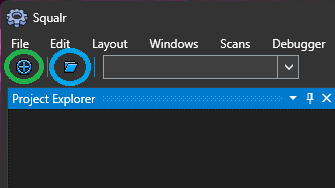
Lets get started! First open up Citra and load up Pokémon Rumble Blast, then open up Squalr. First attach to Citra by clicking the button circled with green in the screenshot below. Select "citra-qt" from the list of processes. Next lets create a new project by clicking the button circled in blue below.
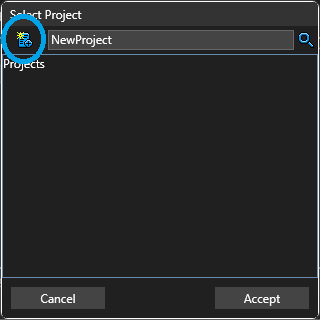
Click the new project button circled in blue below. Give your project a name and click accept.
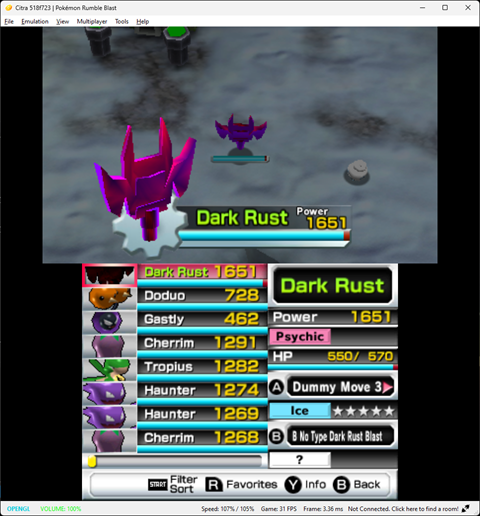
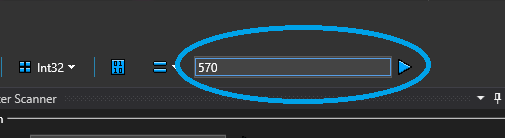
Now we are ready to start editing. To find data for a particular Pokémon in memory we want to start by choosing a value we can see and manipulate in game, in the case of this game we quite obviously should choose the Pokémon's current HP as we can easily see it, and easily change it by taking damage. So switch out the Pokémon you wish to edit then start a search in Sqaulr for it's current HP value. Type it's current HP into the box circled in blue below and click the play button next to it. (You can keep the default scan settings). This will likely find a few hundred values.To narrow the list down go and take some damage, then type the new HP value into the circled box and click the play button. This should narrow the list down to 1 or 2 values (If there are more simply repeat this step until there
are only 1 or 2, take damage then search for new value). If you only have 1 value then this is the value you want. If you have 2 then 1 of them will be the HP value of the Pokémon currently selected on the switch menu. Move up and down the switch menu and you will notice one of the values changes to match the current HP of the Pokémon selected on the menu, you want the value that does NOT change as you navigate the menu. When you have identified the value that represents the HP of the active Pokémon double click it to add it to your project.
Now it's time for the fun part!
Select our newly found address in the project explorer in Squalr, then we need to edit the address to point to the value we wish to change. To get to the desired locations we will need to subtract from this value, the amount depends on what you wish to edit. The offsets are as follows:
Trait: Subtract 0x18
Moves: Subtract 0x20
Species: Subtract 0x24
Please note that the address and these values are in hexadecimal, the math is easy but if you get stuck use a hexadecimal calculator for help. With the address selected in the project explorer turn your attention to the property viewer. Go to the module offset, circled in blue below:
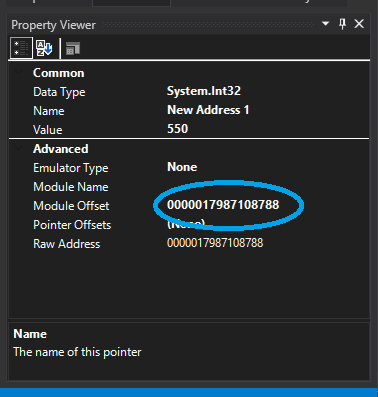
Now edit this value to point the property you wish to edit. For example in my screenshot the address is: 0000017987108788 so if I wanted to edit the species I would change this value to: 0000017987108764 (0x0000017987108788 - 0x24 = 0x0000017987108764). When you click outside the box you will notice the value change in the property explorer.
To edit the actual value being pointed to simply double click it in the project explorer, and the value editor will be shown. All values provided in the lists below are in hexadecimal so we must right click the value editor's textbox and select hexadecimal. For species and trait simply paste the desired value into the box and click accept (You will need to switch out a different Pokémon and switch back for changes to take effect). For moves you must set both moves at the same time, again set the value editor input to hexadecimal. First paste in the B move then the A move. For example if I wanted the B move to be "B No Type Dark Rust Blast (02d1)" and the A move to be "Z Iron Tail (02a5)", I would enter 02d102a5 into the value editor and click accept.
You don't have to use Squalr, the process is exactly the same regardless of how you search and edit memory. The basic steps are simply:
1: Identify the current HP address of the pokemon you wish to edit
2: Subtract the desired offset from this address depending on what you wish to edit
3: Paste in the value(s) from one of the attached lists
Please note there may be a couple of typos in the lists, and the names of some of the forms are definitely wrong. Also I haven't tried out all the unused moves and Pokemon to find out what they do, I haven't played this game (or much Pokemon at all in recent years). Really this was a project for my son but seeing as I couldn't really find any info on how to do this for this game I thought I would make a guide. With the species list you will notice some values after Dark Rust, for some their names were in Japanese and they were just an un-textured model so I had no idea what to call them, some of them were 'turrets' as my son called them. With Citra on the PC these would cause an exception whenever the switch menu was opened however if you click to continue running and then close the switch menu in game it seems you can continue playing. The un-textured Pokemon couldn't move but the turrets could.
Update:
I thought it would be fun to use this information to make a simple Gateway code that changes a specific Pokémon, and came up with the following simple cheat to edit the Pokémon that is active when the save file is first loaded. I have also attached to this post some cheats that can be used on a 3DS by placing the cheats.txt file in the following folder on your SD card /luma/titles/0004000000066C00/ (Create it if it does not exist). These include some example Pokémon edits but also some simple "switchers" to make very basic edits to the Pokémon that is active when the save file is first loaded. Please note these cheats will not work on Citra due to the different address that this Pokémon is loaded to. It wouldn't take much to edit the cheats to work with Citra, simply change any instance of 091037XX to 091027XX. (Where XX represents any number, so 09103724 would become 09102724).
If you are already familiar with memory editing you can probably skip over most of this guide. Simply use the offsets from the current HP in combination with lists attached to edit Pokémon.
Lets get started! First open up Citra and load up Pokémon Rumble Blast, then open up Squalr. First attach to Citra by clicking the button circled with green in the screenshot below. Select "citra-qt" from the list of processes. Next lets create a new project by clicking the button circled in blue below.
Click the new project button circled in blue below. Give your project a name and click accept.
Now we are ready to start editing. To find data for a particular Pokémon in memory we want to start by choosing a value we can see and manipulate in game, in the case of this game we quite obviously should choose the Pokémon's current HP as we can easily see it, and easily change it by taking damage. So switch out the Pokémon you wish to edit then start a search in Sqaulr for it's current HP value. Type it's current HP into the box circled in blue below and click the play button next to it. (You can keep the default scan settings). This will likely find a few hundred values.To narrow the list down go and take some damage, then type the new HP value into the circled box and click the play button. This should narrow the list down to 1 or 2 values (If there are more simply repeat this step until there
are only 1 or 2, take damage then search for new value). If you only have 1 value then this is the value you want. If you have 2 then 1 of them will be the HP value of the Pokémon currently selected on the switch menu. Move up and down the switch menu and you will notice one of the values changes to match the current HP of the Pokémon selected on the menu, you want the value that does NOT change as you navigate the menu. When you have identified the value that represents the HP of the active Pokémon double click it to add it to your project.
Now it's time for the fun part!
Select our newly found address in the project explorer in Squalr, then we need to edit the address to point to the value we wish to change. To get to the desired locations we will need to subtract from this value, the amount depends on what you wish to edit. The offsets are as follows:
Trait: Subtract 0x18
Moves: Subtract 0x20
Species: Subtract 0x24
Please note that the address and these values are in hexadecimal, the math is easy but if you get stuck use a hexadecimal calculator for help. With the address selected in the project explorer turn your attention to the property viewer. Go to the module offset, circled in blue below:
Now edit this value to point the property you wish to edit. For example in my screenshot the address is: 0000017987108788 so if I wanted to edit the species I would change this value to: 0000017987108764 (0x0000017987108788 - 0x24 = 0x0000017987108764). When you click outside the box you will notice the value change in the property explorer.
To edit the actual value being pointed to simply double click it in the project explorer, and the value editor will be shown. All values provided in the lists below are in hexadecimal so we must right click the value editor's textbox and select hexadecimal. For species and trait simply paste the desired value into the box and click accept (You will need to switch out a different Pokémon and switch back for changes to take effect). For moves you must set both moves at the same time, again set the value editor input to hexadecimal. First paste in the B move then the A move. For example if I wanted the B move to be "B No Type Dark Rust Blast (02d1)" and the A move to be "Z Iron Tail (02a5)", I would enter 02d102a5 into the value editor and click accept.
You don't have to use Squalr, the process is exactly the same regardless of how you search and edit memory. The basic steps are simply:
1: Identify the current HP address of the pokemon you wish to edit
2: Subtract the desired offset from this address depending on what you wish to edit
3: Paste in the value(s) from one of the attached lists
Please note there may be a couple of typos in the lists, and the names of some of the forms are definitely wrong. Also I haven't tried out all the unused moves and Pokemon to find out what they do, I haven't played this game (or much Pokemon at all in recent years). Really this was a project for my son but seeing as I couldn't really find any info on how to do this for this game I thought I would make a guide. With the species list you will notice some values after Dark Rust, for some their names were in Japanese and they were just an un-textured model so I had no idea what to call them, some of them were 'turrets' as my son called them. With Citra on the PC these would cause an exception whenever the switch menu was opened however if you click to continue running and then close the switch menu in game it seems you can continue playing. The un-textured Pokemon couldn't move but the turrets could.
Update:
I thought it would be fun to use this information to make a simple Gateway code that changes a specific Pokémon, and came up with the following simple cheat to edit the Pokémon that is active when the save file is first loaded. I have also attached to this post some cheats that can be used on a 3DS by placing the cheats.txt file in the following folder on your SD card /luma/titles/0004000000066C00/ (Create it if it does not exist). These include some example Pokémon edits but also some simple "switchers" to make very basic edits to the Pokémon that is active when the save file is first loaded. Please note these cheats will not work on Citra due to the different address that this Pokémon is loaded to. It wouldn't take much to edit the cheats to work with Citra, simply change any instance of 091037XX to 091027XX. (Where XX represents any number, so 09103724 would become 09102724).
When our Pokémon are loaded from the save file they are always loaded into the same area of memory of the 3DS. When using Squalr to edit the memory of an instance of Citra you will notice that the addresses do change, but this is because Citra is loaded into a different area of memory every time that you run it. Using this knowledge we can create a simple cheat that changes our active Pokémon.
A simple memory write code has the following format:
0XXXXXXX YYYYYYYY - 0 = Indicates we wish to make a 32 bit write
X = Memory address we wish to write to
Y = Value we wish to write
The address of our active Pokémon's current HP is slightly different depending on if you are running Citra or on a 3DS.
If you are running the game on a 3DS then the address is: 09103748
If you are running the game on Citra then the address is: 09102748
So with this address and the offsets listed above we can create a simple cheat code to edit the Pokémon that is active when the save file is first loaded.
09103724 - Species address
09103728 - Moves address
09103730 - Trait address
[Change active to dark rust] - Name label for our cheat
09103724 005012A4 - 32 bit write value 005012A4 (Dark rust) to address 9103724
09103728 00030004 - 32 bit write value 00030004 (B no type dash, B no type Cobalion blast) to address 9103728
09103730 00003400 - 32 bit write value 00003400 (Epic) to address 9103730
This is enough to create a simple cheat to change our active Pokémon however if we enable this cheat before our save file has loaded the game will crash, luckily Action replay/Gateway codes allow operations to be performed conditionally. We can use this to perform some basic checks to make sure we don't write to these locations unless our save data is loaded.
The codes we will be using have the following format:
5XXXXXXX YYYYYYYY - 5 Indicates we wish to check the 32 bit value at address X is equal to value Y
6XXXXXXX YYYYYYYY - The same as above however we are checking the 32 bit value at address X is not equal to value Y
D2000000 00000000 - Indicates the end of all conditional blocks
5910374C 00000000 - When the save file has been loaded the 32 bit value at 0910374C will be equal to 0
69103740 00000000 - 09103740 is the address of the max hp of the active Pokémon, so when the save file has loaded this will not be equal to 0
This is pretty crude and if you try and activate the cheat while still on the Nintendo 3DS splash screen you will still get crashes. There are probably some better values that could be checked that would make this cheat more robust, but like I say as long as you don't activate the cheat on the Nintendo 3DS splash that displays as the game is loading you should be fine. If you are using your cheat with Citra then these checks are not needed, and you can activate the cheat whenever you like.
Putting it all together:
Another thing we could do is to give this Pokémon infinite HP by adding the following writes. The first bold line sets the active Pokémon's current HP to 9001, the second sets it's max HP to the same. You do not have to set the max HP but if you set a current HP that is larger than the max HP then the in game HP bar will extend beyond it's boundaries
You can also set the power value of Pokémon which is at address 09103744 on 3DS/Luma and 09102744 on Citra, however I'm not sure what effect (If any) that this really has.
I should note that any changes that you make to species, moves, or trait will be written to your save file. Changes to HP or Power will not.
To add this cheat to a 3DS running Luma create a text file called cheats.txt, add your cheat(s) to this file, and then copy it to the following folder on your SD card (Create any folders that do not exist): /luma/titles/0004000000066C00/
To add this cheat on Citra right click on the game on Citra's main menu, then click Properties, click on the Cheats tab. Now click on the Add Cheat button. Paste your cheat name where it says [new cheat], Paste your code into the box labelled Code:. Finally click the Save when you are finished.
A simple memory write code has the following format:
0XXXXXXX YYYYYYYY - 0 = Indicates we wish to make a 32 bit write
X = Memory address we wish to write to
Y = Value we wish to write
The address of our active Pokémon's current HP is slightly different depending on if you are running Citra or on a 3DS.
If you are running the game on a 3DS then the address is: 09103748
If you are running the game on Citra then the address is: 09102748
So with this address and the offsets listed above we can create a simple cheat code to edit the Pokémon that is active when the save file is first loaded.
09103724 - Species address
09103728 - Moves address
09103730 - Trait address
[Change active to dark rust] - Name label for our cheat
09103724 005012A4 - 32 bit write value 005012A4 (Dark rust) to address 9103724
09103728 00030004 - 32 bit write value 00030004 (B no type dash, B no type Cobalion blast) to address 9103728
09103730 00003400 - 32 bit write value 00003400 (Epic) to address 9103730
This is enough to create a simple cheat to change our active Pokémon however if we enable this cheat before our save file has loaded the game will crash, luckily Action replay/Gateway codes allow operations to be performed conditionally. We can use this to perform some basic checks to make sure we don't write to these locations unless our save data is loaded.
The codes we will be using have the following format:
5XXXXXXX YYYYYYYY - 5 Indicates we wish to check the 32 bit value at address X is equal to value Y
6XXXXXXX YYYYYYYY - The same as above however we are checking the 32 bit value at address X is not equal to value Y
D2000000 00000000 - Indicates the end of all conditional blocks
5910374C 00000000 - When the save file has been loaded the 32 bit value at 0910374C will be equal to 0
69103740 00000000 - 09103740 is the address of the max hp of the active Pokémon, so when the save file has loaded this will not be equal to 0
This is pretty crude and if you try and activate the cheat while still on the Nintendo 3DS splash screen you will still get crashes. There are probably some better values that could be checked that would make this cheat more robust, but like I say as long as you don't activate the cheat on the Nintendo 3DS splash that displays as the game is loading you should be fine. If you are using your cheat with Citra then these checks are not needed, and you can activate the cheat whenever you like.
Putting it all together:
[Change active poké to dark rust]
5910374C 00000000
69103740 00000000
09103724 005012A4
09103728 00030004
09103730 00003400
D2000000 00000000
5910374C 00000000
69103740 00000000
09103724 005012A4
09103728 00030004
09103730 00003400
D2000000 00000000
[Change active poké to dark rust]
09102724 005012A4
09102728 00030004
09102730 00003400
09102724 005012A4
09102728 00030004
09102730 00003400
Another thing we could do is to give this Pokémon infinite HP by adding the following writes. The first bold line sets the active Pokémon's current HP to 9001, the second sets it's max HP to the same. You do not have to set the max HP but if you set a current HP that is larger than the max HP then the in game HP bar will extend beyond it's boundaries
[Change active to infinite HP dark rust]
5910374C 00000000
69103740 00000000
09103724 005012A4
09103728 00030004
09103730 00003400
09103748 00002329
09103740 00002329
D2000000 00000000
5910374C 00000000
69103740 00000000
09103724 005012A4
09103728 00030004
09103730 00003400
09103748 00002329
09103740 00002329
D2000000 00000000
[Change active to infinite HP dark rust]
5910274C 00000000
69102740 00000000
09102724 005012A4
09102728 00030004
09102730 00003400
09102748 00002329
09102740 00002329
D2000000 00000000
5910274C 00000000
69102740 00000000
09102724 005012A4
09102728 00030004
09102730 00003400
09102748 00002329
09102740 00002329
D2000000 00000000
You can also set the power value of Pokémon which is at address 09103744 on 3DS/Luma and 09102744 on Citra, however I'm not sure what effect (If any) that this really has.
I should note that any changes that you make to species, moves, or trait will be written to your save file. Changes to HP or Power will not.
To add this cheat to a 3DS running Luma create a text file called cheats.txt, add your cheat(s) to this file, and then copy it to the following folder on your SD card (Create any folders that do not exist): /luma/titles/0004000000066C00/
To add this cheat on Citra right click on the game on Citra's main menu, then click Properties, click on the Cheats tab. Now click on the Add Cheat button. Paste your cheat name where it says [new cheat], Paste your code into the box labelled Code:. Finally click the Save when you are finished.
Attachments
Last edited by User154,