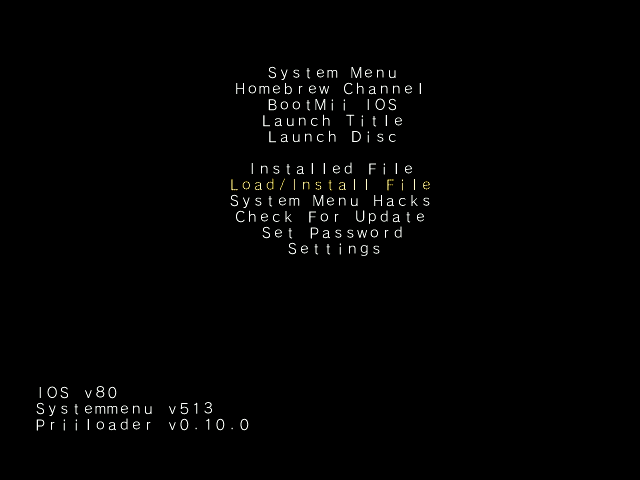
Hi! so I bought this Wii from marketplace, and when i turned it on it just showed the preloader menu. What should i do?

mine got actually system formated.I'm assuming the issue is u don't have a wiimote synced in order to choose any of the options? Newer versions of priiloader support the console face buttons and usb keyboards. If you have PREloader then you may need a gamecube controller to navigate the menu.
Another option is to check if the wii has bootmii installed as boot2, if it does it will launch at startup if particular files are saved to a bootmii folder on the SD card. Grab this bootmii folder and save it to your sd card. Make sure the console is turned off, then turn it on, and hopefully u are taken to a different menu (bootmii): https://raw.githubusercontent.com/modmii/modmii.github.io/master/temp/bootmii_sd_files.zip

okay, doesn't really change anything though, you should still check for bootmii boot2 or use a GC controller to navigate the preloader menu.mine got actually system formated.
mine’s look like thisokay, doesn't really change anything though, you should still check for bootmii boot2 or use a GC controller to navigate the preloader menu.
Also, originally u said u got it from marketplace and turned it on to the preloader menu... when exactly was this system formatted then?
Lastly, you may as well share a pic of the preloader menu you're stuck at, so at least we know the version u have installed. And also confirm whether or not you can navigate the menu please

the bootmii didn’t work. so i guess i’ll use gamecube controller then?Great, now get back to us on the answers to the other things and we'll keep trying to help
I heard that formatting it while having preloader will brick it. Generally formatting isn't recommend.mine got actually system formated.
yea i know. but i read that it is fixable unless you got the family editionI heard that formatting it while having preloader will brick it. Generally formatting isn't recommend.

It shouldn'tI heard that formatting it while having preloader will brick it.

it's not.Plug in the controller and see if u can launch the system menu to sync a wiimote. Also if u could confirm this is the issue it would be great.

more on confused actuallyThis is very frustrating. What is the issue? U just don't know where to begin? From the preloader menu can u access the homebrew channel or the system menu?
U can resoftmod as if it were never modded before to update your mods, or run syscheck and feed your syscheck.csv to modmii's syscheck updater wizard
https://modmii.github.io
https://gbatemp.net/threads/posting-a-system-check.300279
U should use a gamecube controller to navigate through the preloader menu and select "Systemmenu" or if that doesnt work select "Homebrew Channel".more on confused actually