Hacking Pikmin PAL won't work on NTSC Wii

  • Thread starter Thread starter JJBro1
  • Start date Start date
  • Views Views 2,669
  • Replies Replies 12

JJBro1

Well-Known Member
Member
Joined
Jan 20, 2008
Messages
849
Reaction score
0
Trophies
1
XP
584
Country
United States
I'm running the latest version of softmii and when I put PAL pikmin on my ntsc wii the screen just stays black whenever I try to run it. When I try to load it in the gamma backup launcher pal forced or not it comes in black and white and its not cropped to fit my screen. Help to get this working right please? Using img burn with tdk dvd+r dvd's

 
Pal version wont work on NTSC console you should have searched first and you would have found this out. The NTSC version comes out soon so just wait for that. Thats all you can do.
 
sadcrag said:
Pal version wont work on NTSC console you should have searched first and you would have found this out. The NTSC version comes out soon so just wait for that. Thats all you can do.
i did search and i didn't find anything.
 
It works fine for me. I used wii regionfrii 1.2 to change it to ntsc-u. loads fine from the disc channel with the cioscorp pack installed.
 
smash_brew said:
It works fine for me. I used wii regionfrii 1.2 to change it to ntsc-u. loads fine from the disc channel with the cioscorp pack installed.
ya I just tested it after patching the iso with regionfrii 1.2 and its still giving me a black screen when i launch it through the disc channel. I've been told that it has to do with my tv not supporting PAL, I take it yours does?
 
With witch lead is your Wii connected? Try Composite or Component, S-Video and RGB give problems with foreign TV-Norm games.
 
use force ntsc not pal
wink.gif
 
fiddlefaddle22 said:
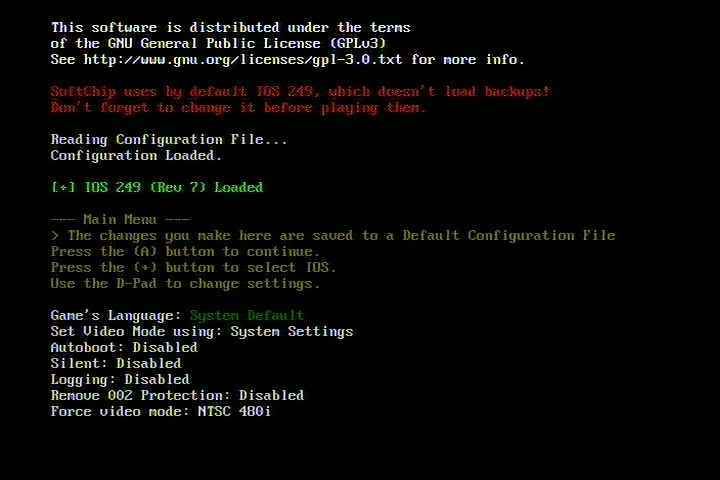
I was able to force NTSC with Pikmin PAL on my Pal Wii using these settings on SoftChipPatchToyR4
http://rapidshare.com/files/205295049/SoftChipPatchToyR4.rar

Oh, i was sure i read that somebody tried it and it didn't work. I know you can tell when a game runs in NTSC(red screen for you), does it really work, or did you only test the menu?

PS: The picture is funny
 
WiiPower said:
fiddlefaddle22 said:
I was able to force NTSC with Pikmin PAL on my Pal Wii using these settings on SoftChipPatchToyR4
http://rapidshare.com/files/205295049/SoftChipPatchToyR4.rar

Oh, i was sure i read that somebody tried it and it didn't work. I know you can tell when a game runs in NTSC(red screen for you), does it really work, or did you only test the menu?

PS: The picture is funny
I ran the game with these exact settings and it worked with red and black colours and what was strange is that your SoftChipPatchToyR4 was the only loader that would get Pikmin Jap version to work with correct Pal 60 colours on a Pal Wii.
 

Site & Scene News

Popular threads in this forum