
Hacking Atmosphere-NX - Custom Firmware in development by SciresM

  • Thread starter Thread starter Waze0613
  • Start date Start date
  • Views Views 2,721,488
  • Replies Replies 9,253
  • Likes Likes 92
After update to atmosphere-1.4.0-prerelease-e580c3970+hbl-2.4.1+hbmenu-3.5.1 and hekate_ctcaer_5.9.0_Nyx_1.4.0, I'm getting this error when sending payload, and it sends me back to OFW, not Hekate bootloader.
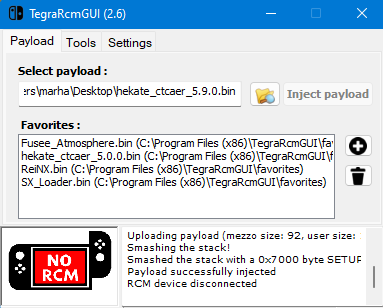
1665848285137.png

Before that, it worked normally. I'm sure my switch is v1 (I bought it from day one) and using atmosphere for ages.
What could go wrong? Does Nin have a way to patch my machine?
FYI: I still Inject TegraExploere normally.
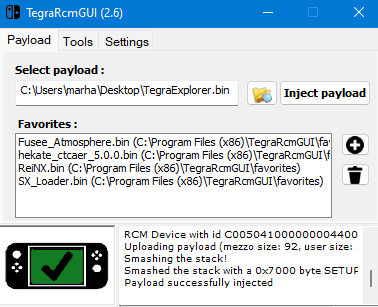
1665848490570.png


Edit: Please ignore this question. I make it work again. I don't know why in "hekate_ipl.ini", there is one line with "autoboot = 3". I deleted it and it worked normally
 
Last edited by marhalloweenvt,
Edit: Please ignore this question. I make it work again. I don't know why in "hekate_ipl.ini", there is one line with "autoboot = 3". I deleted it and it worked normally
Good that you wrote down your solution. Thanks for that ;)
 
Not updating yet, since I am waiting for FW 15.0.1. Since I know that Nintendo releases a few days or weeks later a new firmware, where bugs from FM 15.0 will be fixed.

I love you, @SciresM and the team behind this project. Always fast and reliable updates, please keep up the work. I (and a lot of other people) am really appreciating your efforts!
 
I've kept getting the error code: 2162-002 when I tried to launch atmosphere. I downloaded/updated the atmosphere folder, hekate and fusee.bin. Is there something I did wrong?

UPDATE: Nevermind, I forgot Themes were firmware dependent and I had to uninstall them
 
Last edited by KentaZX,
I broke something. I have a day 1 switch.

I use Atmosphere and Rekado (Android) to load the payload

I updated by OS by mistake to the latest. After reboot, I have a black screen.

I tried to connect it to my phone as always, but the switch is not being recognized.

It's not about the payload not working with the latest update. I don't have a chance to inject the payload at all. I tried to press power off for 15 seconds to force a shutdown, but no luck.

Any ideas?
 
I broke something. I have a day 1 switch.

I use Atmosphere and Rekado (Android) to load the payload

I updated by OS by mistake to the latest. After reboot, I have a black screen.

I tried to connect it to my phone as always, but the switch is not being recognized.

It's not about the payload not working with the latest update. I don't have a chance to inject the payload at all. I tried to press power off for 15 seconds to force a shutdown, but no luck.

Any ideas?
Delete your Atmosphere folder, copy the new one over (1.4.0) and use the NEW fusee.bin file. You can't use the old one to boot the latest version.
 
Delete your Atmosphere folder, copy the new one over (1.4.0) and use the NEW fusee.bin file. You can't use the old one to boot the latest version.


Thanks for the quick response! I tried that without luck.
At the end, the cause was that an Android update had made my phone to "auto turn off OTG after 10 minutes" (before it was a manual on/off, and I always had it on). I just had to turn it of again xD

Thanks again
 
Last edited by Dayr,
good to know what that is a issue on newer phone OSes, please go to the Rekado thread and comment there, so next person can use the information.
 
I've updated firmware, cfw, sigpatches and payloads....and yet tinfoil won't launch. I grabbed the zip file from the site and deleted the old one from my sd card and copied the new one. I'm just getting the "could not start software" message. I wonder what I might be missing here. Some leftover configs I didn't delete? Anybody got any problems? I just noticed when installing it (v 15) from the hbmenu, it still says v 13 on the home menu.

NVM, fixed.
 
Last edited by isoboy,
You need to uninstall old tinfoil before run the new one
I did. I uninstalled the home menu icon, then I deleted the tinfoil folder and copied over the new files. (Self-installer and it says v 15 and I install it and the icon popped up on the home menu as it should but it said v 13 and wouldn't launch so I must've missed some files?) Anyways I then tried again with the applet mode install files and that worked. There must be some old files I might have missed? Some configs or tickets or whatever? It should say v15 on the home menu, not 13. What am I missing?

The only reason I can figure out is I don't have the sigpatches... but... I do. I copied'em over.
 
Hi everyone. Having an issue. Getting a message that says "error: missing warmboot,bin or secmon.bin. These are required'.

I have deleted the folders as stated here on rentry and updated the fusee on my oneloader and the switch's sd card.

I cannot get past this image regardless of what I try.

I got here as when I would click on a game it would say something like "back", "Install Update" and "Launch Software". I clicked the update one by accident.

Any ideas on what to do?
 
Hi everyone. Having an issue. Getting a message that says "error: missing warmboot,bin or secmon.bin. These are required'.

I have deleted the folders as stated here on rentry and updated the fusee on my oneloader and the switch's sd card.

I cannot get past this image regardless of what I try.

I got here as when I would click on a game it would say something like "back", "Install Update" and "Launch Software". I clicked the update one by accident.

Any ideas on what to do?
Put your answer on Noob Paradise I think even has been answered there.
 

Site & Scene News

Popular threads in this forum