Boot9strap updated to 1.4

After 5 years a new update for Boot9strap is available. This is what allows Boot9/Boot11 code execution on your 3DS so we are able to run unsigned code. You are able to update it with SafeB9SInstaller, with instructions below. Maybe in the eyes of Nintendo the 3DS is dead, it shows that its still alive in the homebrew community's eyes.

https://github.com/SciresM/boot9strap/releases
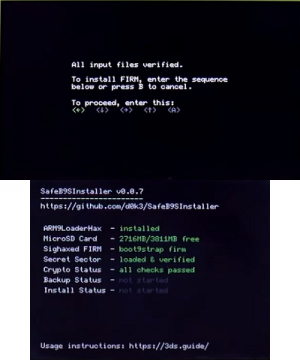
Boot9strap2.png


what got updated:-
Boot9/Boot11 code execution.

  • Boots around 0.25s to 0.4s faster
  • Size halved, now under 16KB
  • If the ntrboot combo (X+Start+Select) is held, or if either FIRM file is corrupt, the notification LEDwill display the following:
    • SD FIRM successfully loaded: green
    • SD FIRM missing, CTRNAND FIRM successfully loaded: yellow
    • SD FIRM corrupt, CTRNAND FIRM successfully loaded: orange
    • SD FIRM missing, CTRNAND FIRM also missing: white
    • SD FIRM missing, CTRNAND FIRM corrupt: magenta
    • SD FIRM corrupt, CTRNAND FIRM also corrupt: red
    • in addition to the above, the LED will blink if it is actually a ntrboot boot
  • Ability to dump boot9/boot11/otp removed (recent Luma commits auto-backup otp.bin anyway). It's also how such improvments could be made in the first place
  • (∩ ͡° ͜ʖ ͡°)⊃━☆゚

Use SafeB9SInstaller to update it.

https://github.com/d0k3/SafeB9SInstaller/releases

  1. Download boot9strap-1.4.zip and unpack it's content into a folder called boot9strap at the root of your SD card.
  2. Then, put SafeB9SInstaller for your 3DS sd card and unpack SafeB9SInstaller.firm to /luma/payloads/ on your SD card.
  3. When everything's done, boot your console with start, select SafeB9SInstaller.firm and follow the instructions on screen.
 
put the safeb9s firm in luma/payloads. then, go into chainloader via holding select at boot up. also, the b9s files should be in a folder named boot9strap on the root.
 
Checking Universal-db updater, I see there's EzB9SUpdater on there. Would that be a viable way to update the B9S data?
be aware though, it only downloads the file (probably puts it in luma/payloads). universal update doesn't update b9s itself.
 
20220530_113740.jpg


for those interested, this is what fastboot looks like. you have to hold home when booting up the system to access its menu.
 
Would it be possible to go from a standard < 1.4 (since I'm not sure what version I'm on) to 1.4 with NTR? I'm somewhat interested in trying to use the Wii U to display the 3DS on the TV (like a wireless version of the Gamecube's GBA player), so I'm pretty sure I'm going to need that CFW on the 3DS side.
 
Would it be possible to go from a standard < 1.4 (since I'm not sure what version I'm on) to 1.4 with NTR? I'm somewhat interested in trying to use the Wii U to display the 3DS on the TV (like a wireless version of the Gamecube's GBA player), so I'm pretty sure I'm going to need that CFW on the 3DS side.
yes, I've updated with ntr cfw. you can upgrade or downgrade. I tested downgrading last time. no issues.
 
its nice i hope someone with 2 consoles can check if new b9s boots faster than fastboot3ds im on it because i can save my payloads on CTRNAND root :) seems better for me, i have godmode9 and luma do someone know another firm payloads to load?
 
Nice thanks :D i Will look for it
I don't think fastboot technically boots up faster. you just have more control over what's bootable, like you don't have to do chainloading, you can change the basic start/select buttons and what they boot up, you can add firms with any button to boot them up just like godmode or something. I have L set for open_agb_firm. fyi, it's for the gba. it's about on par with the vc games.
 
  • Like
Reactions: angelus kun
Use SafeB9SInstaller to update it.

https://github.com/d0k3/SafeB9SInstaller/releases

  1. Download boot9strap-1.4.zip and unpack it's content into a folder called boot9strap at the root of your SD card.
  2. Then, put SafeB9SInstaller for your 3DS sd card and unpack SafeB9SInstaller.firm to /luma/payloads/ on your SD card.
  3. When everything's done, boot your console with start, select SafeB9SInstaller.firm and follow the instructions on screen.

Thanks for this. I thought about asking if this will work before finding this thread. The 3DS guide tells you to replace the luma boot.firm with the b9sinstaller.firm and thus making it mandatory to remove the SD card (https://3ds.hacks.guide/updating-b9s). With your way it all went fine via ftp and I never had to remove Luma3DS :-)
 
My home button is broken, can it be reassignable to another button?
In GodMode9? No. But if you want to emulate the home button outside of it, you can do so with rehid. In fact, i too have a finicky home button, and i have it set up to "start+select+down (d-pad)". Useful when you're in-game, and you want to turn off wifi, lower brightness or load a different game/app...
 
  • Like
Reactions: Pin1988 and Jayro
Hello.

What could be the origin of a failure at the firmware backing-up step? (My n3DSis on the penultimate official system update, Luma11, and the Safe9BS was the latest version (redownloaded to be sure). There are 250 free Mo on the SD.)
 

Site & Scene News

Popular threads in this forum