Help: printable CD-R

  • Thread starter Thread starter Creamu
  • Start date Start date
  • Views Views 1,280
  • Replies Replies 21

Creamu

Well-Known Member
Member
Joined
Jun 6, 2021
Messages
1,793
Reaction score
960
Trophies
1
XP
2,437
Country
Zimbabwe
Hello,

I have found 'printable CD-Rs'. I dont quite understand how they work and am confused by the research I did.

Do I need dedicated printer hardware for this? Can my CD burner do the print? Do I need special software (I have CDBurnerXP)?

Thanks in advance!

 
Hello,

I have found 'printable CD-Rs'. I dont quite understand how they work and am confused by the research I did.

Do I need dedicated printer hardware for this? Can my CD burner do the print? Do I need special software (I have CDBurnerXP)?

Thanks in advance!
I think only burners with LightScribe do this? I've never used it though.
 
Last edited by _v3,
Oh I used to have these, these can be printed on with an inkjet printer, you need a special plastic adapter thing where you put on your CD (printable side up) and you slide the whole thing inside the printer and print like you normally would on paper.

IIRC the Nero suite had a program for designing disk labels which could then be printed
So, there is no way, that a CD burner can do this?
 
So, there is no way, that a CD burner can do this?

A regular one??? No.

There are variations of printable CDs that @Glyptofane mentioned that require a lightscribe drive but these are usually relatively expensive to find in working condition, plus you'll need to shell out a decent amount of cash for a spindle of lightscribe printable discs. Not to mention that the image comes out in black and white and looks horrible.
 
A regular one??? No.

There are variations of printable CDs that @Glyptofane mentioned that require a lightscribe drive but these are usually relatively expensive to find in working condition, plus you'll need to shell out a decent amount of cash for a spindle of lightscribe printable discs. Not to mention that the image comes out in black and white and looks horrible.
I have a burner that has a laser in it to allow for printing. I assume that it can do only black and white? And I have the wrong CD-Rs?

Thanks for the replies.
 
Wherever my old LightScribe drive is right now, may it rest in piece.
To be honest, it wasn't even worth the investment back in the day when it was not even expensive. The colors were gradients of brown, if I remember correctly. I used it for literally two prints and never again.
 
Okay, since I do not have a printer, I will just burn my CDs and right with a marker on them.
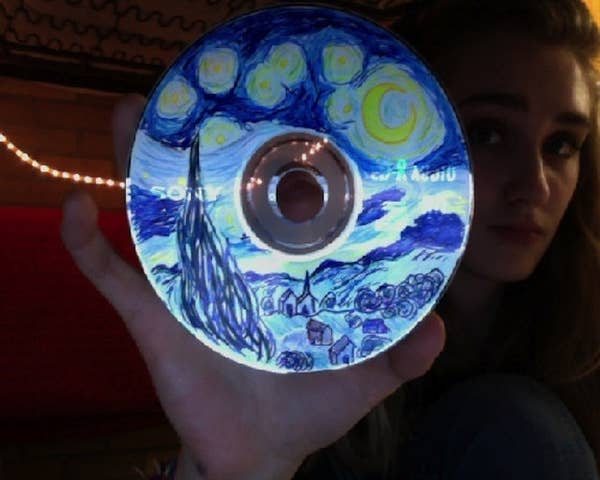
If you have a multitude of markers at your disposal, you could get pretty creative and even create some pieces of art.
enhanced-buzz-21765-1361901062-0.jpg
 
  • Like
Reactions: KleinesSinchen
That is a quite nice Van Gogh! I guess it is easier to do this on a printable one?
Of course. Printable blank media with white surface are a good playground for an artist.

You should use dedicated CD pens, and not some aggressive permanent marker. Some substances and solvents eat up the coating on CD-R, maybe even go through the printable surface. I definitely destroyed non-printable CD-R with aggressive markers in the past.
 
  • Like
Reactions: Creamu
Of course. Printable blank media with white surface are a good playground for an artist.

You should use dedicated CD pens, and not some aggressive permanent marker. Some substances and solvents eat up the coating on CD-R, maybe even go through the printable surface. I definitely destroyed non-printable CD-R with aggressive markers in the past.
Nice! So it has at least one advantage. I have now started burning a CD. I might draw one of my comics on them.
20335.jpg

https://gbatemp.net/threads/creamu-comics.612360/
 
  • Like
Reactions: KleinesSinchen
Wherever my old LightScribe drive is right now, may it rest in piece.
To be honest, it wasn't even worth the investment back in the day when it was not even expensive. The colors were gradients of brown, if I remember correctly. I used it for literally two prints and never again.
Yeah I had a lightscribe CD printer thingy, it was pretty neat, albeit a little disappointing how bland it all looked as a single greyish color on the disc, it looked nicer when they started releasing colored lightscribe discs instead of the standard tanish color discs.

Still, now all these years later, I have a printer that has the adapter to print directly to inkjet CDs like being talked about here, and this is definitely what I really wanted for making my own CDs back in the day. Of course now CDs are practically obsolete so it doesn't even really matter lol.
 
  • Like
Reactions: Creamu
3 approaches for the mere pleb.
1) You buy labels already on discs and have a printer that can do the deed, usually going to be an inkjet one as most lasers will not work owing to the way they work (there is a reason things come out very warm from such a thing). Whether any have been converted to CIS (continuous ink systems) or were there from the start I don't know which might also leave you searching for legacy products and cartridges then gets fun. I doubt any were in the business realm that does keep support for decades either.

2) Litescribe. Needs custom drive to act as basically a laser engraver and discs to match. Was generally considered a failure on the market so not many drives will be found that are not legacy things and similarly going to probably have to source vintage types of disc too (though there might be some cheap firms out there still doing things). If you want anything fancy on the disc front (say dual layer DVDs, never mind dual layer rewriteables) then good luck. As noted then only black and white (or brown and white/silver and white) with whatever limited options for colour gradients you get.

3) You buy labels and print them with normal printer before placing them on like any other sticker. Generally not advised as it can unbalance things quite easily (when it says 52x on some drives it does mean 52 times a second which is a considerable thing to have off balance in a drive, possibly even your expensive litescribe drive).

Beyond that you are probably getting into professional grade tools (some of the water transfer stuff might be an option, don't know what screen printing options might look like for this), which you could possibly find from a company going pop but unlikely.
 
  • Like
Reactions: Creamu
Thanks for the thorough response!

3 approaches for the mere pleb.
1) You buy labels already on discs and have a printer that can do the deed, usually going to be an inkjet one as most lasers will not work owing to the way they work (there is a reason things come out very warm from such a thing). Whether any have been converted to CIS (continuous ink systems) or were there from the start I don't know which might also leave you searching for legacy products and cartridges then gets fun. I doubt any were in the business realm that does keep support for decades either.
Yes I have them but not the printer.
2) Litescribe. Needs custom drive to act as basically a laser engraver and discs to match. Was generally considered a failure on the market so not many drives will be found that are not legacy things and similarly going to probably have to source vintage types of disc too (though there might be some cheap firms out there still doing things). If you want anything fancy on the disc front (say dual layer DVDs, never mind dual layer rewriteables) then good luck. As noted then only black and white (or brown and white/silver and white) with whatever limited options for colour gradients you get.
I have a drive like this but my CD-Rs are a mismatch.
3) You buy labels and print them with normal printer before placing them on like any other sticker. Generally not advised as it can unbalance things quite easily (when it says 52x on some drives it does mean 52 times a second which is a considerable thing to have off balance in a drive, possibly even your expensive litescribe drive).
Yes, this sounds like a bad idea.
Beyond that you are probably getting into professional grade tools (some of the water transfer stuff might be an option, don't know what screen printing options might look like for this), which you could possibly find from a company going pop but unlikely.
Good to know!
 

Site & Scene News

Popular threads in this forum