Coding Question

  • Thread starter Thread starter godreborn
  • Start date Start date
  • Views Views 1,390
  • Replies Replies 11

godreborn

Welcome to the Machine
Member
Joined
Oct 10, 2009
Messages
38,464
Solutions
14
Reaction score
24,176
Trophies
3
XP
29,466
Country
United States
I'm trying to compile this:

https://github.com/Rosalie241/PJ64Launcher

seems simple enough, but I think you need to compile the key with make in the respective directory. anyway, I get this error, which I think is using some outdated code:
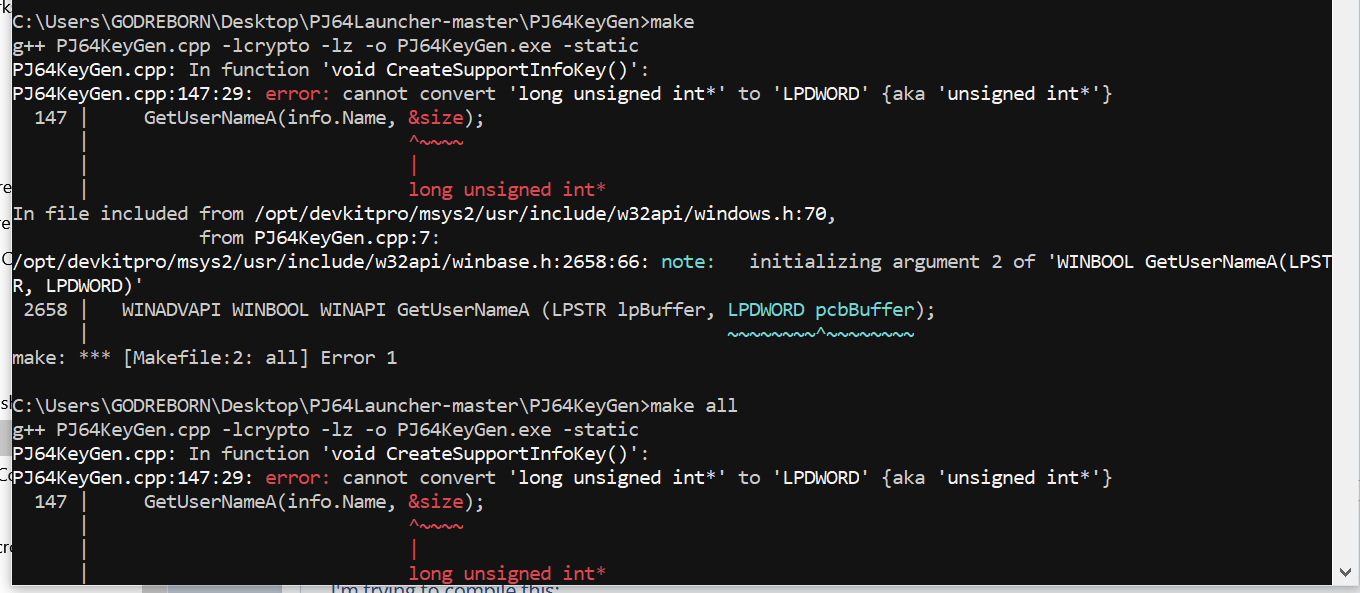
1650228743684.png
 
two questions--what is the command through pacman (tried pacman -S MSVC), and how do I force it to use MSVC instead of gcc through make?
I'm not familiar with Linux but I'm quite sure that you won't be able to use the MSVC compiler on it. You're getting that error because LPDWORD holds a different type essentially on those operating systems. i.e long unsigned int* and unsigned int*. You can make changes to the source to use that type or compile through MSVC on Windows, you have the option to compile for Linux.
 
  • Like
Reactions: godreborn
I'm not familiar with Linux but I'm quite sure that you won't be able to use the MSVC compiler on it. You're getting that error because LPDWORD holds a different type essentially on those operating systems. i.e long unsigned int* and unsigned int*. You can make changes to the source to use that type or compile through MSVC on Windows, you have the option to compile for Linux.
Think I tried on both Linux and windows.
 
Your issue is trying to run a .sln (visual studio solution) as GCC. On top of that, the current GCC (on that shell) may as well be GCC for Windows x32 or x64 processors.

So basically, set up visual studio (community), and open the .SLN file from there
 
Your issue is trying to run a .sln (visual studio solution) as GCC. On top of that, the current GCC (on that shell) may as well be GCC for Windows x32 or x64 processors.

So basically, set up visual studio (community), and open the .SLN file from there
I already tried that. the problem is that it can't find the keygen, so the above is trying to make the keygen with make.
 
I already tried that. the problem is that it can't find the keygen, so the above is trying to make the keygen with make.
You could have done that, yet the image shows something completely different to the point you're trying to make.
So my last post describes how to get the program running.

For instance: GetUserNameA is from the WIN32 (VC++) SDK. It does NOT exist in newlib or stdlib, thus, GCC compiler targeting anything other than x86 or x64 you'll get undefined references.

Here are two repos having Visual Studio 2012 ports from C++ (Linux) to VC++ (Windows) to describe what i'm saying.
 
Last edited by Coto,
I think I got it to work:

1651507437142.png


well, so I thought (it's the same size as the compiled version, so I don't understand what's wrong):

1651507702623.png
 
  • Love
Reactions: AncientBoi
I have an idea about what the problem might be. I saw in a github issues thread related to project 64 that it may have been compiled using vs 2015. I'm using 2022, which wasn't out when that last release was compiled in 2020. I had this problem with wfs extract and inject when I had 2019, so I installed 2015 at that time, and the apps compiled correctly. I uninstalled 2019 and 2015 not that long ago, since I don't have space on my computer for about 9+GBs apiece.
 
  • Like
Reactions: Takokeshi

Site & Scene News

Popular threads in this forum