
Hacking SWITCH NOOB PARADISE - Ask questions here

  • Thread starter Thread starter APartOfMe
  • Start date Start date
  • Views Views 5,997,236
  • Replies Replies 47,915
  • Likes Likes 66
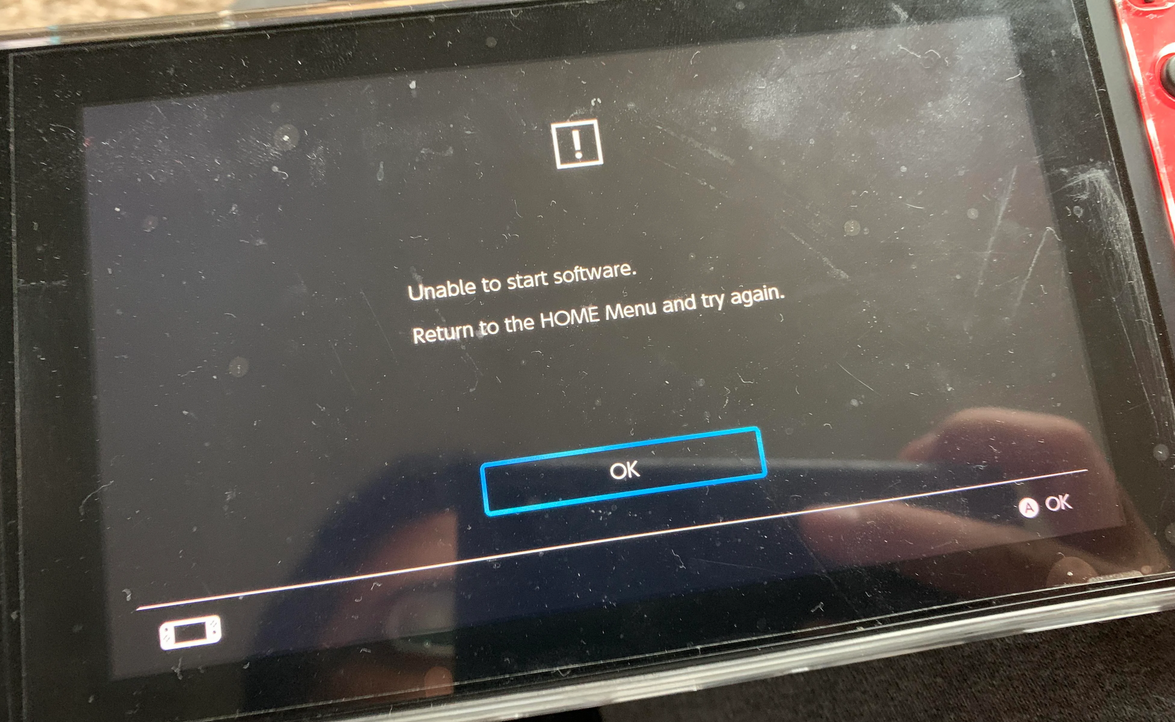
Does anyone know how I can fix this issue I'm having? I've tried installing several games and it seems like a third of them just dont seem to work, and throw up this error when I try to load the game:
456345.png


Many games work, but around a third of them don't, which is strange. I've noticed that all of them seem to be NSPs and not XCIs. All XCIs seem to install and work just fine, but the games causing issues all seem to be NSPs.
The ones I've found not working so far are:
R-Type Final 2
RetroMania Wrestling
Ikaruga
Triangle Strategy
Chocobo GP

Also some of the things I've tried or worth noting:

1. Im on the latest firmware (13.2.1), I have the latest Atmosphere, Hekate, sigpatches. And as I said, most games that I install will work. But certain ones don't.
2. I've tried running the CFW via Hekate, running Atmosphere directly via fusee.bin, also tried chainloading through Hekate.
3. Tried installing to SD card, and NAND. I thought maybe the SD card might be bad and potentially corrupting the game, but I tried another card and still had no luck.
4. I thought maybe the source of where the nsp is being installed from might be a cause, but thats not the case. I tried installing from a USB HDD, via FTP from my NAS, sending the file using NS-USBloader from my PC.
5. Tried over wifi and also with a wired ethernet adaptor, thinking that might make a difference but got nothing.
6. I tried Tinfoil, DBI and Awoo Installer, so the installer doesnt seem to be the issue.
7. I tried nsp dumbs from different sources, thinking maybe my dumps are bad. But unless the different websites are hosting the exact same dump, this didnt seem to make a difference. And also I dont see anyone else complaining about those specific games being troublesome so it seems like these nsps are working for others.

Something else I tried was getting a fresh SD card and copying a new set of Hekate and Atmosphere files to it. Whats weird is that when I ran the fresh CFW, it managed to get RetroMania Wrestling running (which was installed on my NAND), but not the other games.
But then if I uninstalled and then reinstalled RetroMania Wrestling again, it didnt work.

In summary, my Switch is very hit and miss with certain games for some reason and I cant seem to find an explanation for why. And its only caused by NSPs and not XCIs. Which is fine in some cases but then causes issues with games that dont have a XCI release, or game updates which of course have to be a NSP.
Using tools to convert NSPs to XCI doesnt make a difference. The converted XCI in that case would still not work.
Can anyone help?
 
Does anyone know how I can fix this issue I'm having? I've tried installing several games and it seems like a third of them just dont seem to work, and throw up this error when I try to load the game:View attachment 301647

Many games work, but around a third of them don't, which is strange. I've noticed that all of them seem to be NSPs and not XCIs. All XCIs seem to install and work just fine, but the games causing issues all seem to be NSPs.
The ones I've found not working so far are:
R-Type Final 2
RetroMania Wrestling
Ikaruga
Triangle Strategy
Chocobo GP

Also some of the things I've tried or worth noting:

1. Im on the latest firmware (13.2.1), I have the latest Atmosphere, Hekate, sigpatches. And as I said, most games that I install will work. But certain ones don't.
2. I've tried running the CFW via Hekate, running Atmosphere directly via fusee.bin, also tried chainloading through Hekate.
3. Tried installing to SD card, and NAND. I thought maybe the SD card might be bad and potentially corrupting the game, but I tried another card and still had no luck.
4. I thought maybe the source of where the nsp is being installed from might be a cause, but thats not the case. I tried installing from a USB HDD, via FTP from my NAS, sending the file using NS-USBloader from my PC.
5. Tried over wifi and also with a wired ethernet adaptor, thinking that might make a difference but got nothing.
6. I tried Tinfoil, DBI and Awoo Installer, so the installer doesnt seem to be the issue.
7. I tried nsp dumbs from different sources, thinking maybe my dumps are bad. But unless the different websites are hosting the exact same dump, this didnt seem to make a difference. And also I dont see anyone else complaining about those specific games being troublesome so it seems like these nsps are working for others.

Something else I tried was getting a fresh SD card and copying a new set of Hekate and Atmosphere files to it. Whats weird is that when I ran the fresh CFW, it managed to get RetroMania Wrestling running (which was installed on my NAND), but not the other games.
But then if I uninstalled and then reinstalled RetroMania Wrestling again, it didnt work.

In summary, my Switch is very hit and miss with certain games for some reason and I cant seem to find an explanation for why. And its only caused by NSPs and not XCIs. Which is fine in some cases but then causes issues with games that dont have a XCI release, or game updates which of course have to be a NSP.
Using tools to convert NSPs to XCI does make a difference. The converted XCI in that case would still not work.
Can anyone help?
Well you say you have the latest patches but not all places have proper or fully updated patches. Where did you download yours?
 
Pretty sure this is due to the Generate ticket-less dump option. Change it to off instead of on and dump the game again. This time it should install without any signature errors.

edit:

trying to duplicate this with another game and not able to achieve the same results. Diving in a little deeper here…
thanks - please let me know what you find. I deleted all my previous backups and am re-doing them with that setting switched off.
What I find is that the process successfully completed - but most times, the CRC32 checksum fails, but this is because there is 'no match found in no-intro database' instead of anything actually wrong with the dump file (im hoping).
 
  • Like
Reactions: binkinator
I'm currently trying to transfer my emuNAND save of Pokémon: Legends Arceus to sysNAND but no matter what I do my save isn't getting overwritten. Before this I transferred my MK8DX save with no issues. I do this by mounting sysNAND to my PC and then I overwrite my save file from emuNAND but this is having no effect for PLA. I know I'm overwriting the correct save but it just gets set back to the dummy save I created on sysNAND. Do I need to completely delete my PLA dummy save off sysNAND first before transferring my emuNAND save or is there something I'm missing? I've seen people say they transferred their emuNAND saves over for PLA so I know it's possible.
Can anyone help me?
 
thanks - please let me know what you find. I deleted all my previous backups and am re-doing them with that setting switched off.
What I find is that the process successfully completed - but most times, the CRC32 checksum fails, but this is because there is 'no match found in no-intro database' instead of anything actually wrong with the dump file (im hoping).

Yes, I’m not seeing it fail on reinstall or anything. everything works. I just don’t like getting warnings. Especially when I don’t see warnings when installing the original file using the same methodology.

Warnings and errors​

Warnings​

  • "SIGNATURE: Invalid" / "SIGNATURE: GC-> eShop" / "HASH NOT MATCHED TO META" are NOT ERRORS but notifications about a signature mismatch in headers, for example: conversions, custom NSPs, forwarders

image.jpg


So here’s an odd twist. When I use the (R) button in Tinfoil it creates a perfect dumpfile. DBI installs it without complaint. Clearly we’re missing something in NXDumptool. Mine recently upgraded…I’m going to try the previous release and see if that helps.

image.jpg


Edit: got it! (and can duplicate it this time!)

image.jpg


Here are the NXDumpTool v1.1.15 (latest) setting I used.

image.jpg


this is what a good dump looks like:

image.jpg
 
Last edited by binkinator,
  • Like
Reactions: MarkEagle131
If I use the nut version of tinfoil would I get tittle access no just that way you said?

nut.py and nut.exe are server side programs that manage your games library and make them available over USB or Network
tinfoil is a client side program that resides on your switch. Tinfoil connects to a nut server and recieves the games from the nut library over USB or Netwok. There won’t be a nut version of tinfoil as those are two different programs. I hope that helps clarify things.
 
Does anyone know how I can fix this issue I'm having? I've tried installing several games and it seems like a third of them just dont seem to work, and throw up this error when I try to load the game:View attachment 301647

Many games work, but around a third of them don't, which is strange. I've noticed that all of them seem to be NSPs and not XCIs. All XCIs seem to install and work just fine, but the games causing issues all seem to be NSPs.
The ones I've found not working so far are:
R-Type Final 2
RetroMania Wrestling
Ikaruga
Triangle Strategy
Chocobo GP

Also some of the things I've tried or worth noting:

1. Im on the latest firmware (13.2.1), I have the latest Atmosphere, Hekate, sigpatches. And as I said, most games that I install will work. But certain ones don't.
2. I've tried running the CFW via Hekate, running Atmosphere directly via fusee.bin, also tried chainloading through Hekate.
3. Tried installing to SD card, and NAND. I thought maybe the SD card might be bad and potentially corrupting the game, but I tried another card and still had no luck.
4. I thought maybe the source of where the nsp is being installed from might be a cause, but thats not the case. I tried installing from a USB HDD, via FTP from my NAS, sending the file using NS-USBloader from my PC.
5. Tried over wifi and also with a wired ethernet adaptor, thinking that might make a difference but got nothing.
6. I tried Tinfoil, DBI and Awoo Installer, so the installer doesnt seem to be the issue.
7. I tried nsp dumbs from different sources, thinking maybe my dumps are bad. But unless the different websites are hosting the exact same dump, this didnt seem to make a difference. And also I dont see anyone else complaining about those specific games being troublesome so it seems like these nsps are working for others.

Something else I tried was getting a fresh SD card and copying a new set of Hekate and Atmosphere files to it. Whats weird is that when I ran the fresh CFW, it managed to get RetroMania Wrestling running (which was installed on my NAND), but not the other games.
But then if I uninstalled and then reinstalled RetroMania Wrestling again, it didnt work.

In summary, my Switch is very hit and miss with certain games for some reason and I cant seem to find an explanation for why. And its only caused by NSPs and not XCIs. Which is fine in some cases but then causes issues with games that dont have a XCI release, or game updates which of course have to be a NSP.
Using tools to convert NSPs to XCI doesnt make a difference. The converted XCI in that case would still not work.
Can anyone help?

the new sigpatches didnt make a difference, sadly.
they will work if you go to the thread: https://gbatemp.net/threads/sigpatches-for-atmosphere-hekate-fss0-fusee-package3.571543/ as stated DOWNLOAD THE SIGPATCHES FROM THERE AND READ THE TROUBLESHOOTING GUIDE ON THAT THREAD, doing it your system will work fine.
 
  • Like
Reactions: binkinator
  • Haha
Reactions: impeeza
nut.py and nut.exe are server side programs that manage your games library and make them available over USB or Network
tinfoil is a client side program that resides on your switch. Tinfoil connects to a nut server and recieves the games from the nut library over USB or Netwok. There won’t be a nut version of tinfoil as those are two different programs. I hope that helps clarify things.
 
Last edited by Zap2000,
Yes, I’m not seeing it fail on reinstall or anything. everything works. I just don’t like getting warnings. Especially when I don’t see warnings when installing the original file using the same methodology.

Warnings and errors​

Warnings​

  • "SIGNATURE: Invalid" / "SIGNATURE: GC-> eShop" / "HASH NOT MATCHED TO META" are NOT ERRORS but notifications about a signature mismatch in headers, for example: conversions, custom NSPs, forwarders

View attachment 301655

So here’s an odd twist. When I use the (R) button in Tinfoil it creates a perfect dumpfile. DBI installs it without complaint. Clearly we’re missing something in NXDumptool. Mine recently upgraded…I’m going to try the previous release and see if that helps.

View attachment 301654

Edit: got it! (and can duplicate it this time!)

View attachment 301664

Here are the NXDumpTool v1.1.15 (latest) setting I used.

View attachment 301661

this is what a good dump looks like:

View attachment 301663
thanks v much - will check this out !
 
  • Like
Reactions: binkinator
can somebody please help ,e with PM

Let’s keep things in this thread so everyone stays on the same page.

ok i got the installer you told me to get. i was having trouble finding that game from site i got arcade archivies but it needed update is there another game i can find from the site?
(I copied this from your cross post)

Any game that’s around 100M should work great.

Here is a list of the Switch’s smallest games:

https://www.thegamer.com/smallest-nintendo-switch-games/
 
Let’s keep things in this thread so everyone stays on the same page.


(I copied this from your cross post)

Any game that’s around 100M should work great.

Here is a list of the Switch’s smallest games:

https://www.thegamer.com/smallest-nintendo-switch-games/


Ok I check all them games but the only one that was on my site was little inferno but the three links where not working 😔

So I still don’t have small game that dosnt need update.

Also I can’t see awoo installer is the folders right? I see tinfoil but as you know it dosnt install
So far I only been able to get tinwoo to to install a small game but the game need s a update?
 

Attachments

  • 56F5C821-7C1C-42FE-B353-AA52EA151A89.jpeg
    56F5C821-7C1C-42FE-B353-AA52EA151A89.jpeg
    3.1 MB · Views: 76
Ok I check all them games but the only one that was on my site was little inferno but the three links where not working 😔
going to have to look elsewhere. Nobody here will be able to provide links to games.
So I still don’t have small game that dosnt need update.

Othello is out there. I’m certain of it.

Also I can’t see awoo installer is the folders right?

We’re working to get Tinwoo installed. Please check your /switch/tinwoo/ directory.

edit: it sounds like this is working as expected. Wahoooo!


It should look something like this:

69645627-1273-42C0-8F7B-931807DBDE4C.jpeg


I see tinfoil but as you know it dosnt install
So far I only been able to get tinwoo to to install a small game but the game need s a update?

If you are installing with exosphere.ini configured properly and default.txt configured properly (see previous posts and the guide for what that looks like) it should be impossible for your switch to connect to Ninty and know that any game needs an update whatsoever.

Let’s pause for a moment and fix the fact that you are currently streaming data to Nintendo with your Prodinfo intact Before we go any further.
 
Last edited by binkinator,

Site & Scene News

Popular threads in this forum

