Hacking Atmosphere-NX - Custom Firmware in development by SciresM

  • Thread starter Thread starter Waze0613
  • Start date Start date
  • Views Views 2,717,067
  • Replies Replies 9,242
  • Likes Likes 92
Do you know how does it show?

It's just a overlay on top of the game or can I use it on the mini-home button menu?

If it's just a overlay on top of the game I would never use it ☹️

 
Do you know how does it show?

It's just a overlay on top of the game or can I use it on the mini-home button menu?

If it's just a overlay on top of the game I would never use it ☹️
The "mini" mode looks like this
IMG_1528.png
 
  • Like
Reactions: peteruk
You should be using sys-clk for overclocking, that has temperature readings
Does it support adding the info to the Home menu button?
The "mini" mode looks like this
View attachment 270780
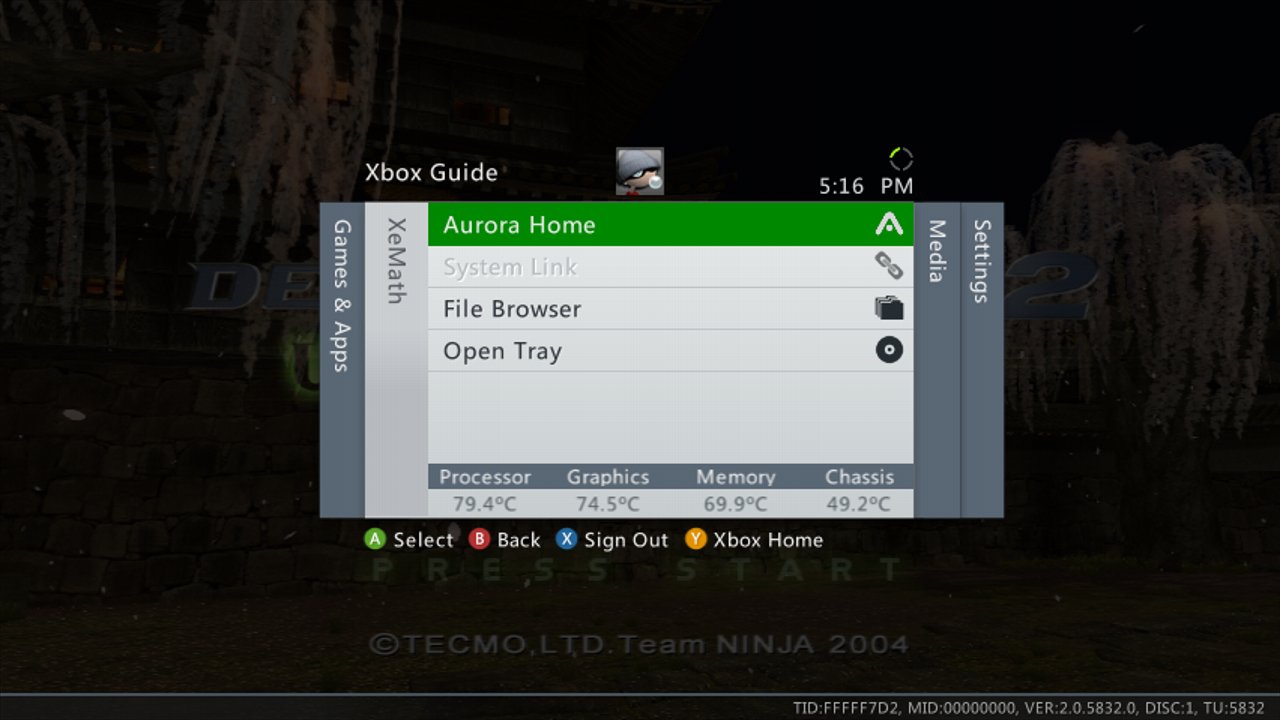
Damn, that suck, I really didn't want an overlay, but rather something like Xbox360 FSD where it would shown the info on the menu button.

The small home menu button from the switch would be perfect as we just maintain Home button pressed and we don't have to exit the game, neither stay the annoying overlay on top of the game.
 
Last edited by guily6669,
That's start menu not home menu :toot:.

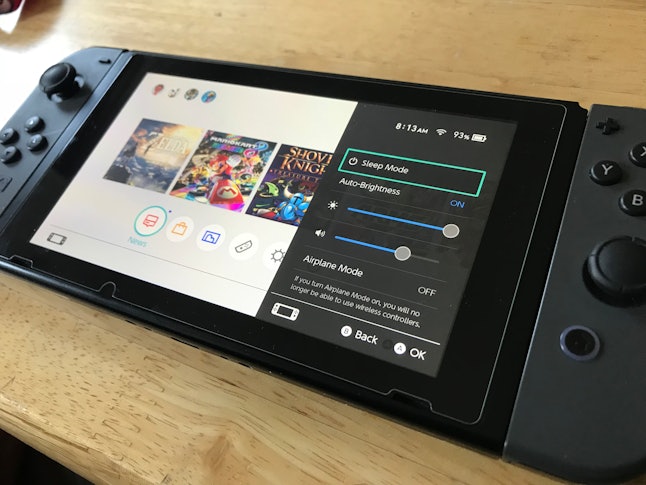
And I think I made a mistake, instead of home menu it's probably the quick access menu or whatever it's called
aypaxkmtbe8yikfvumurxeylgavzplvkbgq31dqkujilawssd4l4czcilwseckno.jpg

(This one above)

EKJ4bnrXsAAAnMo.jpg:large

Would really appreciate something like this Xbox360 quick menu from Aurora (the crap that came after FSD).
PS: Pictures from internetz, not mine:grog:
 
Hi guys. I can launch CFW (Atmosphere) fine and then launch game, but something seems a bit off. On the save file select screen for Skyward Sword, it seems like the game is running faster, and the floating Island of Skyloft was spinning faster too. When I clicked a save file, the game crashed and said that software had to close. My saves are fine, and just now backed up save with JKSV. Not sure what is causing this or what is going on. Am wanting to use cheats with EdiZon, but am not sure if this is an Atmosphere issue, or EdiZon issue... Any help appreciated :)
 
Does it support adding the info to the Home menu button?

Damn, that suck, I really didn't want an overlay, but rather something like Xbox360 FSD where it would shown the info on the menu button.

The small home menu button from the switch would be perfect as we just maintain Home button pressed and we don't have to exit the game, neither stay the annoying overlay on top of the game.
you can always write the code yourself, that overlay is only a template for you make a nicer code.

--------------------- MERGED ---------------------------

Hi guys. I can launch CFW (Atmosphere) fine and then launch game, but something seems a bit off. On the save file select screen for Skyward Sword, it seems like the game is running faster, and the floating Island of Skyloft was spinning faster too. When I clicked a save file, the game crashed and said that software had to close. My saves are fine, and just now backed up save with JKSV. Not sure what is causing this or what is going on. Am wanting to use cheats with EdiZon, but am not sure if this is an Atmosphere issue, or EdiZon issue... Any help appreciated :)
are you using sysclk?
 
What is sysclk? Is it a plugin or something?
It allows you to change the cpu, gpu, and ram clock speeds globally or for individual games. It's a sysmodule, and can be modified via a standalone app or a tesla plug in.

Sent from my SM-G998B using Tapatalk
 
Does it support adding the info to the Home menu button?

Damn, that suck, I really didn't want an overlay, but rather something like Xbox360 FSD where it would shown the info on the menu button.

The small home menu button from the switch would be perfect as we just maintain Home button pressed and we don't have to exit the game, neither stay the annoying overlay on top of the game.
I don't think you can currently add something to the quick acess menu, you would probably need to patch a system module for that, but you can open/close the overlay everytime via button combination, so its not that different from having it in the quick access menu, just 2 clicks more on open.
 
  • Like
Reactions: guily6669
Good to
I don't think you can currently add something to the quick acess menu, you would probably need to patch a system module for that, but you can open/close the overlay everytime via button combination, so its not that different from having it in the quick access menu, just 2 clicks more on open.
Good to know, that's cool then, I thought it would stay ON forever.

I will try when I get a new mSD and make a clean new emunand for atmosphere as both my old mSD are almost full and both are SxOS...
 
Thanks, I use Atmosphere, at home me it tells me that the game card is not read, although I put autonogc = 1 in hekate_ipl.ini
do you know how i can fix it?
 

Site & Scene News

Popular threads in this forum