Status
Not open for further replies.

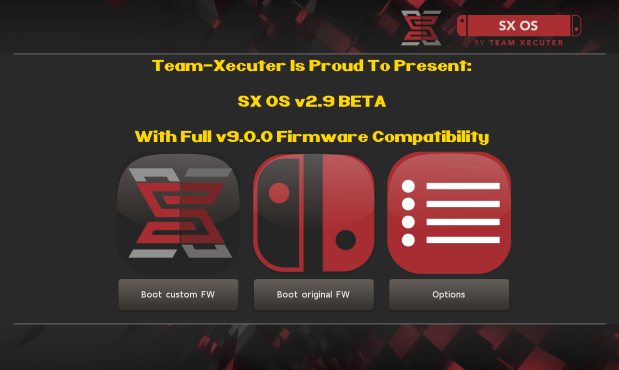
TX Presents SX OS v2.9 BETA - With Full v9.0 Firmware Support!

NEW UPDATE FIXES UPGRADE ISSUES!


PLEASE USE V2.9.1b INSTEAD OF 2.9


YOU CAN NOW USE CHOIDUJOURNX 1.0.2 WITH 2.9.1b

**********************************************


Good day, fans and believers! We hope you are all having a good weekend.
SXOS29.png

Team-Xecuter has done it again, they have updated their world-famous SX OS to now support the latest v9.0 Switch firmware from Nintendo.
Today, we bring you a much needed update of SX OS. Full compatibility with the latest Switch firmware 9.0! Sorry that we kept you waiting, we wanted to make sure all our unique features still properly work.

Additionally, we also introduced support for the "Horizon split format". This means that people who use FAT32 can have folders named 'game.xci' with split parts contained therein (named 00, 01, 02, etc.). Make sure the folder has the 'archive' bit set.

We know you are waiting for some other big features in SX OS, they are coming.. We wanted to get this compatibility update out first though.

So what are you waiting for? SX OS 2.9 beta is available for download on our website now! (and also through the builtin online updater part of SX OS.)
—< Team-Xecuter - Rocking the Switch in 2019 and beyond! >—

:arrow: Source: MaxConsole
 
Last edited by SonyUSA,
Not a brick; review the thread around two pages back. Hint: Use atmosphere and boot into that and use the FW installer and boot back into SX OS 2.9.


Check SX OS website for a guide or other threads.
Thanks Ill try that after i moved all the files back to my MicroSD. I remember booting into Atmosphere and it wasn't booting with something like "FATAL ERROR" but i'll try again. Im using SYSNAND.
 
Thanks Ill try that after i moved all the files back to my MicroSD. I remember booting into Atmosphere and it wasn't booting with something like "FATAL ERROR" but i'll try again. Im using SYSNAND.
That's strange; I was in sysnand as well, make sure you're using the latest release and I used the fusee-primary payload with TegraRcm.
 
Not a brick; review the thread around two pages back. Hint: Use atmosphere and boot into that and use the FW installer and boot back into SX OS 2.9.


Check SX OS website for a guide or other threads.
I have used atomsphere before using SX OS and i want to only using SX OS. Can i delete atomsphere or do you recommend i keep it? How do i delete atomsphere?
 
There are breaking bugs on Choi 1.0.2 with 9.0.0. on SX OS. See the post from one of the SX OS staff earlier in this thread. In this case it's important to use Choi 1.0.1!
The important thing is to use sxos 2.8beta. :teach:
ChoiDujourNX is no problem.
In fact, the official update hangs on sxos 2.9 beta.
So there is an update bug in sxos 2.9 beta.:sad:
 
So if i update the emunand to 9.0, my gc slot will be updated anyway? i don't understand, i have 6.2 sysnand and 8.1 emunand sx os
 
  • Like
Reactions: crazy_p
I have used atomsphere before using SX OS and i want to only using SX OS. Can i delete atomsphere or do you recommend i keep it? How do i delete atomsphere?
If SX OS 2.9 is working and you're on 9.0 then yeah you can delete it. Just remove the files associated with it from the SD card.
 
Pretty dodgy release. Shockingly incompetent actually. Wish I'd read this forum first but like many, I took the plunge and now i'm black screened on sx cfw after failed Choix install. Didn't seem any reason not to update. I had nand backup on my Mac, then my Mac failed couple weeks ago so I had to wipe the drive and reinstall os. Now no nand backup. Then to twist the knife further , SX they release a statement recommending NOT TO UPDATE after hearing of the problems !! Too little too late guys. My confidence in this team has taken a nosedive!!
 
That's strange; I was in sysnand as well, make sure you're using the latest release and I used the fusee-primary payload with TegraRcm.
Wanted to go into this again but now I can't even boot with the sx dongle power and vol+ anymore. I was reformatting it to exfat earlier
 
Pretty dodgy release. Shockingly incompetent actually. Wish I'd read this forum first but like many, I took the plunge and now i'm black screened on sx cfw after failed Choix install. Didn't seem any reason not to update. I had nand backup on my Mac, then my Mac failed couple weeks ago so I had to wipe the drive and reinstall os. Now no nand backup. Then to twist the knife further , SX they release a statement recommending NOT TO UPDATE after hearing of the problems !! Too little too late guys. My confidence in this team has taken a nosedive!!
You're 100% I was in the same boat; but you can fix up your switch in a matter of minutes. There's a post about 4 pages back that explains how to do it. (Be sure to backup nand after you're done)
 
  • Like
Reactions: yakuku
Sorry I fixed it with the menu now gonna try to boot Atmosphere. Im kinda new to this scene.
 
People still uses this even after emunand support on atmosphere?

that's right pizza-nose.
do you enjoy connecting your switch to your PC or removing your microSD each time you want to install a game? how's your usb access in tinfoil going for you? perhaps you are a 'handheld only' sponge without a dedicated display for docked mode?

a feature im sure 99% of people do not realize, and it is the very best SX has to offer, are support for .xc(x) files.
previously only compatible with sxinstaller as sx-album could not scan them. but behold, TX has provided support for this now too!

beyond the usbhdd xci mounting, even a fat32 sd user can copy 4gb chunks of .xc(x) files.

what do people with microSD do when their storage is full and want to install a new .nsp? do you really and truly spend 20 minutes to reinstall some 30gb nsp in tinfoil? does tinfoil-DZ even work with usb or are you stuck at abhorrently embarassing network speeds? muh goldleaf!

me i have a 400gb u3 sandisk ultra but i don't got time to hook that up to my box all the time.
Seriously, what if someone saw me doing that? what if it got around town? people just have no shame anymore, its anything goes. sad.

dedicated external usb SSD for docked mode, and from time to time i will copy split xci's to my sd (and this is where a u3 is ever better than a u1)
(NSC_Builder is a hell of a software, so much so that it warranted a windows install in virtual machine!)

i have to try this flycast emulator, and do hope SX improves compatibility with ever-growing homebrew libraries.
but frankly besides what i've mentioned, and a small handful of cases for overclocking mods, what homebrew does not work with SX that is so special? even those soylent devs that take time to comment their code about SX stealing and being very bad people, most of that crap works too.


SX is patrician class software, whether you are half-retarded, or goddamn blake warner
 
Last edited by jkjj,
a feature im sure 99% of people do not realize, and it is the very best SX has to offer, are support for .xc(x) files.
previously only compatible with sxinstaller as sx-album could not scan them. but behold, TX has provided support for this now too!

beyond the usbhdd xci mounting, even a fat32 sd user can copy 4gb chunks of .xc(x) files.
I don't get why people are praising this as a new feature. It's literally something they took from HOS and passed it off as their own work.
 
Honestly, when having a 400gb sd card, I don't catch the need of xci loading... it is not like you will play more than 15-20 games at the same time...
But for people needing xci loading, it seems the best advice is not to update to 2.9 for now, and for those really wanting to update os to 9.0, do it in atmo with choi 102 before apply need sx version
 
You're 100% I was in the same boat; but you can fix up your switch in a matter of minutes. There's a post about 4 pages back that explains how to do it. (Be sure to backup nand after you're done)
Thank you so much! Been using the stock switch since day 1 and i thought i had to buy a new switch. Ran Atmosphere> Used Choi 9.0.0 in homebrew > Booted into SX OS and XCI loading works
 
Thank you so much! Been using the stock switch since day 1 and i thought i had to buy a new switch. Ran Atmosphere> Used Choi 9.0.0 in homebrew > Booted into SX OS and XCI loading works
Good to hear! Be sure to back up that nand and label it and place it somewhere safe. I think sites like Mega provide enough free space to back up your nand there.
 
  • Like
Reactions: yakuku
Good to hear! Be sure to back up that nand and label it and place it somewhere safe. I think sites like Mega provide enough free space to back up your nand there.
Im definitely gonna keep backing up my NAND now and in the future :). One more noob question, should I do a backup now or when there's a new support for future firmwares?
 
Status
Not open for further replies.

Site & Scene News

Popular threads in this forum