Hacking Wii backup Manager for Windows

  • Thread starter Thread starter fig2k4
  • Start date Start date
  • Views Views 4,935,213
  • Replies Replies 2,996
  • Likes Likes 20
no, they should NOT change that.
it's an issue from your side, you probably are not displaying file extension, and ended naming the file : game.iso.iso !
It's explained in the Nintendo's guide, even if that issue should have been automatically fixed by nintendont.


The "ahb access" error can be fixed by reading the message error.
"Please Launch USBLoaderGX from HBC or from an updated channel or forwarder." if you do and still have that message:
It can be maybe :
- you use an old version of the loader <- update the loader
- you launch the loader from a wrong channel (update the channel) <- update the channel
- you launch the loader from Priiloader using boot.dol instead of forwarder.dol <- launch from HBC
- You don't have HBC 1.0.7+ <- update HBC
- you don't have IOS58 setup in HBC <- install IOS58 and update HBC
 
Last edited by Cyan,
  • Like
Reactions: SushiKing
HC is 1.1.2
My USB Load GX is up to date when i click update.

I tried opening Ninendont from my USBLoader and this error came up in Nintendont:

Failed to load I0558 from NAND

Please ensure that meta.xml is present in your Nintendont application directory and that it contains a line with the tag <ahb_access/>

I have the meta XML document in my Nintendont folder in apps. along with the boot.dol file. But i cant see nothing about the ahb_access file?
 
Thank you so much, you're the best help!!! You make it seem so easy :)

I'm having one last issue.. I can not seem to get Nintendont to work.. I put some Gamecube ISO's onto my hard drive, I named them correctly like this:
"/games/Zelda Wind Waker/game.iso"

But i cant seem to find the games in usb loader GX :(

Thank you if you can help me out!

Put the game ID in the folder names like this:
"/games/Zelda Wind Waker [GLZE01]/game.iso" (or GLZP01 if you're using the PAL one.)

If it still doesn't see them after that then you may have an issue with your drive or partitioning. ONE FAT32 partition on an MBR drive should work fine for all homebrew apps, Gamecube games and Wii games.

Don't go by the update check in USB Loader GX. Go to the credits screen and post the revision number.
 
  • Like
Reactions: SushiKing
You are stuck with an old version. r1262 is the latest official release. Yours is probably from Google Code and will not be able to pick up updates since they shut their service down.

Also, beta53 is not recommended. Use v8 or v10-beta52.
 
Last edited by GreyWolf,
You are stuck with an old version. r1262 is the latest official release. Yours is probably from Google Code and will not be able to pick up updates since they shut their service down.

Also, beta53 is not recommended. Use v8 or v10-beta52.

okay thanks, also how do i update usbloader then?
 
I guess nintendont requires some even newer setting version that 1262 doesn't know.
if you want to use latest nintendont version with this loader, you should update to GreyWolf's version of the loader. he added new nintendont settings.
 
  • Like
Reactions: SushiKing
How do you mount your WBFS drive in Windows Explorer so you can browse through the ISOs?

Apparently this is supported:
Simulated WBFS drives (FAT32/NTFS)
But how exactly? I loaded up my drive E: but I need to have access to the file system using Windows to see the ISOs:
wv3nw7ey.png
Thanks
 
How do you mount your WBFS drive in Windows Explorer so you can browse through the ISOs?

Apparently this is supported:
But how exactly? I loaded up my drive E: but I need to have access to the file system using Windows to see the ISOs:
wv3nw7ey.png
Thanks
Just convert your drive 2 fat32 with wbfs2fat32 app
 
  • Like
Reactions: BullyWiiPlaza
I don't know if Windows have such a thing, but there's a driver for Linux to list and manage WBFS drive's content directly in the file explorer.
I think you can even add any file type (not only wii ISO)
 
Last edited by Cyan,
I don't know if Windows have such a thing, but there's a driver for Linux to list and manage WBFS drive's content directly in the file explorer.
I think you can even add any file type (not only wii ISO)
Same topic as here: https://gbatemp.net/threads/wwt-wit-wiimms-wbfs-iso-tools.182236/page-92#post-7525981

My wit tools support FUSE on Mac and Linux to mount Images of any type (WBFS, ISO, WDF, GCZ, .CISO, ..) readonly. In case of WBFS, multi images are supported too.
* https://wit.wiimm.de/wfuse/
 
Last edited by Wiimm,
For some reason, I can't convert my split .wbfs files to a single .iso file.

I want to convert my Brawl wbfs to iso. I put it on Wii Backup Manager and transfer it to .iso, selected a folder where I want the .iso is going to be output. The progress ran smoothly, but when I checked the folder where the .iso is located, it's not there.

It seems only Brawl do this, since I convert some other wbfs to iso games just fine.
 
For some reason, I can't convert my split .wbfs files to a single .iso file.

I want to convert my Brawl wbfs to iso. I put it on Wii Backup Manager and transfer it to .iso, selected a folder where I want the .iso is going to be output. The progress ran smoothly, but when I checked the folder where the .iso is located, it's not there.

It seems only Brawl do this, since I convert some other wbfs to iso games just fine.

Wii Backup Manager has problems with SSBB. It doesn't handle the extra partition with the WiiWare demos on it properly. Wiimm's ISO Tools does.
 
Wii Backup Manager
Basic Usage.


Select the "Drive 1" tab.
Click "Drive" menu, select your drive.

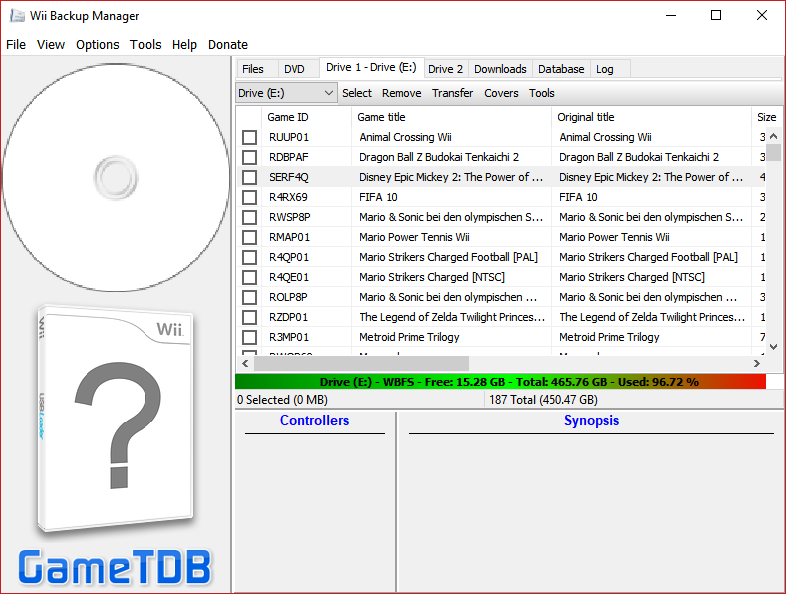
This is where I get stuck: I can't select a drive. In most youtube videos I see, there's supposed to be a dropdown menu that allows me to select a drive. I don't get that option. Build 78, windows 10
 
This is where I get stuck: I can't select a drive. In most youtube videos I see, there's supposed to be a dropdown menu that allows me to select a drive. I don't get that option. Build 78, windows 10
This is what it's talking about. Click "Drive 1" or "Drive 2" tab then pick the storage drive you have plugged in that you want to copy your games to. If you don't at least see your PC's internal drive on the list then something is definitely wrong.

Screenshot (3).png
 

Site & Scene News

Popular threads in this forum