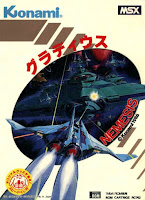
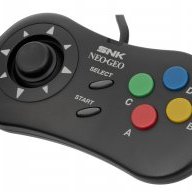
According to the manual, you can play it with the joystick, so basically you do not need any keyboard.
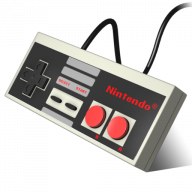
I have been playing some MSX games for a while now, i never needed a keyboard, and i am playing with the original NES mini joysticks.
Hello guys! Question; how do you make a particular button setting for a specific core in retroarch the default button combination? Like for example, I wanted to set a default button setting for the Sega Genesis emulator in retroarch, so that all games I add in my NES Mini would follow/use that default button setting for both player 1 & 2. I know you can remap the buttons via the quick menu, but I wanted to make a default button setting across all games. How do you do that? Thank you in advance!
Hi, I know this was posted a while ago, but have you experienced some graphical glitches with that hack on the NES Mini? For me, the Stage Select's bottom row keeps shaking, as well as the pause menu.
EDIT: I've read some pages and apparently that's normal with that hack on the NES Mini, but does anyone know what causes it?
It isn't a bug. It is that 2.15 calculates all temp data being games, save states, modules, original 30 games into the memory. This actually makes the NES a lot more stable in the long run
If it helps, the default NESC save format for sram saves is just the battery save padded to 32768 bytes with the sha-1 of the padded .sav file stuck on front. Here are some sample files, note that since Zelda2-padded.sav has a sha-1 of a1240457c7a69498b27c9f7b6449b2fb427bfaeb all I did was open it in HxD, paste insert (not overwrite) a1240457c7a69498b27c9f7b6449b2fb427bfaeb at the start of the file as text (not hex), and then saved it as Zelda2-save.sram. To export to standard .sav format, just strip the first 40 bytes and if desired trim to 8k.
While I used HxD and trunc.exe I am sure it could be done pretty easily with a Linux shell script, sha1sum and truncate.
Have you taken the time to verify the files/file sizes using the command line tool?
That way you could isolate a BEFORE/AFTER snapshot of the memory you're losing when you add and then remove games. I'm really curious where
that memory is going to. Hopefully the command line tool can shed light onto this subject.
After reading several pages it appears that the new Hakchi 2.15 is more accurate in terms of what it counts.. but from the reading here it appears
there's something that's holding onto memory when you add/remove games which would be the new bug everyone is talking about. I'm still on 2.13e and have been waiting to upgrade btw..
EDIT: If anyone can reproduce this problem the following might lead us to determine where the memory is being hogged:
1) Use command tool to get a list of all files along with sizes.
2) add a couple games, then do step #1 again.
3) remove the games you added in step #2. Then do step #1 again.
With the 3 logs from above we can hopefully see what's hogging up the memory. Have you used the file command tool for Hakchi before?
So if I'm down to ~270 MB of available space in 2.15, is there any way to free up space besides removing games? What could be bringing the total available down so low? In my games folder, the total amount is ~305 MB, pictures included. What's eating up the extra 35 MB?
I noticed that when you remove games, it sometimes doesn't "recover" the used space. In that case, I close hakchi, reopen it again, and voila, the "used space" is calculated again and (AFAIK) is correct.
I noticed that when you remove games, it sometimes doesn't "recover" the used space. In that case, I close hakchi, reopen it again, and voila, the "used space" is calculated again and (AFAIK) is correct.
Nice find. So to the others.. have you tried closing Hakchi and reopening it like it's listed here?? It may be a minor annoyance but if this fixes the issue..
ya but most only think of the bug as when you only have like 260mb of space. But he could have been referencing the bug that only allows you to put like 100mb of games on like we had discussed earlier.
Could someone help me with understanding atari games?
I tried uploading a few atari 2600 games, however the roms I have are all in the .bin format, which hakchi doesn't recognize as being valid. What format should they be in?
Also, where can I get hmods for other Atari systems?
Thanks!
ya but most only think of the bug as when you only have like 260mb of space. But he could have been referencing the bug that only allows you to put like 100mb of games on like we had discussed earlier.
Have these people that can only put 100MB worth of games on restarted their PC and try it again? sromeroi has indicated that when you close Hakchi and re-open it.. it goes back to normal..
Last month we got confirmation of a new model of Switch 2 to better comply with upcoming EU regulations. With the legislation set to come into effect in February of...
Ocarina of Time is back in style as the upcoming Switch 2 remake looms on the horizon. But what's a fan of the game to do over the next few months? If you've been...
Tired of waiting for Game Freak to bring Pokemon Emerald to modern platforms? We've got you covered with a brand new port in the works. Currently available on GitHub...
For fans of Sinnoh, the pickings are slim. If you want the best experience you're left deciding between the updated region in Platinum, or the somewhat controversial...
The Switch 2 has been out for a year now, but you shouldn't count the original system out yet! Released a few days ago, popular PS2 emulator NetherSX2 has found its...
If you've been waiting for an excuse to replay Super Mario Sunshine and happen to have up to nine friends, do I have some good news for you. Released earlier today...
Hot on the heels of their NetherSX2 port, @Nagaa is back with another hugely anticipated release: a Switch port of the popular Wii U emulator Cemu. We've got more...
The Pokemon series is known for its vast assortment of spin off titles, with the majority being well-received. We've had an assortment of Mystery Dungeon titles, a...
Right on the heels of a NetherSX2 port, the Switch once again proves it's still got some life left in it as 3DS emulation graces the system. Promising mostly...
The golden age of emulation on the Switch continues as a native Dolphin port was released by @Nagaa earlier today. Included in this port, we're looking at cover art...
Last month we got confirmation of a new model of Switch 2 to better comply with upcoming EU regulations. With the legislation set to come into effect in February of...
Ocarina of Time is back in style as the upcoming Switch 2 remake looms on the horizon. But what's a fan of the game to do over the next few months? If you've been...
Tired of waiting for Game Freak to bring Pokemon Emerald to modern platforms? We've got you covered with a brand new port in the works. Currently available on GitHub...
Amidst news of layoffs and cancellations in the wake of Xbox's larger changes, Bethesda has today come out with a statement discussing their active projects. In this...
Announced today during the Octopath Traveler 8th Anniversary live stream, it's been confirmed that both the first game and its sequel will be launching on the Switch...
For fans of Sinnoh, the pickings are slim. If you want the best experience you're left deciding between the updated region in Platinum, or the somewhat controversial...
It's a good time to be a first generation Pokemon fan. But when was it not a good time to be one? In recent weeks we've seen a native LOVE2D recreation of Pokemon Red...
In this time of everything costing more a year after it's released, it's nice to see some things sticking to the old ways. Capcom have today announced that the latest...
If you've been waiting for an excuse to replay Super Mario Sunshine and happen to have up to nine friends, do I have some good news for you. Released earlier today...
The Pokemon series is known for its vast assortment of spin off titles, with the majority being well-received. We've had an assortment of Mystery Dungeon titles, a...