Official hakchi2 - NES Mini very simple pimp tool

  • Thread starter Thread starter Cluster
  • Start date Start date
  • Views Views 4,407,835
  • Replies Replies 18,558
  • Likes Likes 138
I saw this asked a few times, but the responses were unclear so here I go asking again.

On a stock NESC, will I lose all save games save states when I hakchi it?

On a hakchi's NESC, if I reflash it to add more games or RA roms, will I lose all save games and states?

Is there no way to preserve saves and progress, or do I need to make sure I have everything I want on there before I flash so I don't lose progress on games played?
 
I saw this asked a few times, but the responses were unclear so here I go asking again.

On a stock NESC, will I lose all save games save states when I hakchi it?

On a hakchi's NESC, if I reflash it to add more games or RA roms, will I lose all save games and states?

Is there no way to preserve saves and progress, or do I need to make sure I have everything I want on there before I flash so I don't lose progress on games played?
The save states will remain.
 
  • Like
Reactions: Lukano
The save states will remain.

Just wanting to make absolutely sure, so my family doesn't kick my ass for losing anything...

Just save states will remain, or in-game saves as well? And will save-states remain only when updating from stock to hakchi, or hakchi to hakchi?
 
Just wanting to make absolutely sure, so my family doesn't kick my ass for losing anything...

Just save states will remain, or in-game saves as well? And will save-states remain only when updating from stock to hakchi, or hakchi to hakchi?
When you dump your mini in mandatory hakchi2 step, you make a exact copy of your mini NES (at this moment). So the saves you have is keep(backup it), and always you can back to your original kernel dump.

I'm not sure about this, but this only works for original 30 games.

Rgs.
 
Last edited by nesito,
When you dump your mini in mandatory hakchi2 step, you make a exact copy of your mini NES (at this moment). So the saves you have is keep(backup it), and always you can back to your original kernel dump.

Rgs.

So are there any cases where in-game saves or save-states would be lost, when flash or syncing new games/roms?

edit - sorry for rephrasing the question so many times, I just want to make absolutely sure I don't risk losing any progress made now or in the future when adding more NES games or more content for RA.
 
Last edited by Lukano,
So are there any cases where in-game saves or save-states would be lost, when flash or syncing new games/roms?

edit - sorry for rephrasing the question so many times, I just want to make absolutely sure I don't risk losing any progress made now or in the future when adding more NES games or more content for RA.
In your case, better to wait for 2.12. I'm 100% sure that your family will glad you. ;)

Rgs.
 
  • Like
Reactions: Lukano
Dumping or reflashing the original kernel has nothing to do with the filesystem, that's just the kernel. It doesn't affect save files in any way.

Adding new games doesn't remove any save files. The only way to lose those is with a factory reset.
 
  • Like
Reactions: Lukano
Dumping or reflashing the original kernel has nothing to do with the filesystem, that's just the kernel. It doesn't affect save files in any way.

Adding new games doesn't remove any save files. The only way to lose those is with a factory reset.
Yes but he can get a C2 error that back to factory reset, I think.

Rgs.
 
I was talking about the in-game soft reset that brings you to the in-game title screen. Example: You are playing Contra, you forgot to enter the Konami code, instead of going out to the main NES emulator menu and starting Contra again, you can just reset to the Contra title screen.
In this case, at the moment only in RA you can make a Reset from RA menu. But isn't possible(at the moment, maybe never) in a button combination.

Rgs.

It would be awesome if the console's reset button was mapped to reset just the game.
 
Last edited by DChronos,
Dumping or reflashing the original kernel has nothing to do with the filesystem, that's just the kernel. It doesn't affect save files in any way.

Adding new games doesn't remove any save files. The only way to lose those is with a factory reset.

I've had C2 errors before, but I haven't lost any of my saves.
In this case @Lukano , You only need to wait to 2.12 for RA support saves(only in cores prepared in this release, in nexts versions would be more systems integrated) you will not loses any save-state or save in games(like Zelda) added with hakchi2 2.11

Rgs.
---------------------------------------------------------------------------------------------------
Some gameplay(at last) of N64 Super Mario 64 and Wave Racer 64 on Mini NES Classic.

Only I complain a bit about the control(Also framerate but for Mario is playable). The diagonal use of analog stick, doesn't make Mario run. In the gameplay you will notice that in some parts.

Please, enjoy!

Rgs.
 
Last edited by nesito,
'No, the system mod. We completed the madmonkey its kind, will now be able to create, install, upload, and download a variety of fashions, including additional emulator. Or to change the pictures, music, turn your NES in the Famicom, translated from the Japanese Famicom and more. Thus, do not have to overload the program more than functional, and the community will be able to add their own features.
But for integration RetroArch already done so. Scripts automatically detect unsupported NES game and run them through RetroArch. In this work and save and exit the menu. Go and you will not notice that the emulator is not native. Only now replace CRT filter is not choose have madmonkey in this regard is now better success.
sad.gif
'''

FroM Cluster on GBX.RU

wow that sounds awesome we can change nes mini to famicom GUI?

 
'No, the system mod. We completed the madmonkey its kind, will now be able to create, install, upload, and download a variety of fashions, including additional emulator. Or to change the pictures, music, turn your NES in the Famicom, translated from the Japanese Famicom and more. Thus, do not have to overload the program more than functional, and the community will be able to add their own features.
But for integration RetroArch already done so. Scripts automatically detect unsupported NES game and run them through RetroArch. In this work and save and exit the menu. Go and you will not notice that the emulator is not native. Only now replace CRT filter is not choose have madmonkey in this regard is now better success.
sad.gif
'''

FroM Cluster on GBX.RU

wow that sounds awesome we can change nes mini to famicom GUI?
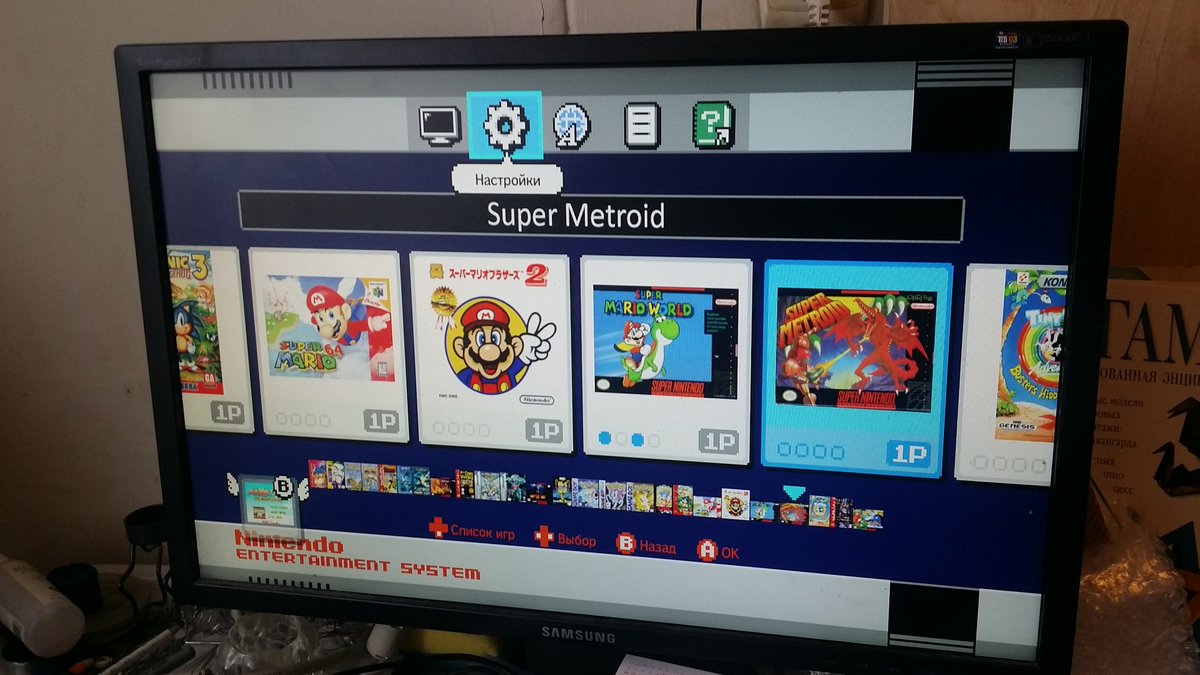
Yes I read and post on Spanish forum. I think nobody put this Cluster's picture in this thread. (Check the save-state)
C420XgtWMAAz3ui.jpg


Rgs.
 
does anyone have some details on how the new folder structuring will work? While we wait I'd like to get an idea of how I can organize things, so I can decide whether or not to include the entire NES USA library or not.
 
I'd love to be sitting in front of the TV later and introducing the kids games like Yoshi's Island, Chrono Trigger, A Link to the Past, Kirby's Dreamland 3, Secret of Mana, etc, etc, etc.:D
 
  • Like
Reactions: jelmer
I'd love to be sitting in front of the TV later and introducing the kids games like Yoshi's Island, Chrono Trigger, A Link to the Past, Kirby's Dreamland 3, Secret of Mana, etc, etc, etc.:D
Depending how old they are, 16 bit is more colorful but 8 bit is a great platform to start.
 
I'd love to be sitting in front of the TV later and introducing the kids games like Yoshi's Island, Chrono Trigger, A Link to the Past, Kirby's Dreamland 3, Secret of Mana, etc, etc, etc.:D

My kids are playing the heck and enjoying 8-Bit Gaming. :) Mostly coop games like Contra, Jackal, Bubble Bobble, Rod Land, Blades of Steel.
 

Site & Scene News

Popular threads in this forum