Official hakchi2 - NES Mini very simple pimp tool

  • Thread starter Thread starter Cluster
  • Start date Start date
  • Views Views 4,418,899
  • Replies Replies 18,558
  • Likes Likes 138
Does anyone know a good NES Rom site they prefer? I have not used NES Roms in a long time. Heard about this and figured might as well add some more games to my NES Classic.
ROMs are not legal to use unless you have the original cartridges.
Oh, my GoodNES ... (got it ?)
 
  • Like
Reactions: sHiErShAo
Any progress on the "reset bug?" Turning all security off and disabling the driver security doesnt fix the problem.
 
seems odd at how this is like 50/50 chances
Any progress on the "reset bug?" Turning all security off and disabling the driver security doesnt fix the problem.
I don't think it is a bug more user error, I have now tested and worked fine on multi pc's and mini nes without issue.

all pc tho win 10 fully updated ect
 
seems odd at how this is like 50/50 chances

I don't think it is a bug more user error, I have now tested and worked fine on multi pc's and mini nes without issue.

all pc tho win 10 fully updated ect

well then please enlighten me what this user error might be. I doubt it, I'm doing everything as it should be done, there are no (visible) errors. The only difference is that the NES doesn't turn off but returns straight to the main menu (w/o the games added). The kernel has been written on the NES though as I can tell by dumping it again.
 
  • Like
Reactions: BravSoldat
I have uboot 8ce1857653874e8f0cd3fe68abe1bb4a.
Anyone knows where I can get the original kernel ? I didn't keep a backup and added some non working games which I can't remove as they are now always included with the kernel dump and unpack.
OR, if somebody knows how to inspect the kernel and how to manually remove the games I don't want, I'd give it a try.
 
LED Problem solved !! Decompress hakchi2 with 7-zip, not winrar, work for me!!
worked for me 7zip with jars kernal i flashed then hit ok,then adding the games,then uploaded right away even though the red light was still on and it shut off and batman was there upon user restart i dit not click ok on the reset message

--------------------- MERGED ---------------------------

i repeat dont unplug after you flash custom
 
My guess is that there is more than just one kernel, at least 3 maybe 4, that's why ppls are having issues, if your dump is bad, then you can't add new games
maybe the hack only works for 2 or 3 kernels (including the famicom one)

i think they will put an other kernel for the new models, so the hack will not work at all for them
 
My guess is that there is more than just one kernel, at least 3 maybe 4, that's why ppls are having issues, if your dump is bad, then you can't add new games
maybe the hack only works for 2 or 3 kernels (including the famicom one)

i think they will put an other kernel for the new models, so the hack will not work at all for them
that's makes sense if so flash another persons kernel as someone posted that works many pages back.
 
led problem was using a wrong decompressor? I used 7-zip and got 0 errors.
Glad this led reset bug got squashed.
 
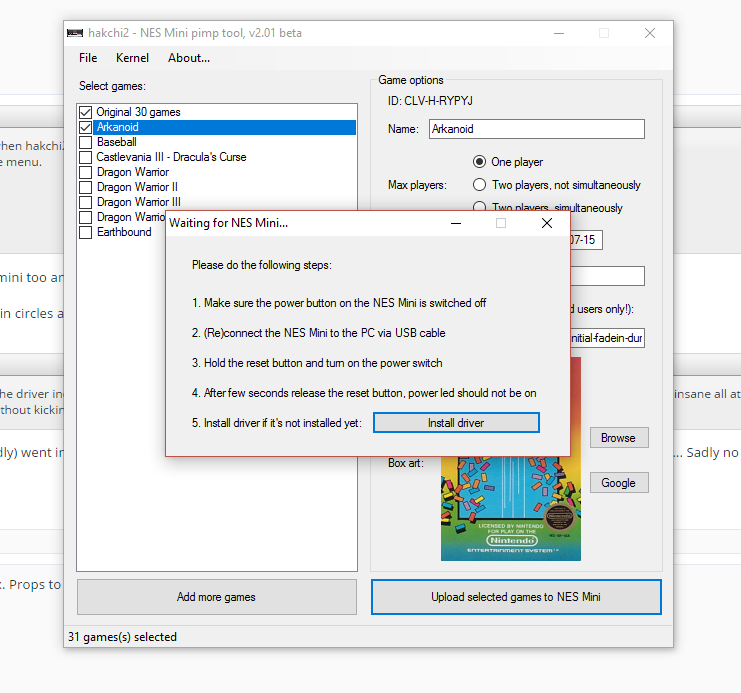
Did anyone got past the "waiting for the nes mini..." window problem?

ce4cae2402d8aeb0e781555786a86b34.png
 

Site & Scene News

Popular threads in this forum