Homebrew Official [Release] kit-kat 2.0 - Wireless Capture-card

  • Thread starter Thread starter pman152
  • Start date Start date
  • Views Views 470,523
  • Replies Replies 1,324
  • Likes Likes 103
i'm also getting the parameter count mismatch, and i just downloaded the last version to get an update.. all i did was add my 3ds ip and i get errors, but i click continue and it works fine afterwards

Yeah after a few attempts and hitting continue it started to work, and the picture quality is much better now.
 
so, also.. does this not work in combination with NTR cheat plugins? when i open Sun all movement stops unless i open the home menu
 
=c the file pushing isn't working for me. it keeps saying i have to run it in admin mode when i know i have it running in admin mode + i have admin mode checked in capabilities.
 
so, i'm assuming Su/Mot works exactly like or/as where you have to be connected to the internet for it to work?

EDIT: works when i'm connected to the festival plaza, but freezes up again when i leave
 
Geez, already a new update?
So I just downloaded it, what is this push feature? @ShinyMK

Edit: @LiveLatios No, just launch NTR 3.4, boot into game, load game, press home and start the program.
Unlike Nitrostream you can go online without having to push the patch that disables online to play offline, since CTR-V does a NFC patch

You may have to reboot the 3ds and NTR 3.4 a few time to get it to work properly.
 
Last edited by Xanek,
so, i'm assuming Su/Mot works exactly like or/as where you have to be connected to the internet for it to work?

EDIT: works when i'm connected to the festival plaza, but freezes up again when i leave


use luma to run a NFC-disable code.isp patch for sun and moon. you can find them on this tutorial

or alternatively you can check the first post and follow the directions there to run the (same?) patch for sun and moon via ctr-v? (i'm unsure if that's still in ctr-v at this point)
 
Last edited by donneee,
use luma to run a NFC-disable code.isp patch for sun and moon. you can find them on this tutorial

or alternatively you can check the first post and follow the directions there to run the (same?) patch for sun and moon via ctr-v? (i'm unsure if that's still in ctr-v at this point)
i guess i won't steam sun then, because there are so many links behind that link and one of them requires me to download another sun CIA so i can decrypt it... is there a "i can't be fucked with waiting 4 hours for a decrypter and hex editor" option?

they also seem way too complicated for me to do when i'm tired like this (which is all the time)
EDIT: i guess i was too tired to actually find the tutorial you were talking about
 
Last edited by ,
i guess i won't steam sun then, because there are so many links behind that link and one of them requires me to download another sun CIA so i can decrypt it... is there a "i can't be fucked with waiting 4 hours for a decrypter and hex editor" option?

they also seem way too complicated for me to do when i'm tired like this (which is all the time)
EDIT: i guess i was too tired to actually find the tutorial you were talking about

umm? do you not have an adblocker? not to mention it's just a mega download. the only sections you need to worry about at this point are the NFC patch and the directions on the bottom. i can upload it to a google drive if you want that. i don't like using CTR-V to do the nfc patch cause it's just a few extra steps i have to do when i can just disable it with luma.
 
umm? do you not have an adblocker? not to mention it's just a mega download. the only sections you need to worry about at this point are the NFC patch and the directions on the bottom. i can upload it to a google drive if you want that. i don't like using CTR-V to do the nfc patch cause it's just a few extra steps i have to do when i can just disable it with luma.
i'm not an idiot.. i don't fall for those giant download buttons, it's just i was too tired and went full tl;dr
 
wait... it's not even an option
0GA6KAG.jpg
 
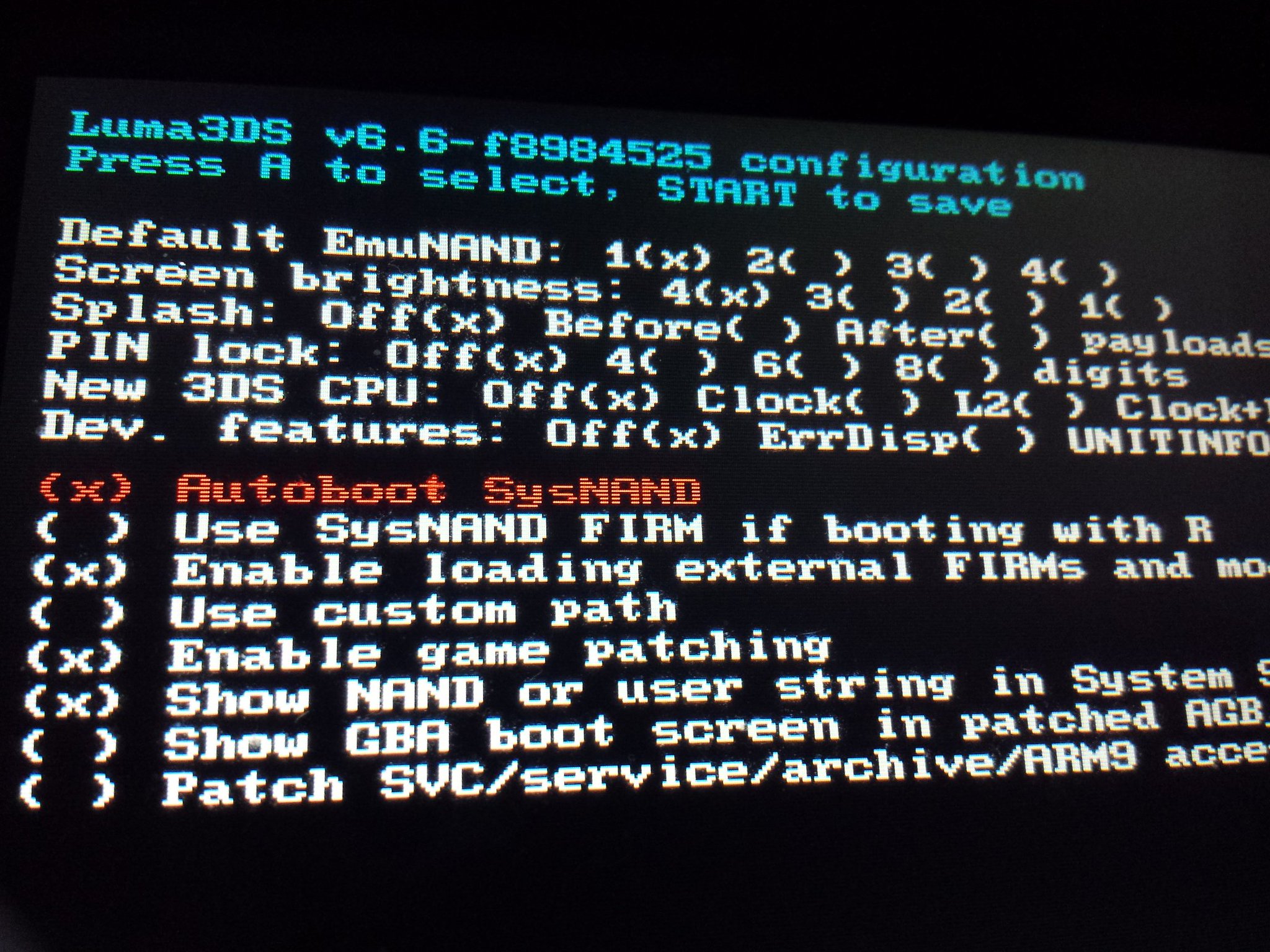
oh your not using the correct luma.

the correct luma is the nightly version. you don't have option to
" (x) Enable game patching "

it literally says that. update luma to the lastest nightly version should be
C0jfguPXEAAmABd.jpg:large
 
Last edited by donneee,
oh your not using the correct luma.

the correct luma is the nightly version. you don't have option to
" (x) Enable game patching "

it literally says that. update luma to the lastest nightly version should be
C0jfguPXEAAmABd.jpg:large
that's not the latest nightly for me, and i don't have the option for nightly, just hourly... which is 5e4fd532
 
which luma updater are you using?

*Edit: hmm they they take out game patching on the newest build? :sad:*
 
Last edited by donneee,

Site & Scene News

Popular threads in this forum