Homebrew [Discontinued] TWLoader - CTR-mode NDS app

  • Thread starter Thread starter RocketRobz
  • Start date Start date
  • Views Views 1,818,949
  • Replies Replies 9,252
  • Likes Likes 147
Status
Not open for further replies.
R4i-SDHC v1.4.x folder from this pack:-
DS Game Forwarder pack (Acekard 2(i), M3DS Real, R4i-SDHC v1.4.x)

I've also tried R4i-SDHC folder from this pack but seeing as there is no R4.dat file in them they refuse to boot on my device:-
DS Game Forwarder pack (DSTT, R4i Gold, R4i-SDHC, SC DSONE)
If your card is an R4i-SDHC v1.4.x, did you go to TWLoader settings, and set it in Flashcard select?
 
Hey, i need some help :/

When i try to start a retail ROM, i only get the boot animation and than a whitescreen, nothing else

What i did:
  • the files for the version 1.4.2 are in the root of my 3ds's SDcard
  • i installed both cia's of 1.4.2
  • the flashcard files are on the fashcard's SDcard (M3DS Real)
  • i created the Super Mario 64 DS.ini on the 3ds's SDcard in "root"/nds/flashcard
Code:
[FLASHCARD-ROM]
NDS_PATH = Games/Super Mario 64 DS.nds
  • i copied the Super Mario 64 DS.nds ROM on my flashcard's SDcard in "root"/Games
  • i set my flashcard settings in TWLoader settings to M3DS Real
what am i doing wrong, or do i have the wrong flashcard?

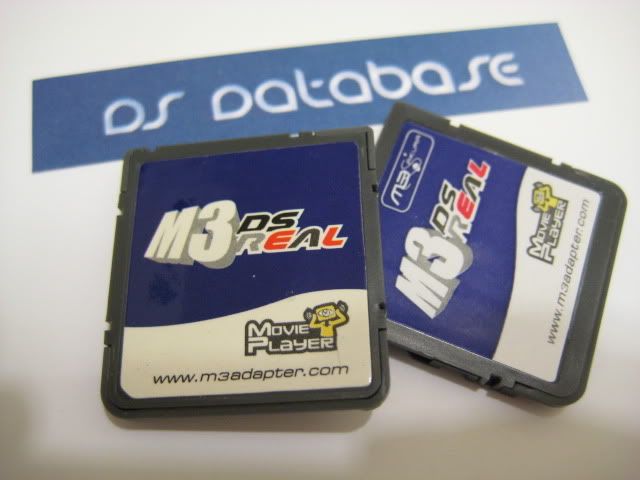
the left one is the M3DS Real, but i have the right one, the M3Sakura

IMG_2932.jpg
 
Hey, i need some help :/

When i try to start a retail ROM, i only get the boot animation and than a whitescreen, nothing else

What i did:
  • the files for the version 1.4.2 are in the root of my 3ds's SDcard
  • i installed both cia's of 1.4.2
  • the flashcard files are on the fashcard's SDcard (M3DS Real)
  • i created the Super Mario 64 DS.ini on the 3ds's SDcard in "root"/nds/flashcard
Code:
[FLASHCARD-ROM]
NDS_PATH = Games/Super Mario 64 DS.nds
  • i copied the Super Mario 64 DS.nds ROM on my flashcard's SDcard in "root"/Games
  • i set my flashcard settings in TWLoader settings to M3DS Real
what am i doing wrong, or do i have the wrong flashcard?

the left one is the M3DS Real, but i have the right one, the M3Sakura
IMG_2932.jpg
  1. Is the card inserted correctly?
  2. Is Reset Slot-1 set to on?
I wonder if CycloDS support would be feasable..
Nope.

--------------------- MERGED ---------------------------

They try to read their data from NAND, not the SD.

--------------------- MERGED ---------------------------

If you already tried the Non-1.4.x version of the pack, and you set the flashcard to the Non-1.4.x version in settings, your card is incompatible.
 
This app just white screens now evertime i try to select anything from the nds folder. Was working earlier after first upgrading to this new version. Was testing neods, gameyob and stella ds all worked wonderful. Now everytime i select anything from the menu it hangs on white screen. Ive re installed and deleted what i i could from previously installed but no luck. Yes ive installed both cias again but no luck in booting anymore. Seems strange. Is there anything else in twlnand i need to delete for a fresh re install?
 
This app just white screens now evertime i try to select anything from the nds folder. Was working earlier after first upgrading to this new version. Was testing neods, gameyob and stella ds all worked wonderful. Now everytime i select anything from the menu it hangs on white screen. Ive re installed and deleted what i i could from previously installed but no luck. Yes ive installed both cias again but no luck in booting anymore. Seems strange. Is there anything else in twlnand i need to delete for a fresh re install?
So this problem could potently not relate to my flashcard
 
So this problem could potently not relate to my flashcard
I dunno. Im playing the ds homebrew emulators from the nds folder internal on my 3ds. Thing is it worked perfect at first and now just hang on white screen after the dsi boot screen
 
This app just white screens now evertime i try to select anything from the nds folder. Was working earlier after first upgrading to this new version. Was testing neods, gameyob and stella ds all worked wonderful. Now everytime i select anything from the menu it hangs on white screen. Ive re installed and deleted what i i could from previously installed but no luck. Yes ive installed both cias again but no luck in booting anymore. Seems strange. Is there anything else in twlnand i need to delete for a fresh re install?
Strange. Everything works fine for me. Try turning console output On (with Debug).
 
Status
Not open for further replies.

Site & Scene News

Popular threads in this forum