Homebrew MenuHax 2.0 Custom Main-Screen Images

  • Thread starter Thread starter SomeGamer
  • Start date Start date
  • Views Views 333,026
  • Replies Replies 798
  • Likes Likes 21
It is about time this thread gets an update.. isn`t? :D

This is for all the GBAtemp (and menuhax) fans out there!
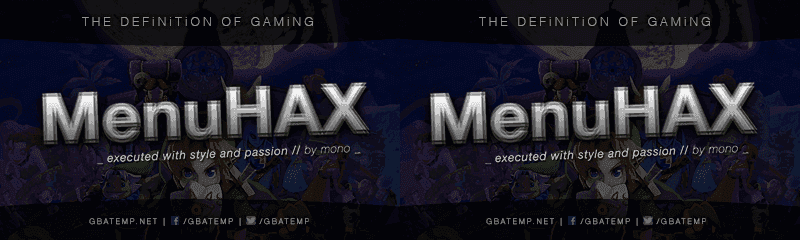
I created couple of (7-layer) menuhax 3d bootscreens.

Enjoy and spread... Long live GBAtemp!

// GBAtemp-Version
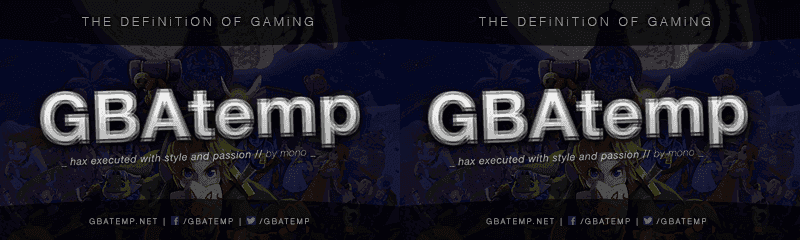
imagedisplay_gbatemp.png


// menuhax-Version

imagedisplay_menuhax.png


... Created with Photoshop ... Rename to imagedisplay.png ........
 
Last edited by mon0,
Made these to fit my menu hotkeys. As a warning, Reisyukaku did not give me a proper logo. This ReiNand logo isnt perfect as I took it from a black background, so you may notice tiny dots of black. But I've fixed what I could (Shouldn't be noticable). More credits at the bottom.
Now, show your 9.6+ ReiNand spirit!

3D letters image:
Pmk0fLo.png

2D:
8RCAntr.png

2D with menuhax icon:
bejzMQt.png


Credits:
  • MythosXe for button prompts
  • NaviD93 for MenuHax icon
  • Reisyukaku for ReiNand logo
If I borrowed assets from you, I'd be fine with taking the images down by request.
Before anyone asks, I do not have the PSD.
This is beautiful, thanks for sharing! A great first post, welcome to GBAtemp!
 
  • Like
Reactions: Shadowfied
Hey guys anyway to get rid of the debug/changing colors on the bottom screen with a splash or just a black screen.
 
Hey guys anyway to get rid of the debug/changing colors on the bottom screen with a splash or just a black screen.
i guess, i doubt ylsw8 needs to actually change the colors of the screen, but unless someone does it for you or you learn how to do it yourself, yeah you'll just have to settle with it :)
 
i guess, i doubt ylsw8 needs to actually change the colors of the screen, but unless someone does it for you or you learn how to do it yourself, yeah you'll just have to settle with it :)

So would that part be located in menuhax or the ropbin payload(2.5 ninjhax) since the payload in menuhax is the same one from Smea's page. I'm still learning basic coding, but I can edit code and compile, if someone could point out where to make the changes.

I tried searching the ninjhax source code but all I could find was the final debug screen with the bunch of string.
 
Last edited by suhaib10,
Just some 3D picture I found on google. I cropped it and formatted it for the 3DS. Feel free to throw whatever you want on it or use as-is.

K6wSe5J.png
 
imagedisplay.png


imagedisplay3.png


Credits to @MythosXe and @ItsYogSothoth
/!\ If you don't want me to share an edited version of your work, please tell me, I'll delete it asap. /!\


I didn't create anything, I just took the custom image by ItsYogSothoth and use a custom version of MythosXe buttons!
I made some adjustments, the first one is for people who want to have the buttons at the bottom. It hides a part of the best hero that was created on PSX, Crash Bandicoot.
I tried to avoid that and put the buttons at the top. (second version)
But it hides Latiku...
3rd version, it doesn't hide Latika but it is a bit strange because I can't write "Boot Sysnand", it's too long.
I'll probably rework that to give a 4th version, a mix between the two last ones...

EDIT: I removed the third version because it didn't look good and I made a mistake with the colour of the buttons...
Here is the final version with buttons at the top.
I cheated a little, I change the font size, it was 12, it's now 11,5. And it fits in the buttons.

Here it is:

imagedisplay_final.png
 

Attachments

  • imagedisplay2.png
    imagedisplay2.png
    44 KB · Views: 415
Last edited by Ekaitz,
View attachment 35428

View attachment 35433


Credits to @MythosXe and @ItsYogSothoth
/!\ If you don't want me to share an edited version of your work, please tell me, I'll delete it asap. /!\


I didn't create anything, I just took the custom image by ItsYogSothoth and use a custom version of MythosXe buttons!
I made some adjustments, the first one is for people who want to have the buttons at the bottom. It hides a part of the best hero that was created on PSX, Crash Bandicoot.
I tried to avoid that and put the buttons at the top. (second version)
But it hides Latiku...
3rd version, it doesn't hide Latika but it is a bit strange because I can't write "Boot Sysnand", it's too long.
I'll probably rework that to give a 4th version, a mix between the two last ones...

EDIT: I removed the third version because it didn't look good and I made a mistake with the colour of the buttons...
Here is the final version with buttons at the top.
I cheated a little, I change the font size, it was 12, it's now 11,5. And it fits in the buttons.

Here it is:

View attachment 35437
Nice dude. I've made that picture from wallpaper found on my PC. So share wherever you want ;)
 
  • Like
Reactions: Ekaitz

Site & Scene News

Popular threads in this forum