Hacking NOOB PARADISE - ask away

  • Thread starter Thread starter richglix
  • Start date Start date
  • Views Views 1,681,724
  • Replies Replies 15,247
  • Likes Likes 14
Can every Wii to date be full soft modded to play all pirated games, emulators GC games (i know blue one cant because it has no GC controller ports) Black and white Wii? Is hack now available on all Wii consoles today?
I think the answer is Yes (NTSC Red Wii here), except for Dragon Quest X Online JAP :dry:
 
Is it possible to create two nands for uneek+di? I have read that having too much games on the nand makes it not boot up, and it doesn't. I've tried. The Press A thing pops up and it freezes after that, so how do I set up two nands for uneek+di?

Edit: Trying sneek but it's gonna take a while.
 
Last edited by Terribaddy,
Can I use a Seagate 3tb hard drive if I dedicate 500GB to wbfs?

Edit: Nvm. I was able to just plug and play using wiiflow. Glad I didn't have to do anything special to my hard drive since I already have other stuff on it :D
 
Last edited by Jehuty25,
Is it possible to create two nands for uneek+di? I have read that having too much games on the nand makes it not boot up, and it doesn't. I've tried. The Press A thing pops up and it freezes after that, so how do I set up two nands for uneek+di?

Edit: Trying sneek but it's gonna take a while.

Edit2: Making 4 tinier nands fixed it. Using uneek because SD card is too small for sneek.
 
Hi Jumokesi, you should download WiiMC see here: http://www.wiimc.org/
NTFS should be fine, don't go formatting anything :)

Thank you so much!! :yay: I got WiiMC to install and work properly! However, some of the video files play all choppy or they wont work at all. It takes me to a black screen with white lettering and at the bottom says "Reloading in 8 seconds" but it never actually loads the movie. I found and installed MplayerCE and it plays the movies and sound fine, but half the screen is distorted and stretched out to the side making the movie unwatchable. I tried another movie and it had no sound.
(All my movies play correctly and have sound when played on my computer -they are all MP3/MP4 video format).
Im so close!! Is there anything else I can install or use that wont interfere with the playback or quality of the movies??! Or is it just something I have to deal with!?

Thank You again!!!
 
Hi Jumokesi,

.....no, its not something you have to put up with. The two apps you have are the best media players for the wii, and both should handle MP4's okay.
Do check you are set up correctly for WiiMC (see: http://www.wiimc.org/documentation/) also seem to remember there were a couple of versions/mods of MplayerCE which may have needed particular cIOS's
good luck
 
Hello,

Some games load while others do not. When I attempt to load a game in USB LOADER GX, there is no preview screen when i click the game cover. "0.00GB" is seen, and clicking "START" sends me back to the Wii Channel Menu.

Games are saved on a 64gb SD-XC (Class 10) that is plugged into a card reader on PORT 0, NTFS. Games saved as native WBFS extension. Out of 32 games loaded on the HDD, 16 are playable.

TROUBLESHOOTING
  • I dl'd from a few other sources to be sure it was not a single batch of games gone bad.
  • Mighty Loader sends me back to Wii Channel Menu
  • USB Loader GX sends me back to Wii Channel Menu
  • CFG Loader prints "bad magic" when loading several of the games.
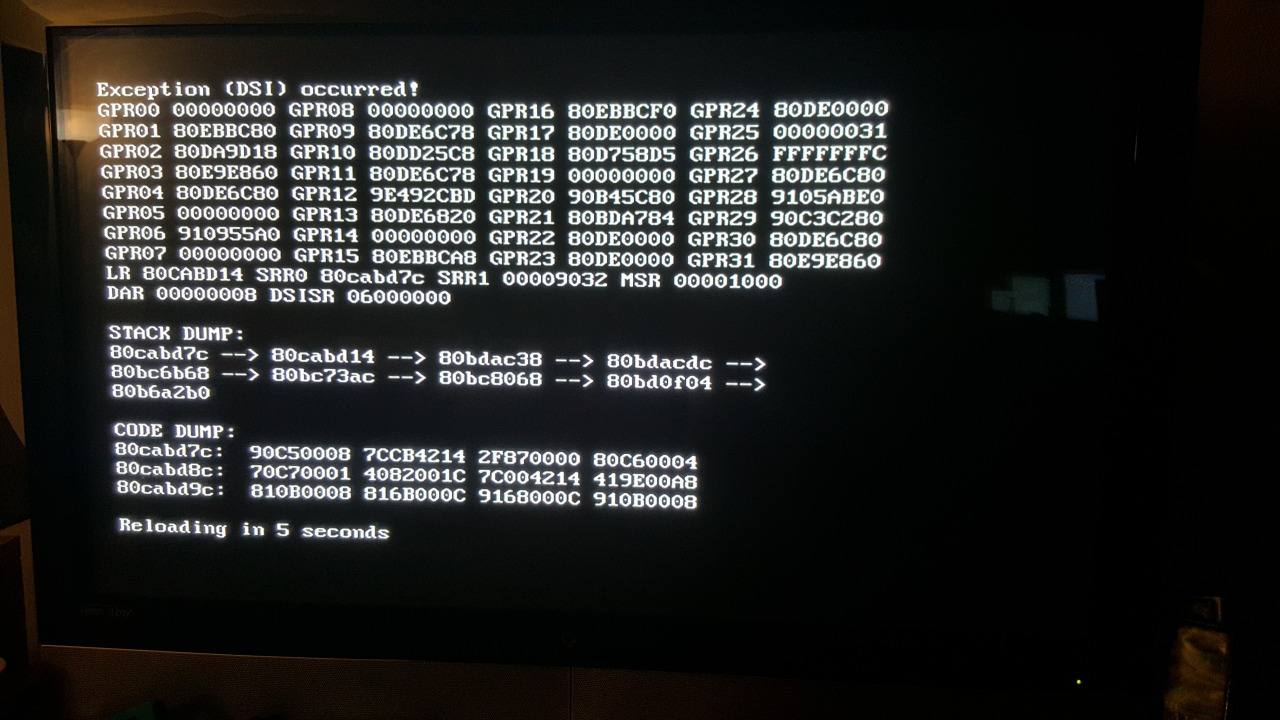
  • Wiiflow prints out an error dump for every game that fails to load. It is always the same error (see link below)

tumblr_ntrypdCON71qa34keo1_1280.jpg


I am leaning the issue to be an IOS that may not be loaded? Since I am new to this, I am struggling either to find the answer, or ask the right question when I search the internet. I would imagine the issue may help me as to why my 750gb HDD can not be seen by any of the loaders as well. Any assistance would be greatly appreciated. Thank you.

SysCheck v2.3.2 HacksDen Edition by JoostinOnline, Double_A, R2-D2199, and Nano
...runs on vIOS58 (rev 6176).

Region: NTSC-U
System Menu 4.3U (v513)
Priiloader installed
Drive date: 12.18.2008
Homebrew Channel 1.1.2 running on IOS58

Hollywood v0x21
Console ID: 151170044
Console Type: Wii
Shop Channel Country: United States (49)
Boot2 v4
Found 94 titles.
Found 55 IOS on this console. 4 of them are stub.

IOS3 (rev 65280): Stub
IOS4 (rev 65280): Stub
IOS9 (rev 1034): No Patches
IOS10 (rev 768): Stub
IOS11 (rev 16174): Trucha Bug, NAND Access
IOS12 (rev 526): No Patches
IOS13 (rev 1032): No Patches
IOS14 (rev 1032): No Patches
IOS15 (rev 1032): No Patches
IOS16 (rev 54321): Trucha Bug, ES Identify, Flash Access, NAND Access
IOS17 (rev 1032): No Patches
IOS20 (rev 16174): Trucha Bug, NAND Access
IOS21 (rev 1039): No Patches
IOS22 (rev 1294): No Patches
IOS28 (rev 1807): No Patches
IOS30 (rev 16174): Trucha Bug, NAND Access
IOS31 (rev 3608): No Patches
IOS33 (rev 3608): No Patches
IOS34 (rev 3608): No Patches
IOS35 (rev 3608): No Patches
IOS36 (rev 3608): No Patches
IOS37 (rev 5663): No Patches
IOS38 (rev 4124): No Patches
IOS40 (rev 16174): Trucha Bug, NAND Access
IOS41 (rev 3607): No Patches
IOS43 (rev 3607): No Patches
IOS45 (rev 3607): No Patches
IOS46 (rev 3607): No Patches
IOS48 (rev 4124): No Patches
IOS50 (rev 16174): Trucha Bug, NAND Access
IOS51 (rev 4864): Stub
IOS52 (rev 16174): Trucha Bug, NAND Access
IOS53 (rev 5663): No Patches
IOS55 (rev 5663): No Patches
IOS56 (rev 5662): No Patches
IOS57 (rev 5919): No Patches
IOS58 (rev 6176): USB 2.0
IOS60 (rev 16174): Trucha Bug, NAND Access
IOS61 (rev 5662): No Patches
IOS62 (rev 6430): No Patches
IOS70 (rev 16174): Trucha Bug, NAND Access
IOS80 (rev 16174): Trucha Bug, NAND Access
IOS90 (rev 54321): Trucha Bug
IOS202[60] (rev 65535, Info: hermesrodries-v6): Trucha Bug, NAND Access, USB 2.0
IOS222[38] (rev 4, Info: hermes-v4): Trucha Bug, ES Identify, NAND Access, USB 2.0
IOS223[38+37] (rev 4, Info: hermes-v4): Trucha Bug, ES Identify, NAND Access, USB 2.0
IOS224[57] (rev 65535, Info: hermesrodries-v6): Trucha Bug, NAND Access, USB 2.0
IOS236[36] (rev 65535, Info: rev 3351): Trucha Bug, ES Identify, NAND Access
IOS245[37] (rev 21008, Info: d2x-v8final): Trucha Bug, NAND Access, USB 2.0
IOS246[38] (rev 21008, Info: d2x-v8final): Trucha Bug, ES Identify, NAND Access
IOS247[53] (rev 21008, Info: d2x-v8final): Trucha Bug, NAND Access, USB 2.0
IOS248[56] (rev 21006, Info: d2x-v6): Trucha Bug, NAND Access, USB 2.0
IOS249[56] (rev 21010, Info: d2x-v10beta53-alt): Trucha Bug, NAND Access, USB 2.0
IOS250[57] (rev 21010, Info: d2x-v10beta53-alt): Trucha Bug, NAND Access, USB 2.0
IOS254 (rev 65281): BootMii
BC v6
MIOS v10
Report generated on 08/28/2015.

 
Are there any unreleased download games? I noticed that there seem to be some for the Wii U, and was wondering if this was the case here?
 
Thank you so much!! :yay: I got WiiMC to install and work properly! However, some of the video files play all choppy or they wont work at all. It takes me to a black screen with white lettering and at the bottom says "Reloading in 8 seconds" but it never actually loads the movie. I found and installed MplayerCE and it plays the movies and sound fine, but half the screen is distorted and stretched out to the side making the movie unwatchable. I tried another movie and it had no sound.
(All my movies play correctly and have sound when played on my computer -they are all MP3/MP4 video format).
Im so close!! Is there anything else I can install or use that wont interfere with the playback or quality of the movies??! Or is it just something I have to deal with!?

Thank You again!!!
I used to use WiiMC exclusively to watch my movies, I used to stream them from my pc to my Wii. And then a few years ago I started to get video files that wouldn't work with WiiMC. So I quit using it. Remember that the Wii is not capable of HD content, and I think that video files of a high quality wont work with WiiMC. If you wanted to convert your video files to work with WiiMC then look around at the WiiMC website.
 
Is there any way to make Channels on the system menu start automatically, without the "Back / Start" screen? I can't seem to come up with anyone even asking about this when I search.

Also, is there a way to skip (or automatically press "A" at) the safety reminder when starting a game (wear the wrist strap, etc.) from a USB loader? I'm using cfg Loader right now but if a different one has this I'd switch. When I searched for this I found a lot of people asking, but the answer seemed to be that it *might* be possible using per-game hacks.
 
Can someone explain wads to me? Specifically, if I have a vc game as a wad, put it on my SD card then use Wad Manager to install it, so I need to then keep it on my SD card? Or has it been completely copied across to the Wii itself?
 
  • Like
Reactions: doorbell8423
Can someone explain wads to me? Specifically, if I have a vc game as a wad, put it on my SD card then use Wad Manager to install it, so I need to then keep it on my SD card? Or has it been completely copied across to the Wii itself?
WAD's are just installation files (just like .exe files on PC, they are just called WAD), you can delete them from your SD with no fear. In WAD folder in your SD card you just put WADS of VC, Wiiware etc.. titles you want to install and that delete them or not if you don't want to, i mean i keep mine because i'm lazy to delete them lol, or if i need them in future (but i never did) but when i want to install new things or my card becomes full i delete them with no second thought. So yes, you can delete WADS from wad folder on SD,

BUT, if you install that WAD title from SD into Wii internal memory, and than go to settings --> channels and move them to your SD card, they Will be on SD card but not as wads or in wad folder, but in "private" folder on root of your SD card, so if you moved apps, games from system memory to SD card via settings, you cant play those games without SD or if you delete folder called private from SD card root. :)

PS. i just found this for you to read..i must read it also, im interested..i just know about wads from what i figured, but this is great to read in details: http://wiibrew.org/wiki/Wad

--------------------- MERGED ---------------------------

Anyway, Does someone knows what does W A D stands for?? i know IOS means input output system... but what WAD means???
 
Last edited by doorbell8423,
  • Like
Reactions: ScouserInExile
Hi guys I need to know one thing, since my wii is not going to be online can I download all files I need for emulation/usb loaders/hacks on my computer and put them on a SD card or usb flash drive and add them that way to my wii? I can't go online with my wii because of my router and I know the faq said that you need to be online through the wii for it to download the updates and everything else.
 
Hi guys I need to know one thing, since my wii is not going to be online can I download all files I need for emulation/usb loaders/hacks on my computer and put them on a SD card or usb flash drive and add them that way to my wii? I can't go online with my wii because of my router and I know the faq said that you need to be online through the wii for it to download the updates and everything else.
If you want to mod your Wii with latest stuff, just use ModMii PC tool to download all the stuff, emulators and homebrew things..
Its a software that guides you through several questions and than downloads things and generates a guide automatically based on your choices...

You can download and see tutorial for ModMii from here: https://gbatemp.net/threads/modmii-for-windows-official-support-topic.207126/
:)

Also, you can download stuff for your wii like VC wii ware ios etc with "NUS downloader"...
 

Site & Scene News

Popular threads in this forum