Hacking [GUIDE] Upgrading 8.1.0-0J to 9.2.0-20J

  • Thread starter Thread starter yifan_lu
  • Start date Start date
  • Views Views 157,785
  • Replies Replies 759
  • Likes Likes 25
I can also confirm success with this method... :lol:
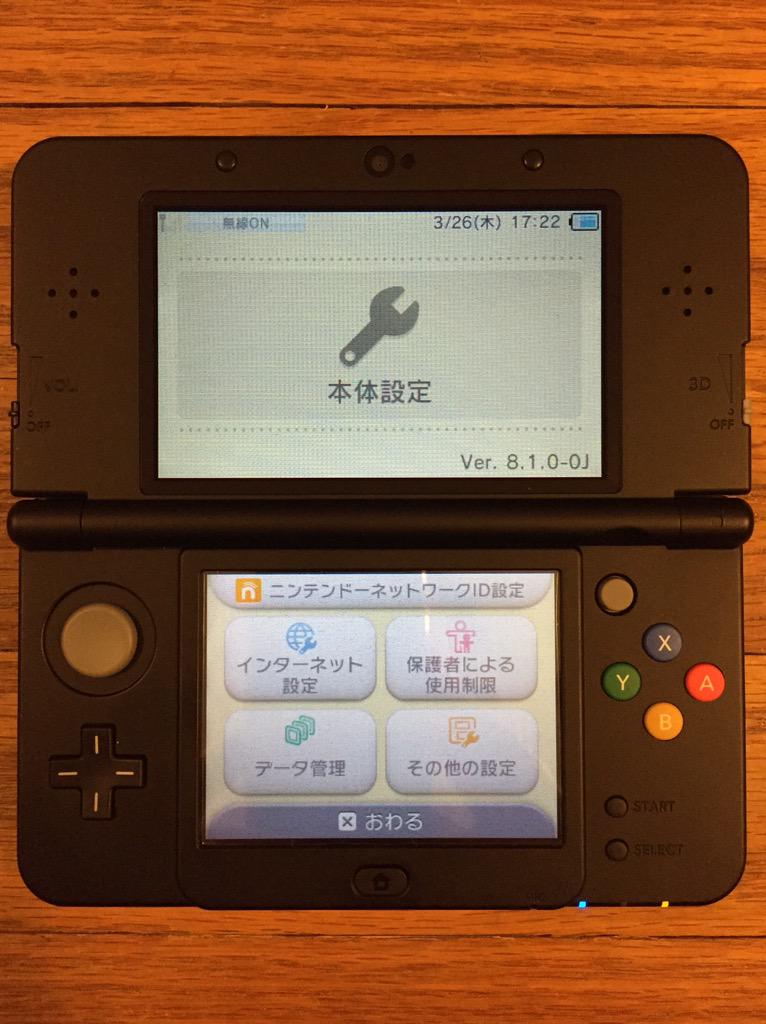
Before and After... ^_^
CBEO0qfUQAAZM3f.jpg
CBEO0qfU8AAzNuT.jpg
 
is there any benefit from upgrading to 8.1j to 9.2j? i currently have a 8.1j and im fine with it. best 3ds ive ever owned in fact
 
WOW!! Is it possible for you guide me through this?? I'm willing to pay for it.

Basically, you need to (FOR 8.1.0-0J TO 9.2.0-20J ONLY!):
1. Set up a webserver to locally host PHP. I used EasyPHP on Windows 8.1: http://www.easyphp.org/easyphp-devserver.php

2. Once you have your webserver running, you need to host 5 main files:
a. GetAccountStatus_response.xml: https://gist.github.com/yifanlu/e0787ca48473cdf992f8
*. You need to change the NusURL value to match the path of your webserver host!
b. GetSystemCommonETicket_response.xml: https://gbatemp.net/threads/guide-upgrading-8-1-0-0j-to-9-2-0-20j.384960/page-2#post-5414650
c. GetSystemTitleHash_response.xml: https://gist.github.com/yifanlu/3a6fab2ea14a2b2f081f
*. You need to change the TitleHash value to match the one in GetSystemUpdate_response.xml: 8564645C8A1B36E6E13F93D6C5348763
d. GetSystemUpdate_response.xml: https://gist.github.com/yifanlu/bdcd22073cb5096942bb
e. update.php: https://gbatemp.net/threads/guide-upgrading-8-1-0-0j-to-9-2-0-20j.384960/#post-5414057
*. You will need to add an elseif statement for the GetSystemCommonETicket case that returns the GetSystemCommonETicket_response.xml file.

3. Once your webserver is all configured, boot up NTR-CFW on your 8.1.0-0J New3DS: https://gbatemp.net/threads/release...gion-free-cfw-on-jp-eu-us-aus-new-3ds.385142/

4. Once you are in the NTR-CFW environment, press X+Y simultaneously to bring up the system menu. Enable the debugger from there.

5. Launch the NTRclient debugger application: https://gbatemp.net/threads/release...st-public-real-time-debugger-for-n3ds.384858/

6. In the NTRclient application, run the following 5 commands:
a. connect('#.#.#.#', 8000)
*. Replace #.#.#.# with the IP address of your New3DS.
b. listprocess()
c. write(0x15E424, tuple(map(ord, "http://hostname/update.php\0")), pid=0x25)
d. write(0x15E0EC, tuple(map(ord, "http://hostname/GetAccountStatus_response.xml\0")), pid=0x25)
e. write(0x15E463, tuple(map(ord, "http://hostname/GetAccountStatus_response.xml\0")), pid=0x25)
*. In all of these, replace hostname with the path to your webserver host!

7. Once you have run all the patching commands, launch System Settings on the New3DS.
*. DO NOT EXIT SYSTEM SETTINGS OR YOU WILL HAVE TO REPERFORM ALL PREVIOUS PATCHING STEPS!!!

8. Perform a system update as normal.

9. When the update is complete, the system should reboot into 9.2.0-20J (with new NTR 2.1 version, the system no longer hangs on reboot!).

I found this whole exercise to be a nice learning experience in web SOAP calls and how the 3DS update process works. It was very interesting and I thank everyone in this thread for contributing to my success!

Good luck!
 
Basically, you need to (FOR 8.1.0-0J TO 9.2.0-20J ONLY!):
1. Set up a webserver to locally host PHP. I used EasyPHP on Windows 8.1: http://www.easyphp.org/easyphp-devserver.php

2. Once you have your webserver running, you need to host 5 main files:
a. GetAccountStatus_response.xml: https://gist.github.com/yifanlu/e0787ca48473cdf992f8
*. You need to change the NusURL value to match the path of your webserver host!
b. GetSystemCommonETicket_response.xml: https://gbatemp.net/threads/guide-upgrading-8-1-0-0j-to-9-2-0-20j.384960/page-2#post-5414650
c. GetSystemTitleHash_response.xml: https://gist.github.com/yifanlu/3a6fab2ea14a2b2f081f
*. You need to change the TitleHash value to match the one in GetSystemUpdate_response.xml: 8564645C8A1B36E6E13F93D6C5348763
d. GetSystemUpdate_response.xml: https://gist.github.com/yifanlu/bdcd22073cb5096942bb
e. update.php: https://gbatemp.net/threads/guide-upgrading-8-1-0-0j-to-9-2-0-20j.384960/#post-5414057
*. You will need to add an ifelse statement for the GetSystemCommonETicket case that returns the GetSystemCommonETicket_response.xml file.

3. Once your webserver is all configured, boot up NTR-CFW on your 8.1.0-0J New3DS: https://gbatemp.net/threads/release...gion-free-cfw-on-jp-eu-us-aus-new-3ds.385142/

4. Once you are in the NTR-CFW environment, press X+Y simultaneously to bring up the system menu. Enable the debugger from there.

5. Launch the NTRclient debugger application: https://gbatemp.net/threads/release...st-public-real-time-debugger-for-n3ds.384858/

6. In the NTRclient application, run the following 5 commands:
a. connect('#.#.#.#', 8000)
*. Replace #.#.#.# with the IP address of your New3DS.
b. listprocess()
c. write(0x15E424, tuple(map(ord, "http://hostname/update.php\0")), pid=0x25)
d. write(0x15E0EC, tuple(map(ord, "http://hostname/GetAccountStatus_response.xml\0")), pid=0x25)
e. write(0x15E463, tuple(map(ord, "http://hostname/GetAccountStatus_response.xml\0")), pid=0x25)
*. In all of these, replace hostname with the path to your webserver host!

7. Once you have run all the patching commands, launch System Settings on the New3DS.
*. DO NOT EXIT SYSTEM SETTINGS OR YOU WILL HAVE TO REPERFORM ALL PREVIOUS PATCHING STEPS!!!

8. Perform a system update as normal.

9. When the update is complete, the system should reboot into 9.2.0-20J (with new NTR 2.1 version, the system no longer hangs on reboot!).
I found this whole exercise to be a nice learning experience in web SOAP calls and how the 3DS update process works. It was very interesting and I thank everyone in this thread for contributing to my success!

Good luck!


Thanks for posting the steps! It's still really hard to understand.. But I'll try my best.
 
*. You will need to add an ifelse statement for the GetSystemCommonETicket case that returns the GetSystemCommonETicket_response.xml file.

Can you please clarify this? I believe I have everything set up to this point.

And how would I find the IP address of my 3DS? There's quite a few devices on my LAN.
 
Can you please clarify this? I believe I have everything set up to this point.

Like this?
PHP:
if($header == "SOAPAction") {
if($value == "urn:nus.wsapi.broadon.com/GetSystemUpdate") {
fwrite($myfile, "GetSystemUpdate detected\n");
echo file_get_contents("GetSystemUpdate_response.xml");
} elseif ($value == "urn:nus.wsapi.broadon.com/GetSystemTitleHash") {
fwrite($myfile, "GetSystemTitleHash detected\n");
echo file_get_contents("GetSystemTitleHash_response.xml");
} elseif ($value == "urn:nus.wsapi.broadon.com/GetSystemCommonETicket") {
fwrite($myfile, "GetSystemCommonETicket detected\n");
echo file_get_contents("GetSystemCommonETicket_response.xml");
}
}
 
Can you please clarify this? I believe I have everything set up to this point.

And how would I find the IP address of my 3DS? There's quite a few devices on my LAN.

The PHP code snippet given by clock should work fine. ^_^

Finding the IP of your 3DS would vary from router to router, but if you look at the table of wireless devices connected to your router, you should be able to match the MAC address of your 3DS to a device in that list (assuming your router also gives the MAC/physical address in the list of connected devices).
 
'null' messages are normal. Good luck! :yaynds:

Sweet. If the NT debugger disconnects after I get into system settings, is that still ok or is everything patched by then?

This happened when I booted the settings:

starting applet: 0004001000020000
FSUSER_OpenDirectory failed, ret=c8804478FSUSER_OpenDirectory failed, ret=c8804478
patching smdh
Unable to read data from the transport connection: A connection attempt failed because the connected party did not properly respond after a period of time, or established connection failed because connected host has failed to respond.
Server disconnected.
 
Sweet. If the NT debugger disconnects after I get into system settings, is that still ok or is everything patched by then?

This happened when I booted the program:

Yeah, freaked me out a little too, but also normal. System Settings seems to disconnect network connections on launch.
 
Well crap. I get an error when trying to update and the 3DS restarts.

Tried twice so far, and I have these two entries in the log:

Host: 192.168.1.7
User-Agent: CTR NUP 040600 Mar 14 2012 13:33:20
Connection: Keep-Alive
Accept-Charset: UTF-8
Content-type: text/xml; charset=utf-8
SOAPAction: urn:nus.wsapi.broadon.com/GetSystemTitleHash
GetSystemTitleHash detected
com.broadon.RequesterName: unitTest
com.broadon.RequesterHash: af99fbe891a31659a4d12efa21377c5d
com.broadon.RequesterTimestamp: 1427444002063
Transfer-Encoding: chunked

Host: 192.168.1.7
User-Agent: CTR NUP 040600 Mar 14 2012 13:33:20
Connection: Keep-Alive
Accept-Charset: UTF-8
Content-type: text/xml; charset=utf-8
SOAPAction: urn:nus.wsapi.broadon.com/GetSystemTitleHash
GetSystemTitleHash detected
com.broadon.RequesterName: unitTest
com.broadon.RequesterHash: 15979877c523e424eeba02680a9a8b8a
com.broadon.RequesterTimestamp: 1427444390760
Transfer-Encoding: chunked
 

Site & Scene News

Popular threads in this forum