Hacking WiiJManager Multiplataform (Windows/OS X)

  • Thread starter Thread starter zon7
  • Start date Start date
  • Views Views 423,034
  • Replies Replies 162
Hi, all of this is swimming around in my head at the moment, WiiJManager, WiiBackupFusion, wit, wwt, wdf, WTF?!! More worked examples of the command lines stuff would be really helpful. Also I can't get WiiJManager working on Linux.

Anyway, I run a linux box at home and I've successfully extracted all my wbfs partition to one of my linux folders, creating a bunch of .wdf files. I've weeded out the bad dumps by scanning with wit (or was it wwt?) and now I have created a new FAT32 partition on my external disk so that I can copy all the files back. What's the command line to do that? I really just need to know how to convert the wdf files into the correct format for the fat32 drive. Thanks very much.

 
Thanks, that looks to work. My theory is that I'll minimise fragmentation if I sort out what I want to put on the drive then do a large batch copy after.

Code example
Code:
wit cp -B 'Zumba Fitness [SZ5E5G].wdf' Zumba.wbfs
 
You can also convert multiple files with one command. Example: Convert all wdf files to wbfs and give the output standard filenames:
wit copy *.wdf %X --wbfs
 
Thanks - I was just wondering if the --wbfs option automatically enable file splitting or do I need to use the --split option? I just left it overnight to find it had failed because of files > 4GB. Anyway I tried it on a 7GB file and found that I do need the --split option explicit.
That brings me to another question - has anyone tried the ext3 file system for a wbfs drive and configurable USB loader? That will take the larger files .... my dream is to be completely rid of MS products - I'm almost there, running Linux and Android, so it would be great to use ext3!!
P.S. Ah, I've got it working with ext3 however wiiflow doesn't work with ext3 as far as I can find - and I like wiiflow. ConfigUSBLoader works fine.
 
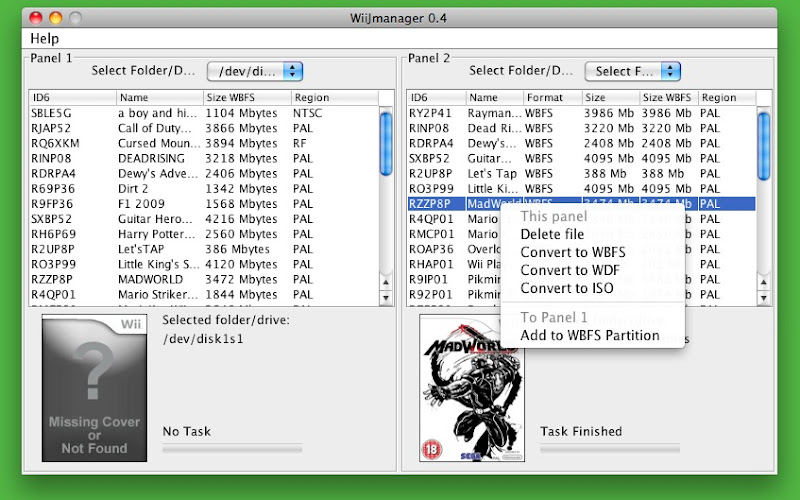
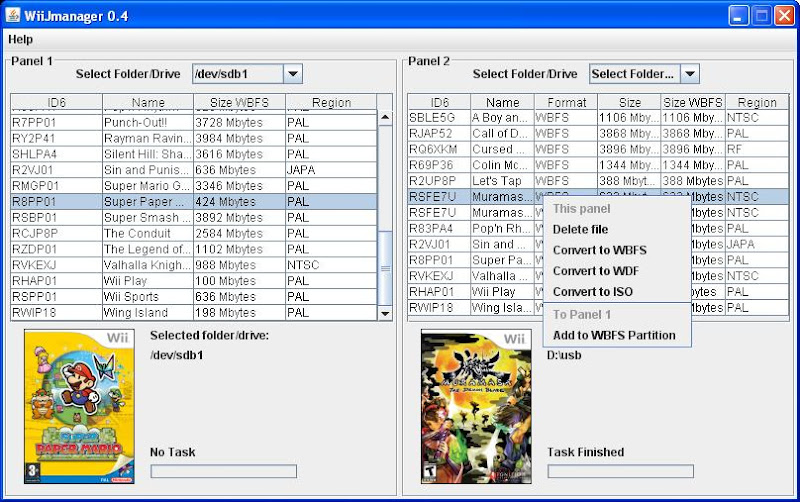
When I right click on games, I don't see any other options besides "This panel: delete, Panel 1: Add to WBFS partition".

How to I convert to WDF?
 
This manager is dead and not supported by the author for a long time. See http://wit.wiimm.de/#gui for alternative GUIs for my tools or use the tools directly on command line.
 
I have a small question that I don't want to create a whole thread for:

So WDF files are smaller but work just as well as WBFS? Why not just use WDF as default always for USB loaders? I've read that file format specification thread about it but it leaves so many questions...
 
Little story:
I have developed WDF as single file archive for images in 2009. WDF is a little bit smaller then rar/zip compressed images. While implementing my tools, I have used wbfs files instead of wbfs drives for testing. It was oggzee (author of CFG loader), who discovered wbfs files with exact one image as alternative for plan iso images about one year later.

wdf is not supported by loaders, wbfs is. I use wdf files for my backups, and a WBFS drive for the Wii. If I prepare a Wii for friends, then I crate a FAT drive with wbfs files.
 
I see, thx. From a technical prospective, won't a WDF file function the same as a WBFS file? Can't you modifiy the header a WDF file as WBFS and the loader won't know the difference? (since the extra 0's are never referenced)
 
Thanks from a Mac user!

I just switched from using WBFS formatted drive to FAT - used the OSX WBFS Manager with much success until recently when my drive started giving errors.
I couldn't figure out how to create WBFS files from my iso files using Wii Backup Fusion.
This neat app did the job nicely & pretty quickly too!
I pointed it at my FAT usb drive and it seemed to just hang up one of the panels - but the other panel still worked fine.
 
I might use this over WBFS manager.

WiiJManagerOSX04.jpg

You have selected the correct game.
 
The latest release has issues on OSX Lion 10.7 and wiitgui is unusable also on 10.7, but if you download the latest Wit & WWT files and replace the old ones.
 
Here is the latest releases of Wit and WWT, simply navigate to WiiJManager/osx and replace the old files with the newly extracted files. Works perfect as I had the transferring issue on OSX 10.7, can email me if you have further questions.
 

Attachments

I tried this app on my mac, and it didn't show the drive at all.

NOTE:I used this drive in the past with a PC so I needed to format it to FAT so does this affect the process of this app ?
 
Hi I have a problem with the WiiJmanager that I was wondering if it was possible for someone to walk me through. Basically I can select the iso file and its works fine but I cannot select a drive. I have a 8GB flash drive and its not showing up. help would be appreciated :)
 
i have a mac i dont know which version to chose ? and when i pick one its said it doesnt let ectracted it need help?:unsure:
 
WiiJManager is a WBFS manager for OSX, Linux and Windows. Basically it's a GUI for WiiMMS programmed with Java.

With it you can copy games from WBFS partitions to ISO/WBFS/WDF and viceversa.

Currently it works in both OS X, Linux and Windows.

It's been tested in Mac OS X 10.6 (still no time to find a machine with 10.5), with Ubuntu 9.04 and Windows XP SP3. If you find any problem (no drives showing or other problems) just ask here or PM me with the log.txt generated by the tool.

WiiJManager Windows
WiiJManager04.jpg

WiiJManager OSX
WiiJManagerOSX04.jpg

As I plan it, when I have it in a more stable way (solved proxy problems and a few things more), I'll post the source code, but not till is done cause now it's a little mess
tongue.gif


In windows just open WiiJManagerWin.exe. In OS X and Linux just open WiiJManager.jar (or java -jar WiiJManager.jar)

Changelog:

Feel free to make requests and to post problems, doubts.

NOTE: LINUX SUPPORT IS PRELIMINARY
Download Version 0.8

Old Versions:
Version 0.7.2
Version 0.7.1
Version 0.6.1
Version 0.5.3
Version 0.5.1


Note: This are testing versions and are not fully implemented. Due to this, some errors can occur.

when you complete the version 0.8 ?
 

Site & Scene News

Popular threads in this forum