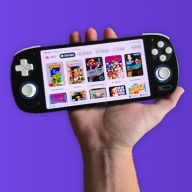
GBA DS Style — A Nintendo DS-Inspired Custom Kernel for EZ-Flash Omega & Omega DE

  • Thread starter Thread starter FrankieT19
  • Start date Start date
  • Views Views 23,273
  • Replies Replies 222
  • Likes Likes 23
I’m sorry version 5.2 is not working for some people with Rev A DE cartridges.

I cannot reproduce the issue on my own hardware. On my setup it always works, even after testing different SD cards, trying formats that are not normally recommended, skipping steps, and leaving files out. On my Omega DE Rev B and Omega (from around 2019), it still launches. The only freeze I can reliably cause is by flashing an Omega with an Omega DE kernel and it still loads to the menu, only freezing when a setting is changed.

Because I cannot trigger the problem myself, I do not really have a reliable way to troubleshoot it. At this point, any code changes I make would just be guesswork, and I would have no way to tell whether they were actually helping. I also have to be careful not to break things for people who are already using it successfully.

We also know this is not affecting every card of the same revision. Not all Rev A cards have the issue, and the only other person who has tested building or changing the kernel so far, merkin, has it working on their Rev A DE as well. So right now I do not think there is a clear fix I can make from my side without affected hardware to test on.

Realistically, the next step would need to come from someone who has one of the affected cards and is able to build and test changes directly. If you are comfortable working with source code, that would be a great help.

For now, use an older version if your cartridge isn't compatible with v5.2, they work, they just lack features of the newer releases.
Post automatically merged:

This worked but the sound effects and the box art features aren't working now :(
Even if you move the chosen theme directly from the downloaded zip to the root of your SD and rename it ezkernel/ezkernelnew via your PC?
 
  • Like
Reactions: Lolight4 and Merkin
I’m sorry version 5.2 is not working for some people with Rev A DE cartridges.

I cannot reproduce the issue on my own hardware. On my setup it always works, even after testing different SD cards, trying formats that are not normally recommended, skipping steps, and leaving files out. On my Omega DE Rev B and Omega (from around 2019), it still launches. The only freeze I can reliably cause is by flashing an Omega with an Omega DE kernel and it still loads to the menu, only freezing when a setting is changed.

Because I cannot trigger the problem myself, I do not really have a reliable way to troubleshoot it. At this point, any code changes I make would just be guesswork, and I would have no way to tell whether they were actually helping. I also have to be careful not to break things for people who are already using it successfully.

We also know this is not affecting every card of the same revision. Not all Rev A cards have the issue, and the only other person who has tested building or changing the kernel so far, merkin, has it working on their Rev A DE as well. So right now I do not think there is a clear fix I can make from my side without affected hardware to test on.

Realistically, the next step would need to come from someone who has one of the affected cards and is able to build and test changes directly. If you are comfortable working with source code, that would be a great help.

For now, use an older version if your cartridge isn't compatible with v5.2, they work, they just lack features of the newer releases.
I see, but I'm certain I have revision B, did I download the wrong kernal?
 
I see, but I'm certain I have revision B, did I download the wrong kernal?
Only the last part is in reply to you.

Even if you move the chosen theme directly from the downloaded zip to the root of your SD and rename it ezkernel/ezkernelnew via your PC?

The posts get automatically merged
 
That on me for not reading posts all the way through -_- but yes even if I move the chosen theme directly from the zip file it doesn't work
That’s very odd if the Pale Blue theme works, because the different theme kernels all use the exact same code. Just to make sure we’re ruling out the obvious first, this is definitely the v5.2 kernel for the Definitive Edition, right? Also, when you say the thumbnails and sounds aren’t working, do you mean they simply do not appear, or does the operating system actually freeze?
 
Might be a good idea to put the 5.0 test build on the first post, with a note to use that if you have a ODE Rev A with issues, otherwise it is advised to just use the most recent build. I'm guessing an early\sub revision of the original DE card might be incompatible with a change made between 5.0 -> 5.1, most likely the audio.
 
  • Like
Reactions: FrankieT19
That’s very odd if the Pale Blue theme works, because the different theme kernels all use the exact same code. Just to make sure we’re ruling out the obvious first, this is definitely the v5.2 kernel for the Definitive Edition, right? Also, when you say the thumbnails and sounds aren’t working, do you mean they simply do not appear, or does the operating system actually freeze?
oh I think I'm using an older version? I'm on 3.3, and I didn't realize it, let me try using the most recent version and I'll edit in if it worked or not.

Edit: Yeah turns out I was just using an older version :rofl2: thank you for the help!
 
Last edited by olimar5050,
  • Like
Reactions: FrankieT19
Might be a good idea to put the 5.0 test build on the first post, with a note to use that if you have a ODE Rev A with issues, otherwise it is advised to just use the most recent build. I'm guessing an early\sub revision of the original DE card might be incompatible with a change made between 5.0 -> 5.1, most likely the audio.

Yes good idea :) , I have actually already added a note under the download button, and a section on the downloads page addressing it with links to the old versions.

At this point, the safest assumption is that DS Style has been tested on the Rev B DE and the original Omega, which are the carts I can actually verify myself. If it also works on other hardware revisions such as the Rev A DE, that is of course welcome, but I cannot guarantee compatibility there.

As features become more complex, undocumented differences between cartridges may start to matter more, and that may be part of what is happening here. The audio system was already designed with compatibility in mind, using raw files pre-converted to headers, so I’m not sure what more can be done on that front. Hopefully someone with an affected card can find a fix, it may just be something small that is currently being overlooked.
Post automatically merged:

oh I think I'm using an older version? I'm on 3.3, and I didn't realize it, let me try using the most recent version and I'll edit in if it worked or not.

Edit: Yeah turns out I was just using an older version :rofl2: thank you for the help!
It happens!:D Glad it’s working. Always welcome.
 
Also, for those having issues please try setting up your SD card with nothing but the required SYSTEM folder on the card. See if you can load past the DS Style splash screen. Perhaps the frontend is having trouble parsing abnormal ROM names possibly in different languages? Was the following added between 5.0test and 5.1?:
  • File extensions and additional ROM info within () or [] hidden, except in list mode
I'm just trying to figure out what variables may be different from user to user and ROM library and language could be something to consider.
 
  • Like
Reactions: FrankieT19
Yes good idea :) , I have actually already added a note under the download button, and a section on the downloads page addressing it with links to the old versions.

At this point, the safest assumption is that DS Style has been tested on the Rev B DE and the original Omega, which are the carts I can actually verify myself. If it also works on other hardware revisions such as the Rev A DE, that is of course welcome, but I cannot guarantee compatibility there.

As features become more complex, undocumented differences between cartridges may start to matter more, and that may be part of what is happening here. The audio system was already designed with compatibility in mind, using raw files pre-converted to headers, so I’m not sure what more can be done on that front. Hopefully someone with an affected card can find a fix, it may just be something small that is currently being overlooked.
Post automatically merged:


It happens!:D Glad it’s working. Always welcome.

As a affected Omega DE Rev. A user I understand that trying to fix issues you cannot replicate is very frustrating. I can only offer my help by saying send me every possible build with ideas you can think of. I'm willing to test anything and everything and send as many reports as I can. Can I maybe suggest a build without the audio-system? I'm spitballing and guessing that the garbled audio may be an indicator that the Omega DE's that are not working might have trouble with the audio.

Also, for those having issues please try setting up your SD card with nothing but the required SYSTEM folder on the card. See if you can load past the DS Style splash screen. Perhaps the frontend is having trouble parsing abnormal ROM names possibly in different languages? Was the following added between 5.0test and 5.1?:
  • File extensions and additional ROM info within () or [] hidden, except in list mode
I'm just trying to figure out what variables may be different from user to user and ROM library and language could be something to consider.

Good idea but sadly no dice, that's what I had on my SD card as a test just now:

1775409219437.png
1775409246947.png


and the same issue happens. Funnily enough the garbled sound almost sounds like a dial-up 56k modem :P
 
  • Love
Reactions: FrankieT19
As a affected Omega DE Rev. A user I understand that trying to fix issues you cannot replicate is very frustrating. I can only offer my help by saying send me every possible build with ideas you can think of. I'm willing to test anything and everything and send as many reports as I can. Can I maybe suggest a build without the audio-system? I'm spitballing and guessing that the garbled audio may be an indicator that the Omega DE's that are not working might have trouble with the audio.


Good idea but sadly no dice, that's what I had on my SD card as a test just now:

View attachment 566484View attachment 566485

and the same issue happens. Funnily enough the garbled sound almost sounds like a dial-up 56k modem :P

That's really helpful thank you!

I do have some test builds that I'm working on with alternative sound implementation.

If you could try them out that would be great!

I've attached one, and included is a version with no sound. I'm fairly confident the no sound one will work for you (but we will see...).
Post automatically merged:

Also, for those having issues please try setting up your SD card with nothing but the required SYSTEM folder on the card. See if you can load past the DS Style splash screen. Perhaps the frontend is having trouble parsing abnormal ROM names possibly in different languages? Was the following added between 5.0test and 5.1?:
  • File extensions and additional ROM info within () or [] hidden, except in list mode
I'm just trying to figure out what variables may be different from user to user and ROM library and language could be something to consider.
Good thinking, but that feature was already implemented before then. I also have some ROMs with unsupported characters, and it reads them okay, just puts a space where an accent should be. I do think the other users are right, that this is to do with the UI sounds, so I've been working on that.
 
Last edited by FrankieT19,
  • Like
Reactions: SkyDX
That's really helpful thank you!

I do have some test builds that I'm working on with alternative sound implementation.

If you could try them out that would be great!

I've attached one, and included is a version with no sound. I'm fairly confident the no sound one will work for you (but we will see...).
Post automatically merged:


Good thinking, but that feature was already implemented before then. I also have some ROMs with unsupported characters, and it reads them okay, just puts a space where an accent should be. I do think the other users are right, that this is to do with the UI sounds, so I've been working on that.

Alright thank you! So here's some feedback:

No Sound version seems to work 100% perfect, Game-Art shows up just fine too!

The New Implementation version works as well and with sound even! I heard the Yoshi tongue and the menu-sounds just fine. However this build has a curious glitch. The Game Art shows only black rectangles initially as I scroll through my games. Then when I scroll backwards the art does show however it has visual glitches.
Post automatically merged:

Additional note: Whenever I'm entering my GBA folder with my ROMs there's an audible "screech".
 
  • Like
Reactions: FrankieT19
I am also willing to test builds for the Original if you need me to, though I'm not familiar enough with source code to work with it unfortunately x)
 
  • Love
Reactions: FrankieT19
Just to update people. Auyx has tested some new builds for me and confirmed that the issue is fixed. This new build still has a couple of bugs I need to work out, so once those are fixed I'll post it.

If anyone wants to help, can you try this version and tell me if you run into any issues. There are a number at the moment, working through them.
 
Last edited by FrankieT19,
  • Like
Reactions: SkyDX and Lolight4
Just to update people. Auyx has tested some new builds for me and confirmed that the issue is fixed. This new build still has a couple of bugs I need to work out, so once those are fixed I'll post it.
Awesome! Thanks again for looking into all of this, we all really appreciate it! :)
 
  • Like
Reactions: FrankieT19
This version seems to have pretty much all bugs I've experienced fixed so you're amazing, great job! The only minor glitches I've found is a kind of "white noise" playing when selecting and then again when the ROM is being loaded but that's hardly an issue.

Out of curiosity, what is different about the Rev. A DEs that it caused such a weird issue?

Oh and is this version already themable?
 
  • Like
Reactions: FrankieT19
That's really helpful thank you!

I do have some test builds that I'm working on with alternative sound implementation.

If you could try them out that would be great!

I've attached one, and included is a version with no sound. I'm fairly confident the no sound one will work for you (but we will see...).
Post automatically merged:


Good thinking, but that feature was already implemented before then. I also have some ROMs with unsupported characters, and it reads them okay, just puts a space where an accent should be. I do think the other users are right, that this is to do with the UI sounds, so I've been working on that.

Could you please do the same for the regular ez omega?
 
This version seems to have pretty much all bugs I've experienced fixed so you're amazing, great job! The only minor glitches I've found is a kind of "white noise" playing when selecting and then again when the ROM is being loaded but that's hardly an issue.

Out of curiosity, what is different about the Rev. A DEs that it caused such a weird issue?

Oh and is this version already themable?

Some Rev A units seem to be incompatible with the kernel’s original UI sound code, which used a PCM playback path with DMA that could lock the cart up and produce static noise. The new build rewrites that playback/cleanup flow to be safer and less timing-sensitive, and stops audio cleanly before the same working memory is reused by things like thumbnails, ROM boot, and NOR writes.

You are safe to make assets for your own theme, updating it to any new kernel I release is as simple as dropping the new file in and rebuilding. Curious to see what others make!

Could you please do the same for the regular ez omega?

I plan to change it over, initially it will go untested except on my Omega cart, which is an early model. But version 5.2 was already working on mine, so I won't know for sure if it fixes it. I may post some test builds at some point. But I can't make any promises as to when this happens. I won't be at my computer for a lot of April, so I'm running out of time to work on this.
 
  • Like
Reactions: SkyDX
Some Rev A units seem to be incompatible with the kernel’s original UI sound code, which used a PCM playback path with DMA that could lock the cart up and produce static noise. The new build rewrites that playback/cleanup flow to be safer and less timing-sensitive, and stops audio cleanly before the same working memory is reused by things like thumbnails, ROM boot, and NOR writes.

You are safe to make assets for your own theme, updating it to any new kernel I release is as simple as dropping the new file in and rebuilding. Curious to see what others make!


I plan to change it over, initially it will go untested except on my Omega cart, which is an early model. But version 5.2 was already working on mine, so I won't know for sure if it fixes it. I may post some test builds at some point. But I can't make any promises as to when this happens. I won't be at my computer for a lot of April, so I'm running out of time to work on this.

Thank you, even for a layman like me that was easy to understand. And alright I'll try to make a new theme later then! Thanks again for the great work :)
Post automatically merged:

@FrankieT19 One question as the Theming Tutorial doesn't cover it, how can I edit the DS splash screen and the sounds?
 
Last edited by SkyDX,
Could someone with a cartridge not compatible with v5.2 test the version I have attached please. If it works, can you identify any bugs?

Thank you, even for a layman like me that was easy to understand. And alright I'll try to make a new theme later then! Thanks again for the great work :)
Post automatically merged:

@FrankieT19 One question as the Theming Tutorial doesn't cover it, how can I edit the DS splash screen and the sounds?

To edit the splash screen it is like the other icons, except you need to name it 'gImage_splash' not 'gImage_SPLASH', just a slight inconsistency in naming.

To change the sounds, use short mono 8-bit signed PCM raw sound effects at 22050 Hz, then convert the .raw files into C header arrays for the kernel. Starting from WAV is best, but any source format is fine as long as the final raw output is signed 8-bit, mono, 22050 Hz, headerless. I used Audacity to prep my sound files (mono, 22050hz, adjusted amplitude so they're loud enough, export as wav 8-bit PCM), then converted them to raw files with FFmpeg. This is the code I ran with FFmpeg: '.\ffmpeg -i startup.wav -ac 1 -ar 22050 -f s8 startup.raw' change 'startup' to the specific sound you are currently converting. The process has a couple steps, so it may be easiest to give the kernel file and some of the sound headers (e.g. accept_raw.h) to a LLM like claude or chatGPT and ask if how to swap out the audio. For some of the code I may have hard coded the length the audio plays, for other bits it calculates the length, so you may run into issues if your sounds are signficantly different in length. Again I'd suggest to get ai to sift through the code and identify these parts, rather than do it manually, it's good at that sort of thing. Although, I wouldn't just blindy trust anything it writes! (But you can probably get away with it for small changes). Hope that helps, sorry, I know it's a little confusing.
 
Last edited by FrankieT19,
  • Like
Reactions: booshankles

Site & Scene News

Popular threads in this forum