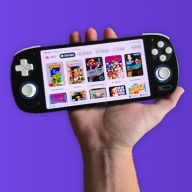
GBA DS Style — A Nintendo DS-Inspired Custom Kernel for EZ-Flash Omega & Omega DE

  • Thread starter Thread starter FrankieT19
  • Start date Start date
  • Views Views 22,415
  • Replies Replies 218
  • Likes Likes 23
This looks amazing, thanks for the great work! Unfortunately it doesn't seem to work on my Omega DE either though. I see the Splash Screen and hear the DS sound but after that it gets stuck with garbled sounds and I don't even see the menu background like in the video posted above :(
 
This looks amazing, thanks for the great work! Unfortunately it doesn't seem to work on my Omega DE either though. I see the Splash Screen and hear the DS sound but after that it gets stuck with garbled sounds and I don't even see the menu background like in the video posted above :(

Did you try the one I posted just before your post?
 
Did you try the one I posted just before your post?

Oh yes I did! I even tried a different SD card size and brand just to be sure but I got the same behavior sadly. Is there anything else I can try?
 
Hmm, no clue. I can only say what is working for me. FAT32 default allocation size 64GB Lexar card with FW5 K1.06 on my Rev A and FAT32 default allocation size 32GB Samsung card with FW7 K1.06 on my Rev B. Both using the ezkernelnew.bin I posted previously. Before I switched to the DS Style, I flashed the official firmware from EZ-Flash to be sure I was fully up to date and then I flashed the most recent version of SimpleDE.
 
I did some more testing and both the Firmware in the first post and the one posted on Page 4 cause my Omega DE to get stuck on the DS style splash-screen with garbled noises. I tried a 4gb no-name SDHC microSD and a 256gb SanDisk one with the Omega DE both in my GBA SP and my Analogue Pocket so it's definitely something with the Omega flashcart itself that causes it.
 
I did some more testing and both the Firmware in the first post and the one posted on Page 4 cause my Omega DE to get stuck on the DS style splash-screen with garbled noises. I tried a 4gb no-name SDHC microSD and a 256gb SanDisk one with the Omega DE both in my GBA SP and my Analogue Pocket so it's definitely something with the Omega flashcart itself that causes it.
Do you also have a Rev A like the other user who is having issues? Rev A say "OMEGA DE" on the back where as Rev B say "EZODE"
 
Do you also have a Rev A like the other user who is having issues? Rev A say "OMEGA DE" on the back where as Rev B say "EZODE"

Hmm yeah mine is a Rev A because it says "OMEGA DE" on the back. The v3.3 Firmware posted earlier in the thread works but obviously doesn't have the nice DS-style menu :(
 
Only other things I can think of are my settings that I had set prior to updating to DS Style 5+ which is
Page 1: Addon - Sleep, Language - English, Engine - Fast Patch Engine, Sleep key - L R Select, Menu key - L R Start, Game RTC - Enabled
Page 2: Save - Auto save, Mode B - Cart, LED - Enable LED, Breathing - Not Set, SD LED - B, Backup - Enabled

Also, do you have the SYSTEM\IMGS folder with all of the game previews installed on your card?
 
Last edited by Merkin,
Only other things I can think of are my settings that I had set prior to updating to DS Style 5+ which is
Page 1: Addon - Sleep, Language - English, Engine - Fast Patch Engine, Sleep key - L R Select, Menu key - L R Start, Game RTC - Enabled
Page 2: Save - Auto save, Mode B - Cart, LED - Enable LED, Breathing - Not Set, SD LED - B, Backup - Enabled

Also, do you have the SYSTEM\IMGS folder with all of the game previews installed on your card?

I double-checked everything and my settings aren't super different and yes I have the IMGS loaded on my SD-card. I went back through the thread and interestingly enough the v5.0 Test Build FW works fine! So something between the test builds and the final builds broke it. Could it perhaps be the audio-system?
 
Great work OP ! Love seeing new themes for older material
Question though : I updated my EzFlash Omega to FW 9 and Kernel 1.10 before installing the DS theme, but I noticed the theme reverted the Kernel to 1.06. Is that normal ?
 
This looks really cool! I'm having trouble changing themes tho, everything else works great but when I try to change the theme, it just stays as the light blue theme.
 
Great work OP ! Love seeing new themes for older material
Question though : I updated my EzFlash Omega to FW 9 and Kernel 1.10 before installing the DS theme, but I noticed the theme reverted the Kernel to 1.06. Is that normal ?
That’ll just be a typo from when I was porting the Definitive Edition code to the original Omega. I’ll correct it in a future version, but don’t worry, the Omega build is 1.10. Thank you for flagging it.
Post automatically merged:

This looks really cool! I'm having trouble changing themes tho, everything else works great but when I try to change the theme, it just stays as the light blue theme.
Are you rebooting the device and holding R as you boot after the theme is ready?
 
I double-checked everything and my settings aren't super different and yes I have the IMGS loaded on my SD-card. I went back through the thread and interestingly enough the v5.0 Test Build FW works fine! So something between the test builds and the final builds broke it. Could it perhaps be the audio-system?
This also fixed the crashing issue for me. Hopefully helps to narrow down the problem.
 
  • Like
Reactions: FrankieT19
I double-checked everything and my settings aren't super different and yes I have the IMGS loaded on my SD-card. I went back through the thread and interestingly enough the v5.0 Test Build FW works fine! So something between the test builds and the final builds broke it. Could it perhaps be the audio-system?
where is this test build? im also experiencing this, thank you. Edit: found it, can confirm the test build works. I do have a "revision a" ez flash omega de if that helps at all.
 
Last edited by booshankles,
I have the same freeze up and garbled audio as a few others have experienced. I thought I would try some troubleshooting to help out.

I have the standard EZ Flash Omega and not the DE variant, running the latest update prior to trying the DS theme.

I also tried two micro SD cards, one is 16GB and the other is 32GB and both were formatted as Fat32 with 32kb set.

I tried setting the options to defaults before installing this theme and nothing changed, I also turned the game art off before changing the firmware again. I have also confirmed my IMGS folder works with the official firmware too.

I do hear the initial DS boot sound, but as soon as the menu appears I am unable to control anything and the audio starts to screech.
 
where is this test build? im also experiencing this, thank you. Edit: found it, can confirm the test build works. I do have a "revision a" ez flash omega de if that helps at all.

Good to know I'm not the only one where this test-build works for a Rev A Omega DE. Hopefully that helps to narrow things down for the developers as to what the actual problem is.

I have the same freeze up and garbled audio as a few others have experienced. I thought I would try some troubleshooting to help out.

I have the standard EZ Flash Omega and not the DE variant, running the latest update prior to trying the DS theme.

I also tried two micro SD cards, one is 16GB and the other is 32GB and both were formatted as Fat32 with 32kb set.

I tried setting the options to defaults before installing this theme and nothing changed, I also turned the game art off before changing the firmware again. I have also confirmed my IMGS folder works with the official firmware too.

I do hear the initial DS boot sound, but as soon as the menu appears I am unable to control anything and the audio starts to screech.

So it really seems to be caused by the first revision of the Omega DE.
 
  • Like
Reactions: booshankles
That’ll just be a typo from when I was porting the Definitive Edition code to the original Omega. I’ll correct it in a future version, but don’t worry, the Omega build is 1.10. Thank you for flagging it.
Post automatically merged:


Are you rebooting the device and holding R as you boot after the theme is ready?
Yeah, I'm rebooting and holding R after selecting the theme, but after the reboot its still one the light blue theme
 
Yeah, I'm rebooting and holding R after selecting the theme, but after the reboot its still one the light blue theme

What happens if you delete ezkernel.bin/ezkernelnew.bin from the root of the SD card before trying to change the theme? You can do this directly on the GBA by highlighting the file and pressing L + Start. Before you restart the GBA, go back to the root and confirm whether there is a new ezkernel/ezkernelnew file. If there isn't, try the step below.

If that still doesn’t work, put the SD card into a computer. Then take a theme from the THEMES folder, move it to the root of the SD card, and rename it to 'ezkernel.bin' or 'ezkernelnew.bin' depending on which Omega you have (Omega / DE). After that, hold R while starting up.

Let me know if either of those steps allow you to successfully change theme.
 
so i have a revision a ez flash omega de, ive gone through your entire setup and guide and each read me. i ca
I see you have the Turkish flag on your profile, teşekkürler arkadaşım! (Translation for non Turkish speakers: Thanks my friend!)


Yes, coming to the original too! You're welcome!

Here are the test builds for both carts if anyone wants to try them out and let me know if it works for them.

Good to know I'm not the only one where this test-build works for a Rev A Omega DE. Hopefully that helps to narrow things down for the developers as to what the actual problem is.


So it really seems to be caused by the first revision of the Omega DE.
Yeah something definitely changed from the test build it seems like. I guess the best we can do is just wait lol
Post automatically merged:

What happens if you delete ezkernel.bin/ezkernelnew.bin from the root of the SD card before trying to change the theme? You can do this directly on the GBA by highlighting the file and pressing L + Start. Before you restart the GBA, go back to the root and confirm whether there is a new ezkernel/ezkernelnew file. If there isn't, try the step below.

If that still doesn’t work, put the SD card into a computer. Then take a theme from the THEMES folder, move it to the root of the SD card, and rename it to 'ezkernel.bin' or 'ezkernelnew.bin' depending on which Omega you have (Omega / DE). After that, hold R while starting up.

Let me know if either of those steps allow you to successfully change theme.
Omega de ain't working for rev a, whatever you changed from the test build to the latest build has broken for now 3 or more people, most people would assume it's an issue with more than just an SD card at this point 🥲. Love the idea of this hopefully you figure out the bugs 🥰
 
Last edited by booshankles,
  • Like
Reactions: SkyDX
What happens if you delete ezkernel.bin/ezkernelnew.bin from the root of the SD card before trying to change the theme? You can do this directly on the GBA by highlighting the file and pressing L + Start. Before you restart the GBA, go back to the root and confirm whether there is a new ezkernel/ezkernelnew file. If there isn't, try the step below.

If that still doesn’t work, put the SD card into a computer. Then take a theme from the THEMES folder, move it to the root of the SD card, and rename it to 'ezkernel.bin' or 'ezkernelnew.bin' depending on which Omega you have (Omega / DE). After that, hold R while starting up.

Let me know if either of those steps allow you to successfully change theme.
This worked but the sound effects and the box art features aren't working now :(
 

Site & Scene News

Popular threads in this forum