Tutorial
Updated
How to make a DVD compatible opening.bnr file (for .iso and .wbfs files for example)
Hi GBATemp ^^ I've been busy with a texture pack for Mario Kart Wii which aims to replicate the atmosphere of the Super Mario Galaxy games and I thought it would be cool to make a custom banner edit for this! Of course making one for a forwarder is easy as there are plenty of tutorials for it, but I wanted to make one that I could inject into an .iso (this requires different headers) which I could not find much information about on how to do. I found one tutorial for it, but I kept getting errors so I decided to try and figure it out myself. This is my first post by the way so I'm sorry if it's a bit sloppy ;c
For more information about opening.bnr check out this thread: https://gbatemp.net/threads/how-to-...ng-bnr-and-inject-it-into-an-iso-file.633607/ (this is also the tutorial I mentioned earlier that didn't end up working for me due to errors, the Wii Menu freezing, etc.)
I am not sure if there's an easier way to do this, but this is what worked for me:
To begin, you need a program called u8tool (by howardc) and you have to make sure to grab the latest version (v10.1). This program CAN NOT boot without you having ran setuppad.exe by microsoft, this installs the missing dependencies that the program needs. Also make sure to put setuppad.exe's compatibility mode to Windows XP before opening it, it won't work if you don't do this:

Once you have this tool opened, you can grab any opening.bnr from any game (I used Super Mario Galaxy's in my case) and click on the 4 dots next to archive file to select it. Then you can choose an archive folder to where you want to extract it to and click on extract to extract the contents.

The tool will extract 3 files for you, banner.bin (what you see when you open up the channel), sound.bin (name should be a giveaway already, this is a .bns file so if you rename .bin to .bns you can listen to it in foobar with the vgmstream2000 plugin) and icon.bin (what you see on the Wii Menu with all of the other channels).
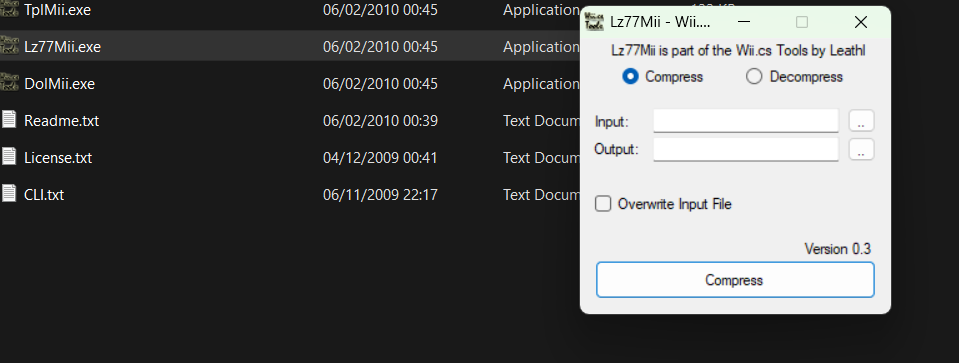
banner.bin and icon.bin are lz77 compressed, you can decompress these by using Wii.cs tools (with the lz77mii.exe tool) and then edit them with something like BrawlCrate, as these are just u8 archives.
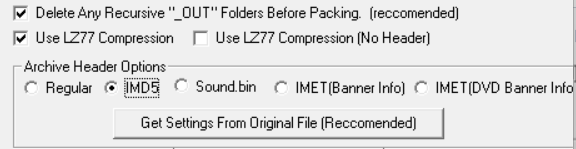
Once you've saved them, go back to the u8tool and click on the 4 dots next to archive file and select banner.bin, then click on the 4 dots next to archive folder and choose a folder where you want to extract the files to. Click on extract once again and after that make sure you turn on lz77 compression and IMD5 (this is the header that ALL 3 .bin files need, the Wii can NOT read the contents otherwise and will just show a black screen when you've opened up the channel and a gamecube logo on the Wii Menu). Click on pack after this and it'll have overwitten the original .bin file, now do the same with icon.bin!! (you can do this with sound.bin too if you have edited that, but I haven't tried this out yet myself)
After you're done with that, click on the 4 dots next to archive folder and select the folder where your custom icon, banner and sound.bin files are. Click on the 4 dots next to archive file and you can select where your new opening.bnr should be saved. After this, click on "get settings from original file" and select your unchanged opening.bnr (this has to be from a disc), an extra tab on the right should show up where you can change the name of your title (this will show up on the Wii Menu when you hover over the channel).
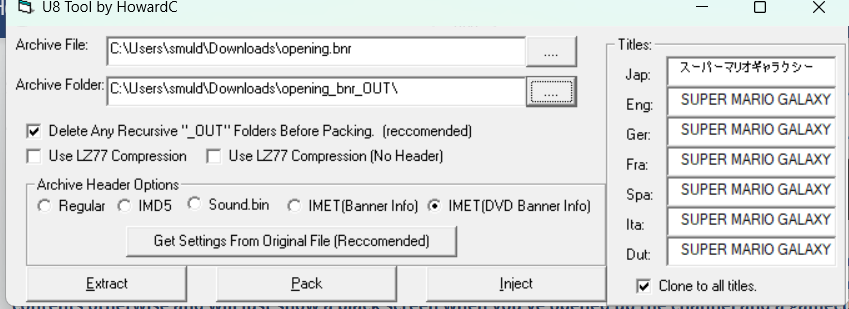
Now make sure that for archive header IMET (DVD Banner Info) is selected and after that click on pack! You should now have a working custom opening.bnr that you can inject in an .iso! ^^


(I know the logo looks like shit but it worked!)
+ MUCH love to JustMLC for helping me figure this out!
Feel free to ask any questions if something's not clear
For more information about opening.bnr check out this thread: https://gbatemp.net/threads/how-to-...ng-bnr-and-inject-it-into-an-iso-file.633607/ (this is also the tutorial I mentioned earlier that didn't end up working for me due to errors, the Wii Menu freezing, etc.)
I am not sure if there's an easier way to do this, but this is what worked for me:
To begin, you need a program called u8tool (by howardc) and you have to make sure to grab the latest version (v10.1). This program CAN NOT boot without you having ran setuppad.exe by microsoft, this installs the missing dependencies that the program needs. Also make sure to put setuppad.exe's compatibility mode to Windows XP before opening it, it won't work if you don't do this:
Once you have this tool opened, you can grab any opening.bnr from any game (I used Super Mario Galaxy's in my case) and click on the 4 dots next to archive file to select it. Then you can choose an archive folder to where you want to extract it to and click on extract to extract the contents.
The tool will extract 3 files for you, banner.bin (what you see when you open up the channel), sound.bin (name should be a giveaway already, this is a .bns file so if you rename .bin to .bns you can listen to it in foobar with the vgmstream2000 plugin) and icon.bin (what you see on the Wii Menu with all of the other channels).
banner.bin and icon.bin are lz77 compressed, you can decompress these by using Wii.cs tools (with the lz77mii.exe tool) and then edit them with something like BrawlCrate, as these are just u8 archives.
Once you've saved them, go back to the u8tool and click on the 4 dots next to archive file and select banner.bin, then click on the 4 dots next to archive folder and choose a folder where you want to extract the files to. Click on extract once again and after that make sure you turn on lz77 compression and IMD5 (this is the header that ALL 3 .bin files need, the Wii can NOT read the contents otherwise and will just show a black screen when you've opened up the channel and a gamecube logo on the Wii Menu). Click on pack after this and it'll have overwitten the original .bin file, now do the same with icon.bin!! (you can do this with sound.bin too if you have edited that, but I haven't tried this out yet myself)
After you're done with that, click on the 4 dots next to archive folder and select the folder where your custom icon, banner and sound.bin files are. Click on the 4 dots next to archive file and you can select where your new opening.bnr should be saved. After this, click on "get settings from original file" and select your unchanged opening.bnr (this has to be from a disc), an extra tab on the right should show up where you can change the name of your title (this will show up on the Wii Menu when you hover over the channel).
Now make sure that for archive header IMET (DVD Banner Info) is selected and after that click on pack! You should now have a working custom opening.bnr that you can inject in an .iso! ^^
(I know the logo looks like shit but it worked!)
+ MUCH love to JustMLC for helping me figure this out!
Feel free to ask any questions if something's not clear
Last edited by dutchmvp26,