Hacking Homebrew Write MLC dump on another Wii U? [Preserving rare Joysound Festa Wii U unit]

  • Thread starter Thread starter mariob0y
  • Start date Start date
  • Views Views 3,061
  • Replies Replies 23
  • Likes Likes 4

mariob0y

Member
Newcomer
Joined
Jun 14, 2016
Messages
20
Reaction score
5
Trophies
2
Age
30
XP
203
Country
Ukraine
UPD: I have updated this post with the steps I followed, so you won’t need to read through all my tries and errors. Huge thanks to @SDIO for guiding me through the whole process!

To avoid confusion, I will refer to the original console being cloned as console #1, and the one becoming the clone as console #2. Same deal for the original HDD - it’s HDD #1, and the blank one it’ll be copied to is HDD #2.

It goes without saying that you should try this at your own risk, since you could potentially brick your console or corrupt HDD data.

Cloning Console:

1. Install ISFShax (minute) permanently on console #2. Follow this guide and stop before "Autoboot" step. https://gbatemp.net/threads/how-to-set-up-isfshax.642258/
2. On console #1, load minute (don’t install it unless you want to). I used Pi Pico for this.
3. Go to "Backup and Restore" -> "Format redNAND" and answer yes to all prompts.
4.. Wait for the process to finish, then turn off console #1.
5. Plug the SD card into your PC. Rename the OTP and SEEPROM backups to "redotp.bin" and "redseeprom.bin," respectively.
6. Make sure "rednand.ini" is present in the /minute folder. It should redirect to all partitions and have SCFM enabled.
7. Plug the SD card into console #2.
8. Run the option "Patch (sd) and boot into ios redNAND."

Cloning Hard Drive:

1. Turn off console #1, unplug HDD #1, and connect HDD #2.
2. Turn on console #1. You should see a pop-up suggesting you initialize HDD #2 -do it. If not, go to Settings -> Data Management and initialize HDD #2.
3. Turn off console #1, reconnect HDD #1, and keep HDD #2 connected too.
4. Turn on console #1. You’ll be prompted to go to Data Management. There, you can select all contents on HDD #1 and copy them to HDD #2. Wait for the process to finish.
5. Turn off console #1. Unplug HDD #2.

Now, when you connect HDD #2 to console #2, it should be recognized without any prompts and load all installed software.

Original post:
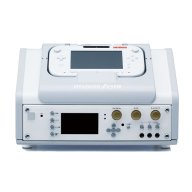
I've recently acquired a rare Wii U variant: the Japanese-exclusive Joysound Festa karaoke machine. It’s essentially a Wii U console housed in a karaoke-specific casing with an audio switch. It features the unique Joysound Festa karaoke app pre-installed, and it came with a 2TB hard drive filled with music (in a form of 99 karaoke DLC packs).
I’m not sure whether the system OS is stock or custom, but the console always autoboots straight into the karaoke app. If you're curious, there are couple of great videos about it on Youtube.

Now that I have it, my first priority is to preserve this so that it doesn’t get lost to time.
I’ve already made a full NAND dump using nanddumper (encrypted), and then a decrypted dump via Dumpling.

My main question is: Is it possible - via redNAND or any other method - to effectively clone the console and restore the dumped MLC to another Wii U console?

Here’s why I want to do this:
a) To preserve Joysound Festa, since there are so few of these consoles in existence;
b) To have a chance to mess around on a second console without risking damage to the original.

I’ve read other guides on forum, but they mostly talk about rebuilding the MLC from scratch and possibly importing save data - that’s about it.

I also tried using NUSpacker to at least get the Joysound Festa app running on another Wii U, but WUP Installer gave me an error.

Has anyone here successfully cloned a Wii U console using a dumped MLC? Is redNAND (or something similar) a viable solution in this case? Any help or guidance would be greatly appreciated!
 

Attachments

  • 495694224_9874506812669639_8988481340335766703_n.jpg
    495694224_9874506812669639_8988481340335766703_n.jpg
    54.9 KB · Views: 106
Last edited by mariob0y,
If it runs on a 5.5.x retail OS, then you could just use a full redNAND including redotp and redseeprom.
For better performance it would be best to dump the mlc trough the recovery menu, so you could setup the redNAND without SCFM.

If it is retail you could also recrypt the SLC and MLC to the target console. But that would still require the OS and everything to use retail keys. Also you would likely run into problems with the tickets, since they are for a different console
 
If it runs on a 5.5.x retail OS, then you could just use a full redNAND including redotp and redseeprom.
For better performance it would be best to dump the mlc trough the recovery menu, so you could setup the redNAND without SCFM.
It has the 5.5.5.J version. Cool, I’ll order a Raspberry Pi and make another dump through the recovery menu.
If I use the full redNAND with redOTP, I assume I’ll be able to use the original hard drive, correct?
Also, could you recommend any guides on setting up a full redNAND with existing dumps?
If it is retail you could also recrypt the SLC and MLC to the target console. But that would still require the OS and everything to use retail keys. Also you would likely run into problems with the tickets, since they are for a different console
Can you please tell me more about recrypting the MLC and tickets? I’m still quite new to Wii U modding, so sorry in advance if I misuse any terms.
But, do I still need to recrypt the MLC if I’m using redOTP?
And regarding tickets - should I copy them as well?
 
With redNAND with redotp and redseeprom, you don't need to reencrypt anything and can use the HDD as is, since you have all the original keys with that.

To setup the redNAND you run the format redNAND option in minute, when it begins dumping the MLC you can shut the console off, since you will use the dump from the recovery menu.
Then you change the partition type of the mic partition to ext4/Linux and dd the mlc dump to it. The. You rename the otp.bin of the source console to redotp.bin and the seeprom.bin to redseeprom.bin. in the rednand.ini you would enable redirection for all 3 partitions and set the disable scfm option to true.

The reencrypting is if you want to use it without redNAND. For the MLC you would use the wfs-recryptor: https://github.com/koolkdev/wfs-tools
For the SLC: https://github.com/jan-hofmeier/betwiinu


The tickets are on the SLC
 
The tickets are on the SLC
I've got a Raspberry Pico and proceeded with dumping the MLC via the Recovery Menu.
I used this fork (since the original doesn’t include the MLC dump option):

https://github.com/jan-hofmeier/recovery_menu/releases

After selecting Dump SLC+MLC, I encountered multiple errors during the SLC dump stage, while the MLC dump completed successfully.

Unmounting MLC...
Unmounting SLC...

slc = 536870912 / 536870912, res 00000000, error 4046
slc_result: -196635

mlc = 07683964928 / 07683964928, res 00000000, errors 0, bad sectors 0


slc = 536870912 / 536870912, res 00000000, error 4046
slc_result: -196635

Then, when I selected Check SLC, I received an error:

ERROR!

Error OpenDir /vol/system: -FFCFFE9
Total Errors: 1

Meanwhile, when I dumped the SLC using nanddumper, I didn’t encounter any errors. Should I attempt the SLC dump again via the Recovery Menu, or would it be better to rely on the nanddumper SLC dump?


UPD: I did try running `SLC Check` before any dumping, and it showed 0 errors. However, after attempting the dump, the same errors during the SLC dump stage reappeared, and I still got the error when choosing `SLC Check` afterwards. I also tried using a different SD card, but the result was the same.
 
Last edited by mariob0y,
The errors are normal for the SLC, since it will have some unprogrammed pages. You couldn't run the checker, because you dumped it before, which unmounted it.
 
The errors are normal for the SLC, since it will have some unprogrammed pages. You couldn't run the checker, because you dumped it before, which unmounted it.
Oh, I see! Thanks for the explanation

I'm following your guide on redNAND, and so far I’ve installed minute on the clone-to-be console and am ready to proceed with the redNAND stage.

I wanted to clarify a few things first so I don’t mess anything up.
To setup the redNAND you run the format redNAND option in minute
Should I create partitions on the SD card before running this option, or after?

If it’s not too much trouble, could you let me know approximately what size each partition should be?
Do I need to create partitions for redslc, redmlc, redotp, and redseeprom?
Should I put the dumps for each in their respective partition?
in the rednand.ini you would enable redirection for all 3 partitions and set the disable scfm option to true.
should my rednand.ini look like this?

Code:
[partitions]
slccmpt=true
slc=true
mlc=true

[scfm]
disable=true
allow_sys=false

[disable_encryption]
mlc=false

[sys_mount]
mlc=false
 
The format redNAND will create all the partitions and clone the NANDs to them
 
The format redNAND will create all the partitions and clone the NANDs to them
Got it!

Here are the steps I followed:
  1. Ran the format redNAND option.
  2. Using GParted, I formatted the MLC’s partition to ext4. The original partition was 7.16 GB, but I expanded it a bit (to precisely 8000 MB) so the MLC dump would fit.
  3. Put the MLC dump files on that partition.
  4. Placed the rest of the dumps on a FAT32 partition and added the “red-” prefix to the filenames.
  5. Ran Patch (sd) and booted into IOS redNAND.
I got the following error:
Code:
INFO: Trying to load sdmo:/redseeprom.bin...        FOUND!
Conrinuing can lead to CORRUPTION!!! Stop if you didn't expect this warning
WARNING: rednand.ini scfm config missmatches mlc partition type

Rednand Config:
    slccmpt: 1048576
    slc: 1048576
    mlc: 16384000
    disable sofm: 1
    mlc_nocrypto: 0
    mlo sysmount: 0
Continue
[POWER/Q] No | [EJECT/P] Yes...
Mounting redslc...
ISFS: using redotp
ISFShax detected
ISFS: using redotp
ancast: no patch file `ios patoh`, stubbing...
ancast: redslc:/sys/title/0050010/1000400a/code/fw.img is not and ancast image (magic is 0x2DD518AE, expected 0xEFA282D9)
Failed to load IOS with patches!
Press POWER/Q to continue.

Here’s the content of my FAT32 partition:
Code:
├── backup_otp_0.bin
├── backup_seeprom_0.bin
├── boot1now.img
├── fw.img
├── hax
│   ├── fw.img
│   └── ios_plugins
│       ├── 00core.ipx
│       └── 5isfshax.ipx
├── ios.img
├── launch.rpx
├── minute
│   └── rednand.ini
├── recovery_menu
├── redotp.bin
├── redseeprom.bin
├── redslc.bin
├── seeprom_decrypted.bin
├── superblock.img
├── superblock.img.sha
├── System Volume Information
│   ├── IndexerVolumeGuid
│   └── WPSettings.dat
└── wiiu
    ├── apps
    │   ├── AromaUpdater
    │   │   └── AromaUpdater.wuhb
    │   ├── fw_img_loader
    │   │   ├── fw_img_loader.elf
    │   │   ├── icon.png
    │   │   └── meta.xml
    │   ├── haxcopy
    │   │   └── haxcopy.wuhb
    │   └── PayloadLoaderInstaller.wuhb
    ├── backups
    │   └── GJH102094884
    │       ├── otp.bin
    │       └── seeprom.bin
    ├── environments
    │   ├── aroma
    │   │   ├── modules
    │   │   │   ├── AromaBaseModule.wms
    │   │   │   ├── ButtonComboModule.wms
    │   │   │   ├── ContentRedirectionModule.wms
    │   │   │   ├── CURLWrapperModule.wms
    │   │   │   ├── FunctionPatcherModule.wms
    │   │   │   ├── KernelModule.wms
    │   │   │   ├── MemoryMappingModule.wms
    │   │   │   ├── NotificationModule.wms
    │   │   │   ├── PatchMemoryRelocationsModule.wms
    │   │   │   ├── PluginBackend.wms
    │   │   │   ├── RPXLoadingModule.wms
    │   │   │   ├── SDHotSwapModule.wms
    │   │   │   ├── setup
    │   │   │   │   ├── 00_mocha.rpx
    │   │   │   │   ├── 01_splashscreen.rpx
    │   │   │   │   ├── 10_wums_loader.rpx
    │   │   │   │   └── 99_autoboot.rpx
    │   │   │   └── WUHBUtilsModule.wms
    │   │   ├── plugins
    │   │   │   ├── AromaBasePlugin.wps
    │   │   │   ├── config
    │   │   │   │   ├── aroma_base_plugin.json
    │   │   │   │   ├── homebrew_on_menu.json
    │   │   │   │   └── region_free_plugin.json
    │   │   │   ├── drc_region_free.wps
    │   │   │   ├── homebrew_on_menu.wps
    │   │   │   └── regionfree.wps
    │   │   └── root.rpx
    │   └── skipUpdateWarn
    ├── homebrew_on_menu_plugin
    │   └── GJH102094884
    │       └── save
    │           └── 8000000C
    │               └── BaristaAccountSaveFile.dat
    ├── ios_plugins
    │   ├── 00core.ipx
    │   └── 5isfshax.ipx
    ├── payload.elf
    ├── payload.rpx
    └── payloads
        ├── default
        │   └── payload.elf
        ├── fw_img_loader
        │   └── payload.elf
        └── nanddumper
            └── payload.elf

And that’s how my SD card partitioning looks:

photo_2025-06-05_22-40-26.jpg

The rednand.ini file looks the same as in my previous post.
 
No, you shouldn't resize the MLC partition, it needs to have exactly the original size.
Also I said ext4, but that was wrong, it should have the NTFS type to be used without scfm.
You don't copy the files to it, you write the imae raw to the partition.
 
No, you shouldn't resize the MLC partition, it needs to have exactly the original size.
Also I said ext4, but that was wrong, it should have the NTFS type to be used without scfm.
You don't copy the files to it, you write the imae raw to the partition.
Ok, right, that makes much more sense now, thanks!

I followed all the steps as described, but I’m still getting an error, it’s slightly different one this time:
Code:
INFO: Trying to load sdmo:/redseeprom.bin...        FOUND!
INFO: Trying to load sdmo:/redotp.bin...        FOUND!

Rednand Config:
    slccmpt: 1048576
    slc: 1048576
    mlc: 15007744
    disable sofm: 1
    mlc_nocrypto: 0
    mlo sysmount: 0
Mounting redslc...
ISFS: using redotp
ISFShax detected
ISFS: using redotp
ancast: no patch file `ios patoh`, stubbing...
ancast: redslc:/sys/title/0050010/1000400a/code/fw.img is not and ancast image (magic is 0x2DD518AE, expected 0xEFA282D9)
Failed to load IOS with patches!
Press POWER/Q to continue.

SD card files and rednand.ini are the same
 
the redotp.bin is from the same console as the redNAND slc? Since that looks like it is using the wrong key to read the fw.img.
 
the redotp.bin is from the same console as the redNAND slc? Since that looks like it is using the wrong key to read the fw.img.
For simplicity, I'll refer to the original Joysound Festa console as console #1, and the regular console I want to clone it to as console #2

I double-checked - redotop.bin and the rest of the files are from the dumps I made through the recovery menu on console #1

The step with formatting the SD card using the 'Format redNAND' option in minute was done on console #2
And, as per previous instructions, I rewrote the MLC partition on console #2’s SD card using the dump from console #1

I’m assuming the other two hidden partitions on the SD card are SLC and SLCCMPT, right? And they have contents from console #2.
Should I overwrite those too with the respective dumps of console #1?


The only issue is that they’re the same size, so I have no way to tell which one is which
 
You need to do the format redNAND on console #1. Since that clones the NAND to the partitions.
If you would wan't do do it with your backups, you would first need to strip the spare data from them.
 
You need to do the format redNAND on console #1. Since that clones the NAND to the partitions.
If you would wan't do do it with your backups, you would first need to strip the spare data from them.
I ran the "format redNAND" option fully on console #1, then inserted the SD card into console #2 (the one with Minute installed) and ran "Patch (sd) and boot IOS redNAND" - no intermediate steps or anything.

And it seems to work!

Console #2 boots straight into the karaoke software, has the same users, menu - everything looks identical.

The only issue is that when the karaoke software finishes loading, I always get error 160-0103.
Is this an issue with my SD card? Or, like you mentioned in your first post, could it be a problem with the tickets?
 
More likely the scfm configuration. If you use the MLC from the format redNAND, then you need the SCFM enabled. If you booted it once with the SCFM disabled then it might already be corrupted now.
 
  • Like
Reactions: mariob0y
More likely the scfm configuration. If you use the MLC from the format redNAND, then you need the SCFM enabled. If you booted it once with the SCFM disabled then it might already be corrupted now.
You are right, it was an SCFM issue

Everything is working great now! Console #2 looks and acts just like console #1.
It's kinda surreal, honestly

Thanks a ton for your help! ❤️🤝🏻
Now I can mess around on the cloned console without worrying about breaking the original

Can I ask you a few questions about the hard drive?

  1. Is it safe to try connecting console #2 to the original hdd now? I am kinda scared that if console #2 doesn't recognize the hdd, it might reformat it without asking.
  2. Can I copy console #1's hdd to another blank one and use it with console #2? I read somewhere (can't find the specific thread) that Wii U console encrypts data based on the hdd's hardware and harness, so simply dumping the contents to another blank hdd might not work
 
Last edited by mariob0y,
The HDD should work on the cloned system. You could use the data management to just copy everything to a new HDD.

The sector count goes into the encryption, so if you want to use a exact clone, you would need to use the USB partition plugin, so you can create one partition of the exact size of the original disk
 
Hi everyone,
I also bought a Joysound Festa recently. I want to create a rednand SD card.
So I follow the guide and format rednand with console #1 and "Patch (sd) and boot IOS redNAND" with console #2.
But I stuck at "Jumping to IOS... GO GO GO" I have no idea what happened.
Any help would be appreciated.

Here's my rednand.ini .
Code:
[partitions]
slccmpt=true
slc=true
mlc=true

[scfm]
disable=false
allow_sys=false

[disable_encryption]
mlc=false

[sys_mount]
mlc=false
 

Attachments

  • IMG_9343.jpg
    IMG_9343.jpg
    589.7 KB · Views: 10
Did you make sure the redotp.bin is from the console where you did the format redNAND?
 

Site & Scene News

Popular threads in this forum