Goldleaf - A Nintendo Switch multipurpose homebrew tool

Goldleaf

Goldleaf is a multipurpose homebrew tool for Nintendo Switch!
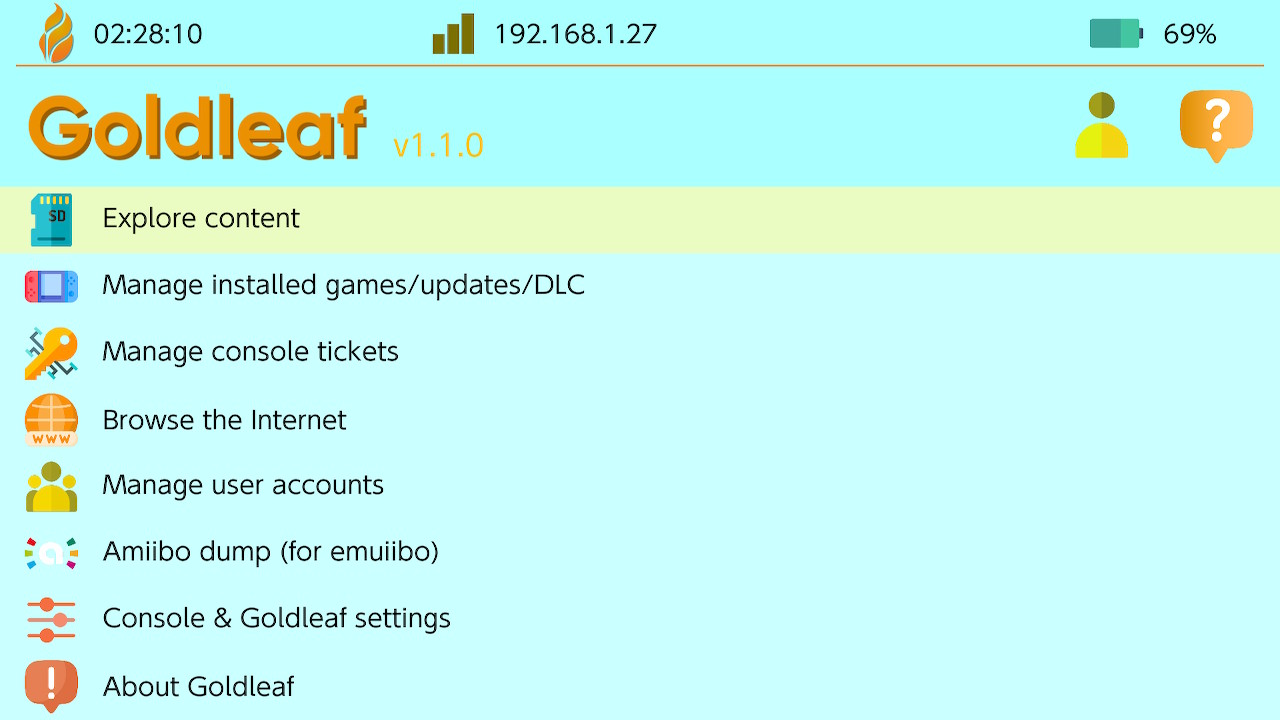
light1.jpg
dark1.jpg


Similar to the well-known 3DS homebrew FBI, Goldleaf serves as a file browser/manager/editor, title manager, user account manager... and more!


Let Goldleaf make your life easier while dealing with more or less technical Nintendo Switch stuff!
 
Last edited by XorTroll, , Reason: 0.6 README changes
I’ve released Goldleaf v1.1.0! Many fixes and improvements, with relevant UI changes and performance fixes!
Check all of them here: https://github.com/XorTroll/Goldleaf/blob/master/cur-changelog.md

Go check it out! https://github.com/XorTroll/Goldleaf/releases/tag/1.1.0
Thanks for the update, could you fix this 100% crashing bug?
https://gbatemp.net/threads/goldlea...ltipurpose-homebrew-tool.527578/post-10472548
still exists on 1.1.0
plug otg usb flashdrive, choose USB Drives , shows 1 drive found, if choose Cancel will crash atmosphere
 
Last edited by dsrules,
i dont know if i did something wrong but this is not working on my system i have an oled updated to 20.01 the first thiing that happened was i replaced the old gold leaf file with the 1.10 i then loaded up my system i launched my forwarder it came to the main menu of goldleaf and froze i closed software from home after trying to launch again i get a black screen i get the same from appulet mode to i went back into my sd and deketed the entire goldleaf folder and put the new nro in the root of the switch folder and once again booted up my system i went into applulet mode and launched goldleaf and again got a black screen any help would be nice thank you guys ahead of time
 
i dont know if i did something wrong but this is not working on my system i have an oled updated to 20.01 the first thiing that happened was i replaced the old gold leaf file with the 1.10 i then loaded up my system i launched my forwarder it came to the main menu of goldleaf and froze i closed software from home after trying to launch again i get a black screen i get the same from appulet mode to i went back into my sd and deketed the entire goldleaf folder and put the new nro in the root of the switch folder and once again booted up my system i went into applulet mode and launched goldleaf and again got a black screen any help would be nice thank you guys ahead of time
just an update so i got it working but it takes forever to load i had to let it sit for almost a minuet before it finaly loaded in 1.0 loaded right away im not sure why this is but i do like the easier visiability of the interface compared to 1.0 while i am very happy about the update it would be nice if it loaded as fast as the original did tinfoil has the same problem it loads but it takes like 10 minutes to load anyways thank you for the update
 
  • Like
Reactions: Blythe93
just an update so i got it working but it takes forever to load i had to let it sit for almost a minuet before it finaly loaded in 1.0 loaded right away im not sure why this is but i do like the easier visiability of the interface compared to 1.0 while i am very happy about the update it would be nice if it loaded as fast as the original did tinfoil has the same problem it loads but it takes like 10 minutes to load anyways thank you for the update
same is happening to JKSV.
 
  • Like
Reactions: Blythe93
same is happening to JKSV.
oh okay thanks for the info hopefully these issuse will be resolved in time i myself am in no rush i realize it takes time for you and the other devs to get things done so no worrys and thanks for all you and the other devs do its greatly appreciated
 
how many partitions on your usb drive, and what format they have?
usb flashdrive should be 1 partition?
128GB exfat

choose Cancel will crash

crash1.jpg


choose Browse will crash, choose Cancel ok
crash2.jpg


just an update so i got it working but it takes forever to load i had to let it sit for almost a minuet before it finaly loaded in 1.0 loaded right away im not sure why this is but i do like the easier visiability of the interface compared to 1.0 while i am very happy about the update it would be nice if it loaded as fast as the original did tinfoil has the same problem it loads but it takes like 10 minutes to load anyways thank you for the update
load speed is fine for me, same speed as 1.0
firmware 20.0.1, AMS 19.0
 
Last edited by dsrules,
usb flashdrive should be 1 partition?
128GB exfat

choose Cancel will crash

View attachment 504443

choose Browse will crash, choose Cancel ok
View attachment 504444


load speed is fine for me, same speed as 1.0
firmware 20.0.1, AMS 19.0
interesting what is your system setup i have an oled running 20.01 fw with atmosphere 1.9.0 and hekate 6.30 all of the following apps load realy slow for me check point 3.10.0 loads at 1:36 seconds goldleaf loads at 1:28 seconds tinfoil takes 15 minutes let me know what you did so i can fix mine thank you
 
interesting what is your system setup i have an oled running 20.01 fw with atmosphere 1.9.0 and hekate 6.30 all of the following apps load realy slow for me check point 3.10.0 loads at 1:36 seconds goldleaf loads at 1:28 seconds tinfoil takes 15 minutes let me know what you did so i can fix mine thank you
just saw this messgae now :)
v1 with latest firmware cfw using sys-patch, no other sys modules or overlays
 
just saw this messgae now :)
v1 with latest firmware cfw using sys-patch, no other sys modules or overlays
i already reverted to 19.01 from 20.01 because i could not get tinfoil to work right be aware that if you revert from 20.01 back to 19.01 that you will lose all your installed games when i used daybreak to install 19.01 back on the emmumc due to the significant changes from 19.01 to 20.01 it caused my user data to become corrupt atmosphere kept crashing so i had to at the atmosphere insignia hold vol up and down to get into maintenance mode at that point i initialized the the option to kepp save data after all that was done the system rebooted i selected emmumc and it booted up i did the setup process when that was finished i was prompted with a message saying this sd was used with a previouse system in order to use it i had to select delete data which i did and now i am reinstalling all my games
 
i already reverted to 19.01 from 20.01 because i could not get tinfoil to work right be aware that if you revert from 20.01 back to 19.01 that you will lose all your installed games when i used daybreak to install 19.01 back on the emmumc due to the significant changes from 19.01 to 20.01 it caused my user data to become corrupt atmosphere kept crashing so i had to at the atmosphere insignia hold vol up and down to get into maintenance mode at that point i initialized the the option to kepp save data after all that was done the system rebooted i selected emmumc and it booted up i did the setup process when that was finished i was prompted with a message saying this sd was used with a previouse system in order to use it i had to select delete data which i did and now i am reinstalling all my games
Thanks for the info, I didn't plan to downgrade the firmware, but downgraded Goldleaf back to 1.0 instead
 
Hello! Have anyone have this issue where at GoldLeaf, despite saying that I'm at the latest firmware, the key generation is stuck to 9? Here is screenshot for proof of this weird behavior.
 

Attachments

  • 20250515_125540.jpg
    20250515_125540.jpg
    54.2 KB · Views: 48
Hi all,

If it can help some people :

https://www.cfwaifu.com/goldleaf-quark/
the big issue i am having right now is with quark 1.10 everytime i launch it and start an install to my switch it causes my video card to discconect and give a code 43 when i use the old version this does not happen i am thinking that some how the new quark is interfering with the ability of my nvidia drivers to work and causing them to crash i have no idea why so for now i am using old version of quark which works just fine and does not cause my video to crash hopefully the dev of quark gets informed of this and can fix it i am using a gtx 1070 geforce video card with 32gb of ram intel i7 6820hk cpu
 
  • Like
Reactions: Andre63
Sorry, there are a few bugs in the last version, I'm working on a new minor release to fix them:
- Key generation is displayed wrong in Mariko consoles
- Installations might fail since I changed the default buffer size config to 16MB, which makes USB freeze
- There might be some weird bugs with USB drives due to compilation issues
- There may be a noticeable slowdown, this is due to 20.x changes (other homebrew like uLaunch, nxdumptool and so on are also having issues) in application icon/nacp loading
- Maybe something else I'm missing
 
Sorry, there are a few bugs in the last version, I'm working on a new minor release to fix them:
- Key generation is displayed wrong in Mariko consoles
- Installations might fail since I changed the default buffer size config to 16MB, which makes USB freeze
- There might be some weird bugs with USB drives due to compilation issues
- There may be a noticeable slowdown, this is due to 20.x changes (other homebrew like uLaunch, nxdumptool and so on are also having issues) in application icon/nacp loading
- Maybe something else I'm missing
Mate, thanks a lot for all your great work!
 
Sorry, there are a few bugs in the last version, I'm working on a new minor release to fix them:
- Key generation is displayed wrong in Mariko consoles
- Installations might fail since I changed the default buffer size config to 16MB, which makes USB freeze
- There might be some weird bugs with USB drives due to compilation issues
- There may be a noticeable slowdown, this is due to 20.x changes (other homebrew like uLaunch, nxdumptool and so on are also having issues) in application icon/nacp loading
- Maybe something else I'm missing
Caching the title info might be your best bet. You could re-use the cache between ulaunch and goldleaf as well. In sphaira I manually parse the control nca as it's faster than ns, even if it's in ns cache on fw20+. That could be an option for you also, but caching it yourself is probably the better option.

If you go the route of manually parsing, heres the order of priority in speed:

FW 20+
1. manually parsing (20ms)
2. ns cache (40 - 130 ms)
3. ns storage (300-500+ ms)

FW 19 (and below)
1. ns cache (5ms)
2. manually parsing (20ms)
3. ns storage (40-50ms, can take longer if its a low storage / slow gamecard mounted)
 
Last edited by Deleted member 413168,

Site & Scene News

Popular threads in this forum