just got myself a v1 nintendo switch

  • Thread starter Thread starter froggy8
  • Start date Start date
  • Views Views 6,672
  • Replies Replies 26
  • Likes Likes 7

froggy8

Member
Newcomer
Joined
Sep 1, 2024
Messages
11
Reaction score
12
Trophies
0
Age
50
XP
70
Country
United Kingdom
hello guys

hope everyone is ok :)

just got myself a v1 unpatched nintendo switch and i will be jailbreaking it. been wanting one for about 3 years and finally got one.

i have got it yet but when i do, i might be asking a few questions if i may.

anyway here is my switch:
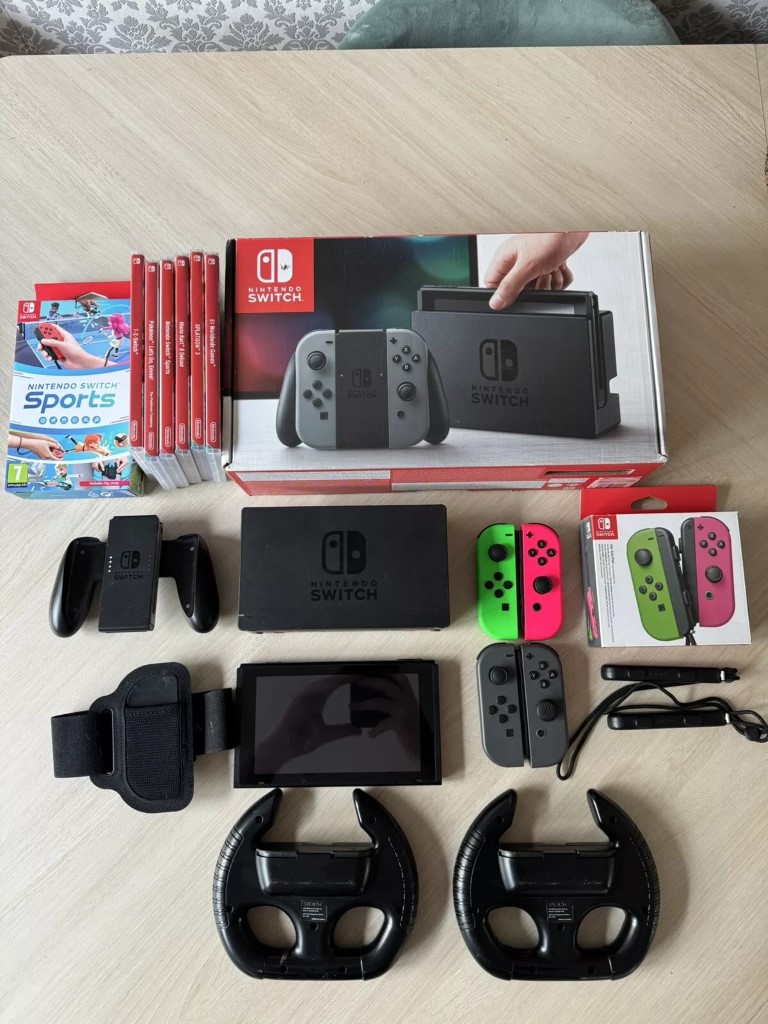
1725199555154.jpeg


cant wait to receive it :)
 
yeah i ordered the rcm jig already, thanks for mentioning that.

i have been reading the nh switch guide which was recommended by wooloo website

i have also downloaded all the files frmm that website.
Post automatically merged:

hi guys

i am trying to find the fusee bin file on my pc but cant find it at all, has it been renamed already to something else?
 
Last edited by froggy8,
the power pack was inside the box:

1725287769239.jpeg


1725287769239.jpeg

Post automatically merged:

No, if you download it, it should just be named 'fusee.bin'.
Just download it in a know location once more.
sorry my bad, i downloaded the atmosphere but didnt see the fusee file below it doh!

I would recommend you getting some joystick replacements too.
the seller has included 2 sets of joysticks unless i am missing something?

Awesome. Nice pickup, and have fun with it.
thank you, really wanted one to jailbreak really and depending what games are out there then i might play it.
Post automatically merged:

ok guys

which is the best tutorial to read? switch.hacks.guide or rentry.co?
 
Last edited by froggy8,
sorry my bad, i downloaded the atmosphere but didnt see the fusee file below it doh!


the seller has included 2 sets of joysticks unless i am missing something?


ok guys

which is the best tutorial to read? switch.hacks.guide or rentry.co?
fusee.bin is actually included in the atmosphere zip file. It's just renamed reboot_payload.bin.

People were probably referring to getting a Pro controller style joystick. I would recommend it too.

As for tutorial to read, why not both? It's better to be more informed than not enough. You don't have to blindly follow a tutorial, just get the information on what you want to do, try to understand what does what, and then apply.
 
fusee.bin is actually included in the atmosphere zip file. It's just renamed reboot_payload.bin.

People were probably referring to getting a Pro controller style joystick. I would recommend it too.

As for tutorial to read, why not both? It's better to be more informed than not enough. You don't have to blindly follow a tutorial, just get the information on what you want to do, try to understand what does what, and then apply.
many thanks

i will look into the pro controller :)

if i wanted to use my phone, i know i will need 2 files on my phone which is the fusee.bin and hekate.bin but on my hekate file it is actually called hekate_ctcaer_6.2.1.bin. will i need to rename it or can i just leave it as that?
 
I would recommend you getting some joystick replacements too.
I assume you're talking about actual analog stick replacement because of "joycon drift". In which case, it's not necessary. Just shoot a little contact cleaner (for electrical contacts, not the kind that go on your eyeballs) under the rubber flap at the base of the stick, and then work the stick a little bit. If you don't have contact cleaner, you can squish an alcohol soaked Q-tip in there to drip down onto the contact pads.
 
  • Like
Reactions: BigOnYa
if i wanted to use my phone, i know i will need 2 files on my phone which is the fusee.bin and hekate.bin but on my hekate file it is actually called hekate_ctcaer_6.2.1.bin. will i need to rename it or can i just leave it as that?
You don't even need these two files on your phone, just the payload you want to use, depending on how you launch your CFW. Personally, when I turn on the Switch, I launch Hekate. So that would be your hekate_ctcaer_6.2.1.bin file. You can rename it or not, it won't matter to your phone, and it won't matter to your Switch.
 
many thanks guys

this is all new to me so i am slowly learning each step.

this is the video i have been watching if i wanted to inject the payload using my phone, the guy said to put both files into my phone:


i will just leave file in my phone as you have suggested, thank you
 
many thanks guys

this is all new to me so i am slowly learning each step.

this is the video i have been watching if i wanted to inject the payload using my phone, the guy said to put both files into my phone:


i will just leave file in my phone as you have suggested, thank you

I always load Hekate first then boot Atmosphere from Hekate but booting Atmosphere directly from your phone should work too and save a few seconds.

Most importantly, use Hekate to backup your NAND and Lockpick to backup your keys which it seems you already have. Keep these files on your micro SD card and also on your computer or a USB stick because you might need them in the future and only having one copy is unsafe because data can get corrupted.

Set up your emuNAND and 90DNS.

Buy a Pro Controller and look into what homebrew apps you want to install. You'll probably want to go with this list.

- EOS (overclocking software)
- Reverse NX (switches between handheld and docked mode)
- Ultrahand Menu (lets you change overclocking and Reverse-NX settings in-game)
- Retroarch (emulates retro systems)
- DBI (installs XCI and NSP files)
 
  • Like
Reactions: froggy8
hello guys

hope everyone is ok :)

just got myself a v1 unpatched nintendo switch and i will be jailbreaking it. been wanting one for about 3 years and finally got one.

i have got it yet but when i do, i might be asking a few questions if i may.

anyway here is my switch:

View attachment 455690

cant wait to receive it :)
you don't jailbreak it, you hack it, jailbreak is a term for apple.
as stated before, invert on a dongle injector.and read https://rentry.org/SwitchHackingIsEasy

STAY AWAY OF ANY YOUTUBE VIDEO THEY ARE OUTDATED THE SAME DAY ARE UPLOADED.
 
I always load Hekate first then boot Atmosphere from Hekate but booting Atmosphere directly from your phone should work too and save a few seconds.

Most importantly, use Hekate to backup your NAND and Lockpick to backup your keys which it seems you already have. Keep these files on your micro SD card and also on your computer or a USB stick because you might need them in the future and only having one copy is unsafe because data can get corrupted.

Set up your emuNAND and 90DNS.

Buy a Pro Controller and look into what homebrew apps you want to install. You'll probably want to go with this list.

- EOS (overclocking software)
- Reverse NX (switches between handheld and docked mode)
- Ultrahand Menu (lets you change overclocking and Reverse-NX settings in-game)
- Retroarch (emulates retro systems)
- DBI (installs XCI and NSP files)
brilliant! thank you

i was going to ask later what apps do you all recommend, and you have put some up already :)

the guy in the video did load hekate first then using hekate to load up atmosphere.
dont know how to load up atmosphere directly without hekate.

i will need to find a step by step to back up my keys.

my switch turned up today but need to wait for the rcm jig which i think might turn up tomorrow.
Post automatically merged:

ok guys i have managed to partition the sd card and got hekate on the switch and ive copied all the files needed for atmosphere on the sd card too but whenever i try to launch the Atmosphere FSS0 emuMMC, it just goes back to my normal home page.

any one shine a light on this problem please?
 
Last edited by froggy8,
  • Like
Reactions: impeeza
update guys:

i have install hekate and atmosphere, backed everything up and installed a few apps.

tinfoil was abit of a nightmare to install as it kepft giving me arrors but have sorted that out now.

only thing left for me to do is figure out how to downoad games as the 'new games' tab wasnt showing in tinfoil as it should.
 
update guys:

i have install hekate and atmosphere, backed everything up and installed a few apps.

tinfoil was abit of a nightmare to install as it kepft giving me arrors but have sorted that out now.

only thing left for me to do is figure out how to downoad games as the 'new games' tab wasnt showing in tinfoil as it should.
Sorry, ON THIS SITE IS PROHIBITED TO ASK AND GIVE PIRACY.

please read https://gbatemp.net/help/terms/
 
For the record, if you want to use multiple accounts, (I have kids), set them up first, booting a clean system and add the accounts, link some of them to nintendo IDs if you want. It is possible to add accounts to emunand, but it hasn't always worked great.

Then (for extra security) block the Nintendo Switch in your router (MAC-block), disable wifi, set up hekate+atmosphere and enjoy your system :)

(With blocked internet, software can't be downloaded to the switch, obviously, but it's a personal choice to disable internet)
 
  • Like
Reactions: froggy8

Site & Scene News

Popular threads in this forum