Apparently Noexes hates Edizon! [15.0.0]

  • Thread starter Thread starter JayBae
  • Start date Start date
  • Views Views 2,959
  • Replies Replies 7

JayBae

Well-Known Member
Member
Joined
May 24, 2020
Messages
302
Reaction score
87
Trophies
0
Age
39
Location
America
XP
402
Country
United States
Apparently Noexes hates Edizon/Breeze on 15.0.0/15.0.1

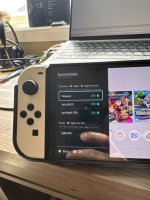
The Fix? I set Noexes sysmod to off, and edizon SE and Breeze works again, they used to hard crash my Switch when searching memory in applet mode, or would just freeze after a while staying idol on the apps; had to hold down the power button to shut it down, cause selecting "Reset" from the power options menu never loads either, when ya click reset it just loads forever. :U The more ya kno~

Now I just gotta remember to disable Noexes if i'mma use the apps haha, cause I kinda use both for searching memory.
 
Last edited by JayBae,

Apparently Noexes hates Edizon/Breeze on 15.0.0/15.0.1

The Fix? I set Noexes sysmod to off, and edizon SE and Breeze works again, they used to hard crash my Switch when searching memory in applet mode, had to hold down the power button to shut it down, cause selecting "Reset" from the power options menu never loads eaither when ya click reset is just loads forever. :U The more ya kno~

Saw some mention they think it has something to do with the wifi connection? I unno.
Push the skinny guy out the lift and blame him for holding it up?
 
how do you remove noexes from my sysmodule and overall from my sd card? where are all parts of it installed?
 
how do you remove noexes from my sysmodule and overall from my sd card? where are all parts of it installed?
It's all in atmosphere's contents folder. Tesla is the titan class sysmodule, you will encounter game that crash if you use Edizon or Breeze while tesla is active ( you don't have to do anything for it to be active, it is by default active )
 
  • Like
Reactions: captansam
It's all in atmosphere's contents folder. Tesla is the titan class sysmodule, you will encounter game that crash if you use Edizon or Breeze while tesla is active ( you don't have to do anything for it to be active, it is by default active )
Okay and which folder would it be in Atmosphere? I'm a bit new to this.

Also wondering what is exactly it does and if I need it? I have Edizon installed along with Breeze, do I need noexo to run these or any applications?

I noticed it listed in the Tesla overlay menu as a sysmodule but no where else, why is that? Why can't I run it from the HB Menu?
 
Okay and which folder would it be in Atmosphere? I'm a bit new to this.

Also wondering what is exactly it does and if I need it? I have Edizon installed along with Breeze, do I need noexo to run these or any applications?

I noticed it listed in the Tesla overlay menu as a sysmodule but no where else, why is that? Why can't I run it from the HB Menu?
You probably don't need noexs sysmodule and if you have not enabled it there is nothing you need to do ( no need to disable if not enabled )
If you get crash disable tesla sysmodule would be the likely cure.

You can disable sysmodules using Breeze:settings:sysmodule manager. The buttons are toggles.

sysmodules are like drivers, they don't serve users directly and they eat memory if enabled and requires no input from you directly.
 
You probably don't need noexs sysmodule and if you have not enabled it there is nothing you need to do ( no need to disable if not enabled )
If you get crash disable tesla sysmodule would be the likely cure.

You can disable sysmodules using Breeze:settings:sysmodule manager. The buttons are toggles.

sysmodules are like drivers, they don't serve users directly and they eat memory if enabled and requires no input from you directly.
To completely remove it from my device and all file traces of it what exactly do I need to delete & where are they located?

In the atmosphere folder, is it the folder named: "054e4f4558454000"? If not which is the correct folder to delete?

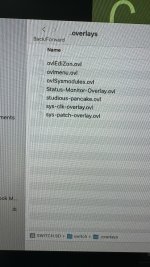
Is there a .ovl file I need to delete as well? Not sure which one it would be see my picture to see which ones I have.

Any other files I need to delete?
 

Attachments

  • IMG_1469.jpeg
    IMG_1469.jpeg
    127.4 KB · Views: 44
  • IMG_1470.jpeg
    IMG_1470.jpeg
    4.6 MB · Views: 48
Last edited by captansam,

Site & Scene News

Popular threads in this forum