

Homebrew Homebrew app Homebrew app just opens and closes

  • Thread starter Thread starter wilburie
  • Start date Start date
  • Views Views 1,217
  • Replies Replies 6

wilburie

Member
Newcomer
Joined
May 11, 2023
Messages
24
Reaction score
9
Trophies
0
XP
102
Country
United States
So I homebrewed my new 2DS XL (via Luma3DS) and it worked perfectly. I have some homebrew apps already installed, and i tried to make my own.

I have the program up and running, the title and icon both work, but it just gives me a black screen for about 4 seconds, and then returns to the HB launcher.
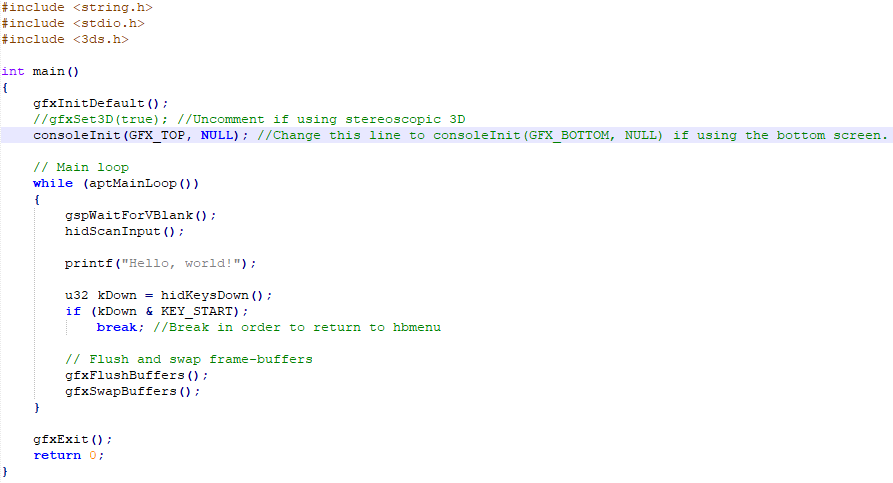
Here's my code:
1683835122310.png


And the two built SMDH and 3DSX files are in a folder called "TestAppHB", like this:

1683835195910.png


As I said, it loads up and shows as an app on the HB menu fine, but when I run it, it doesn't work.

 
i think you need opeing curly brackets from the beginning of the if kdown statement like this

if (kDown & KEY_START);
{
break; //Break in order to return to hbmenu
}

you might not need a semi colon at the end of your if statement too btw
 
i think you need opeing curly brackets from the beginning of the if kdown statement like this

if (kDown & KEY_START);
{
break; //Break in order to return to hbmenu
}

you might not need a semi colon at the end of your if statement too btw
Hey, it works now! Thanks! :)
 
So, I said that it worked because it didn't give me any warnings during the build... But this happens.

IMG_20230515_133351546[1].jpg


Anyway i can make it print "Hello, world!" one time and then wait until they return to the HBM? (press the start button)
 
So, I said that it worked because it didn't give me any warnings during the build... But this happens.

View attachment 371545

Anyway i can make it print "Hello, world!" one time and then wait until they return to the HBM? (press the start button)
place it outside of aptmainloop, like this

while (aptMainLoop())
{
//stuff goes here
}

//now here put your printf statement
 
place it outside of aptmainloop, like this

while (aptMainLoop())
{
//stuff goes here
}

//now here put your printf statement

Well, that didn't work. But I did some experimenting of my own, and instead of placing it AFTER the loop I placed it BEFORE. Works perfectly now! Thanks for the help!

Also, In case you know...

How can i print custom images to the top and bottom screen?
 
Well, that didn't work. But I did some experimenting of my own, and instead of placing it AFTER the loop I placed it BEFORE. Works perfectly now! Thanks for the help!

Also, In case you know...

How can i print custom images to the top and bottom screen?
citro2d, don't know how to but i've heard it's pretty simple.
 

Site & Scene News

Popular threads in this forum