ROM Hack Xenoblade Chronicles 2 - Easy editing method

  • Thread starter Thread starter Type_O_Dev
  • Start date Start date
  • Views Views 16,465
  • Replies Replies 26
  • Likes Likes 7

Type_O_Dev

Developer
Developer
Joined
Dec 12, 2017
Messages
683
Reaction score
418
Trophies
0
XP
1,540
Country
United States
Super Easy Xenoblade Chronicles 2 save editor

what you need
  1. Extract the XC2-Editor.zip
  2. backup your bf2savefile.sav
  3. copy into XC2-Editor
  4. run 010 editor
  5. open your save (bf2savefile.sav)
  6. click on run template -> select bf2savefile.1sc we downloaded from earlier. "

  1. click on run script -> select bf2savefile.bt


Done !


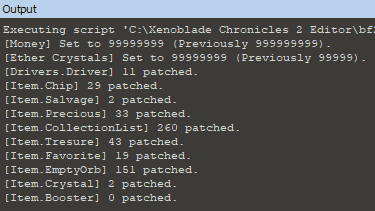
Your output will look similar to this
output-png.123639


You must have one of the item before it is Maxed out

Use your items and re-run
 

Attachments

  • core values.png
    core values.png
    7.7 KB · Views: 1,357
  • cores.png
    cores.png
    4.7 KB · Views: 1,257
  • edit.png
    edit.png
    41.5 KB · Views: 1,060
  • edit2.png
    edit2.png
    3.1 KB · Views: 1,178
  • edit3.png
    edit3.png
    15.3 KB · Views: 1,073
  • edit4.png
    edit4.png
    12.9 KB · Views: 1,029
  • edit5.png
    edit5.png
    11.6 KB · Views: 1,265
  • hp.png
    hp.png
    4.7 KB · Views: 1,187
  • money.png
    money.png
    1.3 KB · Views: 1,177
  • XC2 Editor.zip
    XC2 Editor.zip
    5.8 KB · Views: 346
Last edited by Type_O_Dev,
Easy Xenoblade Chronicles 2 save editor

what you need
  1. Save the 010 template to bf2savefile-template.bt basically drop the .txt
  2. run 010 editor
  3. open your save (bf2savefile.sav)
  4. click on run template -> select bf2savefile-template.bt we downloaded from earlier. "

  • Money
    • goto uint32 Money
    • set Value 99999999

  • common cores
    • expand > struct_gf_ItemBox_ItemBox
    • then > sruct_gf_GfItemInfo_CystalListBox[0]
    • click > uint32 Count: 10
    • set Value = 99
  • rare cores
    • expand > sruct_gf_GfItemInfo_CystalListBox[1]
    • click > uint32 Count: 10
    • set Value = 99
  • legendary cores
    • expand > sruct_gf_GfItemInfo_CystalListBox[2]
    • click > uint32 Count: 10
    • set Value = 99

  • Drivers > SDataDrivers Driver
    • you will see struct gf_SDataDriver Driver[0] to struct gf_SDataDriver Driver[15]
    • in each one look for char_Name =
so struct gf_SDataDriver Driver[0] = Rex
  • Expand and check out follows
HpMax, Stregth, PowEther, Dex, Agility, Luck, PArmer, EArmor, CritRate, GuardRate(block) , Exp, SkillPoints, TotalSkillPoints​
View attachment 123576
Driver location rex hp image
  • Blades > SDareBladed Blades
    • you will see struct gf_SDataBlade Blade[0] to struct struct gf_SDataBlade Blade[421]
    • in each one look for char_Name =
so struct gf_SDataBlade Blade[0] = Pyra​
  • Expand and check out follows
Creator(who bonded), SetDriver(current driver), FavoriteCategory1, FavoriteItem, Cooltime(arts cooldown) TrustPoints, TrustRank​
View attachment 123575
Blades location - pyra


Note: if your adding a core you have never obtained make sure you use the other values
View attachment 123569


So Much to mess with, FUN, FUN
Now you should be able to figure the rest on you own, i am interested to see the mods from this considering the data stored in these saves.
lets see if we can break the game :)

View attachment 123556 View attachment 123557 View attachment 123558

OLDER METHOD!
 
Hmmm part 6 and 7 are reversed for me not sure if thats part of the update of this editor. Running template is bf2savefile.bt while script is .1sc
Update nevermind still works. 99 overdrives...... this is what I been wanting ever since homebrew became a rumor for the Switch
 
Last edited by MasterJ360,
is there a way to get all blades and max all stats with this?

Rare blades were event related, currently there's no simply way to do it (or correctly).

But max stats with your current blades is doable with this.

--------------------- MERGED ---------------------------

got it to work. it's awesome. thank you! got any ideas how to max out the blades' affinity and their skill tree?

Not possible as some are quests/event related. You need to do those manually or edit the events flags, which god knows which is what.
 
How come I dont see the "output" patching message that the OP mentions?

I edit all my values and run script does not bring that message.

--------------------- MERGED ---------------------------

How come I dont see the "output" patching message that the OP mentions?

I edit all my values and run script does not bring that message.

never Mind, this editor works wonderfully, the instructions are a little off but I made my modifications and just clicked save file, overwriting the original and everything worked beautifully.

Thanks!!!
 
Modifying characters stats values (hp, strength, etc) did not work for me.

The stats is related to level, e.g. you can't really keep a 999 attack with level 1 or even 999. Once you mod the level to something like 65535, the stats will stick with 999, but can only down level using the hotel in NG+. The safest bet is max only the exp and level up through hotel, unless you don't care about 3 hits kill on anything forever.
 
thanks, just a heads up that it deleted my rare blade Poppi Buster, the new rare blade that come with DLC, but it's ok it seems like I can still get it again by redoing the quest.
 
I'd like to add that, for some reason, the feed-able ARDURAN from torigoth was dead when I restored a save after this method. I was being really careful to keep him so I'm sure it was still alive before.
 

Site & Scene News

Popular threads in this forum