Homebrew Wii U Linux

  • Thread starter Thread starter pwsincd
  • Start date Start date
  • Views Views 165,806
  • Replies Replies 510
  • Likes Likes 56
Wow, 4 new pages here? (although one page is PSX off topic stuff haha).

@Billy Acuña: Thanks for those amazing screenshots. I'm so hyped for this project! :)

lol I had to do a browser exploit and reinstall Haxchi, I don't know what I did but it didn't like me editing Haxchi's pathways
Changing the sd:/haxchi/config.txt does nothing.
For this to be patched in your actual Haxchi game you first need to re-run the installer, just as you did.

 
ok so i've successfully installed both xorg and lightdm i think since i could connect with my phone, but not ldxe since i had to go
now when linux is booting it shows for a brief second the login page and after that just a line in the top left like computers and it's stuck there
anybody?
i think i'll just write a clean image again and install everything in one session, i guess it kinda made something to corrupt, highly suspicious though
 
anybody?
i think i'll just write a clean image again and install everything in one session, i guess it kinda made something to corrupt, highly suspicious though
Did you try starting the xserver from the command line already?

Try startx.
 
Last edited by lordelan,
And on the flashing line you're not able to enter any commands like startx?
not at all but now it gave a different results.. same flashing line, pressed a key on the keyboard like always and it gave me some lines. i'll capture it just a sec

--------------------- MERGED ---------------------------

0__05aafbbe095025.jpg


--------------------- MERGED ---------------------------

my b wrong image.. wait a sec
edit: now it's fine
 
  • Like
Reactions: lordelan
not at all but now it gave a different results.. same flashing line, pressed a key on the keyboard like always and it gave me some lines. i'll capture it just a sec

--------------------- MERGED ---------------------------

0__05aafbbe095025.jpg


--------------------- MERGED ---------------------------

my b wrong image.. wait a sec
edit: now it's fine
Mmh that looks like the GamePad output although it's your TV/monitor obviously.
Maybe @CompuCat can help you.

Tbh I'd try starting over again. That involves getting fw.img, kernel und rootfs image set up again from the beginning.
 
Mmh that looks like the GamePad output although it's your TV/monitor obviously.
Maybe @CompuCat can help you.

Tbh I'd try starting over again. That involves getting fw.img, kernel und rootfs image set up again from the beginning.
yeah that's what i thought to do at first but i think i'll still wait for an answer. it's not that long but tbh i'm more interested to slove this issue without literally starting all over again, for experience & knowledge and also it might happen even after installing gui stuff again
 
  • Like
Reactions: lordelan
So, actually i was successfull to get a lubuntu ppc img, only thing now is that it doesnt boot with the current boot.cfg, but when i use the custom one, it doesnt boot and hangs on (with usb plugged!). please help me!


[loader]
default=lubuntu

[profile:lubuntu]
name=Lubuntu SID
kernel=sdmc:/linux/dtbImage.wiiu
cmdline=root=/boot/initrd.img rootwait
 
Changing the sd:/haxchi/config.txt does nothing.
For this to be patched in your actual Haxchi game you first need to re-run the installer, just as you did.

Nah I went in with ftpiiu everywhere and changed it in it's actual folder
 
Last edited by M7L7NK7,
I'm so hyped by this project. Can someone put a video with the GUI working to see how it looks like plz ?
 
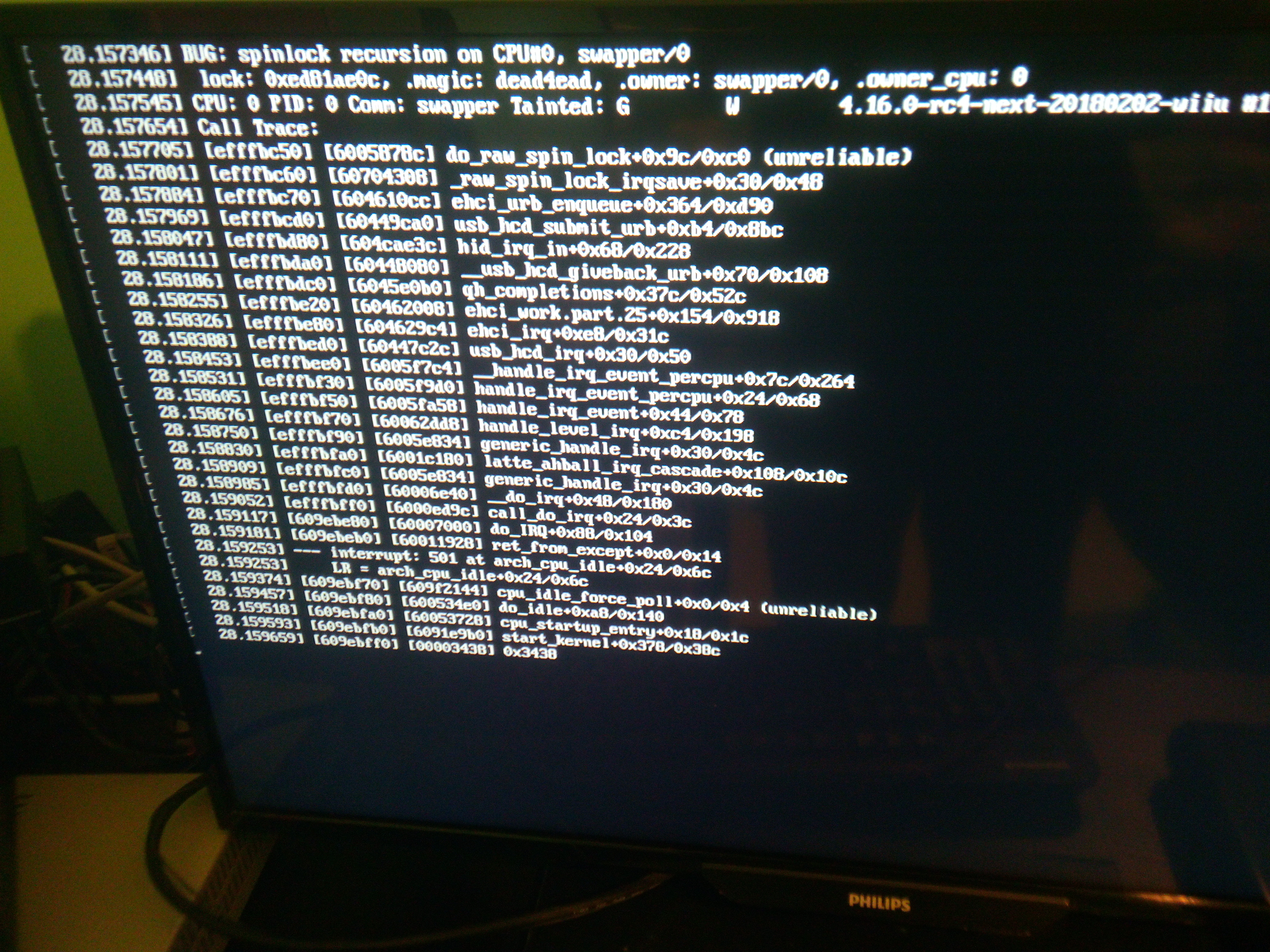
@LasPingas, @lordelan: ignore the spinlock recursion message, that's a known bug. It's harmless, just prints out a stack trace on the screen. Linux is still working. EDIT: I might ask you for some debug logs later, we're trying to gather info to solve the bug...

@kfrfansub: I can probably get a quick capture once I've got access to my Wii U again. I'm quite busy nowadays, though, so it might be a bit.

EDIT 2: for clarity, the GamePad shows output from linux-loader before Linux is booted. As soon as Linux boots, the TV will show output from Linux instead.
 
Last edited by CompuCat,
@LasPingas, @lordelan: ignore the spinlock recursion message, that's a known bug. It's harmless, just prints out a stack trace on the screen. Linux is still working. EDIT: I might ask you for some debug logs later, we're trying to gather info to solve the bug...

@kfrfansub: I can probably get a quick capture once I've got access to my Wii U again. I'm quite busy nowadays, though, so it might be a bit.

EDIT 2: for clarity, the GamePad shows output from linux-loader before Linux is booted. As soon as Linux boots, the TV will show output from Linux instead.
Well it doesn't let me do anything, I try to click a letter on the keyboard and nothing happens. It only responds when I press shutdown on the console
 
hmmm, that's quite odd. Can you take a video of what happens when you get the bug? When it happens, proceed as if none of the bug lines ever occurred (i.e. if it happens in the middle of a line, keep typing the rest of your command and hit Enter like nothing ever happened).
 
hmmm, that's quite odd. Can you take a video of what happens when you get the bug? When it happens, proceed as if none of the bug lines ever occurred (i.e. if it happens in the middle of a line, keep typing the rest of your command and hit Enter like nothing ever happened).
I'll try tomorrow morning (10pm here) with my low quality phone back cam I hope it'll be fine
 
Just make sure the text is legible. If you have a capture card, please use it-it'll help wonders.
no capture card. the quality is shit but i got a different result this time which basically end with an error so i guess there's more indication to what is wrong now.
 
  • Like
Reactions: lordelan
Looks like your root filesystem got corrupted. You'll have to re-image your USB drive and try again.
 
Actually, i want to share with everyone the .img files for flashing it on usb. They are lubuntu and gentoo for ppc, so compatible with wiiu linux! i have tested them, they doesnt want to start, idk why, but if anyone wants to solve the issues i would really like to know what my mistakes were: gentoo: https://mega.nz/#!5tVxxLSL; lubuntu: https://mega.nz/#!ZxkTBarA
 
Last edited by Loller06,
  • Like
Reactions: lordelan

Site & Scene News

Popular threads in this forum