Hacking WBFS Manager and Channel Creator Released!

  • Thread starter Thread starter HowardC
  • Start date Start date
  • Views Views 45,509
  • Replies Replies 192
Status
Not open for further replies.
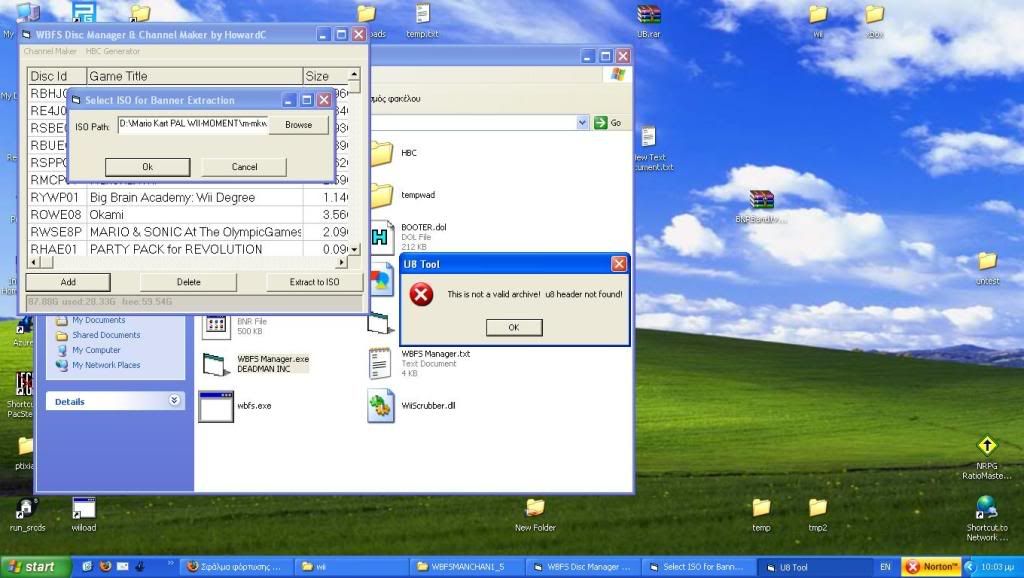
U8 tool cant open the .bnr files!

new.jpg


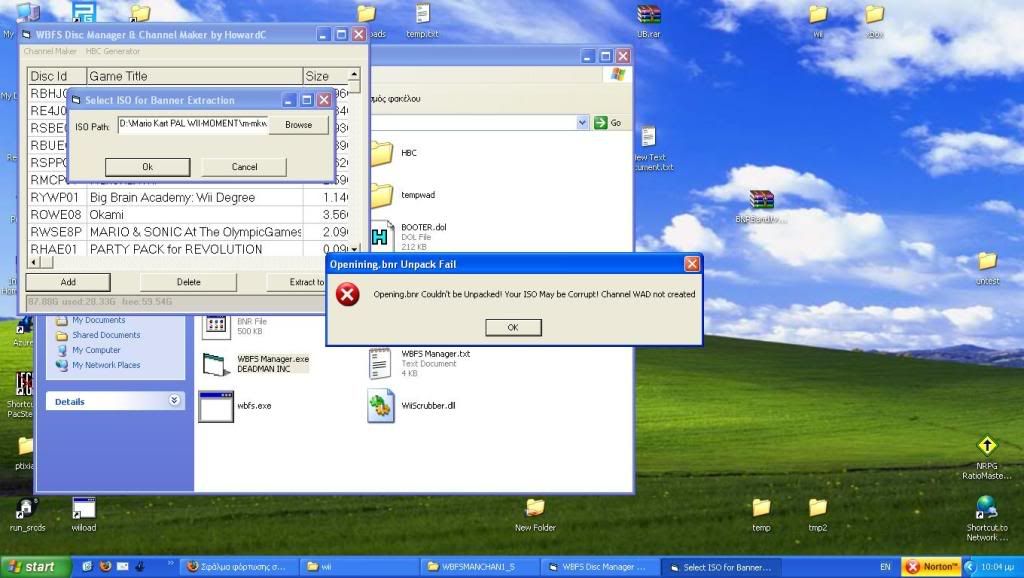
And eventually follows with this.


2.jpg


You have any idea why it does that?
Damn u8 tool must be removed.
 
snaker said:
U8 tool cant open the .bnr files!

new.jpg


And eventually follows with this.


2.jpg


You have any idea why it does that?
Damn u8 tool must be removed.

Im getting the same errors using winXP
 
This tool has saved me a hell of a lot of time and stress but the only thing i dont like and would like to se in future releases would be to out the wad file like this XXXXXX - XXXX.wad ie RH2P41 - UH2P.wad instead of UH2P.wad as it is doing at the moment, so it is easier to know what wad is for what game especially as i created channels for all the game son my hdd in one go.

WiiMonkey
 
I would prefer it to be something like:
XXXX - Game name.wad

Example (the game name was in caps from the ISO):
UNHE - NO MORE HEROES.wad


Question: Is it really necessary to extract the whole ISO from the the hard drive (in the WBFS) and then make a wad from it (that's what the program seems to be doing)? It seems cumbersome just to get the opening.bnr and other files.
 
I can't even get the app to see my external HDD. Any ideas ??

I just get, "Could not find USB drive, please plug drive in and press OK to continue."

I can find the drive with other managers however :S
 
You wouldnt normaly have to extract the whole ISO if you use Wiiscrubber.
I'm not sure about this though...
I get the Runtime error '9'
frown.gif
 
Very usefull application, as fast as command line tool
smile.gif


So, I make 4 channels (from ISO) but if I install them, I have 3 channels installed only
frown.gif

If I reinstall, each time the last channel is replaced by the new one ...

Maybe a problem with channel id ?

If someone can explain me
biggrin.gif


Anyway, the application works like a charm (under XP), thx a lot
wink.gif
 
@HowardC

Seems to be a bug with the u8tool. Have made channel for 'Animal Crossing Lets go to the City' and 'Cate West The Vanishing Files'

Both make use of just the first two words in icon text but all words when viewing banner.

the u8tool seems to be chopping out the needed seperators between the 2 text groups so instead of seeing 'ANIMAL CROSSING' you see 'ANIMAL CROSSINGLETS' in icon text

Original
Code:
00000040h: 49 4D 45 54 00 00 06 00 00 00 00 03 00 01 26 00; IMET..........&.
00000050h: 00 05 BD E0 00 00 F4 30 00 00 00 00 00 43 00 61; ..½à..ô0.....C.a
00000060h: 00 74 00 65 00 20 00 57 00 65 00 73 00 74 00 00; .t.e. .W.e.s.t..
00000070h: 00 00 00 00 00 00 00 00 00 00 00 00 00 00 00 00; ................
00000080h: 00 00 00 00 00 00 00 54 00 68 00 65 00 20 00 56; .......T.h.e. .V
00000090h: 00 61 00 6E 00 69 00 73 00 68 00 69 00 6E 00 67; .a.n.i.s.h.i.n.g
000000a0h: 00 20 00 46 00 69 00 6C 00 65 00 73 00 00 00 00; . .F.i.l.e.s....

WBFS Manager
Code:
00000080h: 49 4D 45 54 00 00 06 00 00 00 00 03 00 01 26 00; IMET..........&.
00000090h: 00 05 BD E0 00 00 F4 30 00 00 00 00 00 43 00 61; ..½à..ô0.....C.a
000000a0h: 00 74 00 65 00 20 00 57 00 65 00 73 00 74 00 54; .t.e. .W.e.s.t.T
000000b0h: 00 68 00 65 00 20 00 56 00 61 00 6E 00 69 00 73; .h.e. .V.a.n.i.s
000000c0h: 00 68 00 69 00 6E 00 67 00 20 00 46 00 69 00 6C; .h.i.n.g. .F.i.l
000000d0h: 00 65 00 73 00 00 00 00 00 00 00 00 00 00 00 00; .e.s............


Also on another thing, I seem to be getting the gameID/wad title Uisc.wad a lot instead of the proper game ID
 
hey this GUI sounds amazing! if only i could get it to work :'( i first tryed it on windows vista home premium (32) and i got the run time -9 error that every one is getting so i go for my XP, start it up and my HDD crashed lol. reformat update and finaly get to try it................ and i get error usb device not connected ahhhh


any fixes for the usb not connected yet?? yes my drive has a letter im on windows XP pro. (32) and it works with every other GUI i have tryed, im copying games to it as im writing this. if any one knows how to fix this problem PLEASE help
 
Skyzoboy said:
Very usefull application, as fast as command line tool
smile.gif


So, I make 4 channels (from ISO) but if I install them, I have 3 channels installed only
frown.gif

If I reinstall, each time the last channel is replaced by the new one ...

Maybe a problem with channel id ?

If someone can explain me
biggrin.gif


Anyway, the application works like a charm (under XP), thx a lot
wink.gif

Check page nine or ten or read the manual. This has been discussed. If you are using the "Channel Maker" option, you must have the game on the HDD already and choose it before trying the "Channel from ISO" option. It will pick up the DiscID from the HDD Game chosen and the banner data from the ISO.

If you don't pick the correct game from the list before doing the "Create WAD from ISO", you will end up with a WAD with the wrong DISC ID.
 
stev418 said:
Also on another thing, I seem to be getting the gameID/wad title Uisc.wad a lot instead of the proper game ID
As has been mentioned about 3 times now in this thread, if you RTFM, you'll see that you have to have the game selected in the list before you choose the "Make Channel for Game From ISO" option to get the correct ID.


Edit: Oh, and for those who didn't see it, like me, there's a new thread for version 2.0 of this app now.
You can find it here: http://gbatemp.net/index.php?showtopic=146177
Hopefully a moderator can close this thread so as to avoid confusion.
 
Status
Not open for further replies.

Site & Scene News