Hacking USB Loader Channel Forwarder

  • Thread starter Thread starter maduin
  • Start date Start date
  • Views Views 10,801
  • Replies Replies 19

maduin

Well-Known Member
Member
Joined
Jul 13, 2006
Messages
417
Reaction score
0
Trophies
1
XP
309
Country
United States
http://www.mediafire.com/?vyjmm4mwtnm

the ID is USLO and if you have your nunchuk plugged into the Wii Remote when you start it, it may code dump or just give you a black screen.

this is what it looks like
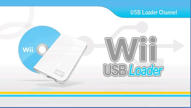


and this boot.dol is compatible with the preloader if you install it, and change your settings to autoboot to file and return to preloader using IOS60

http://www.mediafire.com/?jazq1iwzzn1

I didn't make the graphics or the forwarder, but I combined the two and change the skinny banner. It will open up the boot.dol that is located in your SD:\apps\USBLOADER folder (must be called USBLOADER)

I've noticed some of you asking about a channel for the USB Loader GUI, and this one works great, just rename your folder to USBLOADER and put your boot.dol in there, that way the channel never needs updating as you just updated with a new boot.dol. The Banner has an image of a Blue Wii Disc and a white WD My Passport essential HDD in it. Just install through wad manager and you now have a USB Loader GUI channel.

EDIT: Tried to consolidate my posts a bit with some helpful info.

 
maduin said:
http://www.mediafire.com/?vyjmm4mwtnm

I didn't make the graphics or the forwarder, but I combined the two and change the skinny banner. It will open up the boot.dol that is located in your SD:\apps\USBLOADER folder

I've noticed some of you asking about a channel for the USB Loader GUI, and this one works great, just rename your folder to USBLOADER and put your boot.dol in there, that way the channel never needs updating as you just updated with a new boot.dol. The Banner has an image of a Blue Wii Disc and a white WD My Passport essential HDD in it. Just install through wad manager and you now have a USB Loader GUI channel.

Thanks... I know the Wii Disc/Passport banner you're talking about. I had it as a channel for an old version of USB Loader GUI, and have been looking for a forwarding version. Appreciated. I'll update this post if I have any problems with it.
 
kedest said:
is the dol in that one compatible with preloader's autoboot?

I got it work, install the file, then in your preloader settings have
autoboot to file
return to preloader
rest off
IOS 60

save your settings and then run from installed file or reboot your wii and it auto loads the the USB Loader GUI (or whatever boot.dol is in the USBLOADER folder)
 
ThaKillerKlown said:
Does anyone have a screen cap of what this one looks like?

you can see what it looks like here

[url=http://www.mediafire.com/imageview.php?qui...t3x&thumb=4]http://www.mediafire.com/imageview.php?qui...t3x&thumb=4[/url]

Posts merged

QUOTE(weehaww @ May 5 2009, 06:01 PM) It looks nice but when I start it I only see a black screen. What am I doing wrong?

do you have your boot.dol in your SD:\apps\USBLOADER folder?

make sure the folder is called exactly USBLOADER
 
maduin said:
ThaKillerKlown said:
Does anyone have a screen cap of what this one looks like?

you can see what it looks like here

[url=http://www.mediafire.com/imageview.php?qui...t3x&thumb=4]http://www.mediafire.com/imageview.php?qui...t3x&thumb=4[/url]

Posts merged

QUOTE(weehaww @ May 5 2009, 06:01 PM) It looks nice but when I start it I only see a black screen. What am I doing wrong?

do you have your boot.dol in your SD:\apps\USBLOADER folder?

make sure the folder is called exactly USBLOADER

Yes its in there. My boot.dol is v7.4. Also my folder is lowercase "usbloader".....does that make a difference?
 
Could it be that the nunchuck is plugged in? I have seen that some forwarders don't work correctly if your nunchuck is plugged into the wiimote when starting, there was a thread somewhere?

Just a thought.

Olywa
 
Olywa123 said:
Could it be that the nunchuck is plugged in? I have seen that some forwarders don't work correctly if your nunchuck is plugged into the wiimote when starting, there was a thread somewhere?

Just a thought.

Olywa

well, unplug the nunchuck and let us know what happens.
 
Sorry, I'm not using this forwarder and cannot test it at the moment - just trying to help
smile.gif
 
Got it to work. Thanks a lot.

ThaKillerKlown said:
Does anyone have a screen cap of what this one looks like?

Kind of like this....

USBLoaderV11-banner.jpg

USBLoaderV11-logo.jpg

Usb-Icon.png
Usb-Icon.png
Usb-Icon.png


Its one fault might be the second fade of the channel which is three USB icons on a white strip. You can clearly see the white strip where as the other channels have a smooth transition.


Can I manually change that maduin?
Either way thanks. Finally found a working forwarder for the latest version of USB loader. Don't know why it seemed so impossible.
 
yeah, do whatever you want, that's what I did, just found some graphics and some dols that I liked and put em together, none of this channel is really an original creation, just putting together what I liked. You can make your own with wadder if you download both the wad and dol I provided. You don't need my permission.
 
Olywa123 said:
Could it be that the nunchuck is plugged in? I have seen that some forwarders don't work correctly if your nunchuck is plugged into the wiimote when starting, there was a thread somewhere?

Just a thought.

Olywa

I just figured this out, and it's true, if you have your nunchuk plugged in, you may get a black screen or just a code dump. Anyone know how to fix that?
 
Anyone knows how to change the folder that search this or any forwarder?
All the forwarders looks the usbloader folder in apps, and I want to change it.
Thanks.-
 

Site & Scene News

Popular threads in this forum