Hacking unbrick acekard 2i

Deleted member 194275

Edson Arantes do Nascimento
Member
Joined
Aug 19, 2009
Messages
2,685
Reaction score
2,842
Trophies
2
XP
4,351
I got a acekard 2i a many time ago, at the time somebody tryed to update in order to run in a 1.4 DSi and it get bricked... I leave it because I have a NDSTTi and a M3iZero... Now I decided to ressurect my acekard...

I read many topics about that, all they say was: "run ak2ifw_update_14_DSL_new.nds on a DSLite or DSPhat in any working flashcard, then wait for replace screen to insert Acekard, press B and be happy"

I did it on my DSLite and it begins the process but freeze at 0%...

I tryed on DSi (with DSL file and DSi file too) and still no progress...

I also tryed all again in NDSTT flashcard and it was the same...

So... my acekard died? or there is a way to fix it???

 
Ensure you are using the correct update from my guide. http://gbatemp.net/t218103-updated-n00b-gu...up-your-acekard There is "ak2ifw_update_14_DSL_new.nds" and "ak2ifw_update_14_DSL.nds", the latter of which is known to result in a 0% progress issue.

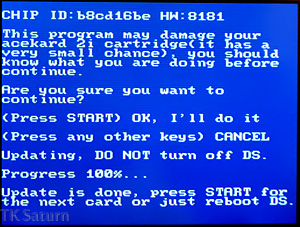
IMG_3704.jpg

As you can see I sucessfully unbricked mine. The long chip ID is because it's bricked, this changed back to the normal 0FC2 after unbricking.
 
You can run the Acekard update in any flashcard? I didn't know that. Thanks.
happy.gif


(It might be useful if my Acekard 2i, bricks.)
 
still not working... now there is something strange... chip ID here isn't long like your exemple... maybe my card is f***ed for another reason....
chip ID here is 40c8
HW: 8181

this is what I got here...
 
The only good chip ID is 0FC2, anything else is bad.

HW:8181 is good, ie not a clone.

Mine was long because I think I interupted the flashing, as it sat 0% while I was messing around and thought it hanged.

If you've tried the new update and it doesn't work, give the old update a go.
 
well...

ak2ifw_update_14_DSL.nds not worked
ak2ifw_update_14_DSL_new.nds not worked
r4ifw_update_14_DSL.nds not worked

tk_saturn, thanks a lot to trying to help me... but I think that a n00b like me cant fix this
frown.gif
 
try doing the paper trick see if that helps you out. do the paper trick then try all the updates you have been trying
 
That's an actual dump of the Acekard firmware, which is dumped from the cart in the same way games are dumped. I've no idea how you would flash that back to the Acekard though.

There also a language fix, 1 for the HW81 carts and another for the HW44 carts. I think that works in the same manner as the DSi update rather than the DSL update, so can't be used for unbricking. I'll go check that's the case in a minute.

edit:yep, the language fix doesn't allow you to swap carts.

I'm not sure what else you can do really.
 
Have you tried leaving it for 5-10 minutes on the 0% progrssing screen? it's worth a shot.

It that doesn't work, check all the contacts are aligned. Apart from asking the 'somebody' what he did to it, I don't know what you can do.
 
the "somebody" is in fact my girl lol... she got my card and said "leave it to me"... sooooo what I got? BRICK lol... anyways... she tryed to update on her DSPhat and something went wrong... I dont know why and how...

well I'll check the contacts now...

anyways... thanks a lot for the attention tk_saturn!!!

edit: While in 0%, I removed the card without power off the DS... and the 0% start to increase lol... no real efects but at least the updater wasnt stoped...
well thats it... I have no more ideas for this problem...
 

Site & Scene News

Popular threads in this forum